Elastic style guide for Vale
Vale is a prose linter that checks documentation in Markdown format against the Elastic style guide. The documentation is checked when you commit changes to a pull request.
Follow the instructions on this page to:
- Use the Vale action for GitHub to check for style issues when you commit changes to a pull request.
- Use the Vale linter in your IDE to check for style issues while writing documentation.
The Vale action for GitHub runs Vale checks on pull requests that include documentation changes. The action reports any style issues found in modified lines in the form of a sticky comment.
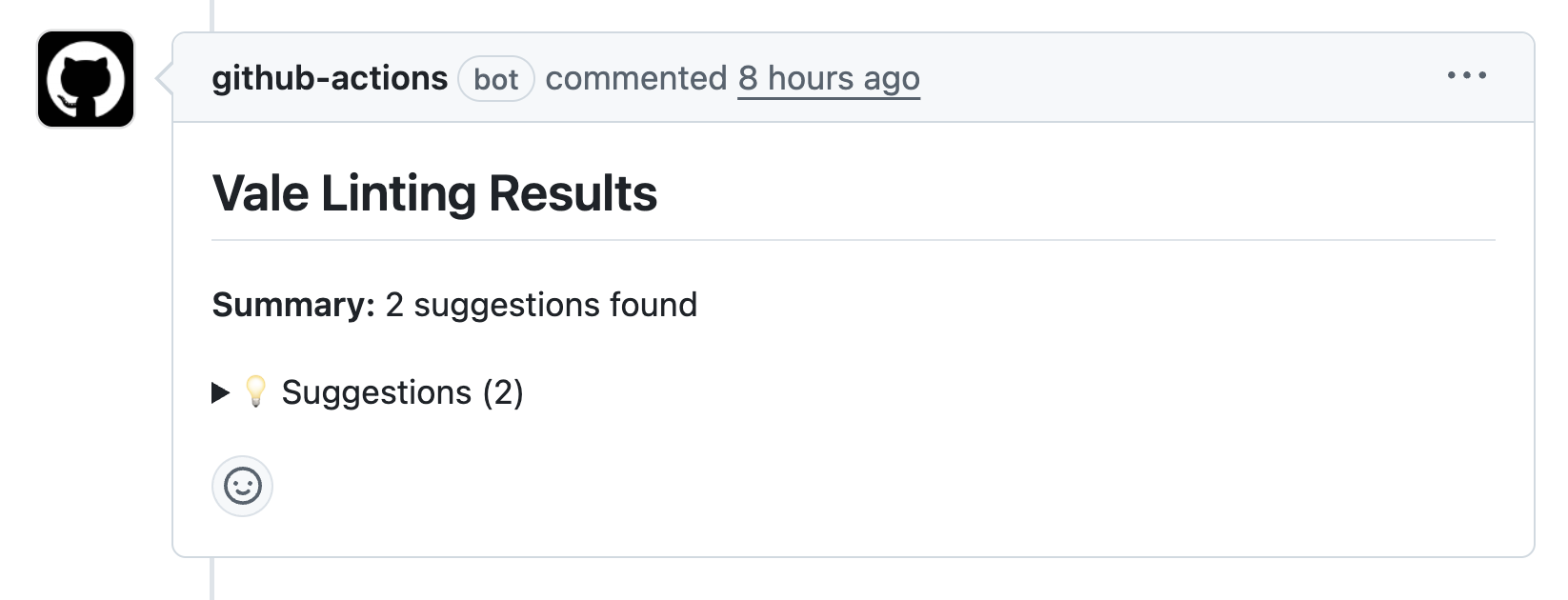
Issues are reported in the form of errors, warnings, and suggestions. You can expand each category to browse the specific issues. The report updates every time you commit changes.
Make an effort to fix all warnings and suggestions reported by the Vale linter. This helps ensure your docs read well and are easier to understand.
You can use the Vale linter locally to check for style issues while writing documentation.
-
Install Vale and the Elastic style
Run these commands to install the Elastic style guide locally. If Vale isn't installed, the commands install it for you or suggest how to do it.
curl -fsSL https://raw.githubusercontent.com/elastic/vale-rules/main/install-macos.sh | bashcurl -fsSL https://raw.githubusercontent.com/elastic/vale-rules/main/install-linux.sh | bashInvoke-WebRequest -Uri https://raw.githubusercontent.com/elastic/vale-rules/main/install-windows.ps1 -OutFile install-windows.ps1 powershell -ExecutionPolicy Bypass -File .\install-windows.ps1TipTo update the Elastic style guide to the latest rules, rerun the installation script. Alternatively, the Elastic Docs Utilities extension automatically checks for style guide updates on activation and offers to update when a new version is available.
-
Install the IDE extension
Install the Vale VSCode extension. The extension is also available for other editors that support the Open VSX Registry, like Cursor.
-
Open any Markdown file
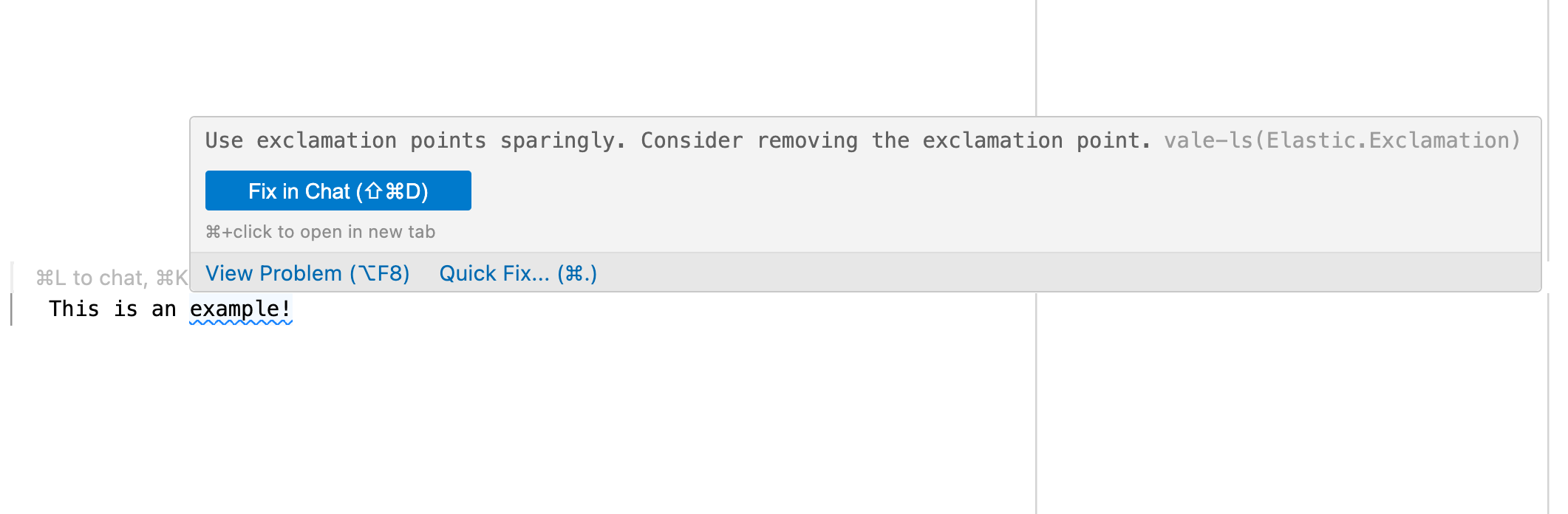
The extension automatically runs Vale checks when you save a document. Issues are reported both in the Problems tab and in the editor itself.
The following table lists all the rules included in the Elastic Vale style package:
| Rule | Description |
|---|---|
| Accessibility | Flags ableist language that defines people by their disability. Refer to Avoid violent, offensive, ableist terminology. |
| Articles | Ensures correct article usage ("a" vs "an") based on pronunciation, not spelling. Refer to Using the right article. |
| BritishSpellings | Suggests American English spellings instead of British English variants. Refer to American English. |
| ConflictMarkers | Detects Git merge conflict markers in source code. |
| DeviceAgnosticism | Suggests device-agnostic language (for example, "select" instead of "tap"). Refer to Use device-agnostic language. |
| Dimensions | Suggests using "MxN" format instead of "M X N" for dimensions. Refer to Dimensions. |
| DontUse | Flags words and phrases that shouldn't be used (for example, "please", "just", "aka"). Refer to Word choice. |
| Ellipses | Discourages the use of ellipses. Refer to Write like a minimalist. |
| EndPuntuaction | Flags headings that end with punctuation. Refer to Capitalization. |
| Exclamation | Encourages sparing use of exclamation points. Refer to Tone. |
| FirstPerson | Discourages first-person pronouns (I, me, my, mine). Refer to Use singular first-person pronouns sparingly. |
| Gender | Flags gender-specific compound pronouns like "he/she" or "s/he". Refer to Use gender-neutral language. |
| GenderBias | Suggests gender-neutral alternatives for gendered terms. Refer to Use gender-neutral language. |
| HeadingColons | Checks that text after colons in headings is capitalized. Refer to Colons. |
| Latinisms | Suggests plain English alternatives to Latin terms (for example, "for example" instead of "e.g."). Refer to Latin abbreviations. |
| MeaningfulCTAs | Flags non-descriptive link text like "click here". Refer to Use meaningful link text. |
| Negations | Suggests rephrasing negative constructions to positive ones. Refer to Write for an international audience. |
| OxfordComma | Enforces the use of the Oxford comma in lists. Refer to Commas. |
| PluralAbbreviations | Flags apostrophes in plural abbreviations (use "APIs" instead of "API's"). Refer to Making abbreviations plural. |
| QuotesPunctuation | Ensures punctuation is placed outside quotation marks. Refer to Punctuation. |
| Repetition | Detects repeated words. Refer to Write like a minimalist. |
| Semicolons | Encourages judicious use of semicolons. Refer to Semicolons. |
| Versions | Suggests "later" or "earlier" instead of "newer", "older", "higher", or "lower" for versions. |
| WordChoice | Suggests preferred word choices (for example, "stop" instead of "abort", "allowlist" instead of "whitelist"). Refer to Word choice. |
| Wordiness | Suggests concise alternatives to wordy phrases. Refer to Write like a minimalist. |
The Elastic Vale style uses Vale vocabularies to recognize product and feature names. Vocabularies help Vale avoid false positives when checking capitalization and spelling rules.
The Elastic style includes these vocabularies:
- ElasticTerms: Contains Elastic product and feature names (for example, Elasticsearch, Kibana, Elastic Agent).
- ThirdPartyProducts: Contains non-Elastic product names (for example, Kubernetes, AWS, Docker).
If Vale incorrectly flags a product or feature name, suggest adding it to the appropriate vocabulary by creating a pull request or issue in the Elastic Vale rules repository.
You can report issues or suggest improvements to the Elastic style guide by creating an issue in the Elastic Vale rules repository.