Island Browser Integration for Elastic
| Version | 1.6.1 (View all) |
| Managed integration release status | GA |
| Subscription level What's this? |
Basic |
| Developed by What's this? |
Elastic |
| Ingestion method(s) | API |
| Minimum Kibana version(s) | 9.1.5 9.0.8 8.19.5 8.18.8 |
You can use this integration as an Elastic Managed integration on Elastic Cloud Hosted deployments running this version or later.
Island reimagines what the browser can be. By taking in the needs of the enterprise, Island delivers a dramatic positive impact on every layer of cybersecurity and all other functions of IT, while improving the end-user experience and productivity. Leveraging the open-source Chromium project that all major browsers are based on, Island provides fine-grain policy control over every facet of a user’s interaction with a web application giving the enterprise limitless visibility, control, and compliance with their most critical applications. As a result, Island can serve as the platform for the future of productive and secured work.
The Island Browser integration for Elastic allows you to collect logs using Island Browser API, then visualise the data in Kibana.
The Island Browser integration is compatible with v1 version of Island Browser API.
This integration periodically queries the Island Browser API to retrieve details for devices, users, and compromised credentials, and to collect SIEM events.
The SIEM Events data stream collects events through the Island SIEM integration. It supports three audit types: user audits, admin audits, and system audits.
The separate Audit and Admin Actions data streams are deprecated. New deployments should use SIEM Events instead.
This integration collects log messages of the following types:
SIEM Events: Collects user audits, admin audits, and system audits through the Island SIEM integration.Admin Actions(deprecated): Collects all admin actions from the Island Browser via Admin Actions API endpoint. Use SIEM Events instead.Audit(deprecated): Collects all timeline audits from the Island Browser via Audit API endpoint. Use SIEM Events instead.Compromised Credential: Collects a list of all compromised credentials from the Island Browser via Compromised Credential API endpoint.Device: Collects a list of all devices from the Island Browser via Device API endpoint.User: Collects all the users from the Island Browser via User API endpoint.
Integrating Island Browser User, Device, Audit, Admin Actions, and Compromised Credential endpoint data with Elastic SIEM provides unified visibility into identity activity, device posture, account exposure, and security events across the environment. This integration enables analysts to correlate user behavior, device health, and credential risks within a single view, strengthening both detection and response capabilities.
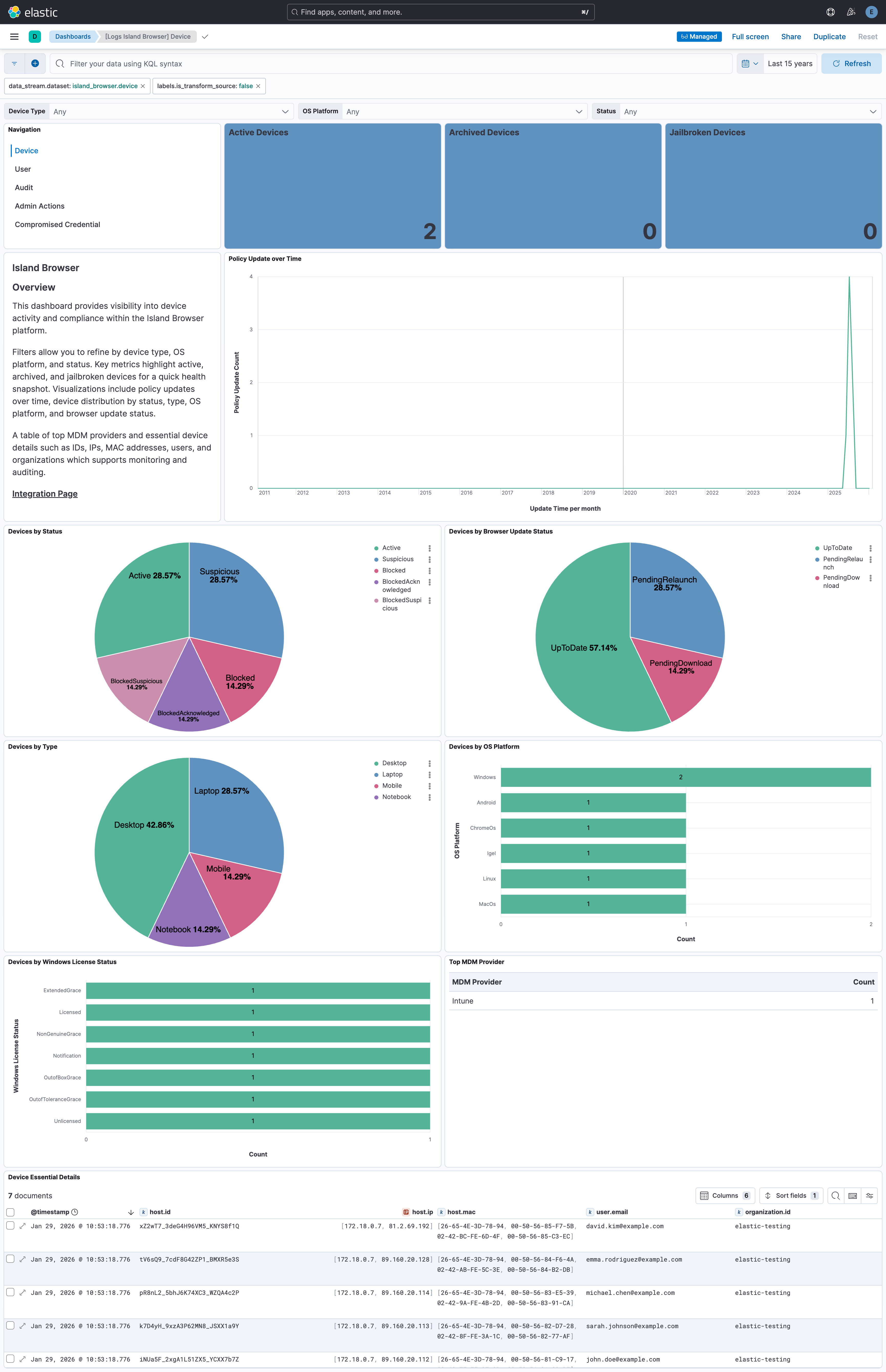
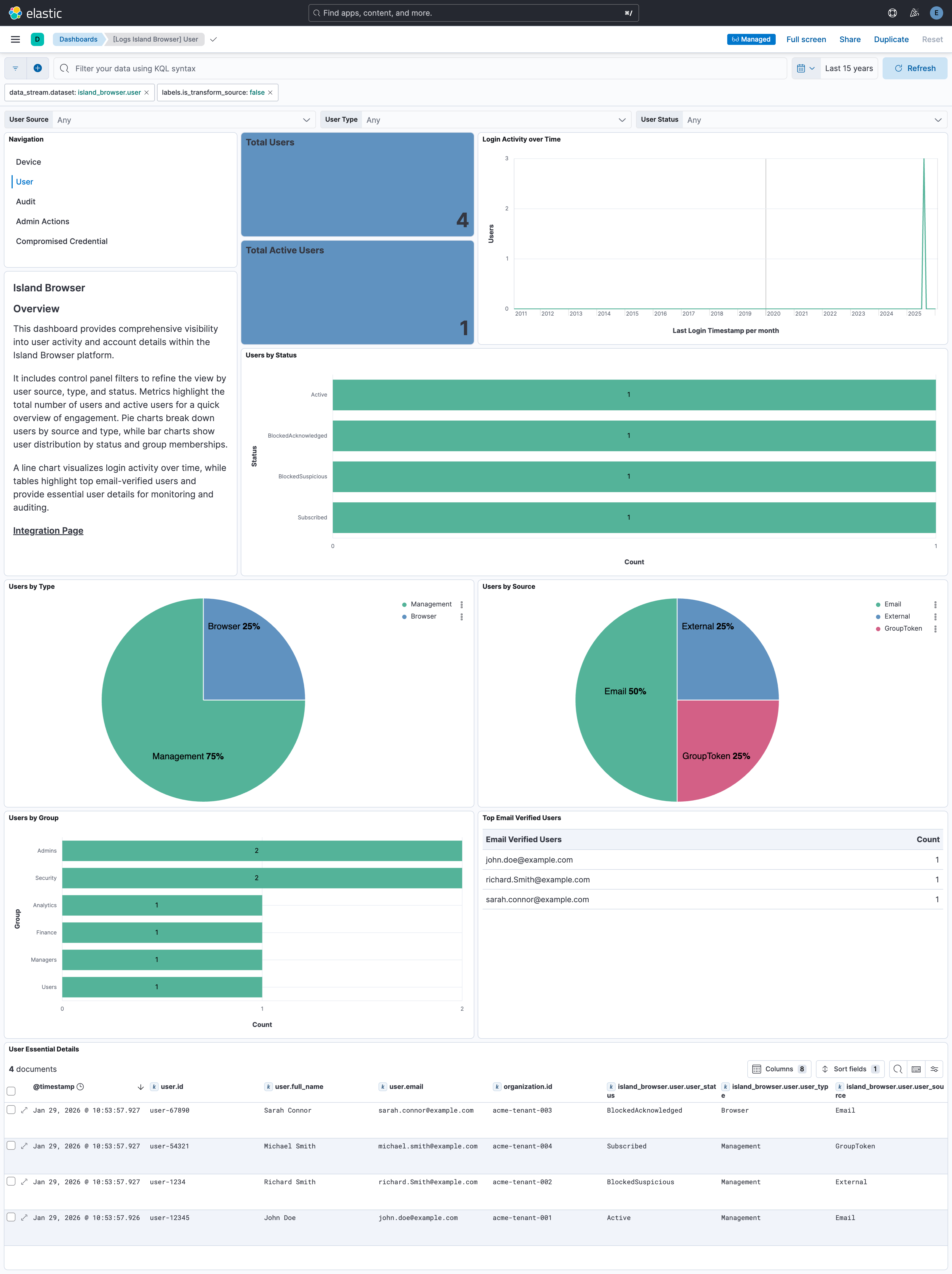
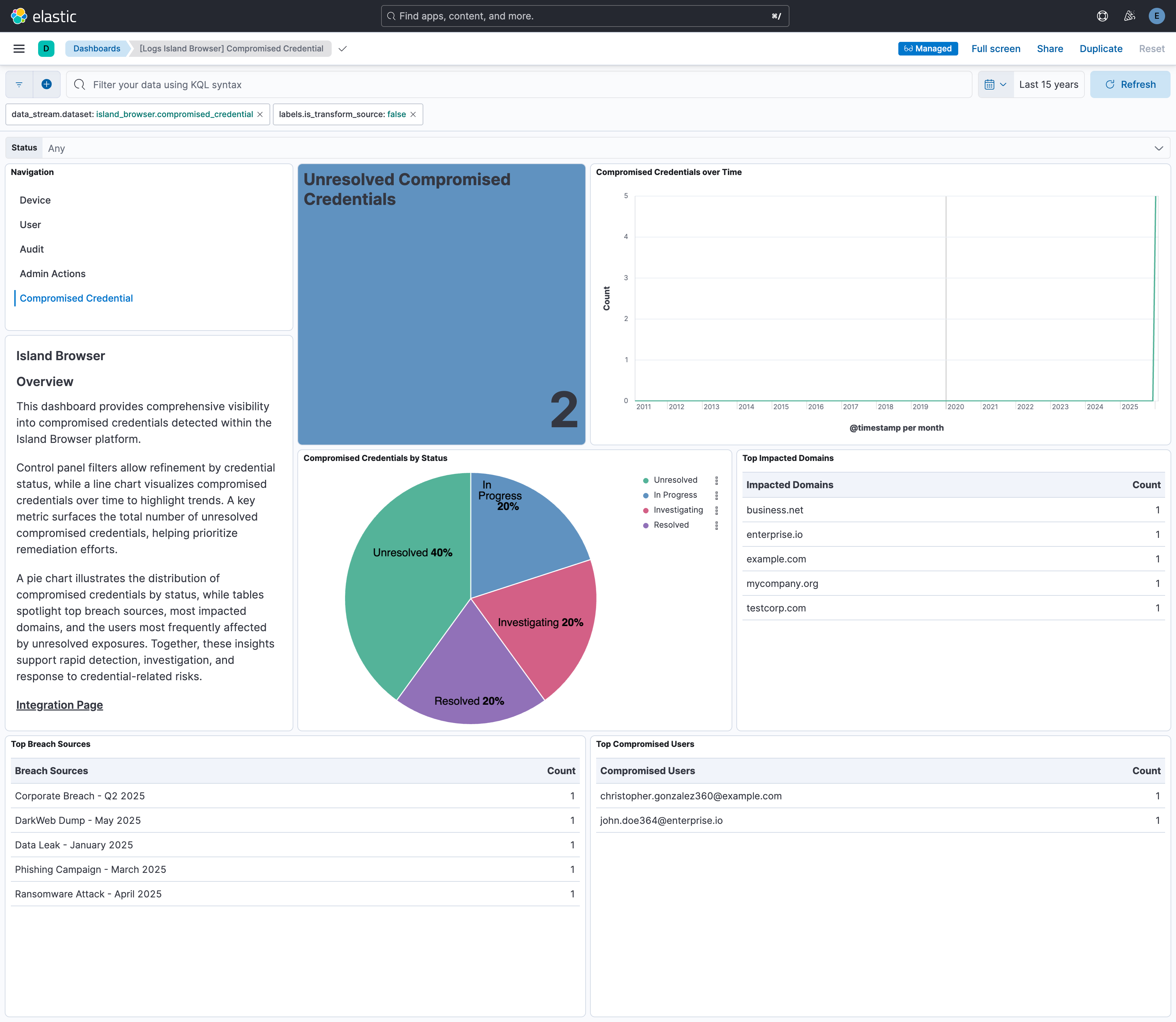
Dashboards track total and active users, login trends, and group distributions, alongside device insights such as active, archived, and jailbroken states, OS platform distribution, policy updates, browser update status, Windows license status, and MDM provider compliance. Compromised Credential visualizations highlight account risks with timelines of exposed records, unresolved credential counts, breach source breakdowns, and distributions by status. Additional charts surface top impacted domains and most affected users, enabling security teams to quickly assess exposure, prioritize remediation, and mitigate identity-based threats.
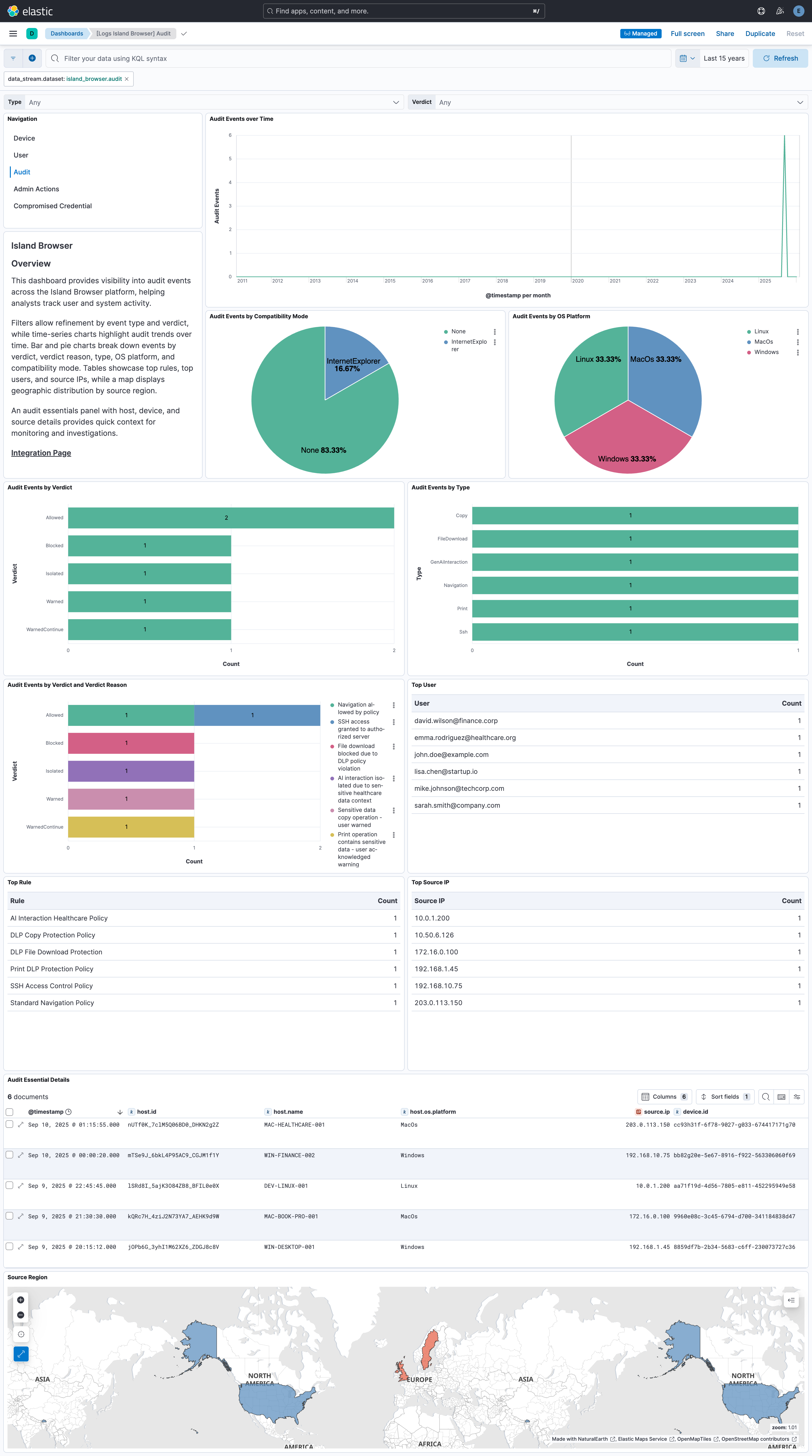
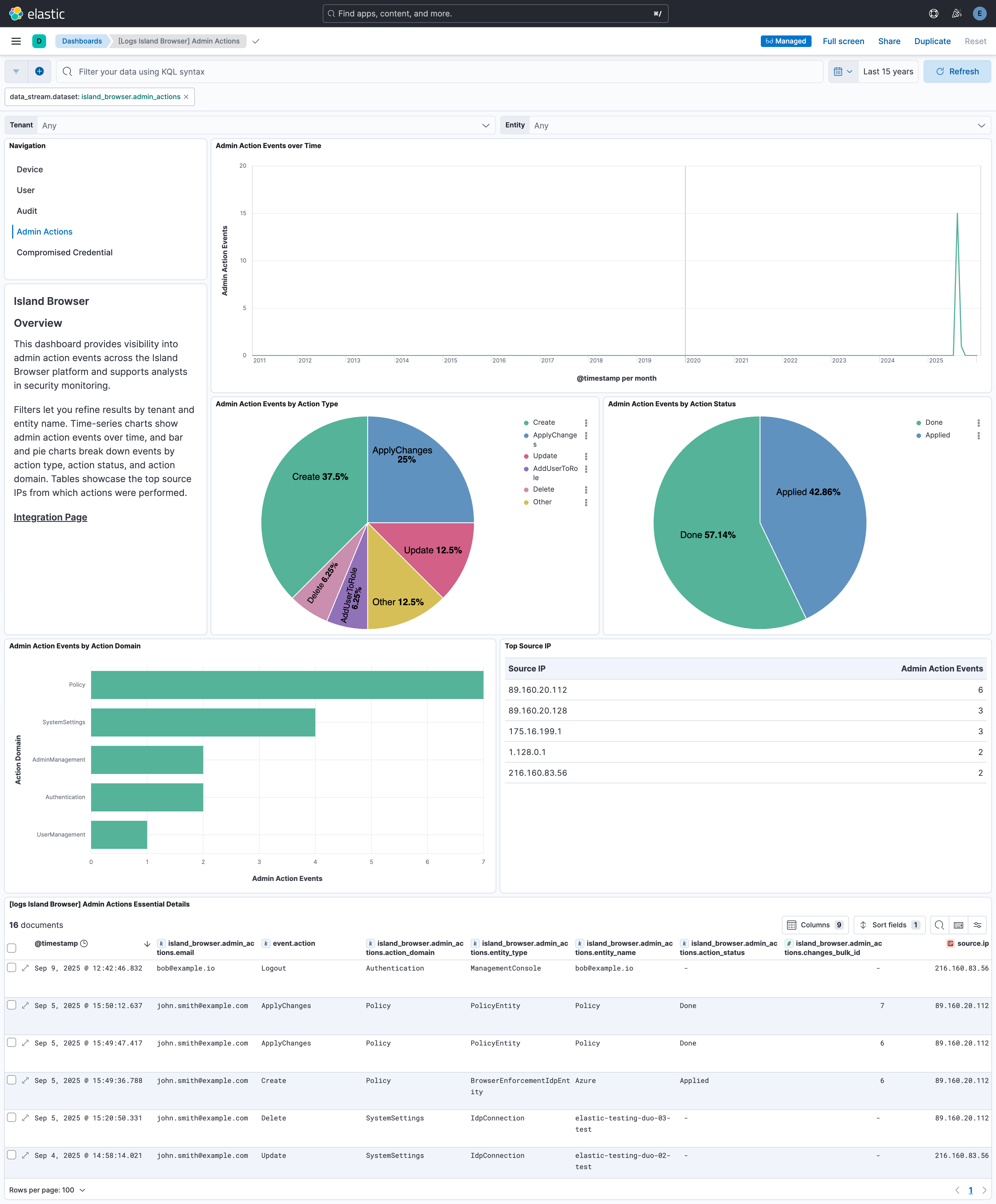
Audit dashboards further enhance oversight by showing event activity over time, verdicts and reasons, top rules, users, source IPs, event types, geographic distributions, and compatibility modes. Saved searches and tables consolidate essential attributes—including verified emails, device and host IDs, IPs, MACs, users, and organizations—adding valuable investigative context. The Admin Actions dashboard shows activity over time, breaks down events by action domain, type, and status, and includes a table of the top source IPs. Together, these insights allow organizations to monitor user behavior, track device health, detect compromised accounts, analyze audit activity, and strengthen compliance, identity management, and endpoint security oversight.
This integration installs Elastic latest transforms. For more details, check the Transform setup and requirements.
Required permissions: The API key must belong to an Island account with administrator access (Admin or System Admin).
Authentication uses an API key as the required credential. The account used to create the key must also have permission to generate and manage API keys.
- Log in to Island Browser Management Console as an administrator (Admin or System Admin).
- From the Island Management Console, navigate to Modules > Platform Settings > System Settings > Integrations > API.
- Click + Create. The Create API Key drawer is displayed to assist in the key creation.
- Enter a Name.
- Select Full Admin or System Admin as the role for this API key.
- Click Generate API Key.
- Copy the API Key to your clipboard to be used when using the API Explorer.
- Click Save.
For more details, check Documentation.
If an API key already exists and you need to create a new one, you must first deactivate and delete the existing key by selecting Deactivate and Delete API Key.
To collect user, admin, and system audits through the SIEM API, set up the Generic SIEM Integration in the Island Management Console and copy the Audit ID.
- Log in to the Island Management Console as an administrator (Full Admin or System Admin).
- Navigate to Modules > Platform Settings > System Settings > Integrations > SIEM.
- Click Setup for the Generic SIEM Integration.
- Click Generate API Key if you need a dedicated SIEM API key. The API key must belong to an Island account with administrator access (Admin or System Admin).
- Copy the Audit ID displayed for the SIEM connector. You will need this value when configuring SIEM Events in Elastic.
Note: Audit and Admin Actions are deprecated. Use SIEM Events for new deployments. Do not enable SIEM Events together with Audit or Admin Actions to avoid collecting duplicate logs.
This integration supports both Elastic Agentless-based and Agent-based installations.
Agentless integrations allow you to collect data without having to manage Elastic Agent in your cloud. They make manual agent deployment unnecessary, so you can focus on your data instead of the agent that collects it. For more information, refer to Agentless integrations and the Agentless integrations FAQ.
Agentless deployments are only supported in Elastic Serverless and Elastic Cloud environments. This functionality is in beta and is subject to change. Beta features are not subject to the support SLA of official GA features.
Elastic Agent must be installed. For more details, check the Elastic Agent installation instructions. You can install only one Elastic Agent per host.
In the top search bar in Kibana, search for Integrations.
In the search bar, type Island Browser.
Select the Island Browser integration from the search results.
Select Add Island Browser to add the integration.
Enable and configure only the collection methods which you will use.
To Collect logs from Island Browser API, you'll need to:
- Configure URL and API Key. SIEM Events must use
https://api.island.io. User, Device, Compromised Credential, and the deprecated Audit and Admin Actions data streams must usehttps://management.island.io. The URL applies to every data stream enabled in the policy, so collect SIEM Events in a separate integration policy from the management API data streams. - Enable/Disable the required datasets.
- For SIEM Events, provide the Audit ID from the Generic SIEM Integration in the Island Management Console.
- For each dataset, adjust the integration configuration parameters if required, including the Interval, Batch Size etc. to enable data collection.
- Configure URL and API Key. SIEM Events must use
Select Save and continue to save the integration.
To collect user, admin, and system audits through the Island SIEM integration:
- Complete the SIEM integration setup in the Island Management Console.
- Enable SIEM Events in Fleet, set URL to
https://api.island.io, and configure API Key and Audit ID.
- In the top search bar in Kibana, search for Dashboards.
- In the search bar, type Island Browser.
- Select a dashboard for the dataset you are collecting, and verify the dashboard information is populated.
- In the top search bar in Kibana, search for Transforms.
- Select the Data / Transforms from the search results.
- In the search bar, type island_browser.
- All transforms from the search results should indicate Healthy under the Health column.
For more information on architectures that can be used for scaling this integration, check the Ingest Architectures documentation.
Exported fields
| Field | Description | Type |
|---|---|---|
| @timestamp | Date/time when the event originated. This is the date/time extracted from the event, typically representing when the event was generated by the source. If the event source has no original timestamp, this value is typically populated by the first time the event was received by the pipeline. Required field for all events. | date |
| data_stream.dataset | The field can contain anything that makes sense to signify the source of the data. Examples include nginx.access, prometheus, endpoint etc. For data streams that otherwise fit, but that do not have dataset set we use the value "generic" for the dataset value. event.dataset should have the same value as data_stream.dataset. Beyond the Elasticsearch data stream naming criteria noted above, the dataset value has additional restrictions: * Must not contain - * No longer than 100 characters |
constant_keyword |
| data_stream.namespace | A user defined namespace. Namespaces are useful to allow grouping of data. Many users already organize their indices this way, and the data stream naming scheme now provides this best practice as a default. Many users will populate this field with default. If no value is used, it falls back to default. Beyond the Elasticsearch index naming criteria noted above, namespace value has the additional restrictions: * Must not contain - * No longer than 100 characters |
constant_keyword |
| data_stream.type | An overarching type for the data stream. Currently allowed values are "logs" and "metrics". We expect to also add "traces" and "synthetics" in the near future. | constant_keyword |
| event.dataset | Name of the dataset. If an event source publishes more than one type of log or events (e.g. access log, error log), the dataset is used to specify which one the event comes from. It's recommended but not required to start the dataset name with the module name, followed by a dot, then the dataset name. | constant_keyword |
| event.module | Name of the module this data is coming from. If your monitoring agent supports the concept of modules or plugins to process events of a given source (e.g. Apache logs), event.module should contain the name of this module. |
constant_keyword |
| input.type | Type of Filebeat input. | keyword |
| log.offset | Log offset. | long |
| routing.source | SIEM event source used for routing. | keyword |
Exported fields
| Field | Description | Type |
|---|---|---|
| @timestamp | Date/time when the event originated. This is the date/time extracted from the event, typically representing when the event was generated by the source. If the event source has no original timestamp, this value is typically populated by the first time the event was received by the pipeline. Required field for all events. | date |
| data_stream.dataset | The field can contain anything that makes sense to signify the source of the data. Examples include nginx.access, prometheus, endpoint etc. For data streams that otherwise fit, but that do not have dataset set we use the value "generic" for the dataset value. event.dataset should have the same value as data_stream.dataset. Beyond the Elasticsearch data stream naming criteria noted above, the dataset value has additional restrictions: * Must not contain - * No longer than 100 characters |
constant_keyword |
| data_stream.namespace | A user defined namespace. Namespaces are useful to allow grouping of data. Many users already organize their indices this way, and the data stream naming scheme now provides this best practice as a default. Many users will populate this field with default. If no value is used, it falls back to default. Beyond the Elasticsearch index naming criteria noted above, namespace value has the additional restrictions: * Must not contain - * No longer than 100 characters |
constant_keyword |
| data_stream.type | An overarching type for the data stream. Currently allowed values are "logs" and "metrics". We expect to also add "traces" and "synthetics" in the near future. | constant_keyword |
| event.dataset | Name of the dataset. If an event source publishes more than one type of log or events (e.g. access log, error log), the dataset is used to specify which one the event comes from. It's recommended but not required to start the dataset name with the module name, followed by a dot, then the dataset name. | constant_keyword |
| event.module | Name of the module this data is coming from. If your monitoring agent supports the concept of modules or plugins to process events of a given source (e.g. Apache logs), event.module should contain the name of this module. |
constant_keyword |
| input.type | Type of Filebeat input. | keyword |
| island_browser.admin_actions.action_domain | keyword | |
| island_browser.admin_actions.action_status | keyword | |
| island_browser.admin_actions.action_type | keyword | |
| island_browser.admin_actions.api_key_name | keyword | |
| island_browser.admin_actions.audit_type | keyword | |
| island_browser.admin_actions.changes_bulk_id | long | |
| island_browser.admin_actions.created_date | date | |
| island_browser.admin_actions.email | keyword | |
| island_browser.admin_actions.entity_id | keyword | |
| island_browser.admin_actions.entity_name | keyword | |
| island_browser.admin_actions.entity_type | keyword | |
| island_browser.admin_actions.id | keyword | |
| island_browser.admin_actions.new_value_string | keyword | |
| island_browser.admin_actions.original_value_string | keyword | |
| island_browser.admin_actions.reason | keyword | |
| island_browser.admin_actions.source | keyword | |
| island_browser.admin_actions.source_ip | ip | |
| island_browser.admin_actions.tenant_id | keyword | |
| island_browser.admin_actions.terraform_provider_version | keyword | |
| island_browser.admin_actions.timestamp | date | |
| island_browser.admin_actions.updated_date | date | |
| island_browser.admin_actions.user_id | keyword | |
| log.offset | Log offset. | long |
| observer.product | The product name of the observer. | constant_keyword |
| observer.vendor | Vendor name of the observer. | constant_keyword |
| routing.source | SIEM event source used for routing. | keyword |
Exported fields
| Field | Description | Type |
|---|---|---|
| @timestamp | Date/time when the event originated. This is the date/time extracted from the event, typically representing when the event was generated by the source. If the event source has no original timestamp, this value is typically populated by the first time the event was received by the pipeline. Required field for all events. | date |
| data_stream.dataset | The field can contain anything that makes sense to signify the source of the data. Examples include nginx.access, prometheus, endpoint etc. For data streams that otherwise fit, but that do not have dataset set we use the value "generic" for the dataset value. event.dataset should have the same value as data_stream.dataset. Beyond the Elasticsearch data stream naming criteria noted above, the dataset value has additional restrictions: * Must not contain - * No longer than 100 characters |
constant_keyword |
| data_stream.namespace | A user defined namespace. Namespaces are useful to allow grouping of data. Many users already organize their indices this way, and the data stream naming scheme now provides this best practice as a default. Many users will populate this field with default. If no value is used, it falls back to default. Beyond the Elasticsearch index naming criteria noted above, namespace value has the additional restrictions: * Must not contain - * No longer than 100 characters |
constant_keyword |
| data_stream.type | An overarching type for the data stream. Currently allowed values are "logs" and "metrics". We expect to also add "traces" and "synthetics" in the near future. | constant_keyword |
| event.dataset | Name of the dataset. If an event source publishes more than one type of log or events (e.g. access log, error log), the dataset is used to specify which one the event comes from. It's recommended but not required to start the dataset name with the module name, followed by a dot, then the dataset name. | constant_keyword |
| event.module | Name of the module this data is coming from. If your monitoring agent supports the concept of modules or plugins to process events of a given source (e.g. Apache logs), event.module should contain the name of this module. |
constant_keyword |
| input.type | Type of Filebeat input. | keyword |
| island_browser.audit.client_event_id | keyword | |
| island_browser.audit.client_sending_date | date | |
| island_browser.audit.compatibility_mode | keyword | |
| island_browser.audit.country | keyword | |
| island_browser.audit.country_code | keyword | |
| island_browser.audit.created_date | date | |
| island_browser.audit.data_target | keyword | |
| island_browser.audit.details | flattened | |
| island_browser.audit.device_id | keyword | |
| island_browser.audit.device_posture_matching_details | keyword | |
| island_browser.audit.domain_or_tenant | keyword | |
| island_browser.audit.email | keyword | |
| island_browser.audit.frame_id | keyword | |
| island_browser.audit.frame_url | keyword | |
| island_browser.audit.id | keyword | |
| island_browser.audit.incognito | boolean | |
| island_browser.audit.is_island_private_access | boolean | |
| island_browser.audit.keystrokes | keyword | |
| island_browser.audit.machine_id | keyword | |
| island_browser.audit.machine_name | keyword | |
| island_browser.audit.matched_device_posture | keyword | |
| island_browser.audit.matched_user_group | keyword | |
| island_browser.audit.origin | keyword | |
| island_browser.audit.os_platform | keyword | |
| island_browser.audit.os_user_name | keyword | |
| island_browser.audit.processed_date | date | |
| island_browser.audit.public_ip | ip | |
| island_browser.audit.region | keyword | |
| island_browser.audit.rule_id | keyword | |
| island_browser.audit.rule_name | keyword | |
| island_browser.audit.saas_application_category | keyword | |
| island_browser.audit.saas_application_id | keyword | |
| island_browser.audit.saas_application_name | keyword | |
| island_browser.audit.screenshot_file_name | keyword | |
| island_browser.audit.short_top_level_url | keyword | |
| island_browser.audit.signature | keyword | |
| island_browser.audit.source | keyword | |
| island_browser.audit.source_ip | ip | |
| island_browser.audit.submitted_url | keyword | |
| island_browser.audit.tab_id | keyword | |
| island_browser.audit.tenant_id | keyword | |
| island_browser.audit.timestamp | date | |
| island_browser.audit.top_level_url | keyword | |
| island_browser.audit.type | keyword | |
| island_browser.audit.updated_date | date | |
| island_browser.audit.url_web_categories | keyword | |
| island_browser.audit.url_web_reputation | long | |
| island_browser.audit.user_id | keyword | |
| island_browser.audit.user_name | keyword | |
| island_browser.audit.verdict | keyword | |
| island_browser.audit.verdict_reason | keyword | |
| island_browser.audit.version | long | |
| island_browser.audit.website_top_level_url | keyword | |
| island_browser.audit.window_id | keyword | |
| log.offset | Log offset. | long |
| observer.product | The product name of the observer. | constant_keyword |
| observer.vendor | Vendor name of the observer. | constant_keyword |
| routing.source | SIEM event source used for routing. | keyword |
Exported fields
| Field | Description | Type |
|---|---|---|
| @timestamp | Date/time when the event originated. This is the date/time extracted from the event, typically representing when the event was generated by the source. If the event source has no original timestamp, this value is typically populated by the first time the event was received by the pipeline. Required field for all events. | date |
| data_stream.dataset | The field can contain anything that makes sense to signify the source of the data. Examples include nginx.access, prometheus, endpoint etc. For data streams that otherwise fit, but that do not have dataset set we use the value "generic" for the dataset value. event.dataset should have the same value as data_stream.dataset. Beyond the Elasticsearch data stream naming criteria noted above, the dataset value has additional restrictions: * Must not contain - * No longer than 100 characters |
constant_keyword |
| data_stream.namespace | A user defined namespace. Namespaces are useful to allow grouping of data. Many users already organize their indices this way, and the data stream naming scheme now provides this best practice as a default. Many users will populate this field with default. If no value is used, it falls back to default. Beyond the Elasticsearch index naming criteria noted above, namespace value has the additional restrictions: * Must not contain - * No longer than 100 characters |
constant_keyword |
| data_stream.type | An overarching type for the data stream. Currently allowed values are "logs" and "metrics". We expect to also add "traces" and "synthetics" in the near future. | constant_keyword |
| event.dataset | Name of the dataset. If an event source publishes more than one type of log or events (e.g. access log, error log), the dataset is used to specify which one the event comes from. It's recommended but not required to start the dataset name with the module name, followed by a dot, then the dataset name. | constant_keyword |
| event.module | Name of the module this data is coming from. If your monitoring agent supports the concept of modules or plugins to process events of a given source (e.g. Apache logs), event.module should contain the name of this module. |
constant_keyword |
| input.type | Type of Filebeat input. | keyword |
| island_browser.compromised_credential.breach_source | keyword | |
| island_browser.compromised_credential.compromised_date | date | |
| island_browser.compromised_credential.created_date | date | |
| island_browser.compromised_credential.email | keyword | |
| island_browser.compromised_credential.id | keyword | |
| island_browser.compromised_credential.impacted_domain | keyword | |
| island_browser.compromised_credential.status | keyword | |
| island_browser.compromised_credential.tenant_id | keyword | |
| island_browser.compromised_credential.updated_date | date | |
| island_browser.compromised_credential.username | keyword | |
| labels.is_transform_source | Distinguishes between documents that are a source for a transform and documents that are an output of a transform, to facilitate easier filtering. | constant_keyword |
| log.offset | Log offset. | long |
| observer.product | The product name of the observer. | constant_keyword |
| observer.vendor | Vendor name of the observer. | constant_keyword |
Exported fields
| Field | Description | Type |
|---|---|---|
| @timestamp | Date/time when the event originated. This is the date/time extracted from the event, typically representing when the event was generated by the source. If the event source has no original timestamp, this value is typically populated by the first time the event was received by the pipeline. Required field for all events. | date |
| data_stream.dataset | The field can contain anything that makes sense to signify the source of the data. Examples include nginx.access, prometheus, endpoint etc. For data streams that otherwise fit, but that do not have dataset set we use the value "generic" for the dataset value. event.dataset should have the same value as data_stream.dataset. Beyond the Elasticsearch data stream naming criteria noted above, the dataset value has additional restrictions: * Must not contain - * No longer than 100 characters |
constant_keyword |
| data_stream.namespace | A user defined namespace. Namespaces are useful to allow grouping of data. Many users already organize their indices this way, and the data stream naming scheme now provides this best practice as a default. Many users will populate this field with default. If no value is used, it falls back to default. Beyond the Elasticsearch index naming criteria noted above, namespace value has the additional restrictions: * Must not contain - * No longer than 100 characters |
constant_keyword |
| data_stream.type | An overarching type for the data stream. Currently allowed values are "logs" and "metrics". We expect to also add "traces" and "synthetics" in the near future. | constant_keyword |
| event.dataset | Name of the dataset. If an event source publishes more than one type of log or events (e.g. access log, error log), the dataset is used to specify which one the event comes from. It's recommended but not required to start the dataset name with the module name, followed by a dot, then the dataset name. | constant_keyword |
| event.module | Name of the module this data is coming from. If your monitoring agent supports the concept of modules or plugins to process events of a given source (e.g. Apache logs), event.module should contain the name of this module. |
constant_keyword |
| input.type | Type of Filebeat input. | keyword |
| island_browser.device.anti_malware_products | keyword | |
| island_browser.device.architecture | keyword | |
| island_browser.device.auth_method | keyword | |
| island_browser.device.azure_tenant_id | keyword | |
| island_browser.device.browser_name | keyword | |
| island_browser.device.browser_update_status | keyword | |
| island_browser.device.browser_version | keyword | |
| island_browser.device.chassis_type | keyword | |
| island_browser.device.chromium_version | keyword | |
| island_browser.device.country | keyword | |
| island_browser.device.country_code | keyword | |
| island_browser.device.cpu_model | keyword | |
| island_browser.device.created_date | date | |
| island_browser.device.crowdstrike_agent_id | keyword | |
| island_browser.device.crowdstrike_cid | keyword | |
| island_browser.device.crowdstrike_zta_score | long | |
| island_browser.device.device_type | keyword | |
| island_browser.device.disk_encrypted | boolean | |
| island_browser.device.email | keyword | |
| island_browser.device.extension_utility_version | keyword | |
| island_browser.device.extension_version | keyword | |
| island_browser.device.external_ip_address | ip | |
| island_browser.device.gatekeeper_version | keyword | |
| island_browser.device.id | keyword | |
| island_browser.device.installed_extensions | keyword | |
| island_browser.device.internal_ip | keyword | |
| island_browser.device.internal_ip_address | ip | |
| island_browser.device.is_archived | boolean | |
| island_browser.device.is_container | boolean | |
| island_browser.device.is_default_browser | boolean | |
| island_browser.device.is_device_attested | boolean | |
| island_browser.device.is_gatekeeper_enabled | boolean | |
| island_browser.device.is_jailbroken | boolean | |
| island_browser.device.is_system_level_install | boolean | |
| island_browser.device.is_virtual_machine | boolean | |
| island_browser.device.island_mdm_custom_key | keyword | |
| island_browser.device.island_platform | keyword | |
| island_browser.device.last_seen | date | |
| island_browser.device.latest_security_update_id | keyword | |
| island_browser.device.mac_addresses | keyword | |
| island_browser.device.machine_id | keyword | |
| island_browser.device.machine_model | keyword | |
| island_browser.device.machine_name | keyword | |
| island_browser.device.manufacturer | keyword | |
| island_browser.device.mdm_compliant | boolean | |
| island_browser.device.mdm_enrolled | boolean | |
| island_browser.device.mdm_provider | keyword | |
| island_browser.device.mdm_tenant_name | keyword | |
| island_browser.device.mdm_topic | keyword | |
| island_browser.device.mobile_enrollment_type | keyword | |
| island_browser.device.os_code_name | keyword | |
| island_browser.device.os_domain | keyword | |
| island_browser.device.os_firewall_enabled | boolean | |
| island_browser.device.os_platform | keyword | |
| island_browser.device.os_screen_lock_enabled | boolean | |
| island_browser.device.os_user_name | keyword | |
| island_browser.device.os_version | keyword | |
| island_browser.device.policy_update_time | date | |
| island_browser.device.ram_size | long | |
| island_browser.device.secure_boot | boolean | |
| island_browser.device.serial_number | keyword | |
| island_browser.device.spm_protected | boolean | |
| island_browser.device.status | keyword | |
| island_browser.device.storage_capacity | long | |
| island_browser.device.sync_enabled | boolean | |
| island_browser.device.system_integrity_protection | boolean | |
| island_browser.device.tenant_id | keyword | |
| island_browser.device.updated_date | date | |
| island_browser.device.updater_version | keyword | |
| island_browser.device.user_id | keyword | |
| island_browser.device.user_name | keyword | |
| island_browser.device.windows_activation_id | keyword | |
| island_browser.device.windows_license_status | keyword | |
| labels.is_transform_source | Distinguishes between documents that are a source for a transform and documents that are an output of a transform, to facilitate easier filtering. | constant_keyword |
| log.offset | Log offset. | long |
| observer.product | The product name of the observer. | constant_keyword |
| observer.vendor | Vendor name of the observer. | constant_keyword |
Exported fields
| Field | Description | Type |
|---|---|---|
| @timestamp | Date/time when the event originated. This is the date/time extracted from the event, typically representing when the event was generated by the source. If the event source has no original timestamp, this value is typically populated by the first time the event was received by the pipeline. Required field for all events. | date |
| data_stream.dataset | The field can contain anything that makes sense to signify the source of the data. Examples include nginx.access, prometheus, endpoint etc. For data streams that otherwise fit, but that do not have dataset set we use the value "generic" for the dataset value. event.dataset should have the same value as data_stream.dataset. Beyond the Elasticsearch data stream naming criteria noted above, the dataset value has additional restrictions: * Must not contain - * No longer than 100 characters |
constant_keyword |
| data_stream.namespace | A user defined namespace. Namespaces are useful to allow grouping of data. Many users already organize their indices this way, and the data stream naming scheme now provides this best practice as a default. Many users will populate this field with default. If no value is used, it falls back to default. Beyond the Elasticsearch index naming criteria noted above, namespace value has the additional restrictions: * Must not contain - * No longer than 100 characters |
constant_keyword |
| data_stream.type | An overarching type for the data stream. Currently allowed values are "logs" and "metrics". We expect to also add "traces" and "synthetics" in the near future. | constant_keyword |
| event.dataset | Name of the dataset. If an event source publishes more than one type of log or events (e.g. access log, error log), the dataset is used to specify which one the event comes from. It's recommended but not required to start the dataset name with the module name, followed by a dot, then the dataset name. | constant_keyword |
| event.module | Name of the module this data is coming from. If your monitoring agent supports the concept of modules or plugins to process events of a given source (e.g. Apache logs), event.module should contain the name of this module. |
constant_keyword |
| input.type | Type of Filebeat input. | keyword |
| island_browser.user.allowed_tenants_ids | keyword | |
| island_browser.user.claims | flattened | |
| island_browser.user.connection_name | keyword | |
| island_browser.user.created_date | date | |
| island_browser.user.email | keyword | |
| island_browser.user.email_verified | boolean | |
| island_browser.user.expiration_date | date | |
| island_browser.user.first_name | keyword | |
| island_browser.user.groups | keyword | |
| island_browser.user.id | keyword | |
| island_browser.user.invitation_date | date | |
| island_browser.user.last_login | date | |
| island_browser.user.last_name | keyword | |
| island_browser.user.last_seen | date | |
| island_browser.user.scim_id | keyword | |
| island_browser.user.tenant_id | keyword | |
| island_browser.user.updated_date | date | |
| island_browser.user.user_id | keyword | |
| island_browser.user.user_source | keyword | |
| island_browser.user.user_status | keyword | |
| island_browser.user.user_type | keyword | |
| labels.is_transform_source | Distinguishes between documents that are a source for a transform and documents that are an output of a transform, to facilitate easier filtering. | constant_keyword |
| log.offset | Log offset. | long |
| observer.product | The product name of the observer. | constant_keyword |
| observer.vendor | Vendor name of the observer. | constant_keyword |
Example
{
    "@timestamp": "2025-08-19T06:20:28.982Z",
    "agent": {
        "ephemeral_id": "0c181bf7-edd6-4155-9c9e-c7614a7f1fdc",
        "id": "49af89eb-a85d-4a4f-9c26-8d61dc0be442",
        "name": "elastic-agent-88704",
        "type": "filebeat",
        "version": "8.18.8"
    },
    "data_stream": {
        "dataset": "island_browser.admin_actions",
        "namespace": "85495",
        "type": "logs"
    },
    "ecs": {
        "version": "8.17.0"
    },
    "elastic_agent": {
        "id": "49af89eb-a85d-4a4f-9c26-8d61dc0be442",
        "snapshot": false,
        "version": "8.18.8"
    },
    "event": {
        "action": "Create",
        "agent_id_status": "verified",
        "created": "2025-08-19T06:20:28.983Z",
        "dataset": "island_browser.admin_actions",
        "id": "ac93aaca-e464-4c8c-bdda-84bc227bb8c7",
        "ingested": "2026-01-29T05:44:58Z",
        "kind": "event",
        "original": "{\"actionDomain\":\"SystemSettings\",\"actionType\":\"Create\",\"createdDate\":\"2025-08-19T06:20:28.983078Z\",\"email\":\"clark.kent@example.com\",\"entityId\":\"fdaa9918-3f19-4596-8e9f-7bbec4ec5880\",\"entityName\":\"Generic SIEM Integration\",\"entityType\":\"SIEMConnector\",\"id\":\"ac93aaca-e464-4c8c-bdda-84bc227bb8c7\",\"sourceIp\":\"89.160.20.128\",\"tenantId\":\"elastic-testing\",\"timestamp\":\"2025-08-19T06:20:28.982451Z\",\"updatedDate\":\"2025-08-19T06:20:28.983078Z\",\"userId\":\"auth0|1e396c45-b365-4207-ae78-b35b10c06aaf\"}"
    },
    "input": {
        "type": "cel"
    },
    "island_browser": {
        "admin_actions": {
            "action_domain": "SystemSettings",
            "action_type": "Create",
            "created_date": "2025-08-19T06:20:28.983Z",
            "email": "clark.kent@example.com",
            "entity_id": "fdaa9918-3f19-4596-8e9f-7bbec4ec5880",
            "entity_name": "Generic SIEM Integration",
            "entity_type": "SIEMConnector",
            "id": "ac93aaca-e464-4c8c-bdda-84bc227bb8c7",
            "source_ip": "89.160.20.128",
            "tenant_id": "elastic-testing",
            "timestamp": "2025-08-19T06:20:28.982Z",
            "updated_date": "2025-08-19T06:20:28.983Z",
            "user_id": "auth0|1e396c45-b365-4207-ae78-b35b10c06aaf"
        }
    },
    "organization": {
        "id": "elastic-testing"
    },
    "related": {
        "ip": [
            "89.160.20.128"
        ],
        "user": [
            "clark.kent@example.com",
            "auth0|1e396c45-b365-4207-ae78-b35b10c06aaf"
        ]
    },
    "source": {
        "geo": {
            "city_name": "Linköping",
            "continent_name": "Europe",
            "country_iso_code": "SE",
            "country_name": "Sweden",
            "location": {
                "lat": 58.4167,
                "lon": 15.6167
            },
            "region_iso_code": "SE-E",
            "region_name": "Östergötland County"
        },
        "ip": "89.160.20.128"
    },
    "tags": [
        "preserve_original_event",
        "preserve_duplicate_custom_fields",
        "forwarded",
        "island_browser-admin_actions"
    ],
    "user": {
        "domain": "example.com",
        "email": "clark.kent@example.com",
        "id": "auth0|1e396c45-b365-4207-ae78-b35b10c06aaf"
    }
}
Example
{
    "@timestamp": "2025-09-09T13:29:38.000Z",
    "agent": {
        "ephemeral_id": "c47c8fe8-1c04-44de-8c4f-0151a17ec928",
        "id": "caf0149d-fb8e-45cc-991f-f2c6f4aa0524",
        "name": "elastic-agent-29545",
        "type": "filebeat",
        "version": "8.18.5"
    },
    "data_stream": {
        "dataset": "island_browser.audit",
        "namespace": "65876",
        "type": "logs"
    },
    "device": {
        "id": "7748cf6a-1a23-4572-b5ee-129962616b25"
    },
    "ecs": {
        "version": "8.17.0"
    },
    "elastic_agent": {
        "id": "caf0149d-fb8e-45cc-991f-f2c6f4aa0524",
        "snapshot": false,
        "version": "8.18.5"
    },
    "event": {
        "agent_id_status": "verified",
        "created": "2025-09-09T09:24:36.278Z",
        "dataset": "island_browser.audit",
        "id": "0554e3ab-618a-4171-a5d7-33555ac4476b",
        "ingested": "2025-09-16T13:22:29Z",
        "kind": "event",
        "original": "{\"clientEventId\":\"d14e7489-e627-4cf8-bf89-daeb6c4b6a55\",\"compatibilityMode\":\"None\",\"country\":\"India\",\"countryCode\":\"IN\",\"createdDate\":\"2025-09-09T09:24:36.278692Z\",\"details\":\"{\\n  \\\"navigation_details\\\": {\\n    \\\"referrer\\\": \\\"https://google.com\\\",\\n    \\\"user_agent\\\": \\\"Mozilla/5.0 (X11; Linux x86_64) AppleWebKit/537.36\\\"\\n  },\\n  \\\"policy_version_details\\\": {\\n    \\\"application_access_policy_version\\\": \\\"1\\\",\\n    \\\"browser_access_policy_version\\\": \\\"1\\\",\\n    \\\"browser_policy_version\\\": \\\"1\\\",\\n    \\\"dlp_policy_version\\\": \\\"1\\\",\\n    \\\"pam_policy_version\\\": \\\"1\\\"\\n  }\\n}\",\"deviceId\":\"7748cf6a-1a23-4572-b5ee-129962616b25\",\"devicePostureMatchingDetails\":\"Device meets all security requirements\",\"domainOrTenant\":\"example.com\",\"email\":\"john.doe@example.com\",\"frameId\":67890,\"frameUrl\":\"https://example.com/iframe\",\"id\":\"0554e3ab-618a-4171-a5d7-33555ac4476b\",\"incognito\":false,\"isIslandPrivateAccess\":false,\"keystrokes\":\"example search query\",\"machineId\":\"iNUa5F_2xgH0L51ZW5_YCFI7b7U\",\"machineName\":\"ub22-50-6-126.manage.local\",\"matchedDevicePosture\":\"Compliant\",\"matchedUserGroup\":\"Standard Users\",\"origin\":\"Island\",\"osPlatform\":\"Linux\",\"osUserName\":\"serviceuser\",\"processedDate\":\"2025-09-09T13:29:39.123456Z\",\"publicIp\":\"89.160.20.112\",\"region\":\"Asia\",\"ruleId\":\"rule-12345\",\"ruleName\":\"Standard Navigation Policy\",\"saasApplicationCategory\":\"Productivity\",\"saasApplicationId\":\"a1b2c3d4-e5f6-7890-abcd-ef1234567890\",\"saasApplicationName\":\"Microsoft 365\",\"screenshotFileName\":\"screenshot_20250909_132938.png\",\"shortTopLevelUrl\":\"example.com\",\"sourceIp\":\"10.50.6.126\",\"submittedUrl\":\"https://example.com/page\",\"tabId\":935959881,\"tenantId\":\"elastic-testing\",\"timestamp\":\"2025-09-09T13:29:38.000Z\",\"topLevelUrl\":\"https://example.com\",\"type\":\"Navigation\",\"updatedDate\":\"2025-09-09T09:24:36.278693Z\",\"urlWebCategories\":[\"Business\",\"Technology\"],\"urlWebReputation\":85,\"userId\":\"auth0|cbbf1398-e567-4e6f-8929-5a786ffc2486\",\"userName\":\"John Doe\",\"verdict\":\"Allowed\",\"verdictReason\":\"Navigation allowed by policy\",\"websiteTopLevelUrl\":\"https://example.com\",\"windowId\":12345}"
    },
    "file": {
        "name": "screenshot_20250909_132938.png"
    },
    "host": {
        "id": "iNUa5F_2xgH0L51ZW5_YCFI7b7U",
        "name": "ub22-50-6-126.manage.local",
        "os": {
            "platform": "Linux"
        }
    },
    "input": {
        "type": "cel"
    },
    "island_browser": {
        "audit": {
            "client_event_id": "d14e7489-e627-4cf8-bf89-daeb6c4b6a55",
            "compatibility_mode": "None",
            "country": "India",
            "country_code": "IN",
            "created_date": "2025-09-09T09:24:36.278Z",
            "details": {
                "navigation_details": {
                    "referrer": "https://google.com",
                    "user_agent": "Mozilla/5.0 (X11; Linux x86_64) AppleWebKit/537.36"
                },
                "policy_version_details": {
                    "application_access_policy_version": "1",
                    "browser_access_policy_version": "1",
                    "browser_policy_version": "1",
                    "dlp_policy_version": "1",
                    "pam_policy_version": "1"
                }
            },
            "device_id": "7748cf6a-1a23-4572-b5ee-129962616b25",
            "device_posture_matching_details": "Device meets all security requirements",
            "domain_or_tenant": "example.com",
            "email": "john.doe@example.com",
            "frame_id": "67890",
            "frame_url": "https://example.com/iframe",
            "id": "0554e3ab-618a-4171-a5d7-33555ac4476b",
            "incognito": false,
            "is_island_private_access": false,
            "keystrokes": "example search query",
            "machine_id": "iNUa5F_2xgH0L51ZW5_YCFI7b7U",
            "machine_name": "ub22-50-6-126.manage.local",
            "matched_device_posture": "Compliant",
            "matched_user_group": "Standard Users",
            "origin": "Island",
            "os_platform": "Linux",
            "os_user_name": "serviceuser",
            "processed_date": "2025-09-09T13:29:39.123Z",
            "public_ip": "89.160.20.112",
            "region": "Asia",
            "rule_id": "rule-12345",
            "rule_name": "Standard Navigation Policy",
            "saas_application_category": "Productivity",
            "saas_application_id": "a1b2c3d4-e5f6-7890-abcd-ef1234567890",
            "saas_application_name": "Microsoft 365",
            "screenshot_file_name": "screenshot_20250909_132938.png",
            "short_top_level_url": "example.com",
            "source_ip": "10.50.6.126",
            "submitted_url": "https://example.com/page",
            "tab_id": "935959881",
            "tenant_id": "elastic-testing",
            "timestamp": "2025-09-09T13:29:38.000Z",
            "top_level_url": "https://example.com",
            "type": "Navigation",
            "updated_date": "2025-09-09T09:24:36.278Z",
            "url_web_categories": [
                "Business",
                "Technology"
            ],
            "url_web_reputation": 85,
            "user_id": "auth0|cbbf1398-e567-4e6f-8929-5a786ffc2486",
            "user_name": "John Doe",
            "verdict": "Allowed",
            "verdict_reason": "Navigation allowed by policy",
            "website_top_level_url": "https://example.com",
            "window_id": "12345"
        }
    },
    "organization": {
        "id": "elastic-testing"
    },
    "related": {
        "hosts": [
            "7748cf6a-1a23-4572-b5ee-129962616b25",
            "iNUa5F_2xgH0L51ZW5_YCFI7b7U",
            "ub22-50-6-126.manage.local"
        ],
        "ip": [
            "89.160.20.112",
            "10.50.6.126"
        ],
        "user": [
            "john.doe@example.com",
            "serviceuser",
            "auth0|cbbf1398-e567-4e6f-8929-5a786ffc2486",
            "John Doe"
        ]
    },
    "rule": {
        "id": "rule-12345",
        "name": "Standard Navigation Policy"
    },
    "service": {
        "name": "Microsoft 365"
    },
    "source": {
        "geo": {
            "city_name": "Linköping",
            "continent_name": "Europe",
            "country_iso_code": "SE",
            "country_name": "Sweden",
            "location": {
                "lat": 58.4167,
                "lon": 15.6167
            },
            "region_iso_code": "SE-E",
            "region_name": "Östergötland County"
        },
        "ip": "10.50.6.126",
        "nat": {
            "ip": "89.160.20.112"
        }
    },
    "tags": [
        "preserve_original_event",
        "preserve_duplicate_custom_fields",
        "forwarded",
        "island_browser-audit"
    ],
    "url": {
        "domain": "example.com",
        "original": "https://example.com",
        "scheme": "https"
    },
    "user": {
        "domain": "example.com",
        "email": "john.doe@example.com",
        "id": "auth0|cbbf1398-e567-4e6f-8929-5a786ffc2486",
        "name": "John Doe"
    }
}
Example
{
    "@timestamp": "2025-09-15T06:38:06.177Z",
    "agent": {
        "ephemeral_id": "1bc13c0a-9d03-40d6-8e50-5e78294c111e",
        "id": "ad1d3c39-3a1c-4004-91f0-aa1d27fd6242",
        "name": "elastic-agent-26694",
        "type": "filebeat",
        "version": "8.18.5"
    },
    "data_stream": {
        "dataset": "island_browser.compromised_credential",
        "namespace": "40655",
        "type": "logs"
    },
    "ecs": {
        "version": "8.17.0"
    },
    "elastic_agent": {
        "id": "ad1d3c39-3a1c-4004-91f0-aa1d27fd6242",
        "snapshot": false,
        "version": "8.18.5"
    },
    "event": {
        "agent_id_status": "verified",
        "created": "2024-09-21T09:46:00.000Z",
        "dataset": "island_browser.compromised_credential",
        "id": "cc-10364-ae99d-20364",
        "ingested": "2025-09-15T06:38:09Z",
        "kind": "event",
        "original": "{\"breachSource\":\"Ransomware Attack - April 2025\",\"compromisedDate\":\"2024-09-13T00:00:00Z\",\"createdDate\":\"2024-09-21T09:46:00Z\",\"email\":\"john.doe364@enterprise.io\",\"id\":\"cc-10364-ae99d-20364\",\"impactedDomain\":\"enterprise.io\",\"status\":\"Unresolved\",\"tenantId\":\"tenant-005-tech\",\"updatedDate\":\"2024-09-21T14:40:00Z\",\"username\":\"john.doe364\"}"
    },
    "input": {
        "type": "cel"
    },
    "island_browser": {
        "compromised_credential": {
            "breach_source": "Ransomware Attack - April 2025",
            "compromised_date": "2024-09-13T00:00:00.000Z",
            "created_date": "2024-09-21T09:46:00.000Z",
            "email": "john.doe364@enterprise.io",
            "id": "cc-10364-ae99d-20364",
            "impacted_domain": "enterprise.io",
            "status": "Unresolved",
            "tenant_id": "tenant-005-tech",
            "updated_date": "2024-09-21T14:40:00.000Z",
            "username": "john.doe364"
        }
    },
    "organization": {
        "id": "tenant-005-tech"
    },
    "related": {
        "user": [
            "john.doe364@enterprise.io",
            "john.doe364"
        ]
    },
    "source": {
        "registered_domain": "enterprise.io"
    },
    "tags": [
        "preserve_original_event",
        "preserve_duplicate_custom_fields",
        "forwarded",
        "island_browser-compromised_credential"
    ],
    "user": {
        "domain": "enterprise.io",
        "email": "john.doe364@enterprise.io",
        "name": "john.doe364"
    }
}
Example
{
    "@timestamp": "2026-02-09T10:24:46.642Z",
    "agent": {
        "ephemeral_id": "558993e6-d167-44d3-9a9e-93b7b5a192ab",
        "id": "4ec57e22-e711-492b-87b6-eed1ae2c21e6",
        "name": "elastic-agent-53014",
        "type": "filebeat",
        "version": "8.18.8"
    },
    "data_stream": {
        "dataset": "island_browser.device",
        "namespace": "44095",
        "type": "logs"
    },
    "device": {
        "manufacturer": "VMware, Inc.",
        "model": {
            "name": "VMware Virtual Platform"
        }
    },
    "ecs": {
        "version": "8.17.0"
    },
    "elastic_agent": {
        "id": "4ec57e22-e711-492b-87b6-eed1ae2c21e6",
        "snapshot": false,
        "version": "8.18.8"
    },
    "event": {
        "agent_id_status": "verified",
        "category": [
            "host"
        ],
        "created": "2025-08-21T08:38:14.478Z",
        "dataset": "island_browser.device",
        "id": "7748cf6a-1a23-4572-b5ee-129962616b25",
        "ingested": "2026-02-09T10:24:49Z",
        "kind": "asset",
        "original": "{\"architecture\":\"x86_64\",\"authMethod\":\"TenantToken\",\"browserName\":\"Island\",\"browserUpdateStatus\":\"UpToDate\",\"browserVersion\":\"1.72.30\",\"chassisType\":\"Laptop\",\"chromiumVersion\":\"139.0.7258.128\",\"country\":\"India\",\"countryCode\":\"IN\",\"cpuModel\":\"Intel(R) Xeon(R) Gold 5220R CPU @ 2.20GHz\",\"createdDate\":\"2025-08-21T08:38:14.478259Z\",\"deviceType\":\"Laptop\",\"diskEncrypted\":false,\"email\":\"john.doe@example.com\",\"extensionVersion\":\"1.12546.6\",\"externalIpAddress\":\"89.160.20.112\",\"id\":\"7748cf6a-1a23-4572-b5ee-129962616b25\",\"internalIpAddress\":\"10.50.6.126\",\"isArchived\":false,\"isDefaultBrowser\":false,\"isVirtualMachine\":true,\"islandPlatform\":\"Browser\",\"lastSeen\":\"2025-08-31T04:19:55.342111Z\",\"macAddresses\":\"00:50:56:81:c9:17 | 02:42:7e:fe:2e:0b | 00:50:56:81:82:be\",\"machineId\":\"iNUa5F_2xgA1L51ZX5_YCXX7b7Z\",\"machineModel\":\"VMware Virtual Platform\",\"machineName\":\"ub22-50-6-126.manage.local\",\"manufacturer\":\"VMware, Inc.\",\"osCodeName\":\"Ubuntu 22.04.5 LTS\",\"osDomain\":\"\",\"osFirewallEnabled\":true,\"osPlatform\":\"Linux\",\"osScreenLockEnabled\":true,\"osUserName\":\"serviceuser\",\"osVersion\":\"22.04\",\"policyUpdateTime\":\"2025-07-08T14:17:18.527794Z\",\"ramSize\":16,\"serialNumber\":\"\",\"status\":\"Active\",\"storageCapacity\":48,\"syncEnabled\":true,\"tenantId\":\"elastic-testing\",\"updatedDate\":\"2025-08-31T04:19:55.345783Z\",\"userId\":\"auth0|cbbf1398-e567-4e6f-8929-5a786ffc2486\",\"userName\":\"John Doe\",\"windowsLicenseStatus\":\"Unlicensed\"}",
        "type": [
            "info"
        ]
    },
    "host": {
        "architecture": "x86_64",
        "geo": {
            "city_name": "Linköping",
            "continent_name": "Europe",
            "country_iso_code": "SE",
            "country_name": "Sweden",
            "location": {
                "lat": 58.4167,
                "lon": 15.6167
            },
            "region_iso_code": "SE-E",
            "region_name": "Östergötland County"
        },
        "id": "iNUa5F_2xgA1L51ZX5_YCXX7b7Z",
        "ip": [
            "89.160.20.112"
        ],
        "mac": [
            "00-50-56-81-C9-17",
            "02-42-7E-FE-2E-0B",
            "00-50-56-81-82-BE"
        ],
        "name": "ub22-50-6-126.manage.local",
        "os": {
            "platform": "Linux",
            "type": "linux",
            "version": "22.04"
        },
        "type": "Laptop"
    },
    "input": {
        "type": "cel"
    },
    "island_browser": {
        "device": {
            "architecture": "x86_64",
            "auth_method": "TenantToken",
            "browser_name": "Island",
            "browser_update_status": "UpToDate",
            "browser_version": "1.72.30",
            "chassis_type": "Laptop",
            "chromium_version": "139.0.7258.128",
            "country": "India",
            "country_code": "IN",
            "cpu_model": "Intel(R) Xeon(R) Gold 5220R CPU @ 2.20GHz",
            "created_date": "2025-08-21T08:38:14.478Z",
            "device_type": "Laptop",
            "disk_encrypted": false,
            "email": "john.doe@example.com",
            "extension_version": "1.12546.6",
            "external_ip_address": "89.160.20.112",
            "id": "7748cf6a-1a23-4572-b5ee-129962616b25",
            "internal_ip_address": "10.50.6.126",
            "is_archived": false,
            "is_default_browser": false,
            "is_virtual_machine": true,
            "island_platform": "Browser",
            "last_seen": "2025-08-31T04:19:55.342Z",
            "mac_addresses": "00:50:56:81:c9:17 | 02:42:7e:fe:2e:0b | 00:50:56:81:82:be",
            "machine_id": "iNUa5F_2xgA1L51ZX5_YCXX7b7Z",
            "machine_model": "VMware Virtual Platform",
            "machine_name": "ub22-50-6-126.manage.local",
            "manufacturer": "VMware, Inc.",
            "os_code_name": "Ubuntu 22.04.5 LTS",
            "os_firewall_enabled": true,
            "os_platform": "Linux",
            "os_screen_lock_enabled": true,
            "os_user_name": "serviceuser",
            "os_version": "22.04",
            "policy_update_time": "2025-07-08T14:17:18.527Z",
            "ram_size": 16,
            "status": "Active",
            "storage_capacity": 48,
            "sync_enabled": true,
            "tenant_id": "elastic-testing",
            "updated_date": "2025-08-31T04:19:55.345Z",
            "user_id": "auth0|cbbf1398-e567-4e6f-8929-5a786ffc2486",
            "user_name": "John Doe",
            "windows_license_status": "Unlicensed"
        }
    },
    "organization": {
        "id": "elastic-testing"
    },
    "related": {
        "hosts": [
            "7748cf6a-1a23-4572-b5ee-129962616b25",
            "iNUa5F_2xgA1L51ZX5_YCXX7b7Z",
            "ub22-50-6-126.manage.local"
        ],
        "ip": [
            "89.160.20.112",
            "10.50.6.126"
        ],
        "user": [
            "john.doe@example.com",
            "serviceuser",
            "auth0|cbbf1398-e567-4e6f-8929-5a786ffc2486",
            "John Doe"
        ]
    },
    "tags": [
        "preserve_original_event",
        "preserve_duplicate_custom_fields",
        "forwarded",
        "island_browser-device"
    ],
    "user": {
        "domain": "example.com",
        "email": "john.doe@example.com",
        "id": "auth0|cbbf1398-e567-4e6f-8929-5a786ffc2486",
        "name": "John Doe"
    },
    "user_agent": {
        "name": "Island"
    }
}
Example
{
    "@timestamp": "2025-09-10T08:13:15.704Z",
    "agent": {
        "ephemeral_id": "a5e6d1ff-3024-4cd8-9dda-7550c7058387",
        "id": "2aac32f5-2967-4646-9ad6-57e343544d85",
        "name": "elastic-agent-15932",
        "type": "filebeat",
        "version": "8.18.5"
    },
    "data_stream": {
        "dataset": "island_browser.user",
        "namespace": "13484",
        "type": "logs"
    },
    "ecs": {
        "version": "8.17.0"
    },
    "elastic_agent": {
        "id": "2aac32f5-2967-4646-9ad6-57e343544d85",
        "snapshot": false,
        "version": "8.18.5"
    },
    "event": {
        "agent_id_status": "verified",
        "category": [
            "iam"
        ],
        "created": "2025-08-15T10:30:00.000Z",
        "dataset": "island_browser.user",
        "id": "f3d9a7c8-42b1-4f19-9b51-8a3c56e6d912",
        "ingested": "2025-09-10T08:13:18Z",
        "kind": "event",
        "original": "{\"allowedTenantsIds\":[\"acme-tenant-001\",\"partner-tenant-002\"],\"claims\":{},\"connectionName\":\"AzureAD\",\"createdDate\":\"2025-08-15T10:30:00Z\",\"email\":\"john.doe@example.com\",\"emailVerified\":true,\"expirationDate\":null,\"firstName\":\"John\",\"groups\":[\"Admins\",\"Security\"],\"id\":\"f3d9a7c8-42b1-4f19-9b51-8a3c56e6d912\",\"invitationDate\":\"2025-08-10T09:00:00Z\",\"lastLogin\":\"2025-08-18T14:40:10Z\",\"lastName\":\"Doe\",\"lastSeen\":\"2025-08-18T14:41:55Z\",\"scimId\":null,\"tenantId\":\"acme-tenant-001\",\"updatedDate\":\"2025-08-18T14:45:00Z\",\"userId\":\"user-12345\",\"userSource\":\"Email\",\"userStatus\":\"Active\",\"userType\":\"Management\"}",
        "type": [
            "user"
        ]
    },
    "input": {
        "type": "cel"
    },
    "island_browser": {
        "user": {
            "allowed_tenants_ids": [
                "acme-tenant-001",
                "partner-tenant-002"
            ],
            "connection_name": "AzureAD",
            "created_date": "2025-08-15T10:30:00.000Z",
            "email": "john.doe@example.com",
            "email_verified": true,
            "first_name": "John",
            "groups": [
                "Admins",
                "Security"
            ],
            "id": "f3d9a7c8-42b1-4f19-9b51-8a3c56e6d912",
            "invitation_date": "2025-08-10T09:00:00.000Z",
            "last_login": "2025-08-18T14:40:10.000Z",
            "last_name": "Doe",
            "last_seen": "2025-08-18T14:41:55.000Z",
            "tenant_id": "acme-tenant-001",
            "updated_date": "2025-08-18T14:45:00.000Z",
            "user_id": "user-12345",
            "user_source": "Email",
            "user_status": "Active",
            "user_type": "Management"
        }
    },
    "organization": {
        "id": "acme-tenant-001"
    },
    "related": {
        "user": [
            "john.doe@example.com",
            "John",
            "user-12345"
        ]
    },
    "tags": [
        "preserve_original_event",
        "preserve_duplicate_custom_fields",
        "forwarded",
        "island_browser-user"
    ],
    "user": {
        "domain": "example.com",
        "email": "john.doe@example.com",
        "full_name": "John Doe",
        "group": {
            "name": [
                "Admins",
                "Security"
            ]
        },
        "id": "user-12345",
        "name": "John"
    }
}
This input is used in this integration:
This integration dataset uses the following APIs:
SIEM Events: Island SIEM APIAdmin Actions(deprecated): Island Browser API. Use SIEM Events instead.Audit(deprecated): Island Browser API. Use SIEM Events instead.Compromised Credential: Island Browser API.Device: Island Browser API.User: Island Browser API.
The data streams below collect a full snapshot of Island Browser devices and users on every polling interval, so their backing indices hold one copy of each record per interval.
The package bounds the growth of these source data streams with a retention that depends on the deployment type:
| Data stream | Self-managed and Elastic Cloud Hosted (ILM policy) | Serverless (data stream lifecycle) |
|---|---|---|
logs-island_browser.device-* |
logs-island_browser.device-default_policy: roll over after 30d, delete 30d after rollover |
delete 30d after rollover |
logs-island_browser.user-* |
logs-island_browser.user-default_policy: roll over after 30d, delete 30d after rollover |
delete 30d after rollover |
On self-managed and Elastic Cloud Hosted deployments the ILM policy applies. The data stream lifecycle shipped with the package is not used there. ILM counts the delete age from the rollover of a backing index, so a document can remain for up to the rollover age plus the delete age. On Serverless, ILM is not available and the data stream lifecycle applies instead. It also works per backing index: Elasticsearch rolls the write index over automatically on age, size, or document count, and deletes a backing index once the retention has passed since it rolled over. A document therefore stays for the retention plus up to one rollover interval. The rollover age is derived from the retention and is an implementation detail that Elasticsearch may change. Where the package installs a transform, the transform's destination indices are not affected by either.
To keep data for a different period:
- Self-managed and Elastic Cloud Hosted: edit the ILM policy in Kibana under Stack Management → Index Lifecycle Policies, or with
PUT _ilm/policy/<policy name>. A package upgrade reinstalls the package's ILM policies, so check your change after upgrading. - Serverless: set the retention on the data stream, for example
PUT _data_stream/logs-island_browser.device-default/_lifecyclewith the body{"data_retention": "90d"}. Replacedefaultwith your namespace.
This integration includes one or more Kibana dashboards that visualizes the data collected by the integration. The screenshots below illustrate how the ingested data is displayed.
Changelog
| Version | Details | Minimum Kibana version |
|---|---|---|
| 1.6.1 | Bug fix (View pull request) Set @timestamp from the event timestamp in the SIEM Events data stream instead of using the collection time. |
9.1.5 9.0.8 8.19.5 8.18.8 |
| 1.6.0 | Enhancement (View pull request) Document that SIEM Events uses https://api.island.io and the other data streams use https://management.island.io. |
9.1.5 9.0.8 8.19.5 8.18.8 |
| 1.5.0 | Enhancement (View pull request) Document the retention applied to source data streams on stateful and Serverless deployments, and how to change it. |
9.1.5 9.0.8 8.19.5 8.18.8 |
| 1.4.1 | Bug fix (View pull request) Fix SIEM event collection when the Island audit response omits the count field. |
9.1.5 9.0.8 8.19.5 8.18.8 |
| 1.4.0 | Enhancement (View pull request) Update the documentation to clarify that the SIEM Events data stream supports user, admin, and system audits. |
9.1.5 9.0.8 8.19.5 8.18.8 |
| 1.3.0 | Enhancement (View pull request) Add siem_event data stream that collects audit and admin_action events from the Island Browser SIEM API v1. Deprecate existing audit and admin_actions data streams. |
9.1.5 9.0.8 8.19.5 8.18.8 |
| 1.2.0 | Enhancement (View pull request) Add tags to ingest pipeline processors. |
9.1.5 9.0.8 8.19.5 8.18.8 |
| 1.1.3 | Enhancement (View pull request) Set agentless deployment mode release field to ga. |
9.1.5 9.0.8 8.19.5 8.18.8 |
| 1.1.2 | Bug fix (View pull request) Fix device ingest pipeline to parse internalIpAddress values that contain multiple NIC entries. |
9.1.5 9.0.8 8.19.5 8.18.8 |
| 1.1.1 | Bug fix (View pull request) Fix kibana.version constraint to use tilde ranges for intermediate version bounds. |
9.1.5 9.0.8 8.19.5 8.18.8 |
| 1.1.0 | Enhancement (View pull request) Use new release field for agentless deployment mode to establish as beta. |
9.1.5 9.0.8 8.19.5 8.18.8 |
| 1.0.0 | Enhancement (View pull request) Release package as GA. |
9.1.5 9.0.8 8.19.5 8.18.8 |
| 0.5.0 | Enhancement (View pull request) Add admin actions data stream. |
9.1.5 9.0.8 8.19.5 8.18.8 |
| 0.4.0 | Enhancement (View pull request) Add compromised credential data stream and add ILM policy for user and device data streams. |
9.1.5 9.0.8 8.19.5 8.18.8 |
| 0.3.1 | Bug fix (View pull request) Remove ILM policy from user and device data streams. |
9.1.2 9.0.5 8.19.2 8.18.5 |
| 0.3.0 | Enhancement (View pull request) Add audit data stream. |
9.1.2 9.0.5 8.19.2 8.18.5 |
| 0.2.0 | Enhancement (View pull request) Add support of User Data Stream. |
9.1.2 9.0.5 8.19.2 8.18.5 |
| 0.1.0 | Enhancement (View pull request) Initial release. |
9.1.2 9.0.5 8.19.2 8.18.5 |