DomainTools Feeds
| Version | 1.9.0 (View all) |
| Managed integration release status | GA |
| Subscription level What's this? |
Basic |
| Developed by What's this? |
Partner |
| Ingestion method(s) | API |
| Minimum Kibana version(s) | 9.1.0 8.19.0 |
You can use this integration as an Elastic Managed integration on Elastic Cloud Hosted deployments running this version or later.
DomainTools Feeds provide data on the different stages of the domain lifecycle: from first-observed in the wild, to newly re-activated after a period of quiet. Access current feed data in real-time or retrieve historical feed data through separate APIs. Some feeds also offer data for DNS firewalls in Response Policy Zone (RPZ) format.
Summary of Available Feeds:
Newly Active Domains (NAD): Apex-level domains (e.g. example.com but not <www.example.com>) that we observe based on the latest lifecycle of the domain. A domain may be seen either for the first time ever, or again after at least 10 days of inactivity (no observed resolutions in DNS). Populated with our global passive DNS (pDNS) sensor network.Newly Observed Domains (NOD): Apex-level domains (e.g. example.com but not <www.example.com>) that we observe for the first time, and have not observed previously with our global DNS sensor network.Domain Discovery: New domains as they are either discovered in domain registration information, observed by our global sensor network, or reported by trusted third parties.Domain RDAP: Changes to global domain registration information, populated by the Registration Data Access Protocol (RDAP). Compliments the 5-Minute WHOIS Feed as registries and registrars switch from Whois to RDAP.Domain Risk: Real-time updates to Domain Risk Scores for apex domains, regardless of observed traffic.Domain Hotlist: Domains with high Domain Risk Scores that have also been active within 24 hours.
With over 300,000 new domains observed daily, the feed empowers security teams to identify and block potentially malicious domains before they can be weaponized. Ideal for threat hunting, phishing prevention, and brand protection.
For example, if you wanted to monitor Newly Observed Domains (NOD) feed, you could ingest the DomainTools NOD feed. Then you can reference ti_domaintools.nod_feed when using visualizations or alerts.
Agentless integrations allow you to collect data without having to manage Elastic Agent in your cloud. They make manual agent deployment unnecessary, so you can focus on your data instead of the agent that collects it. For more information, refer to Agentless integrations and the Agentless integrations FAQ. Agentless deployments are only supported in Elastic Serverless and Elastic Cloud environments. This functionality is in beta and is subject to change. Beta features are not subject to the support SLA of official GA features.
The DomainTools Feeds integration collects one type of data streams: logs
Log data streams collected by the DomainTools integration include the following feeds:
Newly Observed Domains (NOD)Newly Active Domains (NAD)Domain DiscoveryDomain RDAPDomain RiskDomain Hotlist
Threat indicators are re-collected across polling intervals, and the latest transform keeps the active, deduplicated view in its destination index. The source data streams therefore hold repeated copies of the same indicators.
The package bounds the growth of these source data streams with a retention that depends on the deployment type:
| Data stream | Self-managed and Elastic Cloud Hosted (ILM policy) | Serverless (data stream lifecycle) |
|---|---|---|
logs-ti_domaintools.domaindiscovery_feed-* |
logs-ti_domaintools.domaindiscovery_feed-default_policy: roll over after 2d, delete 3d after rollover |
delete 5d after rollover |
logs-ti_domaintools.domainhotlist_feed-* |
logs-ti_domaintools.domainhotlist_feed-default_policy: roll over after 2d, delete 3d after rollover |
delete 5d after rollover |
logs-ti_domaintools.domainrdap_feed-* |
logs-ti_domaintools.domainrdap_feed-default_policy: roll over after 2d, delete 3d after rollover |
delete 5d after rollover |
logs-ti_domaintools.domainrisk_feed-* |
logs-ti_domaintools.domainrisk_feed-default_policy: roll over after 2d, delete 3d after rollover |
delete 5d after rollover |
logs-ti_domaintools.nad_feed-* |
logs-ti_domaintools.nad_feed-default_policy: roll over after 2d, delete 3d after rollover |
delete 5d after rollover |
logs-ti_domaintools.nod_feed-* |
logs-ti_domaintools.nod_feed-default_policy: roll over after 2d, delete 3d after rollover |
delete 5d after rollover |
On self-managed and Elastic Cloud Hosted deployments the ILM policy applies. The data stream lifecycle shipped with the package is not used there. ILM counts the delete age from the rollover of a backing index, so a document can remain for up to the rollover age plus the delete age. On Serverless, ILM is not available and the data stream lifecycle applies instead. It also works per backing index: Elasticsearch rolls the write index over automatically on age, size, or document count, and deletes a backing index once the retention has passed since it rolled over. A document therefore stays for the retention plus up to one rollover interval. The rollover age is derived from the retention and is an implementation detail that Elasticsearch may change. Where the package installs a transform, the transform's destination indices are not affected by either.
To keep data for a different period:
- Self-managed and Elastic Cloud Hosted: edit the ILM policy in Kibana under Stack Management → Index Lifecycle Policies, or with
PUT _ilm/policy/<policy name>. A package upgrade reinstalls the package's ILM policies, so check your change after upgrading. - Serverless: set the retention on the data stream, for example
PUT _data_stream/logs-ti_domaintools.domaindiscovery_feed-default/_lifecyclewith the body{"data_retention": "90d"}. Replacedefaultwith your namespace.
You need Elasticsearch for storing and searching your data and Kibana for visualizing and managing it. You can use our hosted Elasticsearch Service on Elastic Cloud, which is recommended, or self-manage the Elastic Stack on your own hardware.
You will require a license to one or more DomainTools feeds, and API credentials. Your required API credentials will vary with your authentication method, detailed below.
Obtain your API credentials from your group’s API administrator. API administrators can manage their API keys at research.domaintools.com, selecting the drop-down account menu and choosing API admin.
For step-by-step instructions on how to set up an integration, see the Getting started guide.
The nod_feed data stream provides events from DomainTools Newly Observed Domains Feed.
This data is collected via the DomainTools Feeds API.
Example
{
    "@timestamp": "2025-08-15T16:27:14.060Z",
    "agent": {
        "ephemeral_id": "50b89972-86e9-4cbf-81b5-0eac08e609cf",
        "id": "f0fecdee-7426-4dd6-98b1-38cc8fbcd512",
        "name": "elastic-agent-61106",
        "type": "filebeat",
        "version": "8.18.2"
    },
    "data_stream": {
        "dataset": "ti_domaintools.nod_feed",
        "namespace": "70905",
        "type": "logs"
    },
    "domaintools": {
        "domain": "example.com",
        "timestamp": "2025-01-11T08:42:46Z"
    },
    "ecs": {
        "version": "8.17.0"
    },
    "elastic_agent": {
        "id": "f0fecdee-7426-4dd6-98b1-38cc8fbcd512",
        "snapshot": false,
        "version": "8.18.2"
    },
    "event": {
        "agent_id_status": "verified",
        "category": [
            "threat"
        ],
        "dataset": "ti_domaintools.nod_feed",
        "ingested": "2025-08-15T16:27:17Z",
        "kind": "enrichment",
        "type": [
            "indicator"
        ]
    },
    "host": {
        "architecture": "aarch64",
        "containerized": false,
        "hostname": "elastic-agent-61106",
        "ip": [
            "172.21.0.2",
            "172.18.0.4"
        ],
        "mac": [
            "72-4F-CF-EC-6B-83",
            "E2-58-72-96-34-BC"
        ],
        "name": "elastic-agent-61106",
        "os": {
            "family": "",
            "kernel": "6.10.14-linuxkit",
            "name": "Wolfi",
            "platform": "wolfi",
            "type": "linux",
            "version": "20230201"
        }
    },
    "input": {
        "type": "cel"
    },
    "threat": {
        "indicator": {
            "name": "example.com",
            "type": "domain-name"
        }
    }
}
Exported fields
| Field | Description | Type |
|---|---|---|
| @timestamp | Date/time when the event originated. This is the date/time extracted from the event, typically representing when the event was generated by the source. If the event source has no original timestamp, this value is typically populated by the first time the event was received by the pipeline. Required field for all events. | date |
| data_stream.dataset | Data stream dataset. | constant_keyword |
| data_stream.namespace | A user defined namespace. Namespaces are useful to allow grouping of data. Many users already organize their indices this way, and the data stream naming scheme now provides this best practice as a default. Many users will populate this field with default. If no value is used, it falls back to default. Beyond the Elasticsearch index naming criteria noted above, namespace value has the additional restrictions: * Must not contain - * No longer than 100 characters |
constant_keyword |
| data_stream.type | An overarching type for the data stream. Currently allowed values are "logs" and "metrics". We expect to also add "traces" and "synthetics" in the near future. | constant_keyword |
| domaintools.domain | The Domain. Apex-level domains (e.g. example.com but not www.example.com) that we observe for the first time, and have not observed previously with our global DNS sensor network. | keyword |
| domaintools.feed | The feed. | constant_keyword |
| domaintools.timestamp | Timestamp when the domain was added to the DomainTools feed, in ISO 8601 UTC form. | date |
| ecs.version | ECS version this event conforms to. ecs.version is a required field and must exist in all events. When querying across multiple indices -- which may conform to slightly different ECS versions -- this field lets integrations adjust to the schema version of the events. |
keyword |
| error.message | Error message. | match_only_text |
| event.category | This is one of four ECS Categorization Fields, and indicates the second level in the ECS category hierarchy. event.category represents the "big buckets" of ECS categories. For example, filtering on event.category:process yields all events relating to process activity. This field is closely related to event.type, which is used as a subcategory. This field is an array. This will allow proper categorization of some events that fall in multiple categories. |
keyword |
| event.id | Unique ID to describe the event. | keyword |
| event.ingested | Timestamp when an event arrived in the central data store. This is different from @timestamp, which is when the event originally occurred. It's also different from event.created, which is meant to capture the first time an agent saw the event. In normal conditions, assuming no tampering, the timestamps should chronologically look like this: @timestamp < event.created < event.ingested. |
date |
| event.kind | This is one of four ECS Categorization Fields, and indicates the highest level in the ECS category hierarchy. event.kind gives high-level information about what type of information the event contains, without being specific to the contents of the event. For example, values of this field distinguish alert events from metric events. The value of this field can be used to inform how these kinds of events should be handled. They may warrant different retention, different access control, it may also help understand whether the data is coming in at a regular interval or not. |
keyword |
| event.type | This is one of four ECS Categorization Fields, and indicates the third level in the ECS category hierarchy. event.type represents a categorization "sub-bucket" that, when used along with the event.category field values, enables filtering events down to a level appropriate for single visualization. This field is an array. This will allow proper categorization of some events that fall in multiple event types. |
keyword |
| input.type | Type of filebeat input. | keyword |
| labels.is_ioc_transform_source | Indicates whether an IOC is in the raw source data stream, or the in latest destination index. | constant_keyword |
| message | The feed. | match_only_text |
| threat.feed.description | Display the feed description. | constant_keyword |
| threat.feed.name | Display friendly feed name. | constant_keyword |
| threat.feed.reference | Display the feed reference. | constant_keyword |
| threat.indicator.name | The display name indicator in an UI friendly format URL, IP address, email address, registry key, port number, hash value, or other relevant name can serve as the display name. | keyword |
| threat.indicator.type | Type of indicator as represented by Cyber Observable in STIX 2.0. | keyword |
The nad_feed data stream provides events from DomainTools Newly Active Domains Feed.
This data is collected via the DomainTools Feeds API.
Example
{
    "@timestamp": "2025-08-15T16:26:23.805Z",
    "agent": {
        "ephemeral_id": "6619c0ea-29aa-4a31-82aa-1c4a1bac4501",
        "id": "08c98691-2c29-4c5c-8a9a-6376da62ee92",
        "name": "elastic-agent-52467",
        "type": "filebeat",
        "version": "8.18.2"
    },
    "data_stream": {
        "dataset": "ti_domaintools.nad_feed",
        "namespace": "79526",
        "type": "logs"
    },
    "domaintools": {
        "domain": "example.com",
        "timestamp": "2025-01-11T08:42:46Z"
    },
    "ecs": {
        "version": "8.17.0"
    },
    "elastic_agent": {
        "id": "08c98691-2c29-4c5c-8a9a-6376da62ee92",
        "snapshot": false,
        "version": "8.18.2"
    },
    "event": {
        "agent_id_status": "verified",
        "category": [
            "threat"
        ],
        "dataset": "ti_domaintools.nad_feed",
        "ingested": "2025-08-15T16:26:26Z",
        "kind": "enrichment",
        "type": [
            "indicator"
        ]
    },
    "host": {
        "architecture": "aarch64",
        "containerized": false,
        "hostname": "elastic-agent-52467",
        "ip": [
            "172.21.0.2",
            "172.18.0.4"
        ],
        "mac": [
            "6A-50-73-EC-5E-18",
            "E6-8B-75-95-D0-49"
        ],
        "name": "elastic-agent-52467",
        "os": {
            "family": "",
            "kernel": "6.10.14-linuxkit",
            "name": "Wolfi",
            "platform": "wolfi",
            "type": "linux",
            "version": "20230201"
        }
    },
    "input": {
        "type": "cel"
    },
    "threat": {
        "indicator": {
            "name": "example.com",
            "type": "domain-name"
        }
    }
}
Exported fields
| Field | Description | Type |
|---|---|---|
| @timestamp | Date/time when the event originated. This is the date/time extracted from the event, typically representing when the event was generated by the source. If the event source has no original timestamp, this value is typically populated by the first time the event was received by the pipeline. Required field for all events. | date |
| data_stream.dataset | Data stream dataset. | constant_keyword |
| data_stream.namespace | A user defined namespace. Namespaces are useful to allow grouping of data. Many users already organize their indices this way, and the data stream naming scheme now provides this best practice as a default. Many users will populate this field with default. If no value is used, it falls back to default. Beyond the Elasticsearch index naming criteria noted above, namespace value has the additional restrictions: * Must not contain - * No longer than 100 characters |
constant_keyword |
| data_stream.type | An overarching type for the data stream. Currently allowed values are "logs" and "metrics". We expect to also add "traces" and "synthetics" in the near future. | constant_keyword |
| domaintools.domain | The Domain. Apex-level domains (e.g. example.com but not www.example.com) that we observe for the first time, and have not observed previously with our global DNS sensor network. | keyword |
| domaintools.feed | The feed. | constant_keyword |
| domaintools.timestamp | Timestamp when the domain was added to the DomainTools feed, in ISO 8601 UTC form. | date |
| ecs.version | ECS version this event conforms to. ecs.version is a required field and must exist in all events. When querying across multiple indices -- which may conform to slightly different ECS versions -- this field lets integrations adjust to the schema version of the events. |
keyword |
| error.message | Error message. | match_only_text |
| event.category | This is one of four ECS Categorization Fields, and indicates the second level in the ECS category hierarchy. event.category represents the "big buckets" of ECS categories. For example, filtering on event.category:process yields all events relating to process activity. This field is closely related to event.type, which is used as a subcategory. This field is an array. This will allow proper categorization of some events that fall in multiple categories. |
keyword |
| event.id | Unique ID to describe the event. | keyword |
| event.ingested | Timestamp when an event arrived in the central data store. This is different from @timestamp, which is when the event originally occurred. It's also different from event.created, which is meant to capture the first time an agent saw the event. In normal conditions, assuming no tampering, the timestamps should chronologically look like this: @timestamp < event.created < event.ingested. |
date |
| event.kind | This is one of four ECS Categorization Fields, and indicates the highest level in the ECS category hierarchy. event.kind gives high-level information about what type of information the event contains, without being specific to the contents of the event. For example, values of this field distinguish alert events from metric events. The value of this field can be used to inform how these kinds of events should be handled. They may warrant different retention, different access control, it may also help understand whether the data is coming in at a regular interval or not. |
keyword |
| event.type | This is one of four ECS Categorization Fields, and indicates the third level in the ECS category hierarchy. event.type represents a categorization "sub-bucket" that, when used along with the event.category field values, enables filtering events down to a level appropriate for single visualization. This field is an array. This will allow proper categorization of some events that fall in multiple event types. |
keyword |
| input.type | Type of filebeat input. | keyword |
| labels.is_ioc_transform_source | Indicates whether an IOC is in the raw source data stream, or the in latest destination index. | constant_keyword |
| message | The feed. | match_only_text |
| threat.feed.description | Display the feed description. | constant_keyword |
| threat.feed.name | Display friendly feed name. | constant_keyword |
| threat.feed.reference | Display the feed reference. | constant_keyword |
| threat.indicator.name | The display name indicator in an UI friendly format URL, IP address, email address, registry key, port number, hash value, or other relevant name can serve as the display name. | keyword |
| threat.indicator.type | Type of indicator as represented by Cyber Observable in STIX 2.0. | keyword |
The domaindiscovery_feed data stream provides events from DomainTools Domain Discovery Feed.
This data is collected via the DomainTools Feeds API.
Example
{
    "@timestamp": "2025-08-15T16:24:45.166Z",
    "agent": {
        "ephemeral_id": "4b885993-6cba-481f-a0ff-d7be36c964c2",
        "id": "ee73cc56-0bac-42cf-9842-72f8635702e0",
        "name": "elastic-agent-15746",
        "type": "filebeat",
        "version": "8.18.2"
    },
    "data_stream": {
        "dataset": "ti_domaintools.domaindiscovery_feed",
        "namespace": "53410",
        "type": "logs"
    },
    "domaintools": {
        "domain": "example.com",
        "timestamp": "2025-01-11T08:42:46Z"
    },
    "ecs": {
        "version": "8.17.0"
    },
    "elastic_agent": {
        "id": "ee73cc56-0bac-42cf-9842-72f8635702e0",
        "snapshot": false,
        "version": "8.18.2"
    },
    "event": {
        "agent_id_status": "verified",
        "category": [
            "threat"
        ],
        "dataset": "ti_domaintools.domaindiscovery_feed",
        "ingested": "2025-08-15T16:24:48Z",
        "kind": "enrichment",
        "type": [
            "indicator"
        ]
    },
    "host": {
        "architecture": "aarch64",
        "containerized": false,
        "hostname": "elastic-agent-15746",
        "ip": [
            "172.21.0.2",
            "172.18.0.4"
        ],
        "mac": [
            "D6-9C-04-E2-49-F9",
            "DE-3B-ED-FB-70-10"
        ],
        "name": "elastic-agent-15746",
        "os": {
            "family": "",
            "kernel": "6.10.14-linuxkit",
            "name": "Wolfi",
            "platform": "wolfi",
            "type": "linux",
            "version": "20230201"
        }
    },
    "input": {
        "type": "cel"
    },
    "threat": {
        "indicator": {
            "name": "example.com",
            "type": "domain-name"
        }
    }
}
Exported fields
| Field | Description | Type |
|---|---|---|
| @timestamp | Date/time when the event originated. This is the date/time extracted from the event, typically representing when the event was generated by the source. If the event source has no original timestamp, this value is typically populated by the first time the event was received by the pipeline. Required field for all events. | date |
| data_stream.dataset | Data stream dataset. | constant_keyword |
| data_stream.namespace | A user defined namespace. Namespaces are useful to allow grouping of data. Many users already organize their indices this way, and the data stream naming scheme now provides this best practice as a default. Many users will populate this field with default. If no value is used, it falls back to default. Beyond the Elasticsearch index naming criteria noted above, namespace value has the additional restrictions: * Must not contain - * No longer than 100 characters |
constant_keyword |
| data_stream.type | An overarching type for the data stream. Currently allowed values are "logs" and "metrics". We expect to also add "traces" and "synthetics" in the near future. | constant_keyword |
| domaintools.domain | The Domain. | keyword |
| domaintools.feed | The feed type. | constant_keyword |
| domaintools.timestamp | Timestamp when the domain was added to the DomainTools feed, in ISO 8601 UTC form. | date |
| ecs.version | ECS version this event conforms to. ecs.version is a required field and must exist in all events. When querying across multiple indices -- which may conform to slightly different ECS versions -- this field lets integrations adjust to the schema version of the events. |
keyword |
| error.message | Error message. | match_only_text |
| event.category | This is one of four ECS Categorization Fields, and indicates the second level in the ECS category hierarchy. event.category represents the "big buckets" of ECS categories. For example, filtering on event.category:process yields all events relating to process activity. This field is closely related to event.type, which is used as a subcategory. This field is an array. This will allow proper categorization of some events that fall in multiple categories. |
keyword |
| event.id | Unique ID to describe the event. | keyword |
| event.ingested | Timestamp when an event arrived in the central data store. This is different from @timestamp, which is when the event originally occurred. It's also different from event.created, which is meant to capture the first time an agent saw the event. In normal conditions, assuming no tampering, the timestamps should chronologically look like this: @timestamp < event.created < event.ingested. |
date |
| event.kind | This is one of four ECS Categorization Fields, and indicates the highest level in the ECS category hierarchy. event.kind gives high-level information about what type of information the event contains, without being specific to the contents of the event. For example, values of this field distinguish alert events from metric events. The value of this field can be used to inform how these kinds of events should be handled. They may warrant different retention, different access control, it may also help understand whether the data is coming in at a regular interval or not. |
keyword |
| event.type | This is one of four ECS Categorization Fields, and indicates the third level in the ECS category hierarchy. event.type represents a categorization "sub-bucket" that, when used along with the event.category field values, enables filtering events down to a level appropriate for single visualization. This field is an array. This will allow proper categorization of some events that fall in multiple event types. |
keyword |
| input.type | Type of filebeat input. | keyword |
| labels.is_ioc_transform_source | Indicates whether an IOC is in the raw source data stream, or the in latest destination index. | constant_keyword |
| message | The feed from DomainTools Feed API. | match_only_text |
| threat.feed.description | Display the feed description. | constant_keyword |
| threat.feed.name | Display friendly feed name. | constant_keyword |
| threat.feed.reference | Display the feed reference. | constant_keyword |
| threat.indicator.name | The display name indicator in an UI friendly format URL, IP address, email address, registry key, port number, hash value, or other relevant name can serve as the display name. | keyword |
| threat.indicator.type | Type of indicator as represented by Cyber Observable in STIX 2.0. | keyword |
The domainrdap_feed data stream provides events from DomainTools Domain RDAP.
This data is collected via the DomainTools Feeds API.
Example
{
    "@timestamp": "2025-08-20T20:23:51.173Z",
    "agent": {
        "ephemeral_id": "e6092a20-482a-425e-b204-e5714bc968e1",
        "id": "52fa3002-e052-4d6b-8b49-1e0b0538a0cb",
        "name": "elastic-agent-78027",
        "type": "filebeat",
        "version": "8.18.2"
    },
    "data_stream": {
        "dataset": "ti_domaintools.domainrdap_feed",
        "namespace": "22752",
        "type": "logs"
    },
    "domaintools": {
        "domain": "1xbet-ieon.lol",
        "first_request_timestamp": "2025-08-20T16:43:57Z",
        "parsed_record": {
            "parsed_fields": {
                "contacts": [],
                "creation_date": "2025-08-19T14:50:37+00:00",
                "email_domains": [
                    "namecheap.com"
                ],
                "emails": [
                    "abuse@namecheap.com"
                ],
                "expiration_date": "2026-08-19T23:59:59+00:00",
                "handle": "D583238142-CNIC",
                "last_changed_date": "2025-08-19T14:50:42+00:00",
                "nameservers": [
                    "dns1.registrar-servers.com",
                    "dns2.registrar-servers.com"
                ],
                "registrar": {
                    "contacts": [
                        {
                            "email": "abuse@namecheap.com",
                            "handle": "not applicable",
                            "name": "Abuse Contact",
                            "org": "Namecheap",
                            "phone": "tel:+1.9854014545",
                            "roles": [
                                "abuse"
                            ]
                        }
                    ],
                    "iana_id": "1068",
                    "name": "Namecheap"
                }
            }
        },
        "requests_url": [
            "https://rdap.centralnic.com/lol/domain/1xbet-ieon.lol"
        ],
        "timestamp": "2025-08-20T16:44:02Z"
    },
    "ecs": {
        "version": "8.17.0"
    },
    "elastic_agent": {
        "id": "52fa3002-e052-4d6b-8b49-1e0b0538a0cb",
        "snapshot": false,
        "version": "8.18.2"
    },
    "event": {
        "agent_id_status": "verified",
        "category": [
            "threat"
        ],
        "dataset": "ti_domaintools.domainrdap_feed",
        "ingested": "2025-08-20T20:23:54Z",
        "kind": "enrichment",
        "type": [
            "indicator"
        ]
    },
    "host": {
        "architecture": "aarch64",
        "containerized": false,
        "hostname": "elastic-agent-78027",
        "ip": [
            "172.24.0.2",
            "172.18.0.7"
        ],
        "mac": [
            "5A-25-7F-E6-3F-33",
            "76-A2-33-AB-77-D8"
        ],
        "name": "elastic-agent-78027",
        "os": {
            "family": "",
            "kernel": "6.10.14-linuxkit",
            "name": "Wolfi",
            "platform": "wolfi",
            "type": "linux",
            "version": "20230201"
        }
    },
    "input": {
        "type": "cel"
    },
    "threat": {
        "indicator": {
            "name": "1xbet-ieon.lol",
            "type": "domain-name"
        }
    }
}
Exported fields
| Field | Description | Type |
|---|---|---|
| @timestamp | Date/time when the event originated. This is the date/time extracted from the event, typically representing when the event was generated by the source. If the event source has no original timestamp, this value is typically populated by the first time the event was received by the pipeline. Required field for all events. | date |
| data_stream.dataset | Data stream dataset. | constant_keyword |
| data_stream.namespace | A user defined namespace. Namespaces are useful to allow grouping of data. Many users already organize their indices this way, and the data stream naming scheme now provides this best practice as a default. Many users will populate this field with default. If no value is used, it falls back to default. Beyond the Elasticsearch index naming criteria noted above, namespace value has the additional restrictions: * Must not contain - * No longer than 100 characters |
constant_keyword |
| data_stream.type | An overarching type for the data stream. Currently allowed values are "logs" and "metrics". We expect to also add "traces" and "synthetics" in the near future. | constant_keyword |
| domaintools.domain | The Domain. | keyword |
| domaintools.feed | The feed type. | constant_keyword |
| domaintools.first_request_timestamp | The first request timestamp. | date |
| domaintools.parsed_record.parsed_fields.contacts.country | keyword | |
| domaintools.parsed_record.parsed_fields.contacts.email | keyword | |
| domaintools.parsed_record.parsed_fields.contacts.name | keyword | |
| domaintools.parsed_record.parsed_fields.creation_date | The domain creation date. | keyword |
| domaintools.parsed_record.parsed_fields.email_domains | List of email domains. | keyword |
| domaintools.parsed_record.parsed_fields.emails | List of emails. | keyword |
| domaintools.parsed_record.parsed_fields.expiration_date | The domain expiraton date. | keyword |
| domaintools.parsed_record.parsed_fields.handle | The domain handle. | keyword |
| domaintools.parsed_record.parsed_fields.last_changed_date | The domain last changed date. | keyword |
| domaintools.parsed_record.parsed_fields.nameservers | The domain nameservers. | keyword |
| domaintools.parsed_record.parsed_fields.registrar.contacts.email | keyword | |
| domaintools.parsed_record.parsed_fields.registrar.contacts.handle | keyword | |
| domaintools.parsed_record.parsed_fields.registrar.contacts.name | keyword | |
| domaintools.parsed_record.parsed_fields.registrar.contacts.org | keyword | |
| domaintools.parsed_record.parsed_fields.registrar.contacts.phone | keyword | |
| domaintools.parsed_record.parsed_fields.registrar.contacts.roles | keyword | |
| domaintools.parsed_record.parsed_fields.registrar.iana_id | keyword | |
| domaintools.parsed_record.parsed_fields.registrar.name | The registrar name. | keyword |
| domaintools.requests_url | List of extracted rdap request urls used. | keyword |
| domaintools.timestamp | Timestamp when the domain was added to the DomainTools feed, in ISO 8601 UTC form. | date |
| ecs.version | ECS version this event conforms to. ecs.version is a required field and must exist in all events. When querying across multiple indices -- which may conform to slightly different ECS versions -- this field lets integrations adjust to the schema version of the events. |
keyword |
| error.message | Error message. | match_only_text |
| event.category | This is one of four ECS Categorization Fields, and indicates the second level in the ECS category hierarchy. event.category represents the "big buckets" of ECS categories. For example, filtering on event.category:process yields all events relating to process activity. This field is closely related to event.type, which is used as a subcategory. This field is an array. This will allow proper categorization of some events that fall in multiple categories. |
keyword |
| event.id | Unique ID to describe the event. | keyword |
| event.ingested | Timestamp when an event arrived in the central data store. This is different from @timestamp, which is when the event originally occurred. It's also different from event.created, which is meant to capture the first time an agent saw the event. In normal conditions, assuming no tampering, the timestamps should chronologically look like this: @timestamp < event.created < event.ingested. |
date |
| event.kind | This is one of four ECS Categorization Fields, and indicates the highest level in the ECS category hierarchy. event.kind gives high-level information about what type of information the event contains, without being specific to the contents of the event. For example, values of this field distinguish alert events from metric events. The value of this field can be used to inform how these kinds of events should be handled. They may warrant different retention, different access control, it may also help understand whether the data is coming in at a regular interval or not. |
keyword |
| event.type | This is one of four ECS Categorization Fields, and indicates the third level in the ECS category hierarchy. event.type represents a categorization "sub-bucket" that, when used along with the event.category field values, enables filtering events down to a level appropriate for single visualization. This field is an array. This will allow proper categorization of some events that fall in multiple event types. |
keyword |
| input.type | Type of filebeat input. | keyword |
| labels.is_ioc_transform_source | Indicates whether an IOC is in the raw source data stream, or the in latest destination index. | constant_keyword |
| message | The feed from DomainTools Feed API. | match_only_text |
| threat.feed.description | Display the feed description. | constant_keyword |
| threat.feed.name | Display friendly feed name. | constant_keyword |
| threat.feed.reference | Display the feed reference. | constant_keyword |
| threat.indicator.name | The display name indicator in an UI friendly format URL, IP address, email address, registry key, port number, hash value, or other relevant name can serve as the display name. | keyword |
| threat.indicator.type | Type of indicator as represented by Cyber Observable in STIX 2.0. | keyword |
The domainrisk_feed data stream provides events from DomainTools Domain Risk.
This data is collected via the DomainTools Feeds API.
Example
{
    "@timestamp": "2025-09-10T17:13:16.748Z",
    "agent": {
        "ephemeral_id": "4c3bec09-a0dc-44b4-8dd6-40fbaa915536",
        "id": "b2456514-4b1d-41a2-9c43-fa3f1d2c309a",
        "name": "elastic-agent-66378",
        "type": "filebeat",
        "version": "8.18.2"
    },
    "data_stream": {
        "dataset": "ti_domaintools.domainrisk_feed",
        "namespace": "89484",
        "type": "logs"
    },
    "domaintools": {
        "domain": "bathroom-remodeling-65908.bond",
        "malware_risk": 99,
        "overall_risk": 100,
        "phishing_risk": 99,
        "proximity_risk": 100,
        "spam_risk": 77,
        "timestamp": "2025-09-06T23:08:07Z"
    },
    "ecs": {
        "version": "8.17.0"
    },
    "elastic_agent": {
        "id": "b2456514-4b1d-41a2-9c43-fa3f1d2c309a",
        "snapshot": false,
        "version": "8.18.2"
    },
    "event": {
        "agent_id_status": "verified",
        "category": [
            "threat"
        ],
        "dataset": "ti_domaintools.domainrisk_feed",
        "ingested": "2025-09-10T17:13:19Z",
        "kind": "enrichment",
        "type": [
            "indicator"
        ]
    },
    "host": {
        "architecture": "aarch64",
        "containerized": false,
        "hostname": "elastic-agent-66378",
        "ip": [
            "172.24.0.2",
            "172.18.0.5"
        ],
        "mac": [
            "2A-6D-82-23-5E-4E",
            "7E-AE-D2-7C-35-FB"
        ],
        "name": "elastic-agent-66378",
        "os": {
            "family": "",
            "kernel": "6.10.14-linuxkit",
            "name": "Wolfi",
            "platform": "wolfi",
            "type": "linux",
            "version": "20230201"
        }
    },
    "input": {
        "type": "cel"
    },
    "threat": {
        "indicator": {
            "name": "bathroom-remodeling-65908.bond",
            "type": "domain-name"
        }
    }
}
Exported fields
| Field | Description | Type |
|---|---|---|
| @timestamp | Date/time when the event originated. This is the date/time extracted from the event, typically representing when the event was generated by the source. If the event source has no original timestamp, this value is typically populated by the first time the event was received by the pipeline. Required field for all events. | date |
| data_stream.dataset | Data stream dataset. | constant_keyword |
| data_stream.namespace | A user defined namespace. Namespaces are useful to allow grouping of data. Many users already organize their indices this way, and the data stream naming scheme now provides this best practice as a default. Many users will populate this field with default. If no value is used, it falls back to default. Beyond the Elasticsearch index naming criteria noted above, namespace value has the additional restrictions: * Must not contain - * No longer than 100 characters |
constant_keyword |
| data_stream.type | An overarching type for the data stream. Currently allowed values are "logs" and "metrics". We expect to also add "traces" and "synthetics" in the near future. | constant_keyword |
| domaintools.domain | The Domain. | keyword |
| domaintools.feed | The feed type. | constant_keyword |
| domaintools.malware_risk | The malware risk score of the domain. | byte |
| domaintools.overall_risk | The overall risk score of the domain. | byte |
| domaintools.phishing_risk | The phishing risk score of the domain. | byte |
| domaintools.proximity_risk | The proximity risk score of the domain. | byte |
| domaintools.spam_risk | The spam risk score of the domain. | byte |
| domaintools.timestamp | Timestamp when the domain was added to the DomainTools feed, in ISO 8601 UTC form. | date |
| ecs.version | ECS version this event conforms to. ecs.version is a required field and must exist in all events. When querying across multiple indices -- which may conform to slightly different ECS versions -- this field lets integrations adjust to the schema version of the events. |
keyword |
| error.message | Error message. | match_only_text |
| event.category | This is one of four ECS Categorization Fields, and indicates the second level in the ECS category hierarchy. event.category represents the "big buckets" of ECS categories. For example, filtering on event.category:process yields all events relating to process activity. This field is closely related to event.type, which is used as a subcategory. This field is an array. This will allow proper categorization of some events that fall in multiple categories. |
keyword |
| event.id | Unique ID to describe the event. | keyword |
| event.ingested | Timestamp when an event arrived in the central data store. This is different from @timestamp, which is when the event originally occurred. It's also different from event.created, which is meant to capture the first time an agent saw the event. In normal conditions, assuming no tampering, the timestamps should chronologically look like this: @timestamp < event.created < event.ingested. |
date |
| event.kind | This is one of four ECS Categorization Fields, and indicates the highest level in the ECS category hierarchy. event.kind gives high-level information about what type of information the event contains, without being specific to the contents of the event. For example, values of this field distinguish alert events from metric events. The value of this field can be used to inform how these kinds of events should be handled. They may warrant different retention, different access control, it may also help understand whether the data is coming in at a regular interval or not. |
keyword |
| event.type | This is one of four ECS Categorization Fields, and indicates the third level in the ECS category hierarchy. event.type represents a categorization "sub-bucket" that, when used along with the event.category field values, enables filtering events down to a level appropriate for single visualization. This field is an array. This will allow proper categorization of some events that fall in multiple event types. |
keyword |
| input.type | Type of filebeat input. | keyword |
| labels.is_ioc_transform_source | Indicates whether an IOC is in the raw source data stream, or the in latest destination index. | constant_keyword |
| message | The feed from DomainTools Feed API. | match_only_text |
| threat.feed.description | Display the feed description. | constant_keyword |
| threat.feed.name | Display friendly feed name. | constant_keyword |
| threat.feed.reference | Display the feed reference. | constant_keyword |
| threat.indicator.name | The display name indicator in an UI friendly format URL, IP address, email address, registry key, port number, hash value, or other relevant name can serve as the display name. | keyword |
| threat.indicator.type | Type of indicator as represented by Cyber Observable in STIX 2.0. | keyword |
The domainhotlist_feed data stream provides events from DomainTools Domain Hotlist.
This data is collected via the DomainTools Feeds API.
Example
{
    "@timestamp": "2025-09-11T15:48:25.817Z",
    "agent": {
        "ephemeral_id": "74a0f32a-8842-445b-85b8-3f2ef0d68f13",
        "id": "93715821-51ef-48df-8721-78cbe6cf916d",
        "name": "elastic-agent-80427",
        "type": "filebeat",
        "version": "8.18.2"
    },
    "data_stream": {
        "dataset": "ti_domaintools.domainhotlist_feed",
        "namespace": "22303",
        "type": "logs"
    },
    "domaintools": {
        "domain": "axrszo1ibm.click",
        "expires": "2025-09-07T22:57:35Z",
        "malware_risk": 99,
        "overall_risk": 100,
        "phishing_risk": 99,
        "proximity_risk": 100,
        "spam_risk": 99,
        "timestamp": "2025-09-06T23:00:08Z"
    },
    "ecs": {
        "version": "8.17.0"
    },
    "elastic_agent": {
        "id": "93715821-51ef-48df-8721-78cbe6cf916d",
        "snapshot": false,
        "version": "8.18.2"
    },
    "event": {
        "agent_id_status": "verified",
        "category": [
            "threat"
        ],
        "dataset": "ti_domaintools.domainhotlist_feed",
        "ingested": "2025-09-11T15:48:28Z",
        "kind": "enrichment",
        "type": [
            "indicator"
        ]
    },
    "host": {
        "architecture": "aarch64",
        "containerized": false,
        "hostname": "elastic-agent-80427",
        "ip": [
            "172.24.0.2",
            "172.18.0.8"
        ],
        "mac": [
            "A2-E3-32-7E-CF-FE",
            "A6-83-0B-2E-4E-E6"
        ],
        "name": "elastic-agent-80427",
        "os": {
            "family": "",
            "kernel": "6.10.14-linuxkit",
            "name": "Wolfi",
            "platform": "wolfi",
            "type": "linux",
            "version": "20230201"
        }
    },
    "input": {
        "type": "cel"
    },
    "threat": {
        "indicator": {
            "name": "axrszo1ibm.click",
            "type": "domain-name"
        }
    }
}
Exported fields
| Field | Description | Type |
|---|---|---|
| @timestamp | Date/time when the event originated. This is the date/time extracted from the event, typically representing when the event was generated by the source. If the event source has no original timestamp, this value is typically populated by the first time the event was received by the pipeline. Required field for all events. | date |
| data_stream.dataset | Data stream dataset. | constant_keyword |
| data_stream.namespace | A user defined namespace. Namespaces are useful to allow grouping of data. Many users already organize their indices this way, and the data stream naming scheme now provides this best practice as a default. Many users will populate this field with default. If no value is used, it falls back to default. Beyond the Elasticsearch index naming criteria noted above, namespace value has the additional restrictions: * Must not contain - * No longer than 100 characters |
constant_keyword |
| data_stream.type | An overarching type for the data stream. Currently allowed values are "logs" and "metrics". We expect to also add "traces" and "synthetics" in the near future. | constant_keyword |
| domaintools.domain | The Domain. | keyword |
| domaintools.expires | The expiration of the entry. The expiration is 24 hours after the first of the two required events (risk or activity) is detected. | date |
| domaintools.feed | The feed type. | constant_keyword |
| domaintools.malware_risk | The malware risk score of the domain. | byte |
| domaintools.overall_risk | The overall risk score of the domain. | byte |
| domaintools.phishing_risk | The phishing risk score of the domain. | byte |
| domaintools.proximity_risk | The proximity risk score of the domain. | byte |
| domaintools.spam_risk | The spam risk score of the domain. | byte |
| domaintools.timestamp | Timestamp when the domain was added to the DomainTools feed, in ISO 8601 UTC form. | date |
| ecs.version | ECS version this event conforms to. ecs.version is a required field and must exist in all events. When querying across multiple indices -- which may conform to slightly different ECS versions -- this field lets integrations adjust to the schema version of the events. |
keyword |
| error.message | Error message. | match_only_text |
| event.category | This is one of four ECS Categorization Fields, and indicates the second level in the ECS category hierarchy. event.category represents the "big buckets" of ECS categories. For example, filtering on event.category:process yields all events relating to process activity. This field is closely related to event.type, which is used as a subcategory. This field is an array. This will allow proper categorization of some events that fall in multiple categories. |
keyword |
| event.id | Unique ID to describe the event. | keyword |
| event.ingested | Timestamp when an event arrived in the central data store. This is different from @timestamp, which is when the event originally occurred. It's also different from event.created, which is meant to capture the first time an agent saw the event. In normal conditions, assuming no tampering, the timestamps should chronologically look like this: @timestamp < event.created < event.ingested. |
date |
| event.kind | This is one of four ECS Categorization Fields, and indicates the highest level in the ECS category hierarchy. event.kind gives high-level information about what type of information the event contains, without being specific to the contents of the event. For example, values of this field distinguish alert events from metric events. The value of this field can be used to inform how these kinds of events should be handled. They may warrant different retention, different access control, it may also help understand whether the data is coming in at a regular interval or not. |
keyword |
| event.type | This is one of four ECS Categorization Fields, and indicates the third level in the ECS category hierarchy. event.type represents a categorization "sub-bucket" that, when used along with the event.category field values, enables filtering events down to a level appropriate for single visualization. This field is an array. This will allow proper categorization of some events that fall in multiple event types. |
keyword |
| input.type | Type of filebeat input. | keyword |
| labels.is_ioc_transform_source | Indicates whether an IOC is in the raw source data stream, or the in latest destination index. | constant_keyword |
| message | The feed from DomainTools Feed API. | match_only_text |
| threat.feed.description | Display the feed description. | constant_keyword |
| threat.feed.name | Display friendly feed name. | constant_keyword |
| threat.feed.reference | Display the feed reference. | constant_keyword |
| threat.indicator.name | The display name indicator in an UI friendly format URL, IP address, email address, registry key, port number, hash value, or other relevant name can serve as the display name. | keyword |
| threat.indicator.type | Type of indicator as represented by Cyber Observable in STIX 2.0. | keyword |
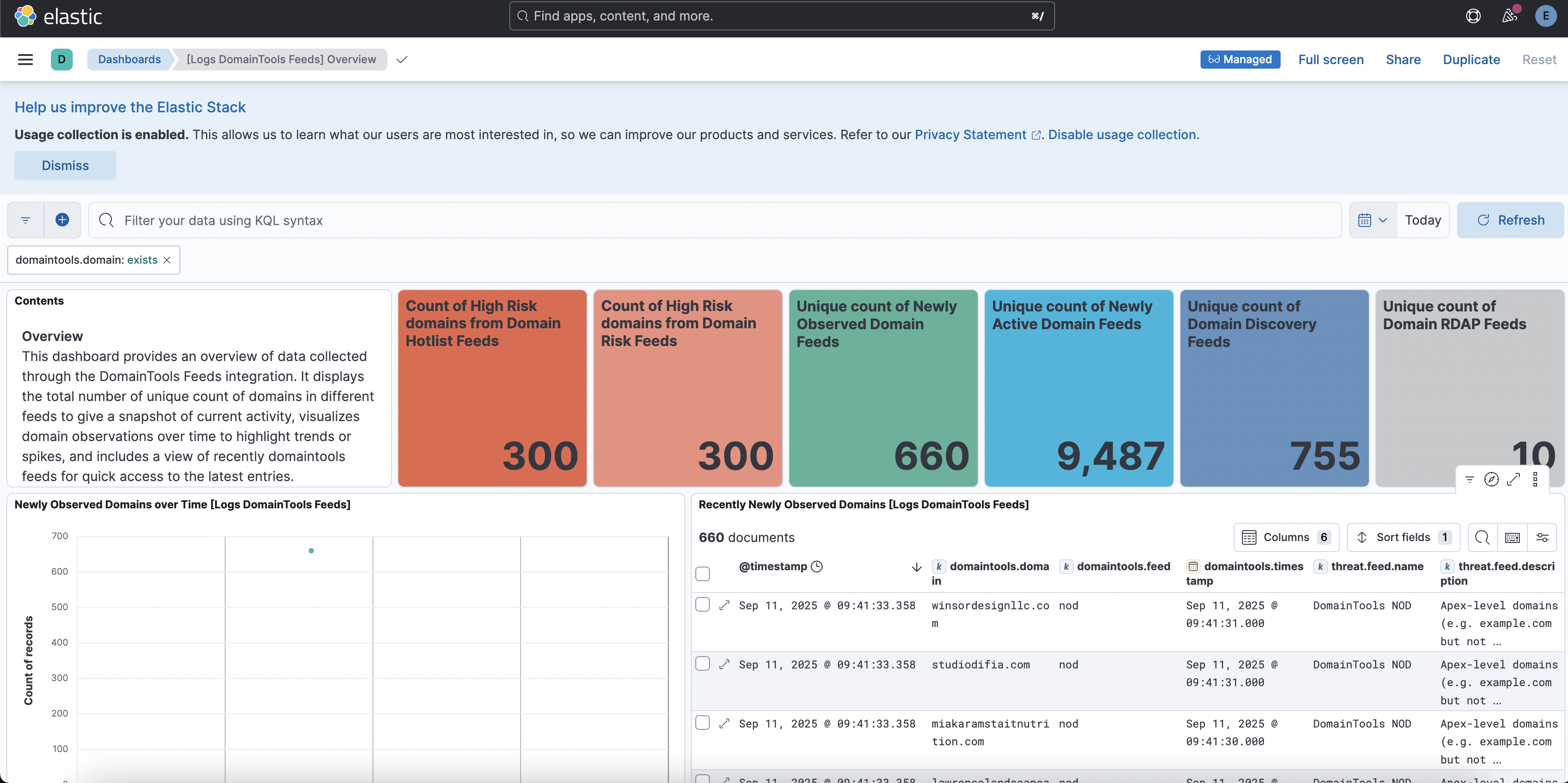
This integration includes one or more Kibana dashboards that visualizes the data collected by the integration. The screenshots below illustrate how the ingested data is displayed.
Changelog
| Version | Details | Minimum Kibana version |
|---|---|---|
| 1.9.0 | Enhancement (View pull request) Document the retention applied to source data streams on stateful and Serverless deployments, and how to change it. |
9.1.0 8.19.0 |
| 1.8.0 | Enhancement (View pull request) Remove redundant ECS field definitions and the catch-all dynamic template from the transforms, relying on the ecs@mappings component template. |
9.1.0 8.19.0 |
| 1.7.0 | Enhancement (View pull request) Add tags to ingest pipeline processors and add preserve_original_event to pipeline-level on_failure handlers. |
9.0.5 8.19.2 |
| 1.6.1 | Enhancement (View pull request) Set agentless deployment mode release field to ga. |
9.0.5 8.19.2 |
| 1.6.0 | Enhancement (View pull request) Use header-based authentication for DomainTools API. |
9.0.5 8.19.2 |
| 1.5.1 | Bug fix (View pull request) Fix transform destination to use keyword for data_stream.namespace, allowing multi-namespace deployments. |
9.0.5 8.19.2 |
| 1.5.0 | Enhancement (View pull request) Enable Agentless deployment. |
9.0.5 8.19.2 |
| 1.4.0 | Enhancement (View pull request) Use num_failure_retries instead of unattended mode for transform failure recovery. |
9.0.0 8.16.0 |
| 1.3.0 | Enhancement (View pull request) Allow transforms to run in unattended mode. |
9.0.0 8.16.0 |
| 1.2.1 | Bug fix (View pull request) Downgrade the format_version to the minimum version that supports all the necessary features for the package. |
9.0.0 8.16.0 |
| 1.2.0 | Enhancement (View pull request) Added domainrisk_feed and domainhotlist_feed data streams.Enhancement (View pull request) Update overview dashboard to include the newly added feeds. |
9.0.0 8.16.0 |
| 1.1.0 | Enhancement (View pull request) Added nad, domaindiscovery and domainrdap domaintools feeds. Enhancement (View pull request) Update overview dashboard to include the newly added feeds. |
9.0.0 8.16.0 |
| 1.0.0 | Enhancement (View pull request) Release package as GA. Enhancement (View pull request) Add overview dashboard. Enhancement (View pull request) Update ECS version to 8.17.0. |
9.0.0 8.15.3 |
| 0.3.2 | Bug fix (View pull request) Fix default request trace enabled behavior. |
9.0.0 8.15.3 |
| 0.3.1 | Bug fix (View pull request) Align field definitions with ECS. The message field was changed from keyword to match_only_text. |
9.0.0 8.15.3 |
| 0.3.0 | Enhancement (View pull request) Enable request trace log removal. |
9.0.0 8.15.3 |
| 0.2.0 | Enhancement (View pull request) Update Kibana constraint to support 9.0.0. |
9.0.0 8.15.3 |
| 0.1.0 | Enhancement (View pull request) Initial draft of the package |
8.15.3 |