ESET Threat Intelligence Integration
| Version | 1.18.0 (View all) |
| Managed integration release status | GA |
| Subscription level What's this? |
Basic |
| Developed by What's this? |
Partner |
| Ingestion method(s) | API |
| Minimum Kibana version(s) | 9.1.4 8.19.4 |
You can use this integration as an Elastic Managed integration on Elastic Cloud Hosted deployments running this version or later.
This integration connects with the ESET Threat Intelligence TAXII version 2 server. It includes the following datasets for retrieving logs:
| Dataset | TAXII2 Collection name |
|---|---|
| androidinfostealer | androidinfostealer stix 2.1 |
| androidthreats | androidthreats stix 2.1 |
| apt | apt stix 2.1 |
| botnet | botnet stix 2.1 |
| cc | botnet.cc stix 2.1 |
| cryptoscam | cryptoscam stix 2.1 |
| domains | domain stix 2.1 |
| emailattachments | emailattachments stix 2.1 |
| files | file stix 2.1 |
| ip | ip stix 2.1 |
| ransomware | ransomware stix 2.1 |
| url | url stix 2.1 |
Agentless integrations allow you to collect data without having to manage Elastic Agent in your cloud. They make manual agent deployment unnecessary, so you can focus on your data instead of the agent that collects it. For more information, refer to Agentless integrations and the Agentless integrations FAQ. Agentless deployments are only supported in Elastic Serverless and Elastic Cloud environments. This functionality is in beta and is subject to change. Beta features are not subject to the support SLA of official GA features.
The ingested IOCs expire after certain duration. An Elastic Transform is created for every source index to
facilitate only active IOCs be available to the end users. Each transform creates a destination index named logs-ti_eset_latest.dest_* which only contains active and unexpired IOCs.
Destinations indices are aliased to logs-ti_eset_latest.<feed name>.
| Source Datastream | Destination Index Pattern | Destination Alias |
|---|---|---|
logs-ti_eset.androidinfostealer-* |
logs-ti_eset_latest.dest_androidinfostealer-* | logs-ti_eset_latest.androidinfostealer |
logs-ti_eset.androidthreats-* |
logs-ti_eset_latest.dest_androidthreats-* | logs-ti_eset_latest.androidthreats |
logs-ti_eset.apt-* |
logs-ti_eset_latest.dest_apt-* | logs-ti_eset_latest.apt |
logs-ti_eset.botnet-* |
logs-ti_eset_latest.dest_botnet-* | logs-ti_eset_latest.botnet |
logs-ti_eset.cc-* |
logs-ti_eset_latest.dest_cc-* | logs-ti_eset_latest.cc |
logs-ti_eset.cryptoscam-* |
logs-ti_eset_latest.dest_cryptoscam-* | logs-ti_eset_latest.cryptoscam |
logs-ti_eset.domains-* |
logs-ti_eset_latest.dest_domains-* | logs-ti_eset_latest.domains |
logs-ti_eset.emailattachments-* |
logs-ti_eset_latest.dest_emailattachments-* | logs-ti_eset_latest.emailattachments |
logs-ti_eset.files-* |
logs-ti_eset_latest.dest_files-* | logs-ti_eset_latest.files |
logs-ti_eset.ip-* |
logs-ti_eset_latest.dest_ip-* | logs-ti_eset_latest.ip |
logs-ti_eset.ransomware-* |
logs-ti_eset_latest.dest_ransomware-* | logs-ti_eset_latest.ransomware |
logs-ti_eset.url-* |
logs-ti_eset_latest.dest_url-* | logs-ti_eset_latest.url |
Threat indicators are re-collected across polling intervals, and the latest transform keeps the active, deduplicated view in its destination index. The source data streams therefore hold repeated copies of the same indicators. Indicators also expire from the latest view after 48 hours (apt: 365 days).
The package bounds the growth of these source data streams with a retention that depends on the deployment type:
| Data stream | Self-managed and Elastic Cloud Hosted (ILM policy) | Serverless (data stream lifecycle) |
|---|---|---|
logs-ti_eset.androidinfostealer-* |
logs-ti_eset.androidinfostealer-default_policy: roll over after 2d, delete 7d after rollover |
delete 7d after rollover |
logs-ti_eset.androidthreats-* |
logs-ti_eset.androidthreats-default_policy: roll over after 2d, delete 7d after rollover |
delete 7d after rollover |
logs-ti_eset.apt-* |
logs-ti_eset.apt-default_policy: roll over after 2d, delete 365d after rollover |
delete 365d after rollover |
logs-ti_eset.botnet-* |
logs-ti_eset.botnet-default_policy: roll over after 2d, delete 7d after rollover |
delete 7d after rollover |
logs-ti_eset.cc-* |
logs-ti_eset.cc-default_policy: roll over after 2d, delete 7d after rollover |
delete 7d after rollover |
logs-ti_eset.cryptoscam-* |
logs-ti_eset.cryptoscam-default_policy: roll over after 2d, delete 7d after rollover |
delete 7d after rollover |
logs-ti_eset.domains-* |
logs-ti_eset.domains-default_policy: roll over after 2d, delete 7d after rollover |
delete 7d after rollover |
logs-ti_eset.emailattachments-* |
logs-ti_eset.emailattachments-default_policy: roll over after 2d, delete 7d after rollover |
delete 7d after rollover |
logs-ti_eset.files-* |
logs-ti_eset.files-default_policy: roll over after 2d, delete 7d after rollover |
delete 7d after rollover |
logs-ti_eset.ip-* |
logs-ti_eset.ip-default_policy: roll over after 2d, delete 7d after rollover |
delete 7d after rollover |
logs-ti_eset.ransomware-* |
logs-ti_eset.ransomware-default_policy: roll over after 2d, delete 7d after rollover |
delete 7d after rollover |
logs-ti_eset.url-* |
logs-ti_eset.url-default_policy: roll over after 2d, delete 7d after rollover |
delete 7d after rollover |
On self-managed and Elastic Cloud Hosted deployments the ILM policy applies. The data stream lifecycle shipped with the package is not used there. ILM counts the delete age from the rollover of a backing index, so a document can remain for up to the rollover age plus the delete age. On Serverless, ILM is not available and the data stream lifecycle applies instead. It also works per backing index: Elasticsearch rolls the write index over automatically on age, size, or document count, and deletes a backing index once the retention has passed since it rolled over. A document therefore stays for the retention plus up to one rollover interval. The rollover age is derived from the retention and is an implementation detail that Elasticsearch may change. Where the package installs a transform, the transform's destination indices are not affected by either.
To keep data for a different period:
- Self-managed and Elastic Cloud Hosted: edit the ILM policy in Kibana under Stack Management → Index Lifecycle Policies, or with
PUT _ilm/policy/<policy name>. A package upgrade reinstalls the package's ILM policies, so check your change after upgrading. - Serverless: set the retention on the data stream, for example
PUT _data_stream/logs-ti_eset.androidinfostealer-default/_lifecyclewith the body{"data_retention": "90d"}. Replacedefaultwith your namespace.
Elastic Agent must be installed. For more details, check the Elastic Agent installation instructions.
- In Kibana navigate to Management > Integrations.
- In the search top bar, type ESET Threat Intelligence.
- Select the ESET Threat Intelligence integration and add it.
- Configure all required integration parameters, including username and password that you have received from ESET during onboarding process. For more information, check the ESET Threat Intelligence documentation.
- Enable data streams you are interested in and have access to.
- Save the integration.
Exported fields
| Field | Description | Type |
|---|---|---|
| @timestamp | Date/time when the event originated. This is the date/time extracted from the event, typically representing when the event was generated by the source. If the event source has no original timestamp, this value is typically populated by the first time the event was received by the pipeline. Required field for all events. | date |
| data_stream.dataset | The field can contain anything that makes sense to signify the source of the data. Examples include nginx.access, prometheus, endpoint etc. For data streams that otherwise fit, but that do not have dataset set we use the value "generic" for the dataset value. event.dataset should have the same value as data_stream.dataset. Beyond the Elasticsearch data stream naming criteria noted above, the dataset value has additional restrictions: * Must not contain - * No longer than 100 characters |
constant_keyword |
| data_stream.namespace | A user defined namespace. Namespaces are useful to allow grouping of data. Many users already organize their indices this way, and the data stream naming scheme now provides this best practice as a default. Many users will populate this field with default. If no value is used, it falls back to default. Beyond the Elasticsearch index naming criteria noted above, namespace value has the additional restrictions: * Must not contain - * No longer than 100 characters |
constant_keyword |
| data_stream.type | An overarching type for the data stream. Currently allowed values are "logs" and "metrics". We expect to also add "traces" and "synthetics" in the near future. | constant_keyword |
| eset.id | The UID of the event object. | keyword |
| eset.labels | Threat labels. | keyword |
| eset.valid_from | Event start of validity. | date |
| eset.valid_until | Event expiration date. | date |
| event.dataset | Name of the dataset. If an event source publishes more than one type of log or events (e.g. access log, error log), the dataset is used to specify which one the event comes from. It's recommended but not required to start the dataset name with the module name, followed by a dot, then the dataset name. | constant_keyword |
| event.module | Name of the module this data is coming from. If your monitoring agent supports the concept of modules or plugins to process events of a given source (e.g. Apache logs), event.module should contain the name of this module. |
constant_keyword |
| input.type | Input type. | keyword |
| labels.is_ioc_transform_source | Indicates whether an IOC is in the raw source data stream, or the in latest destination index. | constant_keyword |
Example
{
    "@timestamp": "2025-08-27T12:51:58.000Z",
    "agent": {
        "ephemeral_id": "4e649840-f137-4c31-91e8-d254c09d489c",
        "id": "9e771b91-5a6f-419b-9971-1da61c8c4252",
        "name": "elastic-agent-94452",
        "type": "filebeat",
        "version": "9.4.2"
    },
    "data_stream": {
        "dataset": "ti_eset.androidinfostealer",
        "namespace": "50257",
        "type": "logs"
    },
    "ecs": {
        "version": "8.11.0"
    },
    "elastic_agent": {
        "id": "9e771b91-5a6f-419b-9971-1da61c8c4252",
        "snapshot": false,
        "version": "9.4.2"
    },
    "eset": {
        "id": "indicator--3f28a31b-5c23-46e6-bbae-15c20b5cb27b",
        "labels": "malicious-activity",
        "valid_until": "2025-08-29T12:51:58.000Z"
    },
    "event": {
        "agent_id_status": "verified",
        "category": [
            "threat"
        ],
        "dataset": "ti_eset.androidinfostealer",
        "ingested": "2026-08-01T20:38:33Z",
        "kind": "enrichment",
        "module": "ti_eset",
        "original": "{\"confidence\":85,\"created\":\"2025-08-27T12:51:58.000Z\",\"created_by_ref\":\"identity--55f6ea5e-51ac-4344-bc8c-4170950d210f\",\"description\":\"Each of these file hashes indicates that a variant of a variant of Android/Spy.Banker.DSU trojan is present.\",\"id\":\"indicator--3f28a31b-5c23-46e6-bbae-15c20b5cb27b\",\"labels\":[\"malicious-activity\"],\"modified\":\"2025-08-27T12:51:58.000Z\",\"name\":\"Malware variant\",\"object_marking_refs\":[\"marking-definition--f88d31f6-486f-44da-b317-01333bde0b82\"],\"pattern\":\"[file:hashes.'SHA-256' = 'd077a2851161c3363e806b50d7b4648203ecf20647cb03d6d9e593074028c728'] OR [file:hashes.'SHA-1' = '5b913f8dfb17533def5db50b63583076ff8a6e28'] OR [file:hashes.'MD5' = '5db237b11fe18f92a13b743c98fb8945']\",\"pattern_type\":\"stix\",\"pattern_version\":\"2.1\",\"spec_version\":\"2.1\",\"type\":\"indicator\",\"valid_from\":\"2025-08-27T12:51:58Z\",\"valid_until\":\"2025-08-29T12:51:58Z\"}",
        "type": [
            "indicator"
        ]
    },
    "input": {
        "type": "cel"
    },
    "labels": {
        "is_ioc_transform_source": "true"
    },
    "tags": [
        "preserve_original_event",
        "forwarded",
        "eset-androidinfostealer"
    ],
    "threat": {
        "feed": {
            "name": "ESET Android info stealer stix 2.1"
        },
        "indicator": {
            "confidence": "High",
            "description": "Each of these file hashes indicates that a variant of a variant of Android/Spy.Banker.DSU trojan is present.",
            "file": {
                "hash": {
                    "md5": "5db237b11fe18f92a13b743c98fb8945",
                    "sha1": "5b913f8dfb17533def5db50b63583076ff8a6e28",
                    "sha256": "d077a2851161c3363e806b50d7b4648203ecf20647cb03d6d9e593074028c728"
                }
            },
            "last_seen": "2025-08-27T12:51:58.000Z",
            "modified_at": "2025-08-27T12:51:58.000Z",
            "name": "Malware variant",
            "provider": "eset",
            "type": "file"
        }
    }
}
Exported fields
| Field | Description | Type |
|---|---|---|
| @timestamp | Date/time when the event originated. This is the date/time extracted from the event, typically representing when the event was generated by the source. If the event source has no original timestamp, this value is typically populated by the first time the event was received by the pipeline. Required field for all events. | date |
| data_stream.dataset | The field can contain anything that makes sense to signify the source of the data. Examples include nginx.access, prometheus, endpoint etc. For data streams that otherwise fit, but that do not have dataset set we use the value "generic" for the dataset value. event.dataset should have the same value as data_stream.dataset. Beyond the Elasticsearch data stream naming criteria noted above, the dataset value has additional restrictions: * Must not contain - * No longer than 100 characters |
constant_keyword |
| data_stream.namespace | A user defined namespace. Namespaces are useful to allow grouping of data. Many users already organize their indices this way, and the data stream naming scheme now provides this best practice as a default. Many users will populate this field with default. If no value is used, it falls back to default. Beyond the Elasticsearch index naming criteria noted above, namespace value has the additional restrictions: * Must not contain - * No longer than 100 characters |
constant_keyword |
| data_stream.type | An overarching type for the data stream. Currently allowed values are "logs" and "metrics". We expect to also add "traces" and "synthetics" in the near future. | constant_keyword |
| eset.id | The UID of the event object. | keyword |
| eset.labels | Threat labels. | keyword |
| eset.valid_from | Event start of validity. | date |
| eset.valid_until | Event expiration date. | date |
| event.dataset | Name of the dataset. If an event source publishes more than one type of log or events (e.g. access log, error log), the dataset is used to specify which one the event comes from. It's recommended but not required to start the dataset name with the module name, followed by a dot, then the dataset name. | constant_keyword |
| event.module | Name of the module this data is coming from. If your monitoring agent supports the concept of modules or plugins to process events of a given source (e.g. Apache logs), event.module should contain the name of this module. |
constant_keyword |
| input.type | Input type. | keyword |
| labels.is_ioc_transform_source | Indicates whether an IOC is in the raw source data stream, or the in latest destination index. | constant_keyword |
Example
{
    "@timestamp": "2024-07-10T11:58:57.000Z",
    "agent": {
        "ephemeral_id": "90f2eb93-3dae-4281-8f1e-7f04770e69bc",
        "id": "c76ed909-0c3f-4f6d-9e2e-ca7c89903cb4",
        "name": "elastic-agent-77465",
        "type": "filebeat",
        "version": "9.4.2"
    },
    "data_stream": {
        "dataset": "ti_eset.androidthreats",
        "namespace": "45853",
        "type": "logs"
    },
    "ecs": {
        "version": "8.11.0"
    },
    "elastic_agent": {
        "id": "c76ed909-0c3f-4f6d-9e2e-ca7c89903cb4",
        "snapshot": false,
        "version": "9.4.2"
    },
    "eset": {
        "id": "indicator--a4d26a0d-4a54-414e-8426-7f71ce95d2c1",
        "labels": "malicious-activity",
        "valid_until": "2024-07-12T11:58:57.000Z"
    },
    "event": {
        "agent_id_status": "verified",
        "category": [
            "threat"
        ],
        "dataset": "ti_eset.androidthreats",
        "ingested": "2026-08-01T20:45:01Z",
        "kind": "enrichment",
        "module": "ti_eset",
        "original": "{\"created\":\"2024-07-10T11:58:57.000Z\",\"description\":\"Each of these file hashes indicates that a variant of a variant of Android/Spy.Agent.DER trojan is present.\",\"id\":\"indicator--a4d26a0d-4a54-414e-8426-7f71ce95d2c1\",\"labels\":[\"malicious-activity\"],\"modified\":\"2024-07-10T11:58:57.000Z\",\"name\":\"Malware variant\",\"pattern\":\"[file:hashes.'SHA-256' = '422985ed937201e230537c5c10bbd8c1fda783923372e4cbd0ecad99a640695d'] OR [file:hashes.'SHA-1' = '3a6c1999caf6d063b7739d6375d1249419595aa1'] OR [file:hashes.'MD5' = '9538fc50262945cd15e42715f32f5039']\",\"pattern_type\":\"stix\",\"pattern_version\":\"2.1\",\"spec_version\":\"2.1\",\"type\":\"indicator\",\"valid_from\":\"2024-07-10T11:58:57Z\",\"valid_until\":\"2024-07-12T11:58:57Z\"}",
        "type": [
            "indicator"
        ]
    },
    "input": {
        "type": "cel"
    },
    "labels": {
        "is_ioc_transform_source": "true"
    },
    "tags": [
        "preserve_original_event",
        "forwarded",
        "eset-androidthreats"
    ],
    "threat": {
        "feed": {
            "name": "ESET Android threats stix 2.1"
        },
        "indicator": {
            "confidence": "High",
            "description": "Each of these file hashes indicates that a variant of a variant of Android/Spy.Agent.DER trojan is present.",
            "file": {
                "hash": {
                    "md5": "9538fc50262945cd15e42715f32f5039",
                    "sha1": "3a6c1999caf6d063b7739d6375d1249419595aa1",
                    "sha256": "422985ed937201e230537c5c10bbd8c1fda783923372e4cbd0ecad99a640695d"
                }
            },
            "last_seen": "2024-07-10T11:58:57.000Z",
            "modified_at": "2024-07-10T11:58:57.000Z",
            "name": "Malware variant",
            "provider": "eset",
            "type": "file"
        }
    }
}
Exported fields
| Field | Description | Type |
|---|---|---|
| @timestamp | Event timestamp. | date |
| cloud.image.id | Image ID for the cloud instance. | keyword |
| data_stream.dataset | Data stream dataset. | constant_keyword |
| data_stream.namespace | Data stream namespace. | constant_keyword |
| data_stream.type | Data stream type. | constant_keyword |
| eset.id | The UID of the event object. | keyword |
| eset.labels | Threat labels. | keyword |
| eset.valid_from | Event start of validity. | date |
| eset.valid_until | Event expiration date. | date |
| event.dataset | Event dataset | constant_keyword |
| event.module | Event module | constant_keyword |
| host.containerized | If the host is a container. | boolean |
| host.os.build | OS build information. | keyword |
| host.os.codename | OS codename, if any. | keyword |
| input.type | Input type. | keyword |
| labels.is_ioc_transform_source | Indicates whether an IOC is in the raw source data stream, or the in latest destination index. | constant_keyword |
| threat.indicator.first_seen | The date and time when intelligence source first reported sighting this indicator. | date |
| threat.indicator.last_seen | The date and time when intelligence source last reported sighting this indicator. | date |
| threat.indicator.modified_at | The date and time when intelligence source last modified information for this indicator. | date |
Example
{
    "@timestamp": "2023-10-18T02:05:09.000Z",
    "agent": {
        "ephemeral_id": "bea850c5-7b99-4fe0-b62a-70e8f816f892",
        "id": "75de7f03-46a5-4fc6-88cb-6ec688bc8813",
        "name": "elastic-agent-97208",
        "type": "filebeat",
        "version": "8.19.4"
    },
    "data_stream": {
        "dataset": "ti_eset.botnet",
        "namespace": "21530",
        "type": "logs"
    },
    "ecs": {
        "version": "8.11.0"
    },
    "elastic_agent": {
        "id": "75de7f03-46a5-4fc6-88cb-6ec688bc8813",
        "snapshot": false,
        "version": "8.19.4"
    },
    "eset": {
        "id": "indicator--80dc09fa-563f-4a9c-ad1d-655d8dffa37f",
        "labels": [
            "malicious-activity"
        ],
        "valid_from": "2023-10-18T02:05:09.000Z",
        "valid_until": "2023-10-20T02:05:09.000Z"
    },
    "event": {
        "agent_id_status": "verified",
        "category": [
            "threat"
        ],
        "created": "2025-10-07T05:23:54.209Z",
        "dataset": "ti_eset.botnet",
        "ingested": "2025-10-07T05:23:57Z",
        "kind": "enrichment",
        "original": "{\"created\":\"2023-10-18T02:05:09.000Z\",\"description\":\"Each of these file hashes indicates that a variant of Win32/Rescoms.B backdoor is present.\",\"id\":\"indicator--80dc09fa-563f-4a9c-ad1d-655d8dffa37f\",\"labels\":[\"malicious-activity\"],\"modified\":\"2023-10-18T02:05:09.000Z\",\"name\":\"373d34874d7bc89fd4cefa6272ee80bf\",\"pattern\":\"[file:hashes.'SHA-256'='b0e914d1bbe19433cc9df64ea1ca07fe77f7b150b511b786e46e007941a62bd7'] OR [file:hashes.'SHA-1'='373d34874d7bc89fd4cefa6272ee80bf'] OR [file:hashes.'MD5'='373d34874d7bc89fd4cefa6272ee80bf']\",\"pattern_type\":\"stix\",\"pattern_version\":\"2.1\",\"spec_version\":\"indicator\",\"type\":\"indicator\",\"valid_from\":\"2023-10-18T02:05:09Z\",\"valid_until\":\"2023-10-20T02:05:09Z\"}",
        "type": [
            "indicator"
        ]
    },
    "input": {
        "type": "httpjson"
    },
    "tags": [
        "preserve_original_event",
        "forwarded",
        "eset-botnet"
    ],
    "threat": {
        "feed": {
            "name": "ESET Botnet stix 2.1"
        },
        "indicator": {
            "confidence": "High",
            "description": "Each of these file hashes indicates that a variant of Win32/Rescoms.B backdoor is present.",
            "file": {
                "hash": {
                    "md5": "373d34874d7bc89fd4cefa6272ee80bf",
                    "sha1": "373d34874d7bc89fd4cefa6272ee80bf",
                    "sha256": "b0e914d1bbe19433cc9df64ea1ca07fe77f7b150b511b786e46e007941a62bd7"
                }
            },
            "last_seen": "2023-10-18T02:05:09.000Z",
            "modified_at": "2023-10-18T02:05:09.000Z",
            "name": "373d34874d7bc89fd4cefa6272ee80bf",
            "provider": "eset",
            "type": "file"
        }
    }
}
Exported fields
| Field | Description | Type |
|---|---|---|
| @timestamp | Event timestamp. | date |
| cloud.image.id | Image ID for the cloud instance. | keyword |
| data_stream.dataset | Data stream dataset. | constant_keyword |
| data_stream.namespace | Data stream namespace. | constant_keyword |
| data_stream.type | Data stream type. | constant_keyword |
| eset.id | The UID of the event object. | keyword |
| eset.labels | Threat labels. | keyword |
| eset.valid_from | Event start of validity. | date |
| eset.valid_until | Event expiration date. | date |
| event.dataset | Event dataset | constant_keyword |
| event.module | Event module | constant_keyword |
| host.containerized | If the host is a container. | boolean |
| host.os.build | OS build information. | keyword |
| host.os.codename | OS codename, if any. | keyword |
| input.type | Input type. | keyword |
| labels.is_ioc_transform_source | Indicates whether an IOC is in the raw source data stream, or the in latest destination index. | constant_keyword |
| threat.indicator.first_seen | The date and time when intelligence source first reported sighting this indicator. | date |
| threat.indicator.last_seen | The date and time when intelligence source last reported sighting this indicator. | date |
| threat.indicator.modified_at | The date and time when intelligence source last modified information for this indicator. | date |
Example
{
    "@timestamp": "2023-10-19T02:00:09.000Z",
    "agent": {
        "ephemeral_id": "b3edd383-6fe5-42f1-98e5-e36a924959ba",
        "id": "c5567d77-e4ac-453b-b1d3-aa2ea2cf9dfb",
        "name": "elastic-agent-90683",
        "type": "filebeat",
        "version": "8.19.4"
    },
    "data_stream": {
        "dataset": "ti_eset.cc",
        "namespace": "30355",
        "type": "logs"
    },
    "ecs": {
        "version": "8.11.0"
    },
    "elastic_agent": {
        "id": "c5567d77-e4ac-453b-b1d3-aa2ea2cf9dfb",
        "snapshot": false,
        "version": "8.19.4"
    },
    "eset": {
        "id": "indicator--34e0eaa0-d35d-4039-b801-8f05d4e16bea",
        "labels": [
            "malicious-activity"
        ],
        "valid_from": "2023-10-19T02:00:09.000Z",
        "valid_until": "2023-10-21T02:00:09.000Z"
    },
    "event": {
        "agent_id_status": "verified",
        "category": [
            "threat"
        ],
        "created": "2025-10-07T05:24:54.170Z",
        "dataset": "ti_eset.cc",
        "ingested": "2025-10-07T05:24:57Z",
        "kind": "enrichment",
        "original": "{\"created\":\"2023-10-19T02:00:09.000Z\",\"description\":\"C\\u0026C of Win32/Smokeloader.H trojan\",\"id\":\"indicator--34e0eaa0-d35d-4039-b801-8f05d4e16bea\",\"labels\":[\"malicious-activity\"],\"modified\":\"2023-10-19T02:00:09.000Z\",\"name\":\"https://example.com/some/path\",\"pattern\":\"[url:value='https://example.com/some/path']\",\"pattern_type\":\"stix\",\"pattern_version\":\"2.1\",\"spec_version\":\"indicator\",\"type\":\"indicator\",\"valid_from\":\"2023-10-19T02:00:09Z\",\"valid_until\":\"2023-10-21T02:00:09Z\"}",
        "type": [
            "indicator"
        ]
    },
    "input": {
        "type": "httpjson"
    },
    "tags": [
        "preserve_original_event",
        "forwarded",
        "eset-cc"
    ],
    "threat": {
        "feed": {
            "name": "ESET Botnet C&C stix 2.1"
        },
        "indicator": {
            "confidence": "High",
            "description": "C&C of Win32/Smokeloader.H trojan",
            "last_seen": "2023-10-19T02:00:09.000Z",
            "modified_at": "2023-10-19T02:00:09.000Z",
            "name": "https://example.com/some/path",
            "provider": "eset",
            "type": "url",
            "url": {
                "original": "https://example.com/some/path"
            }
        }
    }
}
Exported fields
| Field | Description | Type |
|---|---|---|
| @timestamp | Date/time when the event originated. This is the date/time extracted from the event, typically representing when the event was generated by the source. If the event source has no original timestamp, this value is typically populated by the first time the event was received by the pipeline. Required field for all events. | date |
| data_stream.dataset | The field can contain anything that makes sense to signify the source of the data. Examples include nginx.access, prometheus, endpoint etc. For data streams that otherwise fit, but that do not have dataset set we use the value "generic" for the dataset value. event.dataset should have the same value as data_stream.dataset. Beyond the Elasticsearch data stream naming criteria noted above, the dataset value has additional restrictions: * Must not contain - * No longer than 100 characters |
constant_keyword |
| data_stream.namespace | A user defined namespace. Namespaces are useful to allow grouping of data. Many users already organize their indices this way, and the data stream naming scheme now provides this best practice as a default. Many users will populate this field with default. If no value is used, it falls back to default. Beyond the Elasticsearch index naming criteria noted above, namespace value has the additional restrictions: * Must not contain - * No longer than 100 characters |
constant_keyword |
| data_stream.type | An overarching type for the data stream. Currently allowed values are "logs" and "metrics". We expect to also add "traces" and "synthetics" in the near future. | constant_keyword |
| eset.id | The UID of the event object. | keyword |
| eset.labels | Threat labels. | keyword |
| eset.valid_from | Event start of validity. | date |
| eset.valid_until | Event expiration date. | date |
| event.dataset | Name of the dataset. If an event source publishes more than one type of log or events (e.g. access log, error log), the dataset is used to specify which one the event comes from. It's recommended but not required to start the dataset name with the module name, followed by a dot, then the dataset name. | constant_keyword |
| event.module | Name of the module this data is coming from. If your monitoring agent supports the concept of modules or plugins to process events of a given source (e.g. Apache logs), event.module should contain the name of this module. |
constant_keyword |
| input.type | Input type. | keyword |
| labels.is_ioc_transform_source | Indicates whether an IOC is in the raw source data stream, or the in latest destination index. | constant_keyword |
Example
{
    "@timestamp": "2024-03-18T13:25:08.000Z",
    "agent": {
        "ephemeral_id": "03779f2f-485c-4df3-8938-c039b0321c66",
        "id": "32d81282-8391-46bd-bc19-51b8a54a6e8f",
        "name": "elastic-agent-12824",
        "type": "filebeat",
        "version": "9.4.2"
    },
    "data_stream": {
        "dataset": "ti_eset.cryptoscam",
        "namespace": "66693",
        "type": "logs"
    },
    "ecs": {
        "version": "8.11.0"
    },
    "elastic_agent": {
        "id": "32d81282-8391-46bd-bc19-51b8a54a6e8f",
        "snapshot": false,
        "version": "9.4.2"
    },
    "eset": {
        "id": "indicator--5d8275cd-993e-4ba1-87a3-251e8e072894",
        "labels": "unwanted-activity",
        "valid_until": "2024-03-20T13:25:08.000Z"
    },
    "event": {
        "agent_id_status": "verified",
        "category": [
            "threat"
        ],
        "dataset": "ti_eset.cryptoscam",
        "ingested": "2026-08-01T20:50:02Z",
        "kind": "enrichment",
        "module": "ti_eset",
        "original": "{\"created\":\"2024-03-18T13:25:08.000Z\",\"description\":\"Host is known source of active fraudulent content.\",\"id\":\"indicator--5d8275cd-993e-4ba1-87a3-251e8e072894\",\"labels\":[\"unwanted-activity\"],\"modified\":\"2024-03-18T13:25:08.000Z\",\"name\":\"Unwanted\",\"pattern\":\"[url:value='http://future-exchange.net']\",\"pattern_type\":\"stix\",\"pattern_version\":\"2.1\",\"spec_version\":\"2.1\",\"type\":\"indicator\",\"valid_from\":\"2024-03-18T13:25:08Z\",\"valid_until\":\"2024-03-20T13:25:08Z\"}",
        "type": [
            "indicator"
        ]
    },
    "input": {
        "type": "cel"
    },
    "labels": {
        "is_ioc_transform_source": "true"
    },
    "tags": [
        "preserve_original_event",
        "forwarded",
        "eset-cryptoscam"
    ],
    "threat": {
        "feed": {
            "name": "ESET Crypto scam stix 2.1"
        },
        "indicator": {
            "confidence": "Medium",
            "description": "Host is known source of active fraudulent content.",
            "last_seen": "2024-03-18T13:25:08.000Z",
            "modified_at": "2024-03-18T13:25:08.000Z",
            "name": "Unwanted",
            "provider": "eset",
            "type": "url",
            "url": {
                "original": "http://future-exchange.net"
            }
        }
    }
}
Exported fields
| Field | Description | Type |
|---|---|---|
| @timestamp | Event timestamp. | date |
| cloud.image.id | Image ID for the cloud instance. | keyword |
| data_stream.dataset | Data stream dataset. | constant_keyword |
| data_stream.namespace | Data stream namespace. | constant_keyword |
| data_stream.type | Data stream type. | constant_keyword |
| eset.id | The UID of the event object. | keyword |
| eset.labels | Threat labels. | keyword |
| eset.valid_from | Event start of validity. | date |
| eset.valid_until | Event expiration date. | date |
| event.dataset | Event dataset | constant_keyword |
| event.module | Event module | constant_keyword |
| host.containerized | If the host is a container. | boolean |
| host.os.build | OS build information. | keyword |
| host.os.codename | OS codename, if any. | keyword |
| input.type | Input type. | keyword |
| labels.is_ioc_transform_source | Indicates whether an IOC is in the raw source data stream, or the in latest destination index. | constant_keyword |
| threat.indicator.first_seen | The date and time when intelligence source first reported sighting this indicator. | date |
| threat.indicator.last_seen | The date and time when intelligence source last reported sighting this indicator. | date |
| threat.indicator.modified_at | The date and time when intelligence source last modified information for this indicator. | date |
Example
{
    "@timestamp": "2023-10-19T02:00:28.000Z",
    "agent": {
        "ephemeral_id": "73444b7b-a480-4ea7-b838-e041791c2cd8",
        "id": "32093ab2-602b-4282-ab43-c353c6ca2de4",
        "name": "elastic-agent-56675",
        "type": "filebeat",
        "version": "8.19.4"
    },
    "data_stream": {
        "dataset": "ti_eset.domains",
        "namespace": "76832",
        "type": "logs"
    },
    "ecs": {
        "version": "8.11.0"
    },
    "elastic_agent": {
        "id": "32093ab2-602b-4282-ab43-c353c6ca2de4",
        "snapshot": false,
        "version": "8.19.4"
    },
    "eset": {
        "id": "indicator--dfb05726-f2be-43c8-a5b2-48e78cc05286",
        "labels": [
            "malicious-activity"
        ],
        "valid_from": "2023-10-19T02:00:28.000Z",
        "valid_until": "2023-10-21T02:00:28.000Z"
    },
    "event": {
        "agent_id_status": "verified",
        "category": [
            "threat"
        ],
        "created": "2025-10-07T05:25:53.540Z",
        "dataset": "ti_eset.domains",
        "ingested": "2025-10-07T05:25:56Z",
        "kind": "enrichment",
        "original": "{\"created\":\"2023-10-19T02:00:28.000Z\",\"description\":\"Host is known to be actively distributing adware or other medium-risk software.\",\"id\":\"indicator--dfb05726-f2be-43c8-a5b2-48e78cc05286\",\"labels\":[\"malicious-activity\"],\"modified\":\"2023-10-19T02:00:28.000Z\",\"name\":\"example.com\",\"pattern\":\"[domain-name:value='example.com']\",\"pattern_type\":\"stix\",\"pattern_version\":\"2.1\",\"spec_version\":\"indicator\",\"type\":\"indicator\",\"valid_from\":\"2023-10-19T02:00:28Z\",\"valid_until\":\"2023-10-21T02:00:28Z\"}",
        "type": [
            "indicator"
        ]
    },
    "input": {
        "type": "httpjson"
    },
    "tags": [
        "preserve_original_event",
        "forwarded",
        "eset-domains"
    ],
    "threat": {
        "feed": {
            "name": "ESET Domain stix 2.1"
        },
        "indicator": {
            "confidence": "High",
            "description": "Host is known to be actively distributing adware or other medium-risk software.",
            "last_seen": "2023-10-19T02:00:28.000Z",
            "modified_at": "2023-10-19T02:00:28.000Z",
            "name": "example.com",
            "provider": "eset",
            "type": "url",
            "url": {
                "domain": "example.com",
                "original": "example.com"
            }
        }
    }
}
Exported fields
| Field | Description | Type |
|---|---|---|
| @timestamp | Date/time when the event originated. This is the date/time extracted from the event, typically representing when the event was generated by the source. If the event source has no original timestamp, this value is typically populated by the first time the event was received by the pipeline. Required field for all events. | date |
| data_stream.dataset | The field can contain anything that makes sense to signify the source of the data. Examples include nginx.access, prometheus, endpoint etc. For data streams that otherwise fit, but that do not have dataset set we use the value "generic" for the dataset value. event.dataset should have the same value as data_stream.dataset. Beyond the Elasticsearch data stream naming criteria noted above, the dataset value has additional restrictions: * Must not contain - * No longer than 100 characters |
constant_keyword |
| data_stream.namespace | A user defined namespace. Namespaces are useful to allow grouping of data. Many users already organize their indices this way, and the data stream naming scheme now provides this best practice as a default. Many users will populate this field with default. If no value is used, it falls back to default. Beyond the Elasticsearch index naming criteria noted above, namespace value has the additional restrictions: * Must not contain - * No longer than 100 characters |
constant_keyword |
| data_stream.type | An overarching type for the data stream. Currently allowed values are "logs" and "metrics". We expect to also add "traces" and "synthetics" in the near future. | constant_keyword |
| eset.id | The UID of the event object. | keyword |
| eset.labels | Threat labels. | keyword |
| eset.valid_from | Event start of validity. | date |
| eset.valid_until | Event expiration date. | date |
| event.dataset | Name of the dataset. If an event source publishes more than one type of log or events (e.g. access log, error log), the dataset is used to specify which one the event comes from. It's recommended but not required to start the dataset name with the module name, followed by a dot, then the dataset name. | constant_keyword |
| event.module | Name of the module this data is coming from. If your monitoring agent supports the concept of modules or plugins to process events of a given source (e.g. Apache logs), event.module should contain the name of this module. |
constant_keyword |
| input.type | Input type. | keyword |
| labels.is_ioc_transform_source | Indicates whether an IOC is in the raw source data stream, or the in latest destination index. | constant_keyword |
Example
{
    "@timestamp": "2024-03-18T14:15:42.000Z",
    "agent": {
        "ephemeral_id": "10a5edac-8074-47ea-bd11-49a03002b6f5",
        "id": "da1377da-0b30-430d-860b-8f73e8b3568a",
        "name": "elastic-agent-26272",
        "type": "filebeat",
        "version": "9.4.2"
    },
    "data_stream": {
        "dataset": "ti_eset.emailattachments",
        "namespace": "63694",
        "type": "logs"
    },
    "ecs": {
        "version": "8.11.0"
    },
    "elastic_agent": {
        "id": "da1377da-0b30-430d-860b-8f73e8b3568a",
        "snapshot": false,
        "version": "9.4.2"
    },
    "eset": {
        "id": "indicator--00c42f20-62d2-4cb6-be87-2c451aaec4a4",
        "labels": "malicious-activity",
        "valid_until": "2024-03-20T14:15:42.000Z"
    },
    "event": {
        "agent_id_status": "verified",
        "category": [
            "threat"
        ],
        "dataset": "ti_eset.emailattachments",
        "ingested": "2026-08-01T19:34:01Z",
        "kind": "enrichment",
        "module": "ti_eset",
        "original": "{\"created\":\"2024-03-18T14:15:42.000Z\",\"description\":\"Each of these file hashes indicates that a variant of a variant of MSIL/Kryptik.ALDO trojan is present.\",\"id\":\"indicator--00c42f20-62d2-4cb6-be87-2c451aaec4a4\",\"labels\":[\"malicious-activity\"],\"modified\":\"2024-03-18T14:15:42.000Z\",\"name\":\"Malware variant\",\"pattern\":\"[file:hashes.'SHA-256'='a11a40ee211021d421a6f735715f0bae168aadada0a051c76c5b7e9f83fc0abb'] OR [file:hashes.'SHA-1'='9e8303d999889e32328f9ebcd0e17fdc6ecd8b2d'] OR [file:hashes.'MD5'='13442e50b95944a3c6aba42da0c9b1ad']\",\"pattern_type\":\"stix\",\"pattern_version\":\"2.1\",\"spec_version\":\"2.1\",\"type\":\"indicator\",\"valid_from\":\"2024-03-18T14:15:42Z\",\"valid_until\":\"2024-03-20T14:15:42Z\"}",
        "type": [
            "indicator"
        ]
    },
    "input": {
        "type": "cel"
    },
    "labels": {
        "is_ioc_transform_source": "true"
    },
    "tags": [
        "preserve_original_event",
        "forwarded",
        "eset-emailattachments"
    ],
    "threat": {
        "feed": {
            "name": "ESET Email attachments stix 2.1"
        },
        "indicator": {
            "confidence": "High",
            "description": "Each of these file hashes indicates that a variant of a variant of MSIL/Kryptik.ALDO trojan is present.",
            "file": {
                "hash": {
                    "md5": "13442e50b95944a3c6aba42da0c9b1ad",
                    "sha1": "9e8303d999889e32328f9ebcd0e17fdc6ecd8b2d",
                    "sha256": "a11a40ee211021d421a6f735715f0bae168aadada0a051c76c5b7e9f83fc0abb"
                }
            },
            "last_seen": "2024-03-18T14:15:42.000Z",
            "modified_at": "2024-03-18T14:15:42.000Z",
            "name": "Malware variant",
            "provider": "eset",
            "type": "file"
        }
    }
}
Exported fields
| Field | Description | Type |
|---|---|---|
| @timestamp | Event timestamp. | date |
| cloud.image.id | Image ID for the cloud instance. | keyword |
| data_stream.dataset | Data stream dataset. | constant_keyword |
| data_stream.namespace | Data stream namespace. | constant_keyword |
| data_stream.type | Data stream type. | constant_keyword |
| eset.id | The UID of the event object. | keyword |
| eset.labels | Threat labels. | keyword |
| eset.valid_from | Event start of validity. | date |
| eset.valid_until | Event expiration date. | date |
| event.dataset | Event dataset | constant_keyword |
| event.module | Event module | constant_keyword |
| host.containerized | If the host is a container. | boolean |
| host.os.build | OS build information. | keyword |
| host.os.codename | OS codename, if any. | keyword |
| input.type | Input type. | keyword |
| labels.is_ioc_transform_source | Indicates whether an IOC is in the raw source data stream, or the in latest destination index. | constant_keyword |
| threat.indicator.first_seen | The date and time when intelligence source first reported sighting this indicator. | date |
| threat.indicator.last_seen | The date and time when intelligence source last reported sighting this indicator. | date |
| threat.indicator.modified_at | The date and time when intelligence source last modified information for this indicator. | date |
Example
{
    "@timestamp": "2023-10-19T02:00:38.000Z",
    "agent": {
        "ephemeral_id": "11ca0f0e-0d11-4dd3-b2d4-64f567328b32",
        "id": "d13f581e-ff6e-4b91-9ec0-41af4d9ec6dd",
        "name": "elastic-agent-44731",
        "type": "filebeat",
        "version": "8.19.4"
    },
    "data_stream": {
        "dataset": "ti_eset.files",
        "namespace": "39976",
        "type": "logs"
    },
    "ecs": {
        "version": "8.11.0"
    },
    "elastic_agent": {
        "id": "d13f581e-ff6e-4b91-9ec0-41af4d9ec6dd",
        "snapshot": false,
        "version": "8.19.4"
    },
    "eset": {
        "id": "indicator--5d7e9ad6-7b48-42fa-8598-d474e8da1b0f",
        "labels": [
            "malicious-activity"
        ],
        "valid_from": "2023-10-19T02:00:38.000Z",
        "valid_until": "2023-10-21T02:00:38.000Z"
    },
    "event": {
        "agent_id_status": "verified",
        "category": [
            "threat"
        ],
        "created": "2025-10-07T05:26:44.370Z",
        "dataset": "ti_eset.files",
        "ingested": "2025-10-07T05:26:47Z",
        "kind": "enrichment",
        "original": "{\"created\":\"2023-10-19T02:00:38.000Z\",\"description\":\"Each of these file hashes indicates that a variant of HTML/Phishing.Agent.EVU trojan is present.\",\"id\":\"indicator--5d7e9ad6-7b48-42fa-8598-d474e8da1b0f\",\"labels\":[\"malicious-activity\"],\"modified\":\"2023-10-19T02:00:38.000Z\",\"name\":\"b0e914d1bbe19433cc9df64ea1ca07fe77f7b150b511b786e46e007941a62bd7\",\"pattern\":\"[file:hashes.'SHA-256'='b0e914d1bbe19433cc9df64ea1ca07fe77f7b150b511b786e46e007941a62bd7'] OR [file:hashes.'SHA-1'='b0e914d1bbe19433cc9df64ea1ca07fe77f7b150b511b786e46e007941a62bd7'] OR [file:hashes.'MD5'='b0e914d1bbe19433cc9df64ea1ca07fe77f7b150b511b786e46e007941a62bd7']\",\"pattern_type\":\"stix\",\"pattern_version\":\"2.1\",\"spec_version\":\"indicator\",\"type\":\"indicator\",\"valid_from\":\"2023-10-19T02:00:38Z\",\"valid_until\":\"2023-10-21T02:00:38Z\"}",
        "type": [
            "indicator"
        ]
    },
    "input": {
        "type": "httpjson"
    },
    "tags": [
        "preserve_original_event",
        "forwarded",
        "eset-files"
    ],
    "threat": {
        "feed": {
            "name": "ESET Malicious Files stix 2.1"
        },
        "indicator": {
            "confidence": "High",
            "description": "Each of these file hashes indicates that a variant of HTML/Phishing.Agent.EVU trojan is present.",
            "file": {
                "hash": {
                    "md5": "b0e914d1bbe19433cc9df64ea1ca07fe77f7b150b511b786e46e007941a62bd7",
                    "sha1": "b0e914d1bbe19433cc9df64ea1ca07fe77f7b150b511b786e46e007941a62bd7",
                    "sha256": "b0e914d1bbe19433cc9df64ea1ca07fe77f7b150b511b786e46e007941a62bd7"
                }
            },
            "last_seen": "2023-10-19T02:00:38.000Z",
            "modified_at": "2023-10-19T02:00:38.000Z",
            "name": "b0e914d1bbe19433cc9df64ea1ca07fe77f7b150b511b786e46e007941a62bd7",
            "provider": "eset",
            "type": "file"
        }
    }
}
Exported fields
| Field | Description | Type |
|---|---|---|
| @timestamp | Event timestamp. | date |
| cloud.image.id | Image ID for the cloud instance. | keyword |
| data_stream.dataset | Data stream dataset. | constant_keyword |
| data_stream.namespace | Data stream namespace. | constant_keyword |
| data_stream.type | Data stream type. | constant_keyword |
| eset.id | The UID of the event object. | keyword |
| eset.labels | Threat labels. | keyword |
| eset.valid_from | Event start of validity. | date |
| eset.valid_until | Event expiration date. | date |
| event.dataset | Event dataset | constant_keyword |
| event.module | Event module | constant_keyword |
| host.containerized | If the host is a container. | boolean |
| host.os.build | OS build information. | keyword |
| host.os.codename | OS codename, if any. | keyword |
| input.type | Input type. | keyword |
| labels.is_ioc_transform_source | Indicates whether an IOC is in the raw source data stream, or the in latest destination index. | constant_keyword |
| threat.indicator.first_seen | The date and time when intelligence source first reported sighting this indicator. | date |
| threat.indicator.last_seen | The date and time when intelligence source last reported sighting this indicator. | date |
| threat.indicator.modified_at | The date and time when intelligence source last modified information for this indicator. | date |
Example
{
    "@timestamp": "2023-10-19T02:20:06.000Z",
    "agent": {
        "ephemeral_id": "3c72f0b8-ccdc-4db2-93bd-ace8c478a0a8",
        "id": "62646616-f5ca-4969-9058-a59df4d18be7",
        "name": "elastic-agent-58112",
        "type": "filebeat",
        "version": "8.19.4"
    },
    "data_stream": {
        "dataset": "ti_eset.ip",
        "namespace": "34125",
        "type": "logs"
    },
    "ecs": {
        "version": "8.11.0"
    },
    "elastic_agent": {
        "id": "62646616-f5ca-4969-9058-a59df4d18be7",
        "snapshot": false,
        "version": "8.19.4"
    },
    "eset": {
        "id": "indicator--905fad40-d804-4b89-ac9d-b616e0b8f6d3",
        "labels": [
            "malicious-activity"
        ],
        "valid_from": "2023-10-19T02:20:06.000Z",
        "valid_until": "2023-10-21T02:20:06.000Z"
    },
    "event": {
        "agent_id_status": "verified",
        "category": [
            "threat"
        ],
        "created": "2025-10-07T05:27:33.661Z",
        "dataset": "ti_eset.ip",
        "ingested": "2025-10-07T05:27:36Z",
        "kind": "enrichment",
        "original": "{\"created\":\"2023-10-19T02:20:06.000Z\",\"description\":\"Web services scanning and attacks\",\"id\":\"indicator--905fad40-d804-4b89-ac9d-b616e0b8f6d3\",\"labels\":[\"malicious-activity\"],\"modified\":\"2023-10-19T02:20:06.000Z\",\"name\":\"5.2.75.227\",\"pattern\":\"[ipv4-addr:value='5.2.75.227']\",\"pattern_type\":\"stix\",\"pattern_version\":\"2.1\",\"spec_version\":\"indicator\",\"type\":\"indicator\",\"valid_from\":\"2023-10-19T02:20:06Z\",\"valid_until\":\"2023-10-21T02:20:06Z\"}",
        "type": [
            "indicator"
        ]
    },
    "input": {
        "type": "httpjson"
    },
    "tags": [
        "preserve_original_event",
        "forwarded",
        "eset-ip"
    ],
    "threat": {
        "feed": {
            "name": "ESET IP stix 2.1"
        },
        "indicator": {
            "confidence": "High",
            "description": "Web services scanning and attacks",
            "ip": "5.2.75.227",
            "last_seen": "2023-10-19T02:20:06.000Z",
            "modified_at": "2023-10-19T02:20:06.000Z",
            "name": "5.2.75.227",
            "provider": "eset",
            "type": "ipv4-addr"
        }
    }
}
Exported fields
| Field | Description | Type |
|---|---|---|
| @timestamp | Event timestamp. | date |
| cloud.image.id | Image ID for the cloud instance. | keyword |
| data_stream.dataset | Data stream dataset. | constant_keyword |
| data_stream.namespace | Data stream namespace. | constant_keyword |
| data_stream.type | Data stream type. | constant_keyword |
| eset.category | Event category as defined by MISP. | keyword |
| eset.id | The UID of the event object. | keyword |
| eset.meta_category | Event sub-category as defined by MISP. | keyword |
| eset.name | Human readable name describing the event. | keyword |
| eset.type | Type of the event. | keyword |
| eset.valid_until | Event expiration date. | date |
| event.dataset | Event dataset | constant_keyword |
| event.module | Event module | constant_keyword |
| host.containerized | If the host is a container. | boolean |
| host.os.build | OS build information. | keyword |
| host.os.codename | OS codename, if any. | keyword |
| input.type | Input type. | keyword |
| labels.is_ioc_transform_source | Indicates whether an IOC is in the raw source data stream, or the in latest destination index. | constant_keyword |
| threat.indicator.first_seen | The date and time when intelligence source first reported sighting this indicator. | date |
| threat.indicator.last_seen | The date and time when intelligence source last reported sighting this indicator. | date |
| threat.indicator.modified_at | The date and time when intelligence source last modified information for this indicator. | date |
Example
{
    "@timestamp": "2023-09-29T08:48:42.000Z",
    "agent": {
        "ephemeral_id": "a679c1a0-9912-432a-8b96-c086ca315b48",
        "id": "cf4d8f48-a3a0-4e2b-a1c8-227f0e6989dc",
        "name": "elastic-agent-89667",
        "type": "filebeat",
        "version": "8.19.4"
    },
    "data_stream": {
        "dataset": "ti_eset.apt",
        "namespace": "24024",
        "type": "logs"
    },
    "ecs": {
        "version": "8.11.0"
    },
    "elastic_agent": {
        "id": "cf4d8f48-a3a0-4e2b-a1c8-227f0e6989dc",
        "snapshot": false,
        "version": "8.19.4"
    },
    "eset": {
        "id": "indicator--a4cb9aa8-b12e-4141-ae33-509dfd9dd382",
        "meta_category": "file",
        "name": "file",
        "valid_until": "2024-09-28T08:48:42.000Z"
    },
    "event": {
        "agent_id_status": "verified",
        "category": [
            "threat"
        ],
        "created": "2025-10-07T05:22:55.697Z",
        "dataset": "ti_eset.apt",
        "ingested": "2025-10-07T05:22:56Z",
        "kind": "enrichment",
        "original": "{\"created\":\"2023-09-29T08:48:42.000Z\",\"created_by_ref\":\"identity--55f6ea5e-51ac-4344-bc8c-4170950d210f\",\"id\":\"indicator--a4cb9aa8-b12e-4141-ae33-509dfd9dd382\",\"kill_chain_phases\":[{\"kill_chain_name\":\"misp-category\",\"phase_name\":\"file\"}],\"labels\":[\"misp:name=\\\"file\\\"\",\"misp:meta-category=\\\"file\\\"\",\"misp:to_ids=\\\"True\\\"\"],\"modified\":\"2023-09-29T08:48:42.000Z\",\"pattern\":\"[file:hashes.MD5 = '7196b26572d2c357a17599b9a0d71d33' AND file:hashes.SHA1 = 'a3ee3d4bc8057cfde073a7acf3232cfb3cbb10c0' AND file:hashes.SHA256 = '6c9eab41d2e06702313ee6513a8b98adc083ee7bcd2c85821a8a3136c20d687e' AND file:name = 'KihqQGHs7zYOxqqNE0b9zO4w6d7ysXUWrfDf6vLOAW4MU3Fs.mp3' AND file:parent_directory_ref.path = 'Comchit ltr no 4200 dt 23-09-2023' AND file:x_misp_fullpath = 'Comchit ltr no 4200 dt 23-09-2023/KihqQGHs7zYOxqqNE0b9zO4w6d7ysXUWrfDf6vLOAW4MU3Fs.mp3' AND file:extensions.'windows-pebinary-ext'.imphash = 'fcab131627362db5898b1bcc15d7fd72' AND file:extensions.'windows-pebinary-ext'.pe_type = 'dll' AND file:extensions.'windows-pebinary-ext'.x_misp_compilation_timestamp = '2023-09-25 07:03:56+00:00' AND file:extensions.'windows-pebinary-ext'.x_misp_authentihash = '6c744b262dbf76fb20346a93cbedbb0668c90b5bb5027485109e3cfb41f48d8c']\",\"pattern_type\":\"stix\",\"pattern_version\":\"2.1\",\"spec_version\":\"indicator\",\"type\":\"indicator\",\"valid_from\":\"2023-09-26T07:00:04Z\"}",
        "type": [
            "indicator"
        ]
    },
    "input": {
        "type": "httpjson"
    },
    "tags": [
        "preserve_original_event",
        "forwarded",
        "eset-apt"
    ],
    "threat": {
        "feed": {
            "name": "ESET APT stix 2.1"
        },
        "indicator": {
            "confidence": "High",
            "file": {
                "hash": {
                    "md5": "7196b26572d2c357a17599b9a0d71d33",
                    "sha1": "a3ee3d4bc8057cfde073a7acf3232cfb3cbb10c0",
                    "sha256": "6c9eab41d2e06702313ee6513a8b98adc083ee7bcd2c85821a8a3136c20d687e"
                },
                "name": "KihqQGHs7zYOxqqNE0b9zO4w6d7ysXUWrfDf6vLOAW4MU3Fs.mp3"
            },
            "last_seen": "2023-09-29T08:48:42.000Z",
            "modified_at": "2023-09-29T08:48:42.000Z",
            "provider": "eset",
            "type": "file"
        }
    }
}
Exported fields
| Field | Description | Type |
|---|---|---|
| @timestamp | Date/time when the event originated. This is the date/time extracted from the event, typically representing when the event was generated by the source. If the event source has no original timestamp, this value is typically populated by the first time the event was received by the pipeline. Required field for all events. | date |
| data_stream.dataset | The field can contain anything that makes sense to signify the source of the data. Examples include nginx.access, prometheus, endpoint etc. For data streams that otherwise fit, but that do not have dataset set we use the value "generic" for the dataset value. event.dataset should have the same value as data_stream.dataset. Beyond the Elasticsearch data stream naming criteria noted above, the dataset value has additional restrictions: * Must not contain - * No longer than 100 characters |
constant_keyword |
| data_stream.namespace | A user defined namespace. Namespaces are useful to allow grouping of data. Many users already organize their indices this way, and the data stream naming scheme now provides this best practice as a default. Many users will populate this field with default. If no value is used, it falls back to default. Beyond the Elasticsearch index naming criteria noted above, namespace value has the additional restrictions: * Must not contain - * No longer than 100 characters |
constant_keyword |
| data_stream.type | An overarching type for the data stream. Currently allowed values are "logs" and "metrics". We expect to also add "traces" and "synthetics" in the near future. | constant_keyword |
| eset.id | The UID of the event object. | keyword |
| eset.labels | Threat labels. | keyword |
| eset.valid_from | Event start of validity. | date |
| eset.valid_until | Event expiration date. | date |
| event.dataset | Name of the dataset. If an event source publishes more than one type of log or events (e.g. access log, error log), the dataset is used to specify which one the event comes from. It's recommended but not required to start the dataset name with the module name, followed by a dot, then the dataset name. | constant_keyword |
| event.module | Name of the module this data is coming from. If your monitoring agent supports the concept of modules or plugins to process events of a given source (e.g. Apache logs), event.module should contain the name of this module. |
constant_keyword |
| input.type | Input type. | keyword |
| labels.is_ioc_transform_source | Indicates whether an IOC is in the raw source data stream, or the in latest destination index. | constant_keyword |
Example
{
    "@timestamp": "2025-08-27T11:20:08.000Z",
    "agent": {
        "ephemeral_id": "a3510329-1058-4210-aa97-9587d1bceea7",
        "id": "19e754eb-ffee-48b0-9f75-e821c7020398",
        "name": "elastic-agent-21836",
        "type": "filebeat",
        "version": "9.4.2"
    },
    "data_stream": {
        "dataset": "ti_eset.ransomware",
        "namespace": "76770",
        "type": "logs"
    },
    "ecs": {
        "version": "8.11.0"
    },
    "elastic_agent": {
        "id": "19e754eb-ffee-48b0-9f75-e821c7020398",
        "snapshot": false,
        "version": "9.4.2"
    },
    "eset": {
        "id": "indicator--2a142f4d-8895-40ce-8c2b-0cc6961b8c1b",
        "labels": "malicious-activity",
        "valid_until": "2025-08-29T11:20:08.000Z"
    },
    "event": {
        "agent_id_status": "verified",
        "category": [
            "threat"
        ],
        "dataset": "ti_eset.ransomware",
        "ingested": "2026-08-01T20:59:41Z",
        "kind": "enrichment",
        "module": "ti_eset",
        "original": "{\"confidence\":85,\"created\":\"2025-08-27T11:20:08.000Z\",\"created_by_ref\":\"identity--55f6ea5e-51ac-4344-bc8c-4170950d210f\",\"description\":\"Each of these file hashes indicates that a variant of a variant of Win32/Filecoder.DragonForce.A trojan is present.\",\"id\":\"indicator--2a142f4d-8895-40ce-8c2b-0cc6961b8c1b\",\"labels\":[\"malicious-activity\"],\"modified\":\"2025-08-27T11:20:08.000Z\",\"name\":\"Malware variant\",\"object_marking_refs\":[\"marking-definition--f88d31f6-486f-44da-b317-01333bde0b82\"],\"pattern\":\"[file:hashes.'SHA-256' = 'df5ab9015833023a03f92a797e20196672c1d6525501a9f9a94a45b0904c7403'] OR [file:hashes.'SHA-1' = '4a34bbad85312ef34b60818a47f7b5bb8e9a7e26'] OR [file:hashes.'MD5' = 'e84270afa3030b48dc9e0c53a35c65aa']\",\"pattern_type\":\"stix\",\"pattern_version\":\"2.1\",\"spec_version\":\"2.1\",\"type\":\"indicator\",\"valid_from\":\"2025-08-27T11:20:08Z\",\"valid_until\":\"2025-08-29T11:20:08Z\"}",
        "type": [
            "indicator"
        ]
    },
    "input": {
        "type": "cel"
    },
    "labels": {
        "is_ioc_transform_source": "true"
    },
    "tags": [
        "preserve_original_event",
        "forwarded",
        "eset-ransomware"
    ],
    "threat": {
        "feed": {
            "name": "ESET Ransomware stix 2.1"
        },
        "indicator": {
            "confidence": "High",
            "description": "Each of these file hashes indicates that a variant of a variant of Win32/Filecoder.DragonForce.A trojan is present.",
            "file": {
                "hash": {
                    "md5": "e84270afa3030b48dc9e0c53a35c65aa",
                    "sha1": "4a34bbad85312ef34b60818a47f7b5bb8e9a7e26",
                    "sha256": "df5ab9015833023a03f92a797e20196672c1d6525501a9f9a94a45b0904c7403"
                }
            },
            "last_seen": "2025-08-27T11:20:08.000Z",
            "modified_at": "2025-08-27T11:20:08.000Z",
            "name": "Malware variant",
            "provider": "eset",
            "type": "file"
        }
    }
}
Exported fields
| Field | Description | Type |
|---|---|---|
| @timestamp | Event timestamp. | date |
| cloud.image.id | Image ID for the cloud instance. | keyword |
| data_stream.dataset | Data stream dataset. | constant_keyword |
| data_stream.namespace | Data stream namespace. | constant_keyword |
| data_stream.type | Data stream type. | constant_keyword |
| eset.id | The UID of the event object. | keyword |
| eset.labels | Threat labels. | keyword |
| eset.valid_from | Event start of validity. | date |
| eset.valid_until | Event expiration date. | date |
| event.dataset | Event dataset | constant_keyword |
| event.module | Event module | constant_keyword |
| host.containerized | If the host is a container. | boolean |
| host.os.build | OS build information. | keyword |
| host.os.codename | OS codename, if any. | keyword |
| input.type | Input type. | keyword |
| labels.is_ioc_transform_source | Indicates whether an IOC is in the raw source data stream, or the in latest destination index. | constant_keyword |
| threat.indicator.first_seen | The date and time when intelligence source first reported sighting this indicator. | date |
| threat.indicator.last_seen | The date and time when intelligence source last reported sighting this indicator. | date |
| threat.indicator.modified_at | The date and time when intelligence source last modified information for this indicator. | date |
Example
{
    "@timestamp": "2023-10-19T02:00:13.000Z",
    "agent": {
        "ephemeral_id": "5c8679f1-6925-42cb-8688-444f99a1bba1",
        "id": "73974f2f-fe42-40a5-a461-3d277a6d1dcf",
        "name": "elastic-agent-87584",
        "type": "filebeat",
        "version": "8.19.4"
    },
    "data_stream": {
        "dataset": "ti_eset.url",
        "namespace": "85559",
        "type": "logs"
    },
    "ecs": {
        "version": "8.11.0"
    },
    "elastic_agent": {
        "id": "73974f2f-fe42-40a5-a461-3d277a6d1dcf",
        "snapshot": false,
        "version": "8.19.4"
    },
    "eset": {
        "id": "indicator--8986619a-150b-453c-aaa8-bfe8694d05cc",
        "labels": [
            "benign"
        ],
        "valid_from": "2023-10-19T02:00:13.000Z",
        "valid_until": "2023-10-21T02:00:13.000Z"
    },
    "event": {
        "agent_id_status": "verified",
        "category": [
            "threat"
        ],
        "created": "2025-10-07T05:28:22.084Z",
        "dataset": "ti_eset.url",
        "ingested": "2025-10-07T05:28:25Z",
        "kind": "enrichment",
        "original": "{\"created\":\"2023-10-19T02:00:13.000Z\",\"description\":\"Host actively distributes high-severity threat in the form of executable code.\",\"id\":\"indicator--8986619a-150b-453c-aaa8-bfe8694d05cc\",\"labels\":[\"benign\"],\"modified\":\"2023-10-19T02:00:13.000Z\",\"name\":\"https://example.com/some/path\",\"pattern\":\"[url:value='https://example.com/some/path']\",\"pattern_type\":\"stix\",\"pattern_version\":\"2.1\",\"spec_version\":\"indicator\",\"type\":\"indicator\",\"valid_from\":\"2023-10-19T02:00:13Z\",\"valid_until\":\"2023-10-21T02:00:13Z\"}",
        "type": [
            "indicator"
        ]
    },
    "input": {
        "type": "httpjson"
    },
    "tags": [
        "preserve_original_event",
        "forwarded",
        "eset-url"
    ],
    "threat": {
        "feed": {
            "name": "ESET URL stix 2.1"
        },
        "indicator": {
            "confidence": "Low",
            "description": "Host actively distributes high-severity threat in the form of executable code.",
            "last_seen": "2023-10-19T02:00:13.000Z",
            "modified_at": "2023-10-19T02:00:13.000Z",
            "name": "https://example.com/some/path",
            "provider": "eset",
            "type": "url",
            "url": {
                "original": "https://example.com/some/path"
            }
        }
    }
}
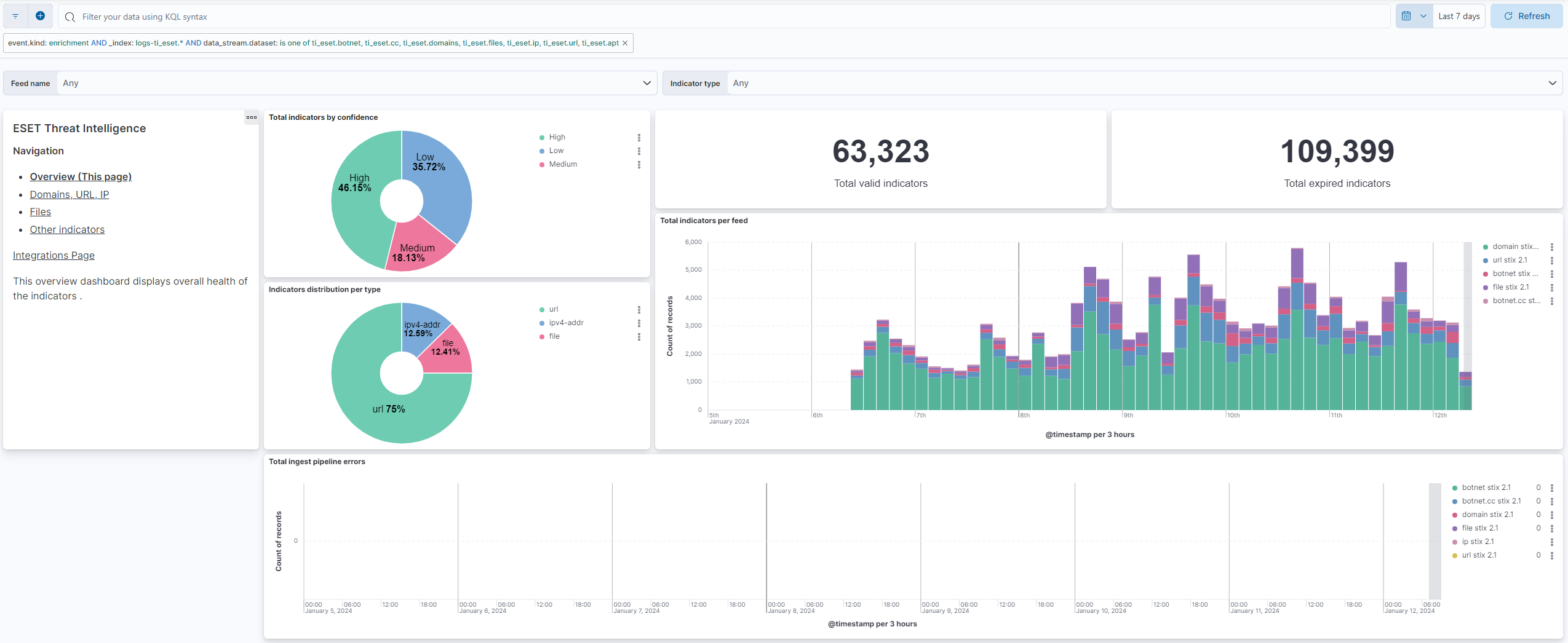
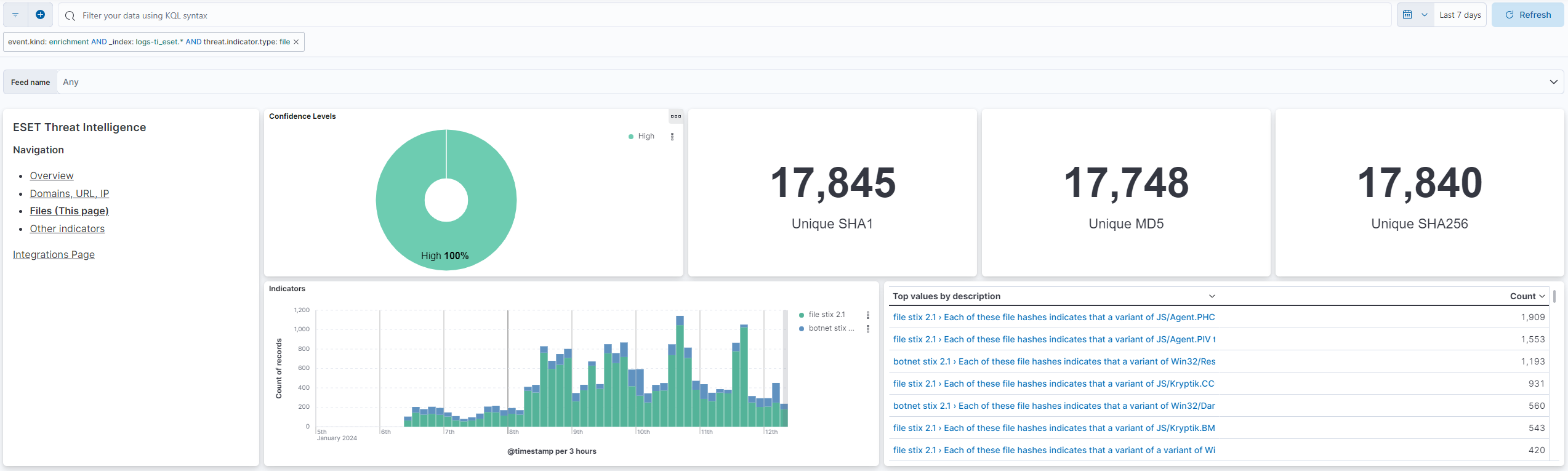
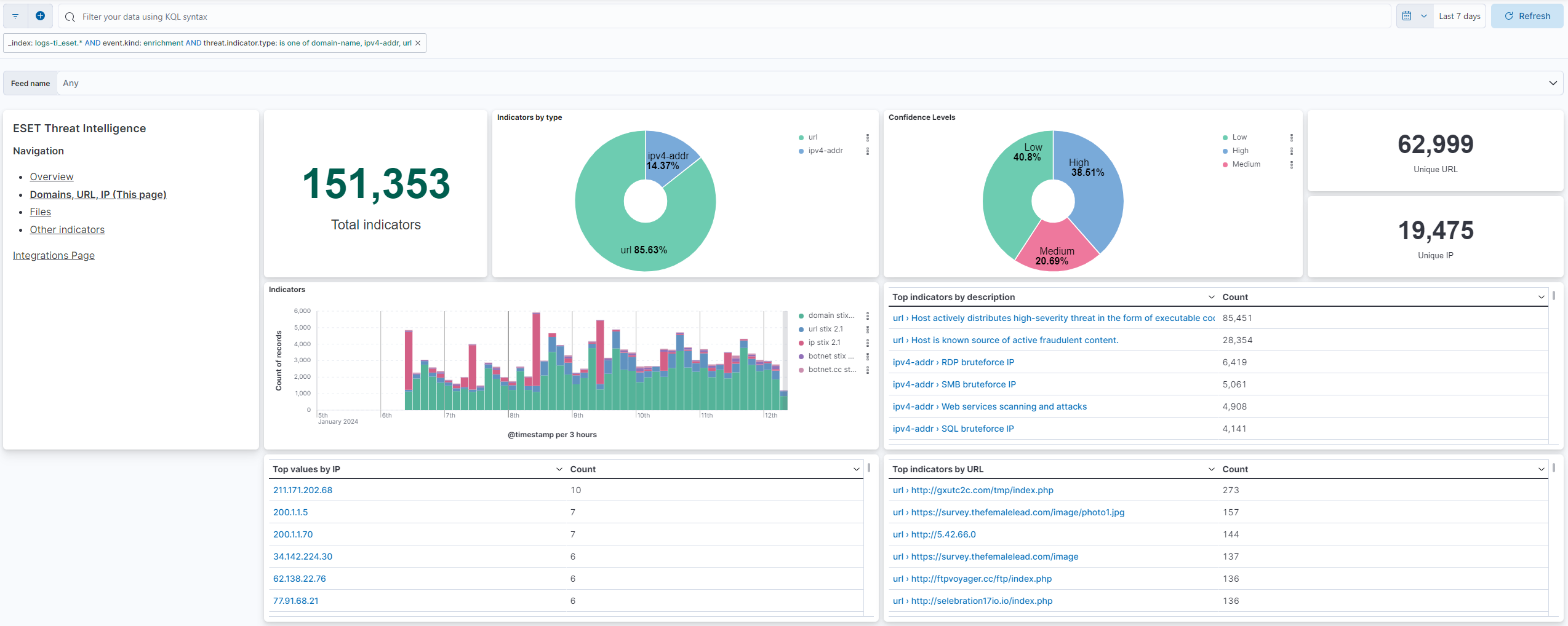
This integration includes one or more Kibana dashboards that visualizes the data collected by the integration. The screenshots below illustrate how the ingested data is displayed.
Changelog
| Version | Details | Minimum Kibana version |
|---|---|---|
| 1.18.0 | Enhancement (View pull request) Document the retention applied to source data streams on stateful and Serverless deployments, and how to change it. |
9.1.4 8.19.4 |
| 1.17.0 | Enhancement (View pull request) Add eset.valid_from to the botnet, cc, domains, files, ip and url data streams.Enhancement (View pull request) Use one CEL input template for all CEL data streams. The emailattachments template differed only in a trailing newline. |
9.1.4 8.19.4 |
| 1.16.0 | Enhancement (View pull request) Add androidthreats, ransomware and cryptoscam data streams |
9.1.4 8.19.4 |
| 1.15.0 | Enhancement (View pull request) Add androidinfostealer and emailattachments data streams |
9.1.4 8.19.4 |
| 1.14.1 | Bug fix (View pull request) Fix issue with consuming whitespaces in IoC pattern for Domains data stream. |
9.1.4 8.19.4 |
| 1.14.0 | Enhancement (View pull request) Remove redundant ECS field definitions and the catch-all dynamic template from the transforms, relying on the ecs@mappings component template. |
9.1.4 8.19.4 |
| 1.13.0 | Enhancement (View pull request) Enable request trace log removal. |
9.1.4 9.0.7 8.19.4 |
| 1.12.0 | Enhancement (View pull request) Add tags to ingest pipeline processors and add preserve_original_event to pipeline-level on_failure handlers.Bug fix (View pull request) Append to error.message in the pipeline-level on_failure handlers instead of overwriting, so multiple failures are retained. error.message is now an array on failed documents. These pipelines record no processor-level errors, so no message is lost today. |
9.1.4 9.0.7 8.19.4 |
| 1.11.2 | Enhancement (View pull request) Set agentless deployment mode release field to ga. |
9.1.4 9.0.7 8.19.4 |
| 1.11.1 | Bug fix (View pull request) Fix transform destination to use keyword for data_stream.namespace, allowing multi-namespace deployments. |
9.1.4 9.0.7 8.19.4 |
| 1.11.0 | Enhancement (View pull request) Enable Agentless deployment. |
9.1.4 9.0.7 8.19.4 |
| 1.10.0 | Enhancement (View pull request) Use num_failure_retries instead of unattended mode for transform failure recovery. |
9.1.4 9.0.7 8.19.4 |
| 1.9.0 | Enhancement (View pull request) Allow transforms to run in unattended mode. |
9.1.4 9.0.7 8.19.4 |
| 1.8.0 | Enhancement (View pull request) Prevent updating fleet health status to degraded. |
9.1.4 9.0.7 8.19.4 |
| 1.7.0 | Enhancement (View pull request) Remove duplicated installation instructions from the documentation |
9.0.0 8.13.0 |
| 1.6.0 | Enhancement (View pull request) Update Kibana constraint to support 9.0.0. |
9.0.0 8.13.0 |
| 1.5.1 | Bug fix (View pull request) Updated SSL description to be uniform and to include links to documentation. |
8.13.0 |
| 1.5.0 | Enhancement (View pull request) Add "preserve_original_event" tag to documents with event.kind manually set to "pipeline_error". |
8.13.0 |
| 1.4.0 | Enhancement (View pull request) Do not remove event.original in main ingest pipeline. |
8.13.0 |
| 1.3.0 | Enhancement (View pull request) Add "preserve_original_event" tag to documents with event.kind set to "pipeline_error". |
8.13.0 |
| 1.2.5 | Bug fix (View pull request) Use triple-brace Mustache templating when referencing variables in ingest pipelines. |
8.13.0 |
| 1.2.4 | Bug fix (View pull request) Fix labels.is_ioc_transform_source values |
8.13.0 |
| 1.2.3 | Bug fix (View pull request) Add missing fields in transform |
8.13.0 |
| 1.2.2 | Bug fix (View pull request) Fix ECS date mapping on threat fields. |
8.13.0 |
| 1.2.1 | Bug fix (View pull request) Remove reference to a Kibana version from the README. |
8.13.0 |
| 1.2.0 | Enhancement (View pull request) Update the kibana constraint to ^8.13.0. Modified the field definitions to remove ECS fields made redundant by the ecs@mappings component template. |
8.13.0 |
| 1.1.1 | Bug fix (View pull request) Adjust field mappings for transform destination index. |
8.12.0 |
| 1.1.0 | Enhancement (View pull request) Improve handling of empty responses. |
8.12.0 |
| 1.0.0 | Enhancement (View pull request) Release package as GA. |
8.12.0 |
| 0.1.0 | Enhancement (View pull request) ESET Threat Intelligence package |
8.12.0 |