Qualys Global AssetView (GAV)
| Version | 0.11.0
|
| Managed integration release status | GA |
| Subscription level What's this? |
Basic |
| Developed by What's this? |
Elastic |
| Ingestion method(s) | API |
| Minimum Kibana version(s) | 9.2.5 8.19.11 |
You can use this integration as an Elastic Managed integration on Elastic Cloud Hosted deployments running this version or later.
To use pre-release integrations, go to the Integrations page in Kibana, scroll down, and toggle on the Display beta integrations option.
Qualys GAV helps you to accurately assess complex IT infrastructure and quickly identify and remediate risk. Using a combination of Qualys sensors — Cloud Agents, scanners and passive network sensors — GAV collects and analyzes data about assets across hybrid environments, and delivers up-to-date, comprehensive and continuous information about those assets as well as their security and compliance posture.
The Qualys GAV integration collect assets via REST API.
The Qualys GAV integration collects logs of the following type:
- Asset: This data stream will collect details of all assets.
For the Asset Dashboard, ensure that the time range is aligned with the configured interval parameter to display accurate and consistent data.
Agentless integrations allow you to collect data without having to manage Elastic Agent in your cloud. They make manual agent deployment unnecessary, so you can focus on your data instead of the agent that collects it. For more information, refer to Agentless integrations and the Agentless integrations FAQ.
Agentless deployments are only supported in Elastic Serverless and Elastic Cloud environments. This functionality is in beta and is subject to change. Beta features are not subject to the support SLA of official GA features.
Elastic Agent must be installed. For more details, check the Elastic Agent installation instructions. You can install only one Elastic Agent per host.
For Rest API, this module has been tested against the 2.0 API version.
- The base URL corresponds to the API Gateway URL of the respective Qualys GAV instance. For reference, see: Qualys Platform Identification.
- The same username and password used for logging into the Qualys instance are required for authentication when fetching logs through the integration.
- In Kibana navigate to Management > Integrations.
- In the search top bar, type Qualys GAV.
- Select the Qualys GAV integration and add it.
- Add all the required integration configuration parameters: URL, Username and Password.
- Save the integration.
When the integration is installed, a transform maintains the latest asset inventory per host in a lookup index (logs-qualys_gav_latest.asset). You can enrich other Qualys or security data with GAV asset metadata at query time using ES|QL LOOKUP JOIN on host.id.
Example enriching Qualys VMDR vulnerability data with GAV asset inventory:
FROM security_solution-qualys_vmdr.vulnerability_latest
| LOOKUP JOIN logs-qualys_gav_latest.asset ON host.id
Elasticsearch 9.1+ is required for LOOKUP JOIN against a lookup index. On releases before 9.1, LOOKUP JOIN must target the concrete transform destination index instead: in Kibana go to Stack Management → Transforms, open the Qualys GAV latest asset transform, and use the destination_index name shown there (that name can change with the integration version).
The data streams below collect a full snapshot of Qualys Global AssetView assets on every polling interval, so their backing indices hold one copy of each record per interval. The latest_asset transform maintains the current view of each asset.
The package bounds the growth of these source data streams with a retention that depends on the deployment type:
| Data stream | Self-managed and Elastic Cloud Hosted (ILM policy) | Serverless (data stream lifecycle) |
|---|---|---|
logs-qualys_gav.asset-* |
logs-qualys_gav.asset-default_policy: roll over after 30d, delete 30d after rollover |
delete 30d after rollover |
On self-managed and Elastic Cloud Hosted deployments the ILM policy applies. The data stream lifecycle shipped with the package is not used there. ILM counts the delete age from the rollover of a backing index, so a document can remain for up to the rollover age plus the delete age. On Serverless, ILM is not available and the data stream lifecycle applies instead. It also works per backing index: Elasticsearch rolls the write index over automatically on age, size, or document count, and deletes a backing index once the retention has passed since it rolled over. A document therefore stays for the retention plus up to one rollover interval. The rollover age is derived from the retention and is an implementation detail that Elasticsearch may change. Where the package installs a transform, the transform's destination indices are not affected by either.
To keep data for a different period:
- Self-managed and Elastic Cloud Hosted: edit the ILM policy in Kibana under Stack Management → Index Lifecycle Policies, or with
PUT _ilm/policy/<policy name>. A package upgrade reinstalls the package's ILM policies, so check your change after upgrading. - Serverless: set the retention on the data stream, for example
PUT _data_stream/logs-qualys_gav.asset-default/_lifecyclewith the body{"data_retention": "90d"}. Replacedefaultwith your namespace.
This is the Asset dataset.
Example
{
"@timestamp": "2026-08-21T07:10:00.039Z",
"agent": {
"ephemeral_id": "10f30ed9-46bc-4e50-8d51-79ee98c6743f",
"id": "9c0c80f1-a0c5-48e8-8827-7fafee0f1efe",
"name": "elastic-agent-94166",
"type": "filebeat",
"version": "8.19.11"
},
"cloud": {
"account": {
"id": "1234"
},
"availability_zone": "us-west-2a",
"instance": {
"id": "instanceId_value",
"name": "hostname_value"
},
"machine": {
"type": "m4.large"
},
"provider": "aws",
"region": "us-west-2",
"service": {
"name": "ec2"
}
},
"data_stream": {
"dataset": "qualys_gav.asset",
"namespace": "83288",
"type": "logs"
},
"device": {
"manufacturer": "Mock manufacturer",
"model": {
"name": "Mock model"
}
},
"ecs": {
"version": "8.17.0"
},
"elastic_agent": {
"id": "9c0c80f1-a0c5-48e8-8827-7fafee0f1efe",
"snapshot": false,
"version": "8.19.11"
},
"event": {
"agent_id_status": "verified",
"category": [
"host"
],
"created": "2025-07-09T14:21:12.000Z",
"dataset": "qualys_gav.asset",
"ingested": "2026-08-21T07:10:02Z",
"kind": "event",
"original": "{\"activity\":{\"lastScannedDate\":1752243670000,\"source\":\"EASM\"},\"address\":\"216.160.83.56\",\"agent\":{\"activations\":[{\"key\":\"httpd\",\"status\":\"ACTIVE\"}],\"configurationProfile\":\"Apache HTTP Server\",\"connectedFrom\":\"216.160.83.56\",\"errorStatus\":false,\"lastActivity\":1752520814000,\"lastCheckedIn\":1752520814000,\"lastInventory\":1752520816000,\"udcManifestAssigned\":false,\"version\":\"2.4.7\"},\"agentId\":\"bda51f1d-13cf-49ad-a3a0-9f83debbe5a9\",\"asn\":\"AS53831\",\"assetId\":67533741,\"assetName\":\"test_asset\",\"assetType\":\"HOST\",\"assetUUID\":\"bda51f1d-13cf-49ad-a3a0-9f83debbe5a9\",\"assignedLocation\":{\"city\":\"Pune\",\"country\":\"IN\",\"name\":\"4492 Camino De La Plaza, Pune,IN\",\"state\":\"MH\"},\"biosAssetTag\":\"Test asset tag\",\"biosDescription\":\"Test\",\"biosSerialNumber\":\"Test serial number\",\"businessAppListData\":{\"businessApp\":[{\"businessCriticality\":\"2 - Less Critical\",\"environment\":\"Production\",\"id\":\"BARCODE283904\",\"managedBy\":\"user\",\"name\":\"Quoting App\",\"operationalStatus\":\"Mended\",\"ownedBy\":\"ownerr\",\"status\":\"Installed\",\"supportGroup\":\"SME Operations\",\"supportedBy\":\"sopporter\",\"usedFor\":\"Production\"}]},\"businessInformation\":{\"company\":\"Qualys\",\"department\":\"Engineering\",\"environment\":\"QA\",\"managedBy\":\"Amit\",\"operationalStatus\":\"Blocked\",\"ownedBy\":\"Paul\",\"supportGroup\":\"ABC_01\",\"supportedBy\":\"Nick\"},\"cloudProvider\":{\"alibaba\":null,\"aws\":{\"ec2\":{\"accountId\":\"1234\",\"availabilityZone\":\"us-west-2a\",\"hasAgent\":true,\"hostname\":\"hostname_value\",\"imageId\":\"imageId_value\",\"instanceId\":\"instanceId_value\",\"instanceState\":\"RUNNING\",\"instanceType\":\"m4.large\",\"kernelId\":null,\"launchdate\":1653386892000,\"privateDNS\":\"privateDNS_value\",\"privateIpAddress\":\"10.0.0.1\",\"publicDNS\":null,\"publicIpAddress\":\"175.16.199.1\",\"qualysScanner\":false,\"region\":{\"code\":\"us-west-2\",\"name\":\"US West (Oregon)\"},\"spotInstance\":false,\"subnetId\":\"subnetId_value\",\"vpcId\":\"vpcId_value\"},\"tags\":[{\"key\":\"tags_key_1\",\"value\":\"tags_value_1\"},{\"key\":\"tags_key_2\",\"value\":\"tags_value_2\"}]},\"azure\":null,\"gcp\":null,\"ibm\":null,\"oci\":null},\"container\":{\"hasSensor\":\"temp_value\",\"noOfContainers\":5,\"noOfImages\":3,\"product\":\"mock_product\",\"version\":\"mock_version\"},\"cpuCount\":0,\"createdDate\":\"2025-07-09T14:21:12.000Z\",\"criticality\":{\"isDefault\":false,\"lastUpdated\":\"2025-07-09T14:21:11.000Z\",\"score\":3},\"customAttributes\":[{\"connectorName\":\"Qualys\",\"key\":\"Media State4\",\"value\":\"Media disconnected\"}],\"dnsName\":\"test_dns\",\"domain\":[\"domain1\",\"domain2\"],\"domainRole\":\"Member Workstation\",\"easmTags\":[\"cloud\",\"cdn\"],\"hardware\":{\"category\":\"Mock category 1 / Mock category 2\",\"category1\":\"Mock category 1\",\"category2\":\"Mock category 2\",\"fullName\":\"Mock hardware\",\"lifecycle\":{\"eosDate\":\"2025-07-09T14:21:12.000Z\",\"gaDate\":\"2025-07-09T14:21:12.000Z\",\"introDate\":\"2025-07-09T14:21:12.000Z\",\"lifeCycleConfidence\":\"Exact\",\"obsoleteDate\":\"2025-07-09T14:21:12.000Z\",\"stage\":\"Not Applicable\"},\"manufacturer\":\"Mock manufacturer\",\"model\":\"Mock model\",\"productFamily\":\"Mock product family\",\"productName\":\"Mock product name\",\"productUrl\":\"https://mock_product_url.com\",\"taxonomy\":{\"category1\":\"Mock category 1\",\"category2\":\"Mock category 2\",\"id\":\"mock_hardware_taxonomy_id\",\"name\":\"Mock hardware taxonomy name\"}},\"hostId\":1437386,\"hostingCategory1\":\"CDN\",\"hwUUID\":\"422a2b16-4c8b-588a-a20c-c1851ad7e376\",\"inventory\":{\"created\":1752070872000,\"lastUpdated\":1752243670000,\"source\":\"EASM\"},\"inventory_list_data\":{\"inventory\":[{\"created\":\"2024-01-12T03:40:12.000Z\",\"last_updated\":\"2025-11-04T08:08:04.000Z\",\"source\":\"EASM\"}]},\"isContainerHost\":false,\"isp\":\"test, Inc.\",\"lastBoot\":\"2025-07-09T14:21:12.000Z\",\"lastLocation\":{\"city\":\"New York\",\"continent\":\"North America\",\"country\":\"United States\",\"name\":\"United States\",\"postal\":\"94040\",\"state\":\"California\"},\"lastLoggedOnUser\":\"test_user\",\"lastModifiedDate\":\"2025-07-11T14:21:10.000Z\",\"lparId\":\"mock_lpar_id\",\"missingSoftware\":[\"test1\",\"test2\",\"test3\"],\"netbiosName\":\"test_bios\",\"networkInterfaceListData\":{\"networkInterface\":[{\"addressIpV4\":\"81.2.69.142\",\"addressIpV6\":\"::ffff:5102:458e\",\"addresses\":\"mock_Address\",\"dnsAddress\":\"mock_dns_address\",\"gatewayAddress\":\"mock_geteaway_address\",\"hostname\":\"mock_hostname\",\"interfaceName\":\"mock_interface_name\",\"macAddress\":\"00:0c:29:15:6a:72\",\"macVendorIntroDate\":946944000000,\"manufacturer\":\"Mock manufacturer\",\"netmask\":\"mock_net_mask\"}]},\"openPortListData\":{\"openPort\":[{\"authorization\":\"Mock authorization\",\"description\":\"http protocol over TLS/SSL\",\"detectedService\":\"HTTPs\",\"detectionScore\":100,\"discoverySources\":\"EASM\",\"firstFound\":\"2025-07-09T14:21:12.000Z\",\"lastUpdated\":\"2025-07-09T14:21:12.000Z\",\"port\":443,\"protocol\":\"TCP\"}]},\"operatingSystem\":{\"architecture\":\"x86\",\"category\":\"Operating System / Windows\",\"category1\":\"Windows\",\"category2\":\"Windows\",\"cpe\":\"mock_cpe\",\"cpeId\":\"mock_cpe_id\",\"cpeType\":\"Mock cpe type\",\"edition\":\"Enterprise\",\"fullName\":\"Microsoft Windows 10 Enterprise\",\"installDate\":\"2025-07-09T14:21:12.000Z\",\"lifecycle\":{\"detectionScore\":100,\"eolDate\":\"2025-07-09T14:21:12.000Z\",\"eolSupportStage\":\"End-of-life\",\"eosDate\":\"2025-07-09T14:21:12.000Z\",\"eosSupportStage\":\"End-of-life\",\"gaDate\":\"2025-07-09T14:21:12.000Z\",\"lifeCycleConfidence\":\"Exact\",\"stage\":\"End-of-life\"},\"marketVersion\":\"10.0.19042.1052\",\"osName\":\"Windows 10\",\"productFamily\":\"Mock product family\",\"productName\":\"Microsoft Windows 10 Enterprise\",\"productUrl\":\"https://mock_product_url.com\",\"publisher\":\"test\",\"release\":\"Mock release\",\"taxonomy\":{\"category1\":\"Mock category1\",\"category2\":\"Mock category2\",\"id\":\"mock_taxonomy_id\",\"name\":\"Mock taxonomy name\"},\"update\":\"22.04 LTS 22.04.5 LTS\",\"version\":\"10.0.19042.1052\"},\"organizationName\":[\"mock\"],\"processor\":{\"coresPerSocket\":2,\"description\":\"Intel(R) Xeon(R) Gold 6430\",\"multithreadingStatus\":\"test\",\"noOfSocket\":2,\"numCPUs\":4,\"speed\":3200,\"threadsPerCore\":2},\"provider\":\"AWS\",\"riskScore\":0,\"sensor\":{\"activatedForModules\":[\"mock_activated_module\"],\"firstEasmScanDate\":1752243670000,\"lastComplianceScan\":0,\"lastEasmScanDate\":1752243670000,\"lastFullScan\":0,\"lastPcScanDateAgent\":0,\"lastPcScanDateScanner\":0,\"lastVMScan\":0,\"lastVmScanDateAgent\":0,\"lastVmScanDateScanner\":0,\"pendingActivationForModules\":[\"mock_pending_module\"]},\"sensorLastUpdatedDate\":\"2025-07-11T14:21:10.000Z\",\"serviceList\":{\"service\":[{\"description\":\"temp_Decp\",\"name\":\"systemd-networkd.service\",\"status\":\"loaded/active/running\"}]},\"softwareComponent\":\"Apache HTTP Server\",\"softwareListData\":{\"software\":[{\"architecture\":\"x86_64\",\"authorization\":\"Mock authorization\",\"authorizationDetectionScore\":5,\"category\":\"Network Application / Web Servers\",\"category1\":\"Network Application\",\"category2\":\"Web Servers\",\"component\":\"Server\",\"cpe\":\"mock_cpe\",\"cpeId\":\"mock_cpe_id\",\"cpeType\":\"Mock cpe type\",\"discoveredName\":\"Mock discovered name\",\"discoveredPublisher\":\"Mock discovered publisher\",\"discoveredVersion\":\"mock_version\",\"discoverySources\":\"EASM\",\"edition\":\"Unknown\",\"formerlyKnownAs\":\"httpd\",\"fullName\":\"Apache HTTP Server\",\"id\":8464359598295418000,\"ignoredReason\":\"Insufficient Information\",\"installDate\":\"2021-10-25T14:21:12.000Z\",\"installPath\":\"/usr/local/apache2\",\"isIgnored\":false,\"isPackage\":false,\"isPackageComponent\":false,\"language\":\"C\",\"lastUpdated\":\"2021-10-25T14:21:12.000Z\",\"lastUseDate\":\"2021-10-25T14:21:12.000Z\",\"license\":{\"category\":\"Mock license category\",\"subcategory\":\"Mock license subcategory\"},\"lifecycle\":{\"detectionScore\":0,\"eolDate\":\"2021-10-25T14:21:12.000Z\",\"eolSupportStage\":\"Mock eol support stage\",\"eosDate\":\"2021-10-25T14:21:12.000Z\",\"eosSupportStage\":\"Mock eos support stage\",\"gaDate\":\"2021-10-25T14:21:12.000Z\",\"lifeCycleConfidence\":\"Exact\",\"stage\":\"Not Applicable\"},\"marketVersion\":\"Unknown\",\"packageName\":null,\"productName\":\"Apache HTTP Server\",\"productUrl\":\"https://en.wikipedia.org/wiki/Apache_HTTP_Server,,\",\"publisher\":\"Apache\",\"softwareInstances\":[{\"BIN_PATH\":\"/usr/bin/docker -H unix:///var/run/docker.sock\",\"CONF_PATH\":\"/etc/docker/daemon.json\",\"InstanceName\":\"DOCKER\",\"PROC\":\" 1487 1 root /usr/bin/dockerd -H fd:// --containerd=/run/containerd/containerd.sock\",\"PRODUCT\":\"Docker\",\"TECHNOLOGY\":\"Docker CE_EE\",\"VERSION\":\"24.0.7\",\"firstSeen\":\"2025-07-08T01:15:52.000Z\",\"lastSeen\":\"2025-07-14T19:20:15.000Z\"}],\"softwareType\":\"Application\",\"supportStageDesc\":\"Mock support stage desc\",\"update\":\"2021-10-25\",\"version\":\"2.4.7\"}]},\"subdomain\":[\"subdomain1\",\"subdomain2\"],\"tagList\":{\"tag\":[{\"backgroundColor\":0,\"businessImpact\":\"mock_business_impact\",\"criticalityScore\":3,\"foregroundColor\":0,\"tagId\":25971788,\"tagName\":\"Shodan\"}]},\"timeZone\":\"+05:30\",\"totalMemory\":10,\"userAccountListData\":{\"userAccount\":[{\"name\":\"root\"},{\"name\":\"serviceuser\"},{\"name\":\"devuser\"}]},\"volumeListData\":{\"volume\":[{\"free\":34645118976,\"name\":\"/\",\"size\":48202350592}]},\"whois\":[{\"createdDate\":\"2024-02-23T00:00:00.000Z\",\"dnssec\":\"test\",\"domain\":\"test_domainr\",\"domainStatus\":\"clientDeleteProhibited clientRenewProhibited clientTransferProhibited clientUpdateProhibited\",\"expirationDate\":\"2026-02-23T00:00:00.000Z\",\"registrantContact\":\"temp\",\"registrantCountry\":\"UNITED STATES\",\"registrantEmail\":\"594f93785ec9444aa7ebabd79b665059@domainsbyproxy.com\",\"registrantName\":\"1API GmbH\",\"registrantOrganization\":\"Domains By Proxy, LLC\",\"registrar\":\"1API GmbH\",\"updatedDate\":\"2025-07-13T00:00:00.000Z\"}]}",
"risk_score": 0,
"timezone": "+05:30",
"type": [
"info"
]
},
"host": {
"architecture": "x86",
"domain": [
"domain1",
"domain2"
],
"geo": {
"city_name": "New York",
"continent_name": "North America",
"country_name": "United States",
"postal_code": "94040"
},
"hostname": "test_dns",
"id": "67533741",
"ip": [
"216.160.83.56"
],
"name": "test_asset",
"os": {
"family": "Mock product family",
"full": "Microsoft Windows 10 Enterprise",
"name": "Windows 10",
"platform": "Microsoft Windows 10 Enterprise",
"type": "windows",
"version": "10.0.19042.1052"
},
"type": "HOST"
},
"input": {
"type": "cel"
},
"observer": {
"product": "Global AssetView",
"vendor": "Qualys"
},
"package": {
"architecture": [
"x86_64"
],
"description": [
"Mock support stage desc"
],
"installed": [
"2021-10-25T14:21:12.000Z"
],
"license": [
"Mock license category"
],
"name": [
"Apache HTTP Server"
],
"path": [
"/usr/local/apache2"
],
"reference": [
"https://en.wikipedia.org/wiki/Apache_HTTP_Server,,"
],
"type": [
"Application"
],
"version": [
"2.4.7"
]
},
"qualys_gav": {
"asset": {
"activity": {
"last_scanned_date": "2025-07-11T14:21:10.000Z",
"source": "EASM"
},
"address": "216.160.83.56",
"agent": {
"activations": [
{
"key": "httpd",
"status": "ACTIVE"
}
],
"configuration_profile": "Apache HTTP Server",
"connected_from": "216.160.83.56",
"error_status": false,
"last_activity": "2025-07-14T19:20:14.000Z",
"last_checked_in": "2025-07-14T19:20:14.000Z",
"last_inventory": "2025-07-14T19:20:16.000Z",
"udc_manifest_assigned": false,
"version": "2.4.7"
},
"agent_id": "bda51f1d-13cf-49ad-a3a0-9f83debbe5a9",
"asn": "AS53831",
"asset_id": "67533741",
"asset_name": "test_asset",
"asset_type": "HOST",
"asset_uuid": "bda51f1d-13cf-49ad-a3a0-9f83debbe5a9",
"assigned_location": {
"city": "Pune",
"country": "IN",
"name": "4492 Camino De La Plaza, Pune,IN",
"state": "MH"
},
"bios_asset_tag": "Test asset tag",
"bios_description": "Test",
"bios_serial_number": "Test serial number",
"business_app_list_data": {
"business_app": [
{
"business_criticality": "2 - Less Critical",
"environment": "Production",
"id": "BARCODE283904",
"managed_by": "user",
"name": "Quoting App",
"operational_status": "Mended",
"owned_by": "ownerr",
"status": "Installed",
"support_group": "SME Operations",
"supported_by": "sopporter",
"used_for": "Production"
}
]
},
"business_information": {
"company": "Qualys",
"department": "Engineering",
"environment": "QA",
"managed_by": "Amit",
"operational_status": "Blocked",
"owned_by": "Paul",
"support_group": "ABC_01",
"supported_by": "Nick"
},
"cloud_provider": {
"aws": {
"ec2": {
"account_id": "1234",
"availability_zone": "us-west-2a",
"has_agent": true,
"hostname": "hostname_value",
"image_id": "imageId_value",
"instance_id": "instanceId_value",
"instance_state": "RUNNING",
"instance_type": "m4.large",
"launchdate": "2022-05-24T10:08:12.000Z",
"private_dns": "privateDNS_value",
"private_ip_address": "10.0.0.1",
"public_ip_address": "175.16.199.1",
"qualys_scanner": false,
"region": {
"code": "us-west-2",
"name": "US West (Oregon)"
},
"spot_instance": false,
"subnet_id": "subnetId_value",
"vpc_id": "vpcId_value"
},
"tags": [
{
"key": "tags_key_1",
"value": "tags_value_1"
},
{
"key": "tags_key_2",
"value": "tags_value_2"
}
]
}
},
"container": {
"has_sensor": "temp_value",
"no_of_containers": 5,
"no_of_images": 3,
"product": "mock_product",
"version": "mock_version"
},
"cpu_count": 0,
"created_date": "2025-07-09T14:21:12.000Z",
"criticality": {
"is_default": false,
"last_updated": "2025-07-09T14:21:11.000Z",
"score": 3
},
"custom_attributes": [
{
"connector_name": "Qualys",
"key": "Media State4",
"value": "Media disconnected"
}
],
"dns_name": "test_dns",
"domain": [
"domain1",
"domain2"
],
"domain_role": "Member Workstation",
"easm_tags": [
"cloud",
"cdn"
],
"hardware": {
"category": "Mock category 1 / Mock category 2",
"category1": "Mock category 1",
"category2": "Mock category 2",
"full_name": "Mock hardware",
"lifecycle": {
"eos_date": "2025-07-09T14:21:12.000Z",
"ga_date": "2025-07-09T14:21:12.000Z",
"intro_date": "2025-07-09T14:21:12.000Z",
"life_cycle_confidence": "Exact",
"obsolete_date": "2025-07-09T14:21:12.000Z",
"stage": "Not Applicable"
},
"manufacturer": "Mock manufacturer",
"model": "Mock model",
"product_family": "Mock product family",
"product_name": "Mock product name",
"product_url": "https://mock_product_url.com",
"taxonomy": {
"category1": "Mock category 1",
"category2": "Mock category 2",
"id": "mock_hardware_taxonomy_id",
"name": "Mock hardware taxonomy name"
}
},
"host_id": "1437386",
"hosting_category1": "CDN",
"hw_uuid": "422a2b16-4c8b-588a-a20c-c1851ad7e376",
"interval_id": "bce5da85-83e4-4aa7-8a13-61045e587625",
"interval_start": "2026-08-21T07:10:00.030Z",
"inventory": {
"created": "2025-07-09T14:21:12.000Z",
"last_updated": "2025-07-11T14:21:10.000Z",
"source": "EASM"
},
"inventory_list_data": {
"inventory": [
{
"created": "2024-01-12T03:40:12.000Z",
"last_updated": "2025-11-04T08:08:04.000Z",
"source": "EASM"
}
]
},
"is_container_host": false,
"isp": "test, Inc.",
"last_boot": "2025-07-09T14:21:12.000Z",
"last_location": {
"city": "New York",
"continent": "North America",
"country": "United States",
"name": "United States",
"postal": "94040",
"state": "California"
},
"last_logged_on_user": "test_user",
"last_modified_date": "2025-07-11T14:21:10.000Z",
"lpar_id": "mock_lpar_id",
"missing_software": [
"test1",
"test2",
"test3"
],
"netbios_name": "test_bios",
"network_interface_list_data": {
"network_interface": [
{
"address_ip_v4": [
"81.2.69.142"
],
"address_ip_v6": [
"::ffff:5102:458e"
],
"addresses": "mock_Address",
"dns_address": "mock_dns_address",
"gateway_address": "mock_geteaway_address",
"hostname": "mock_hostname",
"interface_name": "mock_interface_name",
"mac_address": "00-0C-29-15-6A-72",
"mac_vendor_intro_date": "2000-01-04T00:00:00.000Z",
"manufacturer": "Mock manufacturer",
"netmask": "mock_net_mask"
}
]
},
"open_port_list_data": {
"open_port": [
{
"authorization": "Mock authorization",
"description": "http protocol over TLS/SSL",
"detected_service": "HTTPs",
"detection_score": 100,
"discovery_sources": "EASM",
"first_found": "2025-07-09T14:21:12.000Z",
"last_updated": "2025-07-09T14:21:12.000Z",
"port": 443,
"protocol": "TCP"
}
]
},
"operating_system": {
"architecture": "x86",
"category": "Operating System / Windows",
"category1": "Windows",
"category2": "Windows",
"cpe": "mock_cpe",
"cpe_id": "mock_cpe_id",
"cpe_type": "Mock cpe type",
"edition": "Enterprise",
"full_name": "Microsoft Windows 10 Enterprise",
"install_date": "2025-07-09T14:21:12.000Z",
"lifecycle": {
"detection_score": 100,
"eol_date": "2025-07-09T14:21:12.000Z",
"eol_support_stage": "End-of-life",
"eos_date": "2025-07-09T14:21:12.000Z",
"eos_support_stage": "End-of-life",
"ga_date": "2025-07-09T14:21:12.000Z",
"life_cycle_confidence": "Exact",
"stage": "End-of-life"
},
"market_version": "10.0.19042.1052",
"os_name": "Windows 10",
"product_family": "Mock product family",
"product_name": "Microsoft Windows 10 Enterprise",
"product_url": "https://mock_product_url.com",
"publisher": "test",
"release": "Mock release",
"taxonomy": {
"category1": "Mock category1",
"category2": "Mock category2",
"id": "mock_taxonomy_id",
"name": "Mock taxonomy name"
},
"update": "22.04 LTS 22.04.5 LTS",
"version": "10.0.19042.1052"
},
"organization_name": [
"mock"
],
"processor": {
"cores_per_socket": 2,
"description": "Intel(R) Xeon(R) Gold 6430",
"multithreading_status": "test",
"no_of_socket": 2,
"num_cpus": 4,
"speed": 3200,
"threads_per_core": 2
},
"provider": "AWS",
"risk_score": 0,
"sensor": {
"activated_for_modules": [
"mock_activated_module"
],
"first_easm_scan_date": "2025-07-11T14:21:10.000Z",
"last_easm_scan_date": "2025-07-11T14:21:10.000Z",
"pending_activation_for_modules": [
"mock_pending_module"
]
},
"sensor_last_updated_date": "2025-07-11T14:21:10.000Z",
"service_list": {
"service": [
{
"description": "temp_Decp",
"name": "systemd-networkd.service",
"status": "loaded/active/running"
}
]
},
"software_component": "Apache HTTP Server",
"software_list_data": {
"software": [
{
"architecture": "x86_64",
"authorization": "Mock authorization",
"authorization_detection_score": 5,
"category": "Network Application / Web Servers",
"category1": "Network Application",
"category2": "Web Servers",
"component": "Server",
"cpe": "mock_cpe",
"cpe_id": "mock_cpe_id",
"cpe_type": "Mock cpe type",
"discovered_name": "Mock discovered name",
"discovered_publisher": "Mock discovered publisher",
"discovered_version": "mock_version",
"discovery_sources": "EASM",
"edition": "Unknown",
"formerly_known_as": "httpd",
"full_name": "Apache HTTP Server",
"id": "8464359598295418000",
"ignored_reason": "Insufficient Information",
"install_date": "2021-10-25T14:21:12.000Z",
"install_path": "/usr/local/apache2",
"is_ignored": false,
"is_package": false,
"is_package_component": false,
"language": "C",
"last_updated": "2021-10-25T14:21:12.000Z",
"last_use_date": "2021-10-25T14:21:12.000Z",
"license": {
"category": "Mock license category",
"subcategory": "Mock license subcategory"
},
"lifecycle": {
"detection_score": 0,
"eol_date": "2021-10-25T14:21:12.000Z",
"eol_support_stage": "Mock eol support stage",
"eos_date": "2021-10-25T14:21:12.000Z",
"eos_support_stage": "Mock eos support stage",
"ga_date": "2021-10-25T14:21:12.000Z",
"life_cycle_confidence": "Exact",
"stage": "Not Applicable"
},
"market_version": "Unknown",
"product_name": "Apache HTTP Server",
"product_url": "https://en.wikipedia.org/wiki/Apache_HTTP_Server,,",
"publisher": "Apache",
"software_instances": [
{
"bin_path": "/usr/bin/docker -H unix:///var/run/docker.sock",
"conf_path": "/etc/docker/daemon.json",
"first_seen": "2025-07-08T01:15:52.000Z",
"instance_name": "DOCKER",
"last_seen": "2025-07-14T19:20:15.000Z",
"proc": " 1487 1 root /usr/bin/dockerd -H fd:// --containerd=/run/containerd/containerd.sock",
"product": "Docker",
"technology": "Docker CE_EE",
"version": "24.0.7"
}
],
"software_type": "Application",
"support_stage_desc": "Mock support stage desc",
"update": "2021-10-25",
"version": "2.4.7"
}
]
},
"subdomain": [
"subdomain1",
"subdomain2"
],
"tag_list": {
"tag": [
{
"background_color": "0",
"business_impact": "mock_business_impact",
"criticality_score": 3,
"foreground_color": "0",
"tag_id": "25971788",
"tag_name": "Shodan"
}
]
},
"time_zone": "+05:30",
"total_memory": 10,
"user_account_list_data": {
"user_account": [
{
"name": "root"
},
{
"name": "serviceuser"
},
{
"name": "devuser"
}
]
},
"volume_list_data": {
"volume": [
{
"free": 34645118976,
"name": "/",
"size": 48202350592
}
]
},
"whois": [
{
"created_date": "2024-02-23T00:00:00.000Z",
"dnssec": "test",
"domain": "test_domainr",
"domain_status": "clientDeleteProhibited clientRenewProhibited clientTransferProhibited clientUpdateProhibited",
"expiration_date": "2026-02-23T00:00:00.000Z",
"registrant_contact": "REDACTED",
"registrant_country": "UNITED STATES",
"registrant_email": "594f93785ec9444aa7ebabd79b665059@domainsbyproxy.com",
"registrant_name": "1API GmbH",
"registrant_organization": "Domains By Proxy, LLC",
"registrar": "1API GmbH",
"updated_date": "2025-07-13T00:00:00.000Z"
}
]
}
},
"related": {
"hosts": [
"67533741",
"test_asset",
"bda51f1d-13cf-49ad-a3a0-9f83debbe5a9",
"test_dns",
"domain1",
"domain2",
"subdomain1",
"subdomain2",
"1437386",
"test_bios",
"mock_hostname",
"test_domainr"
],
"ip": [
"216.160.83.56",
"81.2.69.142",
"::ffff:5102:458e"
],
"user": [
"test_user"
]
},
"tags": [
"preserve_original_event",
"preserve_duplicate_custom_fields",
"hide_sensitive",
"forwarded",
"qualys_gav-asset",
"provider_cloud_data"
],
"user": {
"name": "test_user"
}
}
Exported fields
| Field | Description | Type |
|---|---|---|
| @timestamp | Date/time when the event originated. This is the date/time extracted from the event, typically representing when the event was generated by the source. If the event source has no original timestamp, this value is typically populated by the first time the event was received by the pipeline. Required field for all events. | date |
| data_stream.dataset | The field can contain anything that makes sense to signify the source of the data. Examples include nginx.access, prometheus, endpoint etc. For data streams that otherwise fit, but that do not have dataset set we use the value "generic" for the dataset value. event.dataset should have the same value as data_stream.dataset. Beyond the Elasticsearch data stream naming criteria noted above, the dataset value has additional restrictions: * Must not contain - * No longer than 100 characters |
constant_keyword |
| data_stream.namespace | A user defined namespace. Namespaces are useful to allow grouping of data. Many users already organize their indices this way, and the data stream naming scheme now provides this best practice as a default. Many users will populate this field with default. If no value is used, it falls back to default. Beyond the Elasticsearch index naming criteria noted above, namespace value has the additional restrictions: * Must not contain - * No longer than 100 characters |
constant_keyword |
| data_stream.type | An overarching type for the data stream. Currently allowed values are "logs" and "metrics". We expect to also add "traces" and "synthetics" in the near future. | constant_keyword |
| event.dataset | Name of the dataset. If an event source publishes more than one type of log or events (e.g. access log, error log), the dataset is used to specify which one the event comes from. It's recommended but not required to start the dataset name with the module name, followed by a dot, then the dataset name. | constant_keyword |
| event.module | Name of the module this data is coming from. If your monitoring agent supports the concept of modules or plugins to process events of a given source (e.g. Apache logs), event.module should contain the name of this module. |
constant_keyword |
| input.type | Type of Filebeat input. | keyword |
| labels.is_transform_source | Distinguishes between documents that are a source for a transform and documents that are an output of a transform, to facilitate easier filtering. | constant_keyword |
| log.offset | Log offset. | long |
| qualys_gav.asset.activity.last_scanned_date | date | |
| qualys_gav.asset.activity.source | keyword | |
| qualys_gav.asset.address | ip | |
| qualys_gav.asset.agent.activations.key | keyword | |
| qualys_gav.asset.agent.activations.status | keyword | |
| qualys_gav.asset.agent.configuration_profile | keyword | |
| qualys_gav.asset.agent.connected_from | ip | |
| qualys_gav.asset.agent.error_status | boolean | |
| qualys_gav.asset.agent.last_activity | date | |
| qualys_gav.asset.agent.last_checked_in | date | |
| qualys_gav.asset.agent.last_inventory | date | |
| qualys_gav.asset.agent.udc_manifest_assigned | boolean | |
| qualys_gav.asset.agent.version | keyword | |
| qualys_gav.asset.agent_id | keyword | |
| qualys_gav.asset.asn | keyword | |
| qualys_gav.asset.asset_id | keyword | |
| qualys_gav.asset.asset_name | keyword | |
| qualys_gav.asset.asset_type | keyword | |
| qualys_gav.asset.asset_uuid | keyword | |
| qualys_gav.asset.assigned_location.city | keyword | |
| qualys_gav.asset.assigned_location.country | keyword | |
| qualys_gav.asset.assigned_location.name | keyword | |
| qualys_gav.asset.assigned_location.state | keyword | |
| qualys_gav.asset.bios_asset_tag | keyword | |
| qualys_gav.asset.bios_description | keyword | |
| qualys_gav.asset.bios_serial_number | keyword | |
| qualys_gav.asset.business_app_list_data.business_app.business_criticality | keyword | |
| qualys_gav.asset.business_app_list_data.business_app.environment | keyword | |
| qualys_gav.asset.business_app_list_data.business_app.id | keyword | |
| qualys_gav.asset.business_app_list_data.business_app.managed_by | keyword | |
| qualys_gav.asset.business_app_list_data.business_app.name | keyword | |
| qualys_gav.asset.business_app_list_data.business_app.operational_status | keyword | |
| qualys_gav.asset.business_app_list_data.business_app.owned_by | keyword | |
| qualys_gav.asset.business_app_list_data.business_app.status | keyword | |
| qualys_gav.asset.business_app_list_data.business_app.support_group | keyword | |
| qualys_gav.asset.business_app_list_data.business_app.supported_by | keyword | |
| qualys_gav.asset.business_app_list_data.business_app.used_for | keyword | |
| qualys_gav.asset.business_information.company | keyword | |
| qualys_gav.asset.business_information.department | keyword | |
| qualys_gav.asset.business_information.environment | keyword | |
| qualys_gav.asset.business_information.managed_by | keyword | |
| qualys_gav.asset.business_information.operational_status | keyword | |
| qualys_gav.asset.business_information.owned_by | keyword | |
| qualys_gav.asset.business_information.support_group | keyword | |
| qualys_gav.asset.business_information.supported_by | keyword | |
| qualys_gav.asset.cloud_provider.aws.ec2.account_id | keyword | |
| qualys_gav.asset.cloud_provider.aws.ec2.availability_zone | keyword | |
| qualys_gav.asset.cloud_provider.aws.ec2.has_agent | boolean | |
| qualys_gav.asset.cloud_provider.aws.ec2.hostname | keyword | |
| qualys_gav.asset.cloud_provider.aws.ec2.image_id | keyword | |
| qualys_gav.asset.cloud_provider.aws.ec2.instance_id | keyword | |
| qualys_gav.asset.cloud_provider.aws.ec2.instance_state | keyword | |
| qualys_gav.asset.cloud_provider.aws.ec2.instance_type | keyword | |
| qualys_gav.asset.cloud_provider.aws.ec2.kernel_id | keyword | |
| qualys_gav.asset.cloud_provider.aws.ec2.launchdate | date | |
| qualys_gav.asset.cloud_provider.aws.ec2.private_dns | keyword | |
| qualys_gav.asset.cloud_provider.aws.ec2.private_ip_address | keyword | |
| qualys_gav.asset.cloud_provider.aws.ec2.public_dns | keyword | |
| qualys_gav.asset.cloud_provider.aws.ec2.public_ip_address | keyword | |
| qualys_gav.asset.cloud_provider.aws.ec2.qualys_scanner | boolean | |
| qualys_gav.asset.cloud_provider.aws.ec2.region.code | keyword | |
| qualys_gav.asset.cloud_provider.aws.ec2.region.name | keyword | |
| qualys_gav.asset.cloud_provider.aws.ec2.spot_instance | boolean | |
| qualys_gav.asset.cloud_provider.aws.ec2.subnet_id | keyword | |
| qualys_gav.asset.cloud_provider.aws.ec2.vpc_id | keyword | |
| qualys_gav.asset.cloud_provider.aws.tags.key | keyword | |
| qualys_gav.asset.cloud_provider.aws.tags.value | keyword | |
| qualys_gav.asset.cloud_provider.azure.tags.name | keyword | |
| qualys_gav.asset.cloud_provider.azure.tags.value | keyword | |
| qualys_gav.asset.cloud_provider.azure.vm.image_offer | keyword | |
| qualys_gav.asset.cloud_provider.azure.vm.image_publisher | keyword | |
| qualys_gav.asset.cloud_provider.azure.vm.image_version | keyword | |
| qualys_gav.asset.cloud_provider.azure.vm.location | keyword | |
| qualys_gav.asset.cloud_provider.azure.vm.mac_address | keyword | |
| qualys_gav.asset.cloud_provider.azure.vm.name | keyword | |
| qualys_gav.asset.cloud_provider.azure.vm.platform | keyword | |
| qualys_gav.asset.cloud_provider.azure.vm.private_ip_address | keyword | |
| qualys_gav.asset.cloud_provider.azure.vm.public_ip_address | keyword | |
| qualys_gav.asset.cloud_provider.azure.vm.resource_group_name | keyword | |
| qualys_gav.asset.cloud_provider.azure.vm.size | keyword | |
| qualys_gav.asset.cloud_provider.azure.vm.state | keyword | |
| qualys_gav.asset.cloud_provider.azure.vm.subnet | keyword | |
| qualys_gav.asset.cloud_provider.azure.vm.subscription_id | keyword | |
| qualys_gav.asset.cloud_provider.azure.vm.virtual_network | keyword | |
| qualys_gav.asset.cloud_provider.azure.vm.vm_id | keyword | |
| qualys_gav.asset.cloud_provider.gcp.compute.hostname | keyword | |
| qualys_gav.asset.cloud_provider.gcp.compute.image_id | keyword | |
| qualys_gav.asset.cloud_provider.gcp.compute.instance_id | keyword | |
| qualys_gav.asset.cloud_provider.gcp.compute.mac_address | keyword | |
| qualys_gav.asset.cloud_provider.gcp.compute.machine_type | keyword | |
| qualys_gav.asset.cloud_provider.gcp.compute.network | keyword | |
| qualys_gav.asset.cloud_provider.gcp.compute.private_ip_address | keyword | |
| qualys_gav.asset.cloud_provider.gcp.compute.project_id | keyword | |
| qualys_gav.asset.cloud_provider.gcp.compute.project_number | keyword | |
| qualys_gav.asset.cloud_provider.gcp.compute.public_ip_address | keyword | |
| qualys_gav.asset.cloud_provider.gcp.compute.state | keyword | |
| qualys_gav.asset.cloud_provider.gcp.compute.zone | keyword | |
| qualys_gav.asset.cloud_provider.gcp.tags.key | keyword | |
| qualys_gav.asset.cloud_provider.gcp.tags.value | keyword | |
| qualys_gav.asset.cloud_provider.ibm.tags.name | keyword | |
| qualys_gav.asset.cloud_provider.ibm.tags.value | keyword | |
| qualys_gav.asset.cloud_provider.ibm.virtual_server.datacenter_id | keyword | |
| qualys_gav.asset.cloud_provider.ibm.virtual_server.device_name | keyword | |
| qualys_gav.asset.cloud_provider.ibm.virtual_server.domain | keyword | |
| qualys_gav.asset.cloud_provider.ibm.virtual_server.ibm_id | keyword | |
| qualys_gav.asset.cloud_provider.ibm.virtual_server.location | keyword | |
| qualys_gav.asset.cloud_provider.ibm.virtual_server.private_ip | keyword | |
| qualys_gav.asset.cloud_provider.ibm.virtual_server.private_vlan | keyword | |
| qualys_gav.asset.cloud_provider.ibm.virtual_server.public_ip | keyword | |
| qualys_gav.asset.cloud_provider.ibm.virtual_server.public_vlan | keyword | |
| qualys_gav.asset.cloud_provider.ibm.virtual_server.state | keyword | |
| qualys_gav.asset.container.has_sensor | keyword | |
| qualys_gav.asset.container.no_of_containers | long | |
| qualys_gav.asset.container.no_of_images | long | |
| qualys_gav.asset.container.product | keyword | |
| qualys_gav.asset.container.version | keyword | |
| qualys_gav.asset.cpu_count | long | |
| qualys_gav.asset.created_date | date | |
| qualys_gav.asset.criticality.is_default | boolean | |
| qualys_gav.asset.criticality.last_updated | date | |
| qualys_gav.asset.criticality.score | long | |
| qualys_gav.asset.custom_attributes.connector_name | keyword | |
| qualys_gav.asset.custom_attributes.key | keyword | |
| qualys_gav.asset.custom_attributes.value | keyword | |
| qualys_gav.asset.dns_name | keyword | |
| qualys_gav.asset.domain | keyword | |
| qualys_gav.asset.domain_role | keyword | |
| qualys_gav.asset.easm_tags | keyword | |
| qualys_gav.asset.hardware.category | keyword | |
| qualys_gav.asset.hardware.category1 | keyword | |
| qualys_gav.asset.hardware.category2 | keyword | |
| qualys_gav.asset.hardware.full_name | keyword | |
| qualys_gav.asset.hardware.lifecycle.eos_date | date | |
| qualys_gav.asset.hardware.lifecycle.ga_date | date | |
| qualys_gav.asset.hardware.lifecycle.intro_date | date | |
| qualys_gav.asset.hardware.lifecycle.life_cycle_confidence | keyword | |
| qualys_gav.asset.hardware.lifecycle.obsolete_date | date | |
| qualys_gav.asset.hardware.lifecycle.stage | keyword | |
| qualys_gav.asset.hardware.manufacturer | keyword | |
| qualys_gav.asset.hardware.model | keyword | |
| qualys_gav.asset.hardware.product_family | keyword | |
| qualys_gav.asset.hardware.product_name | keyword | |
| qualys_gav.asset.hardware.product_url | keyword | |
| qualys_gav.asset.hardware.taxonomy.category1 | keyword | |
| qualys_gav.asset.hardware.taxonomy.category2 | keyword | |
| qualys_gav.asset.hardware.taxonomy.id | keyword | |
| qualys_gav.asset.hardware.taxonomy.name | keyword | |
| qualys_gav.asset.host_id | keyword | |
| qualys_gav.asset.hosting_category1 | keyword | |
| qualys_gav.asset.hw_uuid | keyword | |
| qualys_gav.asset.interval_id | The universally unique identifier (UUID) values will change with each interval of ingestion. | keyword |
| qualys_gav.asset.interval_start | The start time of the interval of ingestion. | date |
| qualys_gav.asset.inventory.created | date | |
| qualys_gav.asset.inventory.last_updated | date | |
| qualys_gav.asset.inventory.source | keyword | |
| qualys_gav.asset.inventory_list_data.inventory.created | date | |
| qualys_gav.asset.inventory_list_data.inventory.last_updated | date | |
| qualys_gav.asset.inventory_list_data.inventory.source | keyword | |
| qualys_gav.asset.is_container_host | boolean | |
| qualys_gav.asset.isp | keyword | |
| qualys_gav.asset.last_boot | date | |
| qualys_gav.asset.last_location.city | keyword | |
| qualys_gav.asset.last_location.continent | keyword | |
| qualys_gav.asset.last_location.country | keyword | |
| qualys_gav.asset.last_location.name | keyword | |
| qualys_gav.asset.last_location.postal | keyword | |
| qualys_gav.asset.last_location.state | keyword | |
| qualys_gav.asset.last_logged_on_user | keyword | |
| qualys_gav.asset.last_modified_date | date | |
| qualys_gav.asset.lpar_id | keyword | |
| qualys_gav.asset.missing_software | keyword | |
| qualys_gav.asset.netbios_name | keyword | |
| qualys_gav.asset.network_interface_list_data.network_interface.address_ip_v4 | ip | |
| qualys_gav.asset.network_interface_list_data.network_interface.address_ip_v6 | ip | |
| qualys_gav.asset.network_interface_list_data.network_interface.addresses | keyword | |
| qualys_gav.asset.network_interface_list_data.network_interface.dns_address | keyword | |
| qualys_gav.asset.network_interface_list_data.network_interface.gateway_address | keyword | |
| qualys_gav.asset.network_interface_list_data.network_interface.hostname | keyword | |
| qualys_gav.asset.network_interface_list_data.network_interface.interface_name | keyword | |
| qualys_gav.asset.network_interface_list_data.network_interface.mac_address | keyword | |
| qualys_gav.asset.network_interface_list_data.network_interface.mac_vendor_intro_date | date | |
| qualys_gav.asset.network_interface_list_data.network_interface.manufacturer | keyword | |
| qualys_gav.asset.network_interface_list_data.network_interface.netmask | keyword | |
| qualys_gav.asset.open_port_list_data.open_port.authorization | keyword | |
| qualys_gav.asset.open_port_list_data.open_port.description | keyword | |
| qualys_gav.asset.open_port_list_data.open_port.detected_service | keyword | |
| qualys_gav.asset.open_port_list_data.open_port.detection_score | long | |
| qualys_gav.asset.open_port_list_data.open_port.discovery_sources | keyword | |
| qualys_gav.asset.open_port_list_data.open_port.first_found | date | |
| qualys_gav.asset.open_port_list_data.open_port.last_updated | date | |
| qualys_gav.asset.open_port_list_data.open_port.port | long | |
| qualys_gav.asset.open_port_list_data.open_port.protocol | keyword | |
| qualys_gav.asset.operating_system.architecture | keyword | |
| qualys_gav.asset.operating_system.category | keyword | |
| qualys_gav.asset.operating_system.category1 | keyword | |
| qualys_gav.asset.operating_system.category2 | keyword | |
| qualys_gav.asset.operating_system.cpe | keyword | |
| qualys_gav.asset.operating_system.cpe_id | keyword | |
| qualys_gav.asset.operating_system.cpe_type | keyword | |
| qualys_gav.asset.operating_system.edition | keyword | |
| qualys_gav.asset.operating_system.full_name | keyword | |
| qualys_gav.asset.operating_system.install_date | date | |
| qualys_gav.asset.operating_system.lifecycle.detection_score | long | |
| qualys_gav.asset.operating_system.lifecycle.eol_date | date | |
| qualys_gav.asset.operating_system.lifecycle.eol_support_stage | keyword | |
| qualys_gav.asset.operating_system.lifecycle.eos_date | date | |
| qualys_gav.asset.operating_system.lifecycle.eos_support_stage | keyword | |
| qualys_gav.asset.operating_system.lifecycle.ga_date | date | |
| qualys_gav.asset.operating_system.lifecycle.life_cycle_confidence | keyword | |
| qualys_gav.asset.operating_system.lifecycle.stage | keyword | |
| qualys_gav.asset.operating_system.market_version | keyword | |
| qualys_gav.asset.operating_system.os_name | keyword | |
| qualys_gav.asset.operating_system.product_family | keyword | |
| qualys_gav.asset.operating_system.product_name | keyword | |
| qualys_gav.asset.operating_system.product_url | keyword | |
| qualys_gav.asset.operating_system.publisher | keyword | |
| qualys_gav.asset.operating_system.release | keyword | |
| qualys_gav.asset.operating_system.taxonomy.category1 | keyword | |
| qualys_gav.asset.operating_system.taxonomy.category2 | keyword | |
| qualys_gav.asset.operating_system.taxonomy.id | keyword | |
| qualys_gav.asset.operating_system.taxonomy.name | keyword | |
| qualys_gav.asset.operating_system.update | keyword | |
| qualys_gav.asset.operating_system.version | keyword | |
| qualys_gav.asset.organization_name | keyword | |
| qualys_gav.asset.processor.cores_per_socket | long | |
| qualys_gav.asset.processor.description | keyword | |
| qualys_gav.asset.processor.multithreading_status | keyword | |
| qualys_gav.asset.processor.no_of_socket | long | |
| qualys_gav.asset.processor.num_cpus | long | |
| qualys_gav.asset.processor.speed | long | |
| qualys_gav.asset.processor.threads_per_core | long | |
| qualys_gav.asset.provider | keyword | |
| qualys_gav.asset.risk_score | float | |
| qualys_gav.asset.sensor.activated_for_modules | keyword | |
| qualys_gav.asset.sensor.first_easm_scan_date | date | |
| qualys_gav.asset.sensor.last_compliance_scan | date | |
| qualys_gav.asset.sensor.last_easm_scan_date | date | |
| qualys_gav.asset.sensor.last_full_scan | date | |
| qualys_gav.asset.sensor.last_pc_scan_date_agent | date | |
| qualys_gav.asset.sensor.last_pc_scan_date_scanner | date | |
| qualys_gav.asset.sensor.last_vm_scan_date_agent | date | |
| qualys_gav.asset.sensor.last_vm_scan_date_scanner | date | |
| qualys_gav.asset.sensor.last_vmscan | date | |
| qualys_gav.asset.sensor.pending_activation_for_modules | keyword | |
| qualys_gav.asset.sensor.software_component | keyword | |
| qualys_gav.asset.sensor_last_updated_date | date | |
| qualys_gav.asset.service_list.service.description | keyword | |
| qualys_gav.asset.service_list.service.name | keyword | |
| qualys_gav.asset.service_list.service.status | keyword | |
| qualys_gav.asset.software_component | keyword | |
| qualys_gav.asset.software_list_data.software.architecture | keyword | |
| qualys_gav.asset.software_list_data.software.authorization | keyword | |
| qualys_gav.asset.software_list_data.software.authorization_detection_score | long | |
| qualys_gav.asset.software_list_data.software.category | keyword | |
| qualys_gav.asset.software_list_data.software.category1 | keyword | |
| qualys_gav.asset.software_list_data.software.category2 | keyword | |
| qualys_gav.asset.software_list_data.software.component | keyword | |
| qualys_gav.asset.software_list_data.software.cpe | keyword | |
| qualys_gav.asset.software_list_data.software.cpe_id | keyword | |
| qualys_gav.asset.software_list_data.software.cpe_type | keyword | |
| qualys_gav.asset.software_list_data.software.discovered_name | keyword | |
| qualys_gav.asset.software_list_data.software.discovered_publisher | keyword | |
| qualys_gav.asset.software_list_data.software.discovered_version | keyword | |
| qualys_gav.asset.software_list_data.software.discovery_sources | keyword | |
| qualys_gav.asset.software_list_data.software.edition | keyword | |
| qualys_gav.asset.software_list_data.software.formerly_known_as | keyword | |
| qualys_gav.asset.software_list_data.software.full_name | keyword | |
| qualys_gav.asset.software_list_data.software.id | keyword | |
| qualys_gav.asset.software_list_data.software.ignored_reason | keyword | |
| qualys_gav.asset.software_list_data.software.install_date | date | |
| qualys_gav.asset.software_list_data.software.install_path | keyword | |
| qualys_gav.asset.software_list_data.software.is_ignored | boolean | |
| qualys_gav.asset.software_list_data.software.is_package | boolean | |
| qualys_gav.asset.software_list_data.software.is_package_component | boolean | |
| qualys_gav.asset.software_list_data.software.language | keyword | |
| qualys_gav.asset.software_list_data.software.last_updated | date | |
| qualys_gav.asset.software_list_data.software.last_use_date | date | |
| qualys_gav.asset.software_list_data.software.license.category | keyword | |
| qualys_gav.asset.software_list_data.software.license.subcategory | keyword | |
| qualys_gav.asset.software_list_data.software.lifecycle.detection_score | long | |
| qualys_gav.asset.software_list_data.software.lifecycle.eol_date | date | |
| qualys_gav.asset.software_list_data.software.lifecycle.eol_support_stage | keyword | |
| qualys_gav.asset.software_list_data.software.lifecycle.eos_date | date | |
| qualys_gav.asset.software_list_data.software.lifecycle.eos_support_stage | keyword | |
| qualys_gav.asset.software_list_data.software.lifecycle.ga_date | date | |
| qualys_gav.asset.software_list_data.software.lifecycle.life_cycle_confidence | keyword | |
| qualys_gav.asset.software_list_data.software.lifecycle.stage | keyword | |
| qualys_gav.asset.software_list_data.software.market_version | keyword | |
| qualys_gav.asset.software_list_data.software.package_name | keyword | |
| qualys_gav.asset.software_list_data.software.product_name | keyword | |
| qualys_gav.asset.software_list_data.software.product_url | keyword | |
| qualys_gav.asset.software_list_data.software.publisher | keyword | |
| qualys_gav.asset.software_list_data.software.software_instances.bin_path | keyword | |
| qualys_gav.asset.software_list_data.software.software_instances.conf_path | keyword | |
| qualys_gav.asset.software_list_data.software.software_instances.first_seen | date | |
| qualys_gav.asset.software_list_data.software.software_instances.instance_name | keyword | |
| qualys_gav.asset.software_list_data.software.software_instances.last_seen | date | |
| qualys_gav.asset.software_list_data.software.software_instances.proc | keyword | |
| qualys_gav.asset.software_list_data.software.software_instances.product | keyword | |
| qualys_gav.asset.software_list_data.software.software_instances.technology | keyword | |
| qualys_gav.asset.software_list_data.software.software_instances.version | keyword | |
| qualys_gav.asset.software_list_data.software.software_type | keyword | |
| qualys_gav.asset.software_list_data.software.support_stage_desc | keyword | |
| qualys_gav.asset.software_list_data.software.update | keyword | |
| qualys_gav.asset.software_list_data.software.version | keyword | |
| qualys_gav.asset.subdomain | keyword | |
| qualys_gav.asset.tag_list.tag.background_color | keyword | |
| qualys_gav.asset.tag_list.tag.business_impact | keyword | |
| qualys_gav.asset.tag_list.tag.criticality_score | double | |
| qualys_gav.asset.tag_list.tag.foreground_color | keyword | |
| qualys_gav.asset.tag_list.tag.tag_id | keyword | |
| qualys_gav.asset.tag_list.tag.tag_name | keyword | |
| qualys_gav.asset.time_zone | keyword | |
| qualys_gav.asset.total_memory | long | |
| qualys_gav.asset.user_account_list_data.user_account | flattened | |
| qualys_gav.asset.volume_list_data.volume.free | long | |
| qualys_gav.asset.volume_list_data.volume.name | keyword | |
| qualys_gav.asset.volume_list_data.volume.size | long | |
| qualys_gav.asset.whois.created_date | date | |
| qualys_gav.asset.whois.dnssec | keyword | |
| qualys_gav.asset.whois.domain | keyword | |
| qualys_gav.asset.whois.domain_status | keyword | |
| qualys_gav.asset.whois.expiration_date | date | |
| qualys_gav.asset.whois.organization_name | keyword | |
| qualys_gav.asset.whois.registrant_contact | keyword | |
| qualys_gav.asset.whois.registrant_country | keyword | |
| qualys_gav.asset.whois.registrant_email | keyword | |
| qualys_gav.asset.whois.registrant_name | keyword | |
| qualys_gav.asset.whois.registrant_organization | keyword | |
| qualys_gav.asset.whois.registrar | keyword | |
| qualys_gav.asset.whois.updated_date | date |
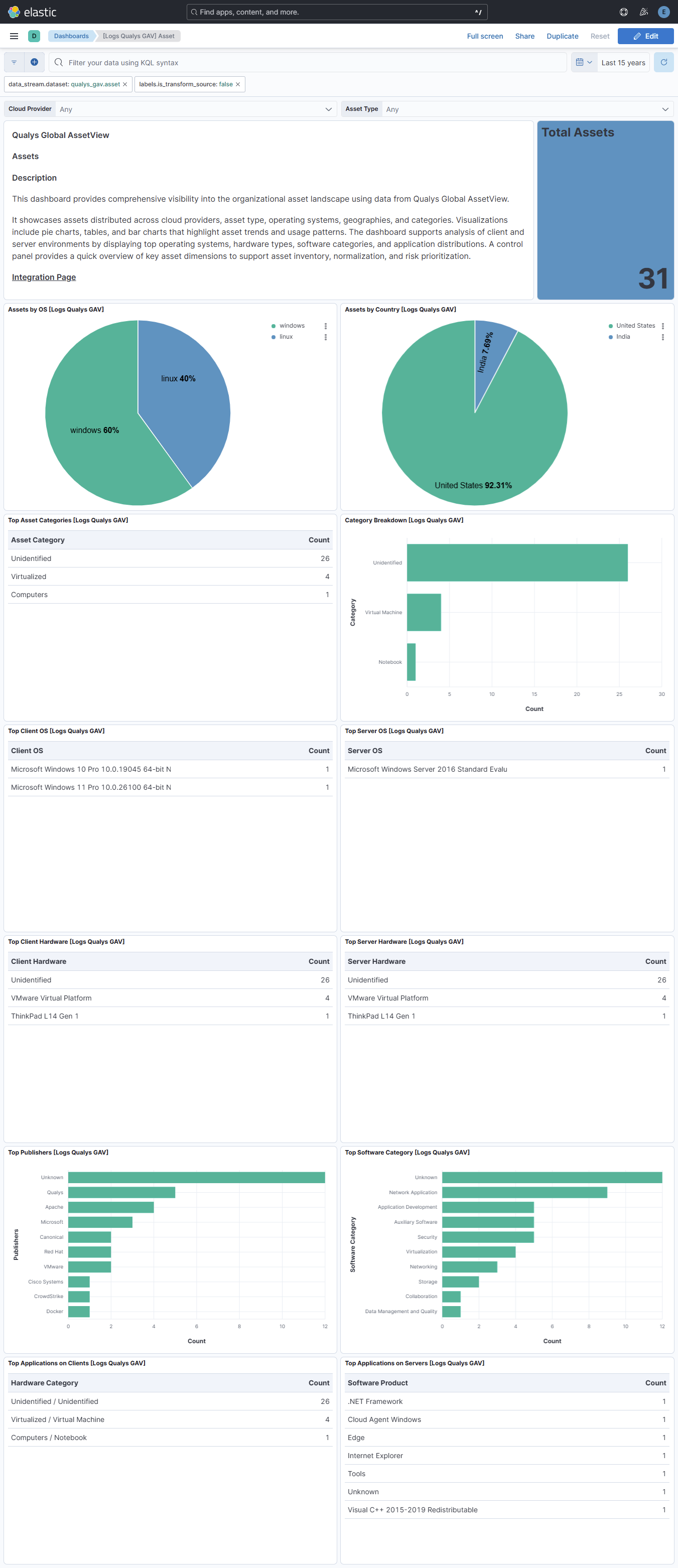
This integration includes one or more Kibana dashboards that visualizes the data collected by the integration. The screenshots below illustrate how the ingested data is displayed.
Changelog
| Version | Details | Minimum Kibana version |
|---|---|---|
| 0.11.0 | Enhancement (View pull request) Document the retention applied to source data streams on stateful and Serverless deployments, and how to change it. |
9.2.5 8.19.11 |
| 0.10.1 | Bug fix (View pull request) Skip Qualys lifecycle date parsing for the "Not Announced" sentinel to avoid pipeline errors. |
9.2.5 8.19.11 |
| 0.10.0 | Enhancement (View pull request) Add tags to ingest pipeline processors and add preserve_original_event to pipeline-level on_failure handlers. |
9.2.5 8.19.11 |
| 0.9.2 | Enhancement (View pull request) Set agentless deployment mode release field to ga. |
9.2.5 8.19.11 |
| 0.9.1 | Bug fix (View pull request) Bump the latest-asset transform destination index so lookup index mode is applied on upgrade. |
9.2.5 8.19.11 |
| 0.9.0 | Enhancement (View pull request) Configure the latest-asset transform destination with lookup index mode so it can be used as the right-hand side of ES|QL LOOKUP JOIN. |
9.2.5 8.19.11 |
| 0.8.0 | Enhancement (View pull request) Use new release field for agentless deployment mode to establish as beta. |
9.2.5 8.19.11 |
| 0.7.2 | Bug fix (View pull request) Fix pagination failure when Qualys API returns an empty asset list with hasMore set. |
9.2.5 8.19.11 |
| 0.7.1 | Bug fix (View pull request) Remove rate-limit headers from authentication API call. |
9.2.5 8.19.11 |
| 0.7.0 | Enhancement (View pull request) Enhance the data collection of the asset data stream to generate unique identifiers for each interval of ingestion. |
9.1.2 8.19.2 |
| 0.6.1 | Bug fix (View pull request) Fix the Qualys API field names to use excludeFields and includeFields. |
9.1.2 8.19.2 |
| 0.6.0 | Enhancement (View pull request) Implement X-RateLimit header handling for API rate limiting. |
9.1.2 8.19.2 |
| 0.5.0 | Enhancement (View pull request) Added support for excluding and including fields in the asset object in the response. |
9.1.2 9.0.5 8.19.2 8.18.5 |
| 0.4.1 | Bug fix (View pull request) Refactor date processing for asset inventory list to use foreach processor. |
9.1.2 9.0.5 8.19.2 8.18.5 |
| 0.4.0 | Enhancement (View pull request) Map Qualys cloud fields to cloud ECS fields. Bug fix (View pull request) Fix mapping for field qualys_gav.asset.inventory_list_data.inventory |
9.1.2 9.0.5 8.19.2 8.18.5 |
| 0.3.1 | Bug fix (View pull request) Added support for comma separated list of IPv4 addresses in network_interface list data. |
9.1.2 9.0.5 8.19.2 8.18.5 |
| 0.3.0 | Enhancement (View pull request) Added support for configuring cel max_executions parameter. |
9.1.2 9.0.5 8.19.2 8.18.5 |
| 0.2.1 | Bug fix (View pull request) Downgrade the format_version to the minimum version that supports all the necessary features for the package. |
9.1.2 9.0.5 8.19.2 8.18.5 |
| 0.2.0 | Bug fix (View pull request) Fix mapping for cloud_provider field. |
9.1.2 9.0.5 8.19.2 8.18.5 |
| 0.1.0 | Enhancement (View pull request) Initial release. |
9.1.2 9.0.5 8.19.2 8.18.5 |