NGINX OpenTelemetry Assets
| Version | 0.9.0
|
| Subscription level What's this? |
Basic |
| Developed by What's this? |
Elastic |
| Minimum Kibana version(s) | 9.4.0 |
To use pre-release integrations, go to the Integrations page in Kibana, scroll down, and toggle on the Display beta integrations option.
The NGINX OpenTelemetry Assets package allows you to monitor Nginx, a high-performance web server, reverse proxy, and load balancer. NGINX is widely used for serving web content, proxying traffic, and load balancing across multiple servers.
This content package provides dashboards, alerting rule templates, and SLO templates for NGINX metrics and logs collected by the Nginx (OpenTelemetry) integration package: stub_status metrics from the NGINX receiver, and access and error logs parsed from the NGINX log files.
You need Elasticsearch for storing and searching your data and Kibana for visualizing and managing it. You can use our hosted Elasticsearch Service on Elastic Cloud, which is recommended, or self-manage the Elastic Stack on your own hardware.
- NGINX with the
stub_statusmodule enabled and the status endpoint reachable by Elastic Agent. For example:
server {
    listen 80;
    server_name localhost;
    location /nginx_status {
        stub_status on;
        allow 127.0.0.1;
        deny all;
    }
}
Install the Nginx (OpenTelemetry) integration package and configure it with your
stub_statusendpoint and the paths of your NGINX access and error logs. The dashboards and templates rely on the fields that integration parses from the logs (for exampleurl.path,http.response.status_code, andlog.level), so collect the data through it rather than a custom Collector configuration.Optional: to populate the latency panels, configure the extended NGINX log format with request and upstream timings described in the Nginx (OpenTelemetry) integration package documentation.
This package includes four pre-built Kibana dashboards:
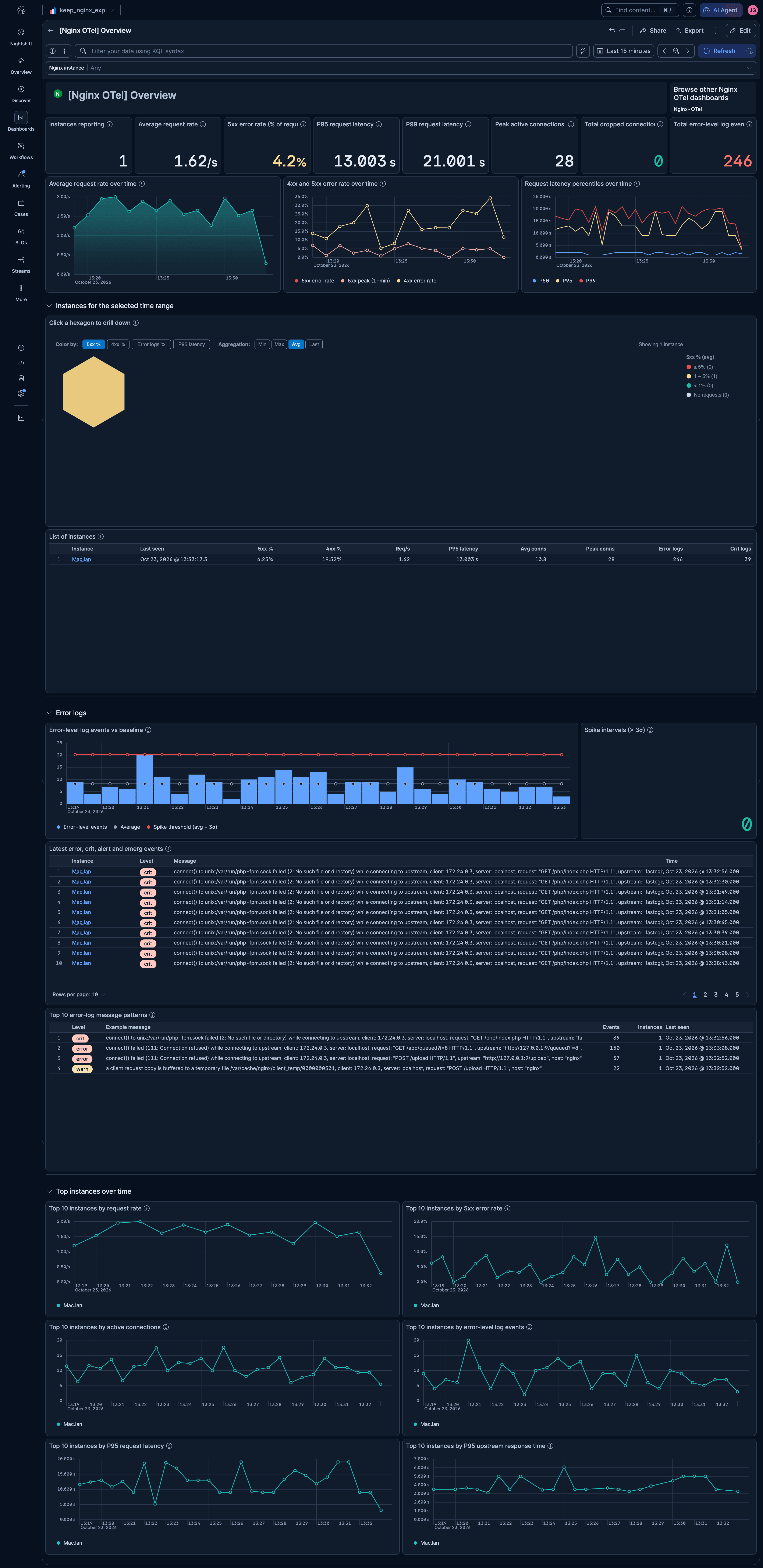
- [Nginx OTel] Overview — All NGINX instances at a glance: golden-signal KPIs, request rate, error rate and latency trends, an instance hexmap and table, error-log analysis, and top instances over time. Drill down from an instance to its details.
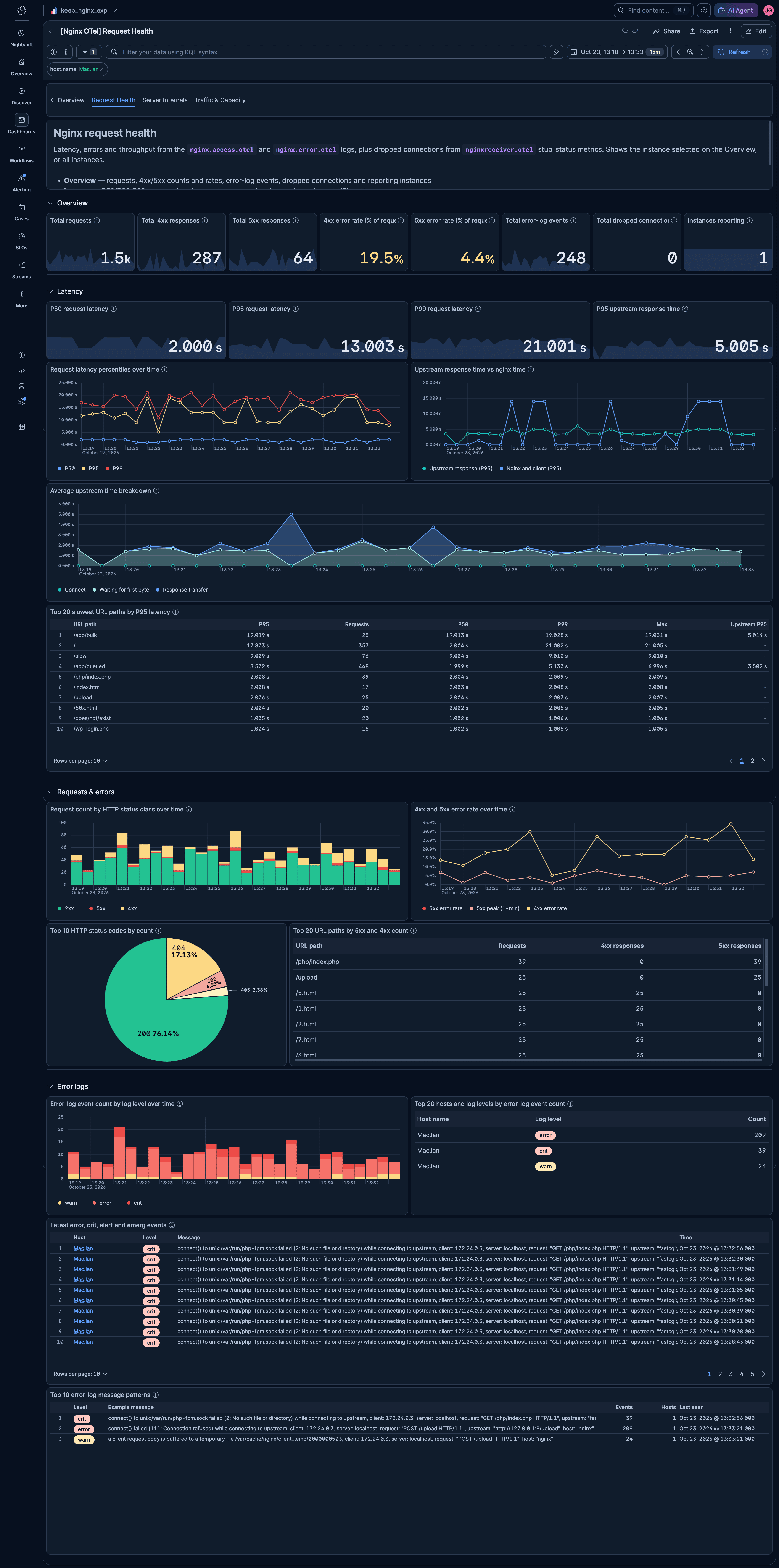
- [Nginx OTel] Request Health — Latency (P50/P95/P99, upstream vs NGINX time, slowest URL paths), 4xx/5xx errors, and error logs.
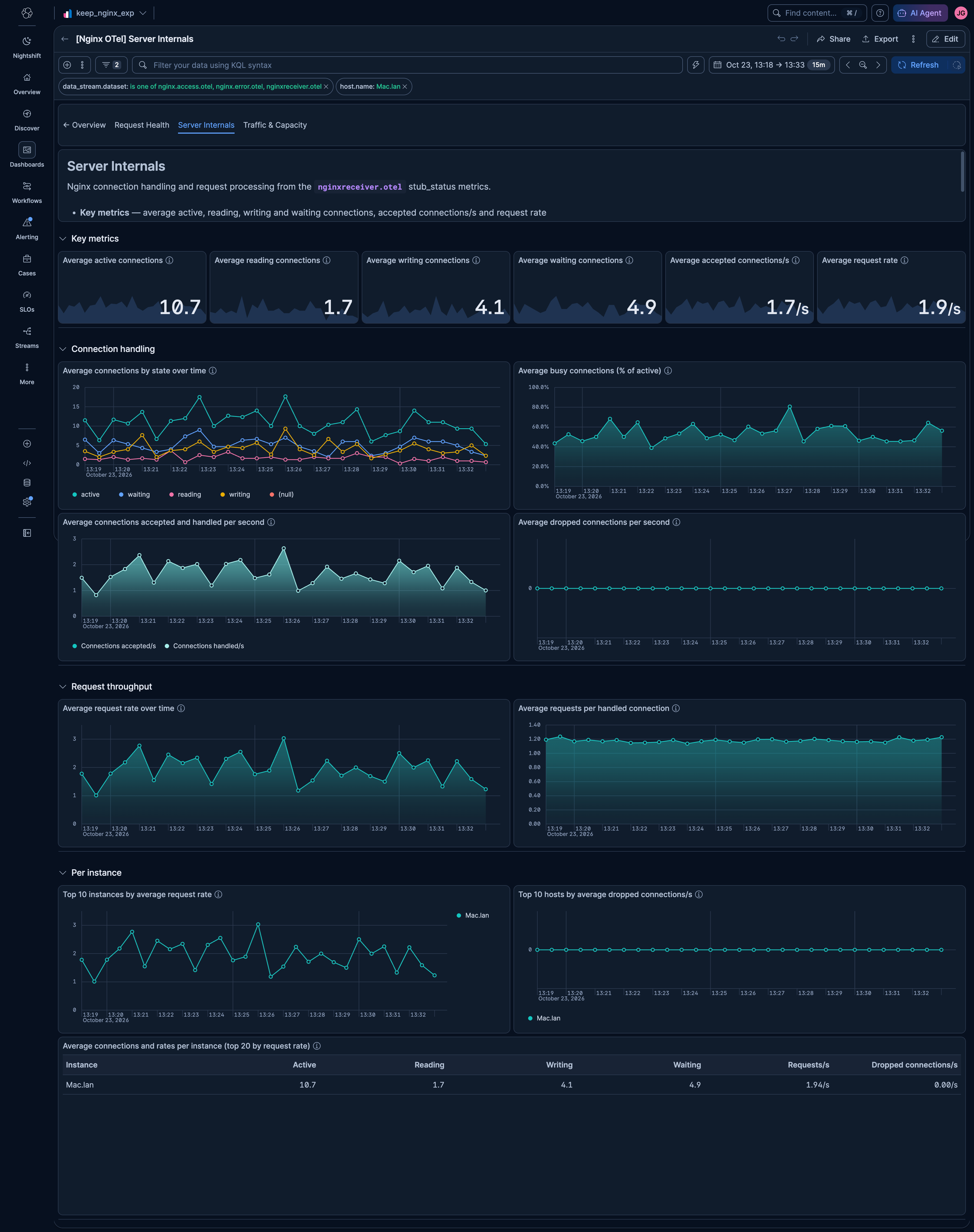
- [Nginx OTel] Server Internals — Connection states, accepted vs handled connections, request throughput, and per-instance
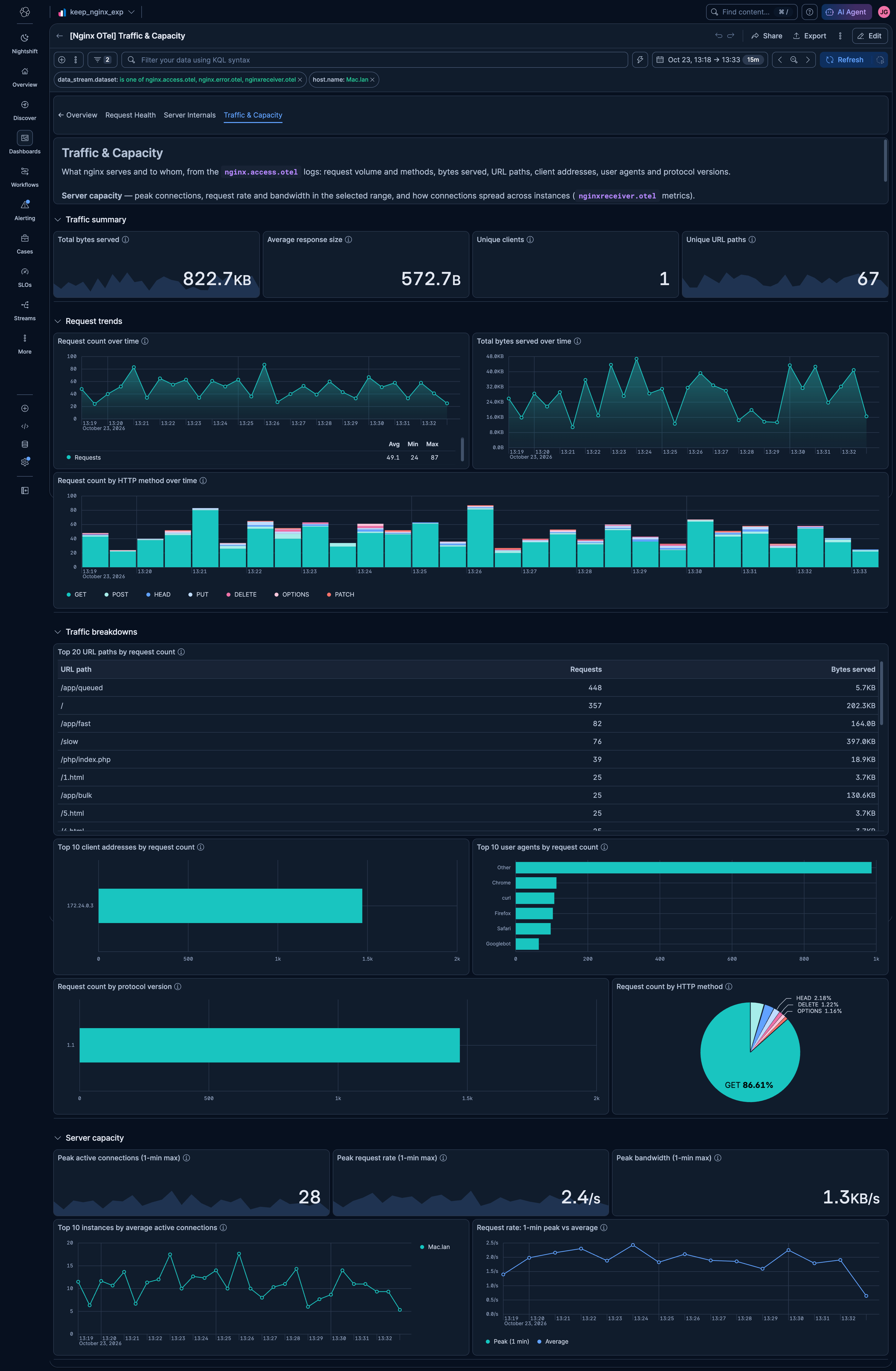
stub_statusmetrics. - [Nginx OTel] Traffic & Capacity — Request volume, bytes served, top URL paths, clients, user agents, HTTP methods and protocol versions, plus peak capacity.
Request Health, Server Internals, and Traffic & Capacity share a tab bar and keep the instance selected on the Overview.
This package ships five alerting rule templates that you can enable and customize:
| Rule | Default threshold | Window | Description |
|---|---|---|---|
| [Nginx OTel] High 4xx error rate | > 15% | 15 min | Fires when the share of HTTP 4xx client errors exceeds the threshold per host (minimum 50 requests). |
| [Nginx OTel] High 5xx error rate | > 5% | 15 min | Fires when the share of HTTP 5xx server errors exceeds the threshold per host (minimum 50 requests). |
| [Nginx OTel] High active connections | > 256 avg | 5 min | Fires when average active connections exceed the threshold. Adjust to match your NGINX worker_connections setting. |
| [Nginx OTel] Error log spike | > 50 entries | 15 min | Fires when severe error log entries (error, crit, alert, emerg) exceed the threshold per host. |
| [Nginx OTel] Dropped connections | Any drop detected | 5 min | Fires when NGINX accepted more connections than it handled, indicating resource exhaustion. |
All rules use ES|QL queries, run every 1 minute, and group by host.name. Thresholds can be adjusted to match your environment's baseline.
SLO templates require Elastic Stack version 9.4.0 or later.
This package includes two SLO templates:
| SLO | Target | Window | Description |
|---|---|---|---|
| [Nginx OTel] Request availability | 99% | Rolling 30 days | Percentage of requests that return a non-server-error response (status code < 500). Uses occurrence-based budgeting over access logs. |
| [Nginx OTel] Connection handling rate | 99.5% | Rolling 30 days | Percentage of 1-minute time slices where all accepted connections are handled (no drops). Uses timeslice budgeting over stub_status metrics. |
Both SLOs are grouped by host.name, allowing per-instance tracking.
The dashboards use the stub_status metrics collected by the NGINX receiver. For the full list of metrics and their attributes, refer to the NGINX receiver documentation in the upstream OpenTelemetry Collector repository.
This integration includes one or more Kibana dashboards that visualizes the data collected by the integration. The screenshots below illustrate how the ingested data is displayed.
Changelog
| Version | Details | Minimum Kibana version |
|---|---|---|
| 0.9.0 | Enhancement (View pull request) Imporove dashboards |
9.4.0 |
| 0.8.0 | Enhancement (View pull request) Rename the documentation title to NGINX OpenTelemetry Assets. |
9.4.0 |
| 0.7.0 | Enhancement (View pull request) Rename attributes.log.level to log.level and attributes.http.version to attributes.network.protocol.version. |
9.4.0 |
| 0.6.1 | Enhancement (View pull request) Add group field to package manifest. |
9.4.0 |
| 0.6.0 | Enhancement (View pull request) Add tags to Kibana assets |
9.4.0 |
| 0.5.0 | Enhancement (View pull request) Move links from markdown to link panel |
9.4.0 |
| 0.4.0 | Enhancement (View pull request) Add description and artifact fields to alerting rule template. |
9.4.0 |
| 0.3.0 | Enhancement (View pull request) Add SRE-aligned dashboard hierarchy with Request Health, Server Internals, and Traffic & Capacity dashboards covering access logs, error logs, and metrics. SLO and alerting rule templates |
9.3.0 |
| 0.2.1 | Bug fix (View pull request) Use OTEL host.name instead of host.hostname in dashboard control |
9.2.0 |
| 0.2.0 | Enhancement (View pull request) Add discovery field to support auto-install |
9.2.0 |
| 0.1.1 | Enhancement (View pull request) Add opentelemetry category |
9.0.0 |
| 0.1.0 | Enhancement (View pull request) Dashboard image and logo update |
9.0.0 |
| 0.0.1 | Enhancement (View pull request) Initial draft of the NGINX OTEL content package |
9.0.0 |