Pleasant Password Server
| Version | 1.3.0 (View all) |
| Subscription level What's this? |
Basic |
| Developed by What's this? |
Community |
| Ingestion method(s) | File, Network Protocol |
| Minimum Kibana version(s) | 9.0.0 8.13.0 |
The Pleasant Password Server integration collects and parses DNS, DHCP, and Audit data collected from Pleasant Password Server via TCP/UDP or logfile.
The PPS integration collects the following event types: log.
This module has been tested against Pleasant Password Server Version 7.11.44.0 .
It should however work with all versions.
Elastic Agent must be installed. For more details, check the Elastic Agent installation instructions.
- Enable the integration with TCP/UDP input.
- Log in to the PPS WebUI.
- Configure the PPS to send messages to a Syslog server using the following steps.
- From the menu go to Logging -> Syslog Configuration.
- Set the Syslog Configuration to Enabled.
- Set Hostname to the Hostname of your Fleet Agent or Load Balancer.
- Set the Correct Port used in the Integration Configuration.
- Set UDP or TCP.
- Optionally set the Facility.
- In Kibana navigate to Management > Integrations.
- In the search top bar, type Pleasant Password Server or PPS.
- Select the Pleasant Password Server integration and add it.
- Add all the required integration configuration parameters.
- Save the integration.
Below are the sample logs of the respective category.
<134>Jan 23 09:49:10 SRV-PPS-001 Pleasant Password Server:192.168.1.2 - user@name.test -  - Success - Syslog Settings Changed - User <user@name.test> Syslogging setting updated  changing the host from <localhost> to <127.0.0.1> changing the port fr	127.0.0.1	23/01 09:49:10.894
<134>Jan 23 11:32:57 SRV-PPS-001 Pleasant Password Server:192.168.1.2 - user@name.test -  - Success - Password Fetched - User <user@name.test> fetched the password for <TOP/SECRET/PASSWORD> - test	127.0.0.1	23/01 11:32:57.857
<134>Jan 23 12:20:07 SRV-PPS-001 Pleasant Password Server:0.0.0.0 - Backup Restore Service -  - Success - Backup Occurred - User <Backup Restore Service> backing up database to <C:\ProgramData\Pleasant Solutions\Password Server\Backups\Backup	127.0.0.1	23/01 12:20:07.802
<134>Jan 23 12:37:37 SRV-PPS-001 Pleasant Password Server:192.168.1.1 - user@name.test -  - Success - Session Log On - User <user@name.test> logged on	127.0.0.1	23/01 12:37:37.346
<134>Jan 23 12:38:07 SRV-PPS-001 Pleasant Password Server:192.168.1.1 - user@name.test -  - Success - Entry Updated - User <user@name.test> updated entry <TOP/SECRET/PASSWORD> changing the password	127.0.0.1	23/01 12:38:07.629
<134>Jan 23 13:43:47 SRV-PPS-001 Pleasant Password Server:192.168.1.3 - user@name.test -  - Success - Identity Verified - User <user@name.test> verified via ApplicationBasicOAuth	127.0.0.1	23/01 13:43:47.422
<134>Jan 23 13:47:25 SRV-PPS-001 Pleasant Password Server:192.168.1.3 - user@name.test -  - Error - Identity Not Verified - User <user@name.test> failed to verify themselves	127.0.0.1	23/01 13:47:25.593
<134>Jan 23 13:47:25 SRV-PPS-001 Pleasant Password Server:192.168.1.3 - user@name.test -  - Error - Sign-in Failed - User <user@name.test> sign-in denied	127.0.0.1	23/01 13:47:25.641
<134>Jan 23 14:05:54 SRV-PPS-001 Pleasant Password Server:192.168.1.3 - user@name.test -  - Success - Entry Created - User <user@name.test> created entry <TOP/SECRET/PASSWORD> as a duplicate	127.0.0.1	23/01 14:05:54.404
<134>Jan 23 14:05:54 SRV-PPS-001 Pleasant Password Server:192.168.1.3 - user@name.test -  - Success - Entry Duplicated - User <user@name.test> duplicated entry <TOP/SECRET/PASSWORD>	127.0.0.1	23/01 14:05:54.450
This is the log dataset.
Example
{
    "@timestamp": "2025-01-23T09:49:10.000+05:00",
    "agent": {
        "ephemeral_id": "e3830e56-f9b7-4278-b2cc-6c0041b3204b",
        "id": "92657501-44cd-4942-ab49-19404cc15d88",
        "name": "elastic-agent-47754",
        "type": "filebeat",
        "version": "8.13.0"
    },
    "client": {
        "ip": "192.168.1.2"
    },
    "data_stream": {
        "dataset": "pps.log",
        "namespace": "63231",
        "type": "logs"
    },
    "ecs": {
        "version": "8.17.0"
    },
    "elastic_agent": {
        "id": "92657501-44cd-4942-ab49-19404cc15d88",
        "snapshot": false,
        "version": "8.13.0"
    },
    "event": {
        "agent_id_status": "verified",
        "created": "2025-01-23T09:49:10.000+05:00",
        "dataset": "pps.log",
        "ingested": "2025-05-30T11:05:38Z",
        "kind": "event",
        "original": "<134>Jan 23 09:49:10 SRV-PPS-001 Pleasant Password Server:192.168.1.2 - user@name.test -  - Success - Syslog Settings Changed - User <user@name.test> Syslogging setting updated  changing the host from <localhost> to <127.0.0.1> changing the port fr\t127.0.0.1\t23/01 09:49:10.894\t",
        "outcome": "success",
        "timezone": "+0500"
    },
    "host": {
        "hostname": "SRV-PPS-001"
    },
    "input": {
        "type": "udp"
    },
    "log": {
        "source": {
            "address": "192.168.255.3:58871"
        },
        "syslog": {
            "priority": 134
        }
    },
    "message": "Syslog Settings Changed - User <user@name.test> Syslogging setting updated  changing the host from <localhost> to <127.0.0.1> changing the port fr\t127.0.0.1\t23/01 09:49:10.894\t",
    "tags": [
        "preserve_original_event",
        "forwarded",
        "pps-log"
    ],
    "user": {
        "domain": "name.test",
        "email": "user@name.test",
        "name": "user"
    }
}
Exported fields
| Field | Description | Type |
|---|---|---|
| @timestamp | Event timestamp. | date |
| data_stream.dataset | Data stream dataset. | constant_keyword |
| data_stream.namespace | Data stream namespace. | constant_keyword |
| data_stream.type | Data stream type. | constant_keyword |
| input.type | Input type | keyword |
| log.offset | Log offset | long |
| log.source.address | Log source address | keyword |
| pps.entry.name | The name of an entry in the password manager | keyword |
| pps.entry.path | Password Path | keyword |
| pps.entry.reason | Reason the user interacted with a password | keyword |
| pps.entry.target.name | The new name of an entry in the password manager if it was changed | keyword |
| pps.entry.target.username | The new username of an entry in the password manager if it was changed | keyword |
| pps.entry.username | The username of an entry in the password manager | keyword |
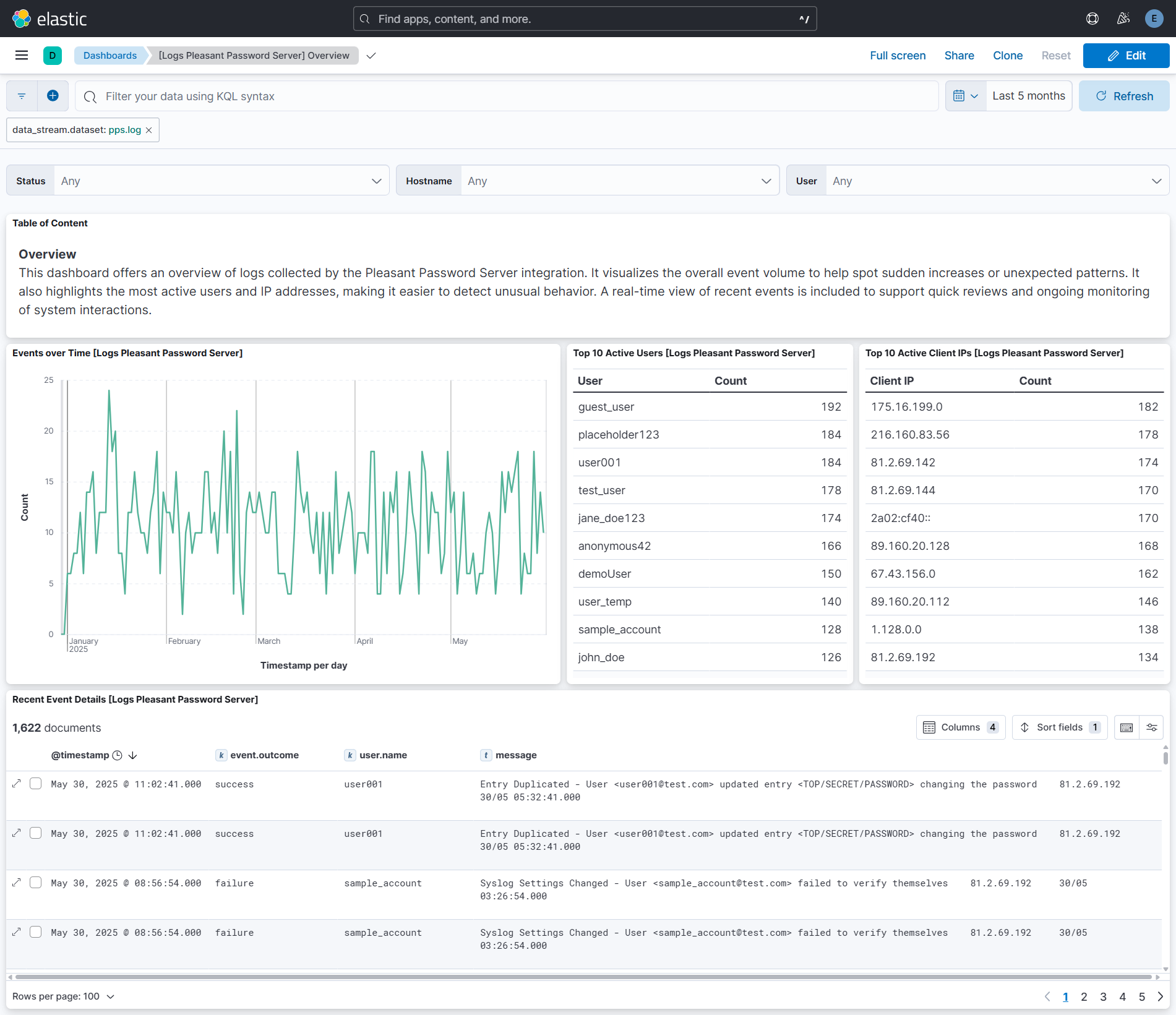
This integration includes one or more Kibana dashboards that visualizes the data collected by the integration. The screenshots below illustrate how the ingested data is displayed.
Changelog
| Version | Details | Minimum Kibana version |
|---|---|---|
| 1.3.0 | Enhancement (View pull request) Add tags to ingest pipeline processors. |
9.0.0 8.13.0 |
| 1.2.1 | Bug fix (View pull request) Fix parsing for plain usernames and space-padded dates for syslog messages from Pleasant Password Server. |
9.0.0 8.13.0 |
| 1.2.0 | Bug fix (View pull request) Handle RFC 6587 octet-counting prefix in syslog messages from newer Pleasant Password Server versions. Bug fix (View pull request) Fix grok alternation patterns that used character classes instead of groups. Enhancement (View pull request) Add tcp_options variable to TCP input for custom configuration such as RFC 6587 framing. |
9.0.0 8.13.0 |
| 1.1.0 | Enhancement (View pull request) Improved field extraction. |
9.0.0 8.13.0 |
| 1.0.1 | Enhancement (View pull request) Remove duplicated installation instructions from the documentation. |
9.0.0 8.13.0 |
| 1.0.0 | Enhancement (View pull request) Release integration as GA. Enhancement (View pull request) Add overview dashboard. Enhancement (View pull request) Upgrade ECS version to 8.17.0. |
9.0.0 8.13.0 |
| 0.5.0 | Enhancement (View pull request) Update Kibana constraint to support 9.0.0. |
9.0.0 8.13.0 |
| 0.4.1 | Bug fix (View pull request) Updated SSL description in package manifest.yml to be uniform and to include links to documentation. |
8.13.0 |
| 0.4.0 | Enhancement (View pull request) Allow the usage of deprecated log input and support for stack 9.0 |
8.13.0 |
| 0.3.0 | Enhancement (View pull request) Do not remove event.original in main ingest pipeline. |
8.13.0 |
| 0.2.0 | Enhancement (View pull request) Add "preserve_original_event" tag to documents with event.kind set to "pipeline_error". |
8.13.0 |
| 0.1.2 | Enhancement (View pull request) Update docs. |
8.13.0 |
| 0.1.0 | Enhancement (View pull request) Update the kibana constraint to ^8.13.0. Modified the field definitions to remove ECS fields made redundant by the ecs@mappings component template. |
8.13.0 |
| 0.0.1 | Enhancement (View pull request) Initial Integration for Pleasant Password Server in Elastic |
8.0.0 |