CrowdStrike Integration
| Version | 4.10.0 (View all) |
| Managed integration release status |
|
| Subscription level What's this? |
Basic |
| Developed by What's this? |
Elastic |
| Ingestion method(s) | API, AWS S3, File |
| Minimum Kibana version(s) | 9.1.8 8.19.8 |
You can use this integration as an Elastic Managed integration on Elastic Cloud Hosted deployments running this version or later.
The CrowdStrike integration allows you to efficiently connect your CrowdStrike Falcon platform to Elastic for seamless onboarding of alerts and telemetry from CrowdStrike Falcon and Falcon Data Replicator, including Identity Protection data collected over GraphQL. Elastic Security can leverage this data for security analytics including correlation, visualization, and incident response.
For a demo, refer to the following video (click to view).

This integration is compatible with CrowdStrike Falcon SIEM Connector 2.29.0, REST API, and CrowdStrike Event Streams API.
The integration collects data from multiple sources within CrowdStrike Falcon and ingests it into Elasticsearch for security analysis and visualization:

CrowdStrike Event Streams — Real-time security events (auth, CSPM, firewall, user activity, XDR, detections). You can collect this data in two ways:
- Falcon SIEM Connector — A pre-built integration that connects CrowdStrike Falcon with your SIEM. The connector collects event stream data and writes it to files; this integration reads from the connector's output path (the
output_pathincs.falconhoseclient.cfg). - Event Streams API — Continuously streams security logs from CrowdStrike Falcon for proactive monitoring and threat detection.
Data from either method is indexed into the
falcondataset in Elasticsearch.- Falcon SIEM Connector — A pre-built integration that connects CrowdStrike Falcon with your SIEM. The connector collects event stream data and writes it to files; this integration reads from the connector's output path (the
CrowdStrike REST API — Pulls alerts, host inventory, and vulnerability data (indexed into the
alert,host, andvulnerabilitydatasets).Identity Protection (GraphQL) — Additional datasets use the CrowdStrike Identity Protection GraphQL API (
/identity-protection/combined/graphql/v1).- Security assessments (
identity_protection_assessment) — Discovers domains, then ingests per-domain security assessment results. - Timeline (
identity_protection_timeline) — Collects identity protection timeline events including authentication, service access, LDAP search, account lifecycle, and privilege escalation activity.
NoteGovCloud CID users must enable the GovCloud option in the integration configuration to query the
/devices/queries/devices/v1endpoint instead of the unsupported/devices/combined/devices/v1endpoint.- Security assessments (
Falcon Data Replicator (FDR) — Batch data from your endpoints, cloud workloads, and identities using the Falcon platform's lightweight agent. Data is written to CrowdStrike-managed S3; this integration consumes it using SQS notifications (or from your own S3 bucket if you use the FDR tool to replicate). Logs are indexed into the
fdrdataset in Elasticsearch.
- Event Streams (falcon dataset)
- FDR (fdr dataset)
- Alerts (alert dataset)
- Hosts (host dataset)
- Vulnerability (vulnerability dataset)
- Identity Protection (GraphQL):
- Security assessments (identity_protection_assessment dataset)
- Timeline (identity_protection_timeline dataset)
This section describes the requirements and configuration details for each supported data source.
To collect data using the Falcon SIEM Connector, you need the file path where the connector stores event data received from the Event Streams.
This is the same as the output_path setting in the cs.falconhoseclient.cfg configuration file.
The integration supports only JSON output format from the Falcon SIEM Connector. Other formats such as Syslog and CEF are not supported.
Additionally, this integration collects logs only through the file system. Ingestion using a Syslog server is not supported.
The log files are written to multiple rotated output files based on the output_path setting in the cs.falconhoseclient.cfg file. The default output location for the Falcon SIEM Connector is /var/log/crowdstrike/falconhoseclient/output.
By default, files named output* in /var/log/crowdstrike/falconhoseclient directory contain valid JSON event data and should be used as the source for ingestion.
Files with names like cs.falconhoseclient-*.log in the same directory are primarily used for logging internal operations of the Falcon SIEM Connector and are not intended to be consumed by this integration.
By default, the configuration file for the Falcon SIEM Connector is located at /opt/crowdstrike/etc/cs.falconhoseclient.cfg, which provides configuration options related to the events collected. The EventTypeCollection and EventSubTypeCollection sections list which event types the connector collects.
The following parameters from your CrowdStrike instance are required:
Client ID
Client Secret
Token URL
API Endpoint URL
CrowdStrike App ID
Required scopes for event streams:
Data Stream Scope Event Stream read: Event streams
You can use the Falcon SIEM Connector as an alternative to the Event Streams API.
The following event types are supported for CrowdStrike Event Streams (whether you use the Falcon SIEM Connector or the Event Streams API):
- AutomatedLeadSummaryEvent
- CustomerIOCEvent
- DataProtectionDetectionSummaryEvent
- DetectionSummaryEvent
- EppDetectionSummaryEvent
- IncidentSummaryEvent
- UserActivityAuditEvent
- AuthActivityAuditEvent
- APIActivityAuditEvent
- FirewallMatchEvent
- RemoteResponseSessionStartEvent
- RemoteResponseSessionEndEvent
- CSPM Streaming events
- CSPM Search events
- IDP Incidents
- IDP Summary events
- Mobile Detection events
- OverwatchGenericDetectionSummaryEvent
- Recon Notification events
- XDR Detection events
- Scheduled Report Notification events
The following parameters from your CrowdStrike instance are required:
Client ID
Client Secret
Token URL
API Endpoint URL
Required scopes for each data stream:
Data Stream Scope Alert read:alert Host read:host Vulnerability read:vulnerability Identity protection assessment read:Identity Protection Assessment, write:Identity Protection GraphQL Identity protection timeline read:Identity Protection Timeline, write:Identity Protection GraphQL
The CrowdStrike Falcon Data Replicator allows CrowdStrike users to replicate data from CrowdStrike managed S3 buckets. When new data is written to S3, notifications are sent to a CrowdStrike-managed SQS queue (using S3 event notifications configured in AWS), so this integration can consume them.
This integration can be used in two ways. It can consume SQS notifications directly from the CrowdStrike managed SQS queue or it can be used in conjunction with the FDR tool that replicates the data to a self-managed S3 bucket and the integration can read from there.
In both cases SQS messages are deleted after they are processed. This allows you to operate more than one Elastic Agent with this integration if needed and not have duplicate events, but it means you cannot ingest the data a second time.
This is the simplest way to setup the integration, and also the default.
You need to set the integration up with the SQS queue URL provided by CrowdStrike FDR.
This option can be used if you want to archive the raw CrowdStrike data.
You need to follow the steps below:
- Create an S3 bucket to receive the logs.
- Create an SQS queue.
- Configure your S3 bucket to send object created notifications to your SQS queue.
- Follow the FDR tool instructions to replicate data to your own S3 bucket.
- Configure the integration to read from your self-managed SQS topic.
While the FDR tool can replicate the files from S3 to your local file system, this integration cannot read those files because they are gzip compressed, and the log file input does not support reading compressed files.
AWS credentials are required for running this integration if you want to use the S3 input.
access_key_id: first part of access key.secret_access_key: second part of access key.session_token: required when using temporary security credentials.credential_profile_name: profile name in shared credentials file.shared_credential_file: directory of the shared credentials file.endpoint: URL of the entry point for an AWS web service.role_arn: AWS IAM Role to assume.
There are three types of AWS credentials that can be used:
- access keys,
- temporary security credentials, and
- IAM role ARN.
AWS_ACCESS_KEY_ID and AWS_SECRET_ACCESS_KEY are the two parts of access keys.
They are long-term credentials for an IAM user, or the AWS account root user.
See AWS Access Keys and Secret Access Keys
for more details.
Temporary security credentials have a limited lifetime and consist of an
access key ID, a secret access key, and a security token which are typically returned
from GetSessionToken.
MFA-enabled IAM users would need to submit an MFA code
while calling GetSessionToken. default_region identifies the AWS Region
whose servers you want to send your first API request to by default.
This is typically the Region closest to you, but it can be any Region. See Temporary Security Credentials for more details.
sts get-session-token AWS CLI can be used to generate temporary credentials.
For example, with MFA-enabled:
aws> sts get-session-token --serial-number arn:aws:iam::1234:mfa/your-email@example.com --duration-seconds 129600 --token-code 123456
Because temporary security credentials are short term, after they expire, the
user needs to generate new ones and manually update the package configuration in
order to continue collecting aws metrics.
This will cause data loss if the configuration is not updated with new credentials before the old ones expire.
An IAM role is an IAM identity that you can create in your account that has specific permissions that determine what the identity can and cannot do in AWS.
A role does not have standard long-term credentials such as a password or access keys associated with it. Instead, when you assume a role, it provides you with temporary security credentials for your role session. IAM role Amazon Resource Name (ARN) can be used to specify which AWS IAM role to assume to generate temporary credentials.
See AssumeRole API documentation for more details.
- Use access keys: Access keys include
access_key_id,secret_access_keyand/orsession_token. - Use
role_arn:role_arnis used to specify which AWS IAM role to assume for generating temporary credentials. Ifrole_arnis given, the package will check if access keys are given. If not, the package will check for credential profile name. If neither is given, default credential profile will be used.
Ensure credentials are given under either a credential profile or
access keys.
3. Use credential_profile_name and/or shared_credential_file:
If access_key_id, secret_access_key and role_arn are all not given, then
the package will check for credential_profile_name.
If you use different credentials for different tools or applications, you can use profiles to
configure multiple access keys in the same configuration file.
If there is no credential_profile_name given, the default profile will be used.
shared_credential_file is optional to specify the directory of your shared
credentials file.
If it's empty, the default directory will be used.
In Windows, shared credentials file is at C:\Users\<yourUserName>\.aws\credentials.
For Linux, macOS or Unix, the file is located at ~/.aws/credentials.
See Create Shared Credentials File
for more details.
The FDR dataset includes:
- Events generated by the Falcon sensor on your hosts
- DataProtectionDetectionSummaryEvent (Data Protection detection summary)
- File Integrity Monitor: FileIntegrityMonitorRuleMatched and FileIntegrityMonitorRuleMatchedEnriched events
- EppDetectionSummaryEvent (EPP detection summary)
- CSPM: Indicators of Misconfiguration (IOM) and Indicators of Attack (IOA) events
- In Kibana, go to Management > Integrations.
- In the "Search for integrations" search bar, type CrowdStrike.
- Click the CrowdStrike integration from the search results.
- Click the Add CrowdStrike button to add the integration.
- Configure the integration.
- Click Save and Continue to save the integration.
Elastic Managed integrations allow you to collect data without having to manage Elastic Agent in your cloud. They make manual agent deployment unnecessary, so you can focus on your data instead of the agent that collects it. For more information, refer to Elastic Managed integrations and the Elastic Managed integrations FAQ.
When using this integration as an Elastic Managed integration, only the following data streams are available: Collect alerts from CrowdStrike, Collect host inventory from CrowdStrike, Collect identity protection assessments from CrowdStrike, Collect identity protection timeline events from CrowdStrike, and Collect vulnerability data from CrowdStrike. These data streams use inputs compatible with the Elastic Managed deployment mode. Other data streams (CrowdStrike Falcon events and Falcon Data Replicator) require AWS S3, Logfile, or Streaming inputs, which are not supported in the Elastic Managed deployment mode. To collect data from these data streams, use Elastic Agent.
Elastic Managed deployments are only supported in Elastic Serverless and Elastic Cloud environments. This functionality is in beta and is subject to change. Beta features are not subject to the support SLA of official GA features.
Elastic Agent must be installed. For more details, check the Elastic Agent installation instructions. You can install only one Elastic Agent per host. Elastic Agent is required to stream data from the AWS SQS, Event Streams API, REST API, or SIEM Connector and ship the data to Elastic, where the events will then be processed using the integration's ingest pipelines.
The Falcon events data stream's Event Streams API input (streaming) reconnects to the CrowdStrike stream with a bounded number of retries. Failures such as a non-200 response or an authentication error from bad credentials count toward Retry - Maximum Attempts; once that limit is reached the input terminates and the Elastic Agent must be restarted to resume collection.
On Elastic Agent 8.19.19, 9.3.8, 9.4.4, or later, transient connection-level failures (an empty response, a network error, or a timeout) are instead retried indefinitely with back-off and do not count toward the limit, so the input self-heals once the upstream recovers. On earlier agents these transient failures count toward the limit and can terminate the input.
If the Falcon Event Streams input goes Degraded and then stops, and the agent logs show repeated discover or connection errors, tune the retry settings on the integration policy:
- Increase Retry - Maximum Attempts to tolerate longer upstream outages.
- Enable Retry - Infinite Retries to never terminate on repeated failures. The input keeps retrying with capped back-off until the upstream recovers.
- Under Advanced options, adjust Retry - Minimum Wait and Retry - Maximum Wait to control the back-off window between attempts.
Values above 10 for Retry - Maximum Attempts, and Retry - Infinite Retries, also require Elastic Agent 8.19.19, 9.3.8, 9.4.4, or later; on earlier agents they are silently capped at 10 attempts.
This error can occur for the following reasons:
- Too many records in the response.
- The pagination token has expired. Tokens expire 120 seconds after a call is made.
To resolve this, adjust the Batch Size setting in the integration to reduce the number of records returned per pagination call.
The option Enable Data Deduplication allows you to avoid consuming duplicate events. By default, this option is set to false, and so duplicate events can be ingested. When this option is enabled, a fingerprint processor is used to calculate a hash from a set of CrowdStrike fields that uniquely identify the event. The hash is assigned to the Elasticsearch _id field that makes the document unique and prevent duplicates.
The fingerprint includes @timestamp, CrowdStrike id/aid/cid, and the FDR object type (aidmaster, userinfo, or data), derived from log.file.path or aws.s3.object.key. When present, rule.id is also included — for Cloud Security (CSPM) findings and for other event types that map a rule id (for example EPP detection summary, FIM rule matched, and Data Protection detection summary). For Cloud Security findings, a resource identifier is included as well so distinct findings that share a timestamp and customer id stay unique.
If duplicate events are ingested, to help find them, the integration's event.id field is populated by concatenating a few CrowdStrike fields that uniquely identify the event. These fields are id, aid, and cid from the CrowdStrike event. The fields are separated with pipe |.
For example, if your CrowdStrike event contains id: 123, aid: 456, and cid: 789 then the event.id would be 123|456|789.
The values used in event.severity are consistent with Elastic Detection Rules.
| Severity Name | event.severity |
|---|---|
| Low, Info or Informational | 21 |
| Medium | 47 |
| High | 73 |
| Critical | 99 |
The integration sets event.severity according to the mapping in the table above. If the severity name is not available from the original document, it is determined from the numeric severity value according to the following table.
| CrowdStrike Severity | Severity Name |
|---|---|
| 0 - 19 | info |
| 20 - 39 | low |
| 40 - 59 | medium |
| 60 - 79 | high |
| 80 - 100 | critical |
In 3.16.2 the FDR lookup transform destination indices and stable aliases were moved out of the logs-* namespace so the empty lookup indices no longer match the default Security Solution logs-* index pattern (which produced "missing the timestamp field @timestamp" warnings on detection rules):
| Before | After |
|---|---|
logs-crowdstrike_lookup.aidmaster |
crowdstrike_lookup.aidmaster |
logs-crowdstrike_lookup.userinfo |
crowdstrike_lookup.userinfo |
logs-crowdstrike_lookup.dest_aidmaster-1 |
crowdstrike_lookup.dest_aidmaster-1 |
logs-crowdstrike_lookup.dest_userinfo-1 |
crowdstrike_lookup.dest_userinfo-1 |
If you wrote custom ES|QL queries, dashboards, or detection rules against the old alias names, update them to the new names. The bundled dashboards have been updated. After upgrading, the old logs-crowdstrike_lookup.* indices and aliases left behind by previous installs are unused and can be safely deleted.
When the integration is installed, a transform maintains the latest host metadata (aidmaster) per host in a lookup index. You can enrich FDR event data with this metadata at query time using ES|QL LOOKUP JOIN on host.id.
Lookup index: crowdstrike_lookup.aidmaster — stable alias for the aidmaster lookup data maintained by the integration transform. The backing destination index is managed by the package and may change when you upgrade; use this alias in queries so joins keep working across versions. The lookup retains only host.id and crowdstrike.info.*; ECS host fields from aidmaster are stored under crowdstrike.info.host.* (e.g. crowdstrike.info.host.hostname, crowdstrike.info.host.cid, crowdstrike.info.host.os_version).
Example ES|QL query:
FROM logs-crowdstrike.fdr-*
| WHERE aws.s3.object.key LIKE "*/data/*"
| LOOKUP JOIN crowdstrike_lookup.aidmaster ON host.id
| KEEP @timestamp, event.action, host.id, crowdstrike.info.host.hostname
| LIMIT 20
Elasticsearch 8.19+ is required for LOOKUP JOIN to resolve an alias. Use crowdstrike_lookup.aidmaster as in the example above. On releases before 8.19, LOOKUP JOIN must target the concrete transform destination index instead: in Kibana go to Stack Management → Transforms, open the CrowdStrike latest aidmaster transform, and use the destination_index name shown there (that name can change with the integration version).
Using enriched fields: Enrichment from the lookup is under the crowdstrike.info.host.* namespace (e.g. crowdstrike.info.host.hostname for hostname, crowdstrike.info.host.cid for customer ID). Use these fields in dashboards and detection rules when building on query-time enrichment.
Ingest-time versus query-time: The FDR integration’s Enrich Host and User Metadata option (enrich_metadata, on by default) uses the Elastic Agent (Filebeat) metadata cache to attach aidmaster and userinfo to events at ingest time. If you rely on query-time host enrichment only (transform + LOOKUP JOIN above), set Enrich Host and User Metadata to Off so host metadata is not applied twice. Turning it off also disables ingest-time enrichment from userinfo; if you still need user fields from userinfo on every document, keep ingest-time enrichment enabled or supplement with a separate query pattern. Disabling Enrich Host and User Metadata automatically makes Keep Original Host and User Metadata option (keep_metadata) ineffective and the metadata events are retained.
Deprecation notice: Ingest-time cache enrichment (enrich_metadata and related settings — keep_metadata, metadata_ttl, metadata_cache_capacity, metadata_cache_write_interval) is deprecated and will be removed in a future major version. Query-time enrichment via LOOKUP JOIN is the replacement. The default for keep_metadata has been changed to true so that metadata events are indexed and the LOOKUP JOIN transforms have source data. Existing installations that upgrade retain their previous keep_metadata setting; if it was false, set it to true to enable query-time enrichment.
A second transform maintains the latest user metadata per host-user pair from UserIdentity and UserLogon sensor events in a lookup index. Unlike userinfo directory data (which requires Falcon Discover and covers only Windows), sensor events are available to all FDR customers on all platforms (Windows, macOS, Linux, ChromeOS). You can enrich FDR events with user metadata at query time using ES|QL LOOKUP JOIN.
Lookup index: crowdstrike_lookup.userinfo — stable alias for the user lookup data maintained by the integration transform. The backing destination index is managed by the package and may change when you upgrade; use this alias in queries so joins keep working across versions. The lookup retains only host_user_key and crowdstrike.info.*; user fields are stored under crowdstrike.info.user.* (e.g. crowdstrike.info.user.name, crowdstrike.info.user.domain, crowdstrike.info.user.logon_type).
Composite join key: Because Unix UIDs are local to each host (the same numeric UID can refer to different users on different machines), the user lookup uses a composite key combining both host.id and user.id. Queries must construct this key with EVAL before joining:
FROM logs-crowdstrike.fdr-*
| WHERE aws.s3.object.key LIKE "*/data/*" OR log.file.path LIKE "*/data/*"
| EVAL host_user_key = CONCAT(host.id, "::", user.id)
| LOOKUP JOIN crowdstrike_lookup.userinfo ON host_user_key
| KEEP @timestamp, event.action, host.id, user.id,
       crowdstrike.info.user.name, crowdstrike.info.user.domain
| LIMIT 20
Combined host and user enrichment: Both lookups can be chained in a single query. The aidmaster join does not need to come first — host.id comes from the source index, so the EVAL does not depend on it:
FROM logs-crowdstrike.fdr-*
| WHERE aws.s3.object.key LIKE "*/data/*" OR log.file.path LIKE "*/data/*"
| LOOKUP JOIN crowdstrike_lookup.aidmaster ON host.id
| EVAL host_user_key = CONCAT(host.id, "::", user.id)
| LOOKUP JOIN crowdstrike_lookup.userinfo ON host_user_key
| KEEP @timestamp, event.action, host.id, crowdstrike.info.host.hostname,
       user.id, crowdstrike.info.user.name, crowdstrike.info.user.domain
| LIMIT 20
Elasticsearch 8.19+ is required for LOOKUP JOIN to resolve an alias. Use crowdstrike_lookup.userinfo as in the examples above. On releases before 8.19, LOOKUP JOIN must target the concrete transform destination index instead: in Kibana go to Stack Management → Transforms, open the CrowdStrike latest userinfo transform, and use the destination_index name shown there (that name can change with the integration version). If you use both host and user lookups on releases before 8.19, you will need two concrete destination index names — one for aidmaster and one for userinfo — both obtainable from Stack Management → Transforms.
Using enriched fields: Enrichment from the user lookup is under the crowdstrike.info.user.* namespace (e.g. crowdstrike.info.user.name for username, crowdstrike.info.user.domain for UPN domain, crowdstrike.info.user.logon_type for logon type). Use these fields in dashboards and ES|QL detection rules when building on query-time enrichment. Note that detection rules using EQL, threshold, or KQL operate on stored documents and cannot use LOOKUP JOIN — those rule types continue to rely on ingest-time cache enrichment for user metadata.
Ingest-time versus query-time: The same Enrich Host and User Metadata option (enrich_metadata) that controls ingest-time host enrichment also controls ingest-time user enrichment from userinfo directory data. Query-time user enrichment via the transform is additive — it works regardless of whether ingest-time enrichment is enabled. If you rely on query-time enrichment only, set Enrich Host and User Metadata to Off so metadata is not applied twice. If both are active, user metadata may appear under crowdstrike.info.user.* from both the ingest-time cache and the query-time lookup; the values should be consistent but the ingest-time cache is populated from userinfo while the query-time lookup uses sensor events, so field availability may differ.
Deprecation notice: Ingest-time cache enrichment is deprecated and will be removed in a future major version. Query-time enrichment via the transforms and LOOKUP JOIN described above is the replacement. See the deprecation notice in the host metadata section above for details on the keep_metadata default change.
The FDR Overview dashboards include ES|QL visualizations that use LOOKUP JOIN for query-time enrichment. Top 10 hostnames and Event rate over time by hostname join against the aidmaster lookup; Top 10 usernames and Event rate over time by username join against the userinfo lookup. They are reference examples of query-time enrichment that you can reuse in your own dashboards.
ES|QL result row cap: By default, Elasticsearch returns at most 1000 rows for an ES|QL query. If your query does not end with an explicit LIMIT, results are truncated at that cap. See ES|QL limitations for the authoritative limits.
What you can do: Add an explicit | LIMIT … at the end of your ES|QL query when you need more rows than the default. Narrow the time range, filter hosts or indices, or clone a packaged visualization and tune the query for your environment.
This is the alert dataset.
Example
{
    "@timestamp": "2023-11-03T18:00:22.328Z",
    "agent": {
        "ephemeral_id": "efb69ba7-0736-4cf7-a39f-70f3183e7530",
        "id": "d541c008-3558-403d-9392-4faa6d42fcb4",
        "name": "elastic-agent-43429",
        "type": "filebeat",
        "version": "8.18.0"
    },
    "crowdstrike": {
        "alert": {
            "agent_id": "2ce412d17b334ad4adc8c1c54dbfec4b",
            "aggregate_id": "aggind:2ce412d17b334ad4adc8c1c54dbfec4b:163208931778",
            "alleged_filetype": "exe",
            "cid": "92012896127c4a948236ba7601b886b0",
            "cloud_indicator": false,
            "cmdline": "\"C:\\Users\\yuvraj.mahajan\\AppData\\Local\\Temp\\Temp3cc4c329-2896-461f-9dea-88009eb2e8fb_pfSenseFirewallOpenVPNClients-20230823T120504Z-001.zip\\pfSenseFirewallOpenVPNClients\\Windows\\openvpn-cds-pfSense-UDP4-1194-pfsense-install-2.6.5-I001-amd64.exe\"",
            "composite_id": "92012896127c4a8236ba7601b886b0:ind:2ce412d17b334ad4adc8c1c54dbfec4b:399748687993-5761-42627600",
            "confidence": 10,
            "context_timestamp": "2023-11-03T18:00:31.000Z",
            "control_graph_id": "ctg:2ce4127b334ad4adc8c1c54dbfec4b:163208931778",
            "crawl_edge_ids": {
                "Sensor": [
                    "KZcZ=__;K&cmqQ]Z=W,QK4W.9(rBfs\\gfmjTblqI^F-_oNnAWQ&-o0:dR/>>2J<d2T/ji6R&RIHe-tZSkP*q?HW;:leq.:kk)>IVMD36[+=kiQDRm.bB?;d\"V0JaQlaltC59Iq6nM?6>ZAs+LbOJ9p9A;9'WV9^H3XEMs8N",
                    "KZcZA__;?\"cmott@m_k)MSZ^+C?.cg<Lga#0@71X07*LY2teE56*16pL[=!bjF7g@0jOQE'jT6RX_F@sr#RP-U/d[#nm9A,A,W%cl/T@<WalY1K_h%QDBBF;_e7S!!*'!",
                    "KZd)iK2;s\\ckQl_P*d=Mo?^a7/JKc\\*L48169!7I5;0\\<H^hNG\"ZQ3#U3\"eo<>92t[f!>*b9WLY@H!V0N,BJsNSTD:?/+fY';e<OHh9AmlT?5<gGqK:*L99kat+P)eZ$HR\"Ql@Q!!!$!rr",
                    "N6=Ks_B9Bncmur)?\\[fV$k/N5;:6@aB$P;R$2XAaPJ?E<G5,UfaP')8#2AY4ff+q?T?b0/RBi-YAeGmb<6Bqp[DZh#I(jObGkjJJaMf\\:#mb;BM\\L[g!\\F*M!!*'!",
                    "N6B%O'=_7d#%u&d[+LTNDs<3307?8n=GrFI:4YYGCL,cIt-Tuj!&<6:3RbCuNjL#gW&=)E4^/'fp*.bFX@p_$,R6.\"=lV*T*5Vfc.:nkd$+YD:DJ,Ls0[sArC')K%YTc$:@kUQW5s8N",
                    "N6B%s!\\k)ed$F6>a%iM\"<FTSe/eH8M:<9gf;$$.b??kpC*99aX!Lq:g6:Q3@Ga4Zrb@MaMa]L'YAt$IFBu])\"H^sF$r7gDPf6&CHpVKO3<DgK9,Y/e@V\"b&m!<<'",
                    "N6CU&%VT\"d$=67=h\\I)/BJH:8-lS!.%\\-!$1@bAhtVO?q4]9'9'haE4N0*-0Uh'-'f',YW3]T=jL3D#N=fJi]Pp-bWej+R9q[%h[p]p26NK8q3b50k9G:.&eM<Qer>__\"59K'R?_='rK/'hA\"r+L5i-*Ut5PI!!*'!",
                    "N6CUF__;K!d$:[C93.?=/5(5KnM]!L#UbnSY5HOHc#[6A&FE;(naXB4h/OG\"%MDAR=fo41Z]rXc\"J-\\&&V8UW.?I6V*G+,))Ztu_IuCMV#ZJ:QDJ_EjQmjiX#HENY'WD0rVAV$Gl6_+0e:2$8D)):.LUs+8-S$L!!!$!rr",
                    "N6CUF__;K!d$:\\N43JV0AO56@6D0$!na(s)d.dQ'iI1*uiKt#j?r\"X'\\AtNML2_C__7ic6,8Dc[F<0NTUGtl%HD#?/Y)t8!1X.;G!*FQ9GP-ukQn6I##&$^81(P+hN*-#rf/cUs)Wb\"<_/?I'[##WMh'H[Rcl+!!<<'",
                    "N6L[G__;K!d\"qhT7k?[D\"Bk:5s%+=>#DM0j$_<r/JG0TCEQ!Ug(be3)&R2JnX+RSqorgC-NCjf6XATBWX(5<L1J1DV>44ZjO9q*d!YLuHhkq!3>3tpi>OPYZp9]5f1#/AlRZL06/I6cl\"d.&=To@9kS!prs8N"
                ]
            },
            "crawl_vertex_ids": {
                "Sensor": [
                    "aggind:2ce412d17b334ad4adc8c1c54dbfec4b:163208931778",
                    "ctg:2ce412d17b334ad4adc8c1c54dbfec4b:163208931778",
                    "ind:2ce412d17b34ad4adc8c1c54dbfec4b:399748687993-5761-42627600",
                    "mod:2ce412d17b4ad4adc8c1c54dbfec4b:0b25d56bd2b4d8a6df45beff7be165117fbf7ba6ba2c07744f039143866335e4",
                    "mod:2ce412d17b4ad4adc8c1c54dbfec4b:b26a6791b72753d2317efd5e1363d93fdd33e611c8b9e08a3b24ea4d755b81fd",
                    "mod:2ce412d17b334ad4adc8c1c54dbfec4b:caef4ae19056eeb122a0540508fa8984cea960173ada0dc648cb846d6ef5dd33",
                    "pid:2ce412d17b33d4adc8c1c54dbfec4b:392734873135",
                    "pid:2ce412d17b334ad4adc8c1c54dbfec4b:392736520876",
                    "pid:2ce412d17b334ad4adc8c1c54dbfec4b:399748687993",
                    "quf:2ce412d17b334ad4adc8c1c54dbfec4b:b26a6791b72753d2317efd5e1363d93fdd33e611c8b9e08a3b24ea4d755b81fd",
                    "uid:2ce412d17b334ad4adc8c1c54dbfec4b:S-1-5-21-1909377054-3469629671-4104191496-4425"
                ]
            },
            "crawled_timestamp": "2023-11-03T19:00:23.985Z",
            "created_timestamp": "2023-11-03T18:01:23.995Z",
            "data_domains": [
                "Endpoint"
            ],
            "description": "ThisfilemeetstheAdware/PUPAnti-malwareMLalgorithm'slowest-confidencethreshold.",
            "device": {
                "agent_load_flags": 0,
                "agent_local_time": "2023-10-12T03:45:57.753Z",
                "agent_version": "7.04.17605.0",
                "bios_manufacturer": "ABC",
                "bios_version": "F8CN42WW(V2.05)",
                "cid": "92012896127c4a948236ba7601b886b0",
                "config_id_base": "65994763",
                "config_id_build": "17605",
                "config_id_platform": 3,
                "external_ip": "81.2.69.142",
                "first_seen": "2023-04-07T09:36:36.000Z",
                "groups": [
                    "18704e21288243b58e4c76266d38caaf"
                ],
                "hostinfo": {
                    "active_directory_dn_display": [
                        "WinComputers",
                        "WinComputers\\ABC"
                    ],
                    "domain": "ABC.LOCAL"
                },
                "hostname": "ABC709-1175",
                "id": "2ce412d17b334ad4adc8c1c54dbfec4b",
                "last_seen": "2023-11-03T17:51:42.000Z",
                "local_ip": "81.2.69.142",
                "mac_address": "AB-21-48-61-05-B2",
                "machine_domain": "ABC.LOCAL",
                "major_version": "10",
                "minor_version": "0",
                "modified_timestamp": "2023-11-03T17:53:43.000Z",
                "os_version": "Windows11",
                "ou": [
                    "ABC",
                    "WinComputers"
                ],
                "platform_id": "0",
                "platform_name": "Windows",
                "product_type": "1",
                "product_type_desc": "Workstation",
                "site_name": "Default-First-Site-Name",
                "status": "normal",
                "system_manufacturer": "LENOVO",
                "system_product_name": "20VE"
            },
            "falcon_host_link": "https://falcon.us-2.crowdstrike.com/activity-v2/detections/dhjffg:ind:2ce412d17b334ad4adc8c1c54dbfec4b:399748687993-5761-42627600",
            "filename": "openvpn-abc-pfSense-UDP4-1194-pfsense-install-2.6.5-I001-amd64.exe",
            "filepath": "\\Device\\HarddiskVolume3\\Users\\yuvraj.mahajan\\AppData\\Local\\Temp\\Temp3cc4c329-2896-461f-9dea-88009eb2e8fb_pfSenseFirewallOpenVPNClients-20230823T120504Z-001.zip\\pfSenseFirewallOpenVPNClients\\Windows\\openvpn-cds-pfSense-UDP4-1194-pfsense-install-2.6.5-I001-amd64.exe",
            "grandparent_details": {
                "cmdline": "C:\\Windows\\system32\\userinit.exe",
                "filename": "userinit.exe",
                "filepath": "\\Device\\HarddiskVolume3\\Windows\\System32\\userinit.exe",
                "local_process_id": "4328",
                "md5": "b07f77fd3f9828b2c9d61f8a36609741",
                "process_graph_id": "pid:2ce412d17b334ad4adc8c1c54dbfec4b:392734873135",
                "process_id": "392734873135",
                "sha256": "caef4ae19056eeb122a0540508fa8984cea960173ada0dc648cb846d6ef5dd33",
                "timestamp": "2023-10-30T16:49:19.000Z",
                "user_graph_id": "uid:2ce412d17b334ad4adc8c1c54dbfec4b:S-1-5-21-1909377054-3469629671-4104191496-4425",
                "user_id": "S-1-5-21-1909377054-3469629671-4104191496-4425",
                "user_name": "yuvraj.mahajan"
            },
            "has_script_or_module_ioc": true,
            "id": "ind:2ce412d17b334ad4adc8c1c54dbfec4b:399748687993-5761-42627600",
            "indicator_id": "ind:2ce412d17b334ad4adc8c1c54dbfec4b:399748687993-5761-42627600",
            "ioc_context": [
                {
                    "ioc_description": "\\Device\\HarddiskVolume3\\Users\\yuvraj.mahajan\\AppData\\Local\\Temp\\Temp3cc4c329-2896-461f-9dea-88009eb2e8fb_pfSenseFirewallOpenVPNClients-20230823T120504Z-001.zip\\pfSenseFirewallOpenVPNClients\\Windows\\openvpn-cds-pfSense-UDP4-1194-pfsense-install-2.6.5-I001-amd64.exe",
                    "ioc_source": "library_load",
                    "ioc_type": "hash_sha256",
                    "ioc_value": "b26a6791b72753d2317efd5e1363d93fdd33e611c8b9e08a3b24ea4d755b81fd",
                    "md5": "cdf9cfebb400ce89d5b6032bfcdc693b",
                    "sha256": "b26a6791b72753d2317efd5e1363d93fdd33e611c8b9e08a3b24ea4d755b81fd",
                    "type": "module"
                }
            ],
            "ioc_values": [
                "b26a6791b72753d2317efd5e1363d93fdd33e611c8b9e08a3b24ea4d755b81fd"
            ],
            "is_synthetic_quarantine_disposition": true,
            "local_process_id": "17076",
            "logon_domain": "ABSYS",
            "md5": "cdf9cfebb400ce89d5b6032bfcdc693b",
            "name": "PrewittPupAdwareSensorDetect-Lowest",
            "objective": "FalconDetectionMethod",
            "parent_details": {
                "cmdline": "C:\\WINDOWS\\Explorer.EXE",
                "filename": "explorer.exe",
                "filepath": "\\Device\\HarddiskVolume3\\Windows\\explorer.exe",
                "local_process_id": "1040",
                "md5": "8cc3fcdd7d52d2d5221303c213e044ae",
                "process_graph_id": "pid:2ce412d17b334ad4adc8c1c54dbfec4b:392736520876",
                "process_id": "392736520876",
                "sha256": "0b25d56bd2b4d8a6df45beff7be165117fbf7ba6ba2c07744f039143866335e4",
                "timestamp": "2023-11-03T18:00:32.000Z",
                "user_graph_id": "uid:2ce412d17b334ad4adc8c1c54dbfec4b:S-1-5-21-1909377054-3469629671-4104191496-4425",
                "user_id": "S-1-5-21-1909377054-3469629671-4104191496-4425",
                "user_name": "mohit.jha"
            },
            "parent_process_id": "392736520876",
            "pattern_disposition": 2176,
            "pattern_disposition_description": "Prevention/Quarantine,processwasblockedfromexecutionandquarantinewasattempted.",
            "pattern_disposition_details": {
                "blocking_unsupported_or_disabled": false,
                "bootup_safeguard_enabled": false,
                "critical_process_disabled": false,
                "detect": false,
                "fs_operation_blocked": false,
                "handle_operation_downgraded": false,
                "inddet_mask": false,
                "indicator": false,
                "kill_action_failed": false,
                "kill_parent": false,
                "kill_process": false,
                "kill_subprocess": false,
                "operation_blocked": false,
                "policy_disabled": false,
                "process_blocked": true,
                "quarantine_file": true,
                "quarantine_machine": false,
                "registry_operation_blocked": false,
                "rooting": false,
                "sensor_only": false,
                "suspend_parent": false,
                "suspend_process": false
            },
            "pattern_id": "5761",
            "platform": "Windows",
            "poly_id": "AACSASiWEnxKlIIaw8LWC-8XINBatE2uYZaWqRAAATiEEfPFwhoY4opnh1CQjm0tvUQp4Lu5eOAx29ZVj-qrGrA==",
            "process_end_time": "2023-11-03T18:00:21.000Z",
            "process_id": "399748687993",
            "process_start_time": "2023-11-03T18:00:13.000Z",
            "product": "epp",
            "quarantined_files": [
                {
                    "filename": "\\Device\\Volume3\\Users\\yuvraj.mahajan\\AppData\\Local\\Temp\\Temp3cc4c329-2896-461f-9dea-88009eb2e8fb_pfSenseFirewallOpenVPNClients-20230823T120504Z-001.zip\\pfSenseFirewallOpenVPNClients\\Windows\\openvpn-cds-pfSense-UDP4-1194-pfsense-install-2.6.5-I001-amd64.exe",
                    "id": "2ce412d17b334ad4adc8c1c54dbfec4b_b26a6791b72753d2317efd5e1363d93fdd33e611c8b9e08a3b24ea4d755b81fd",
                    "sha256": "b26a6791b72753d2317efd5e1363d93fdd33e611c8b9e08a3b24ea4d755b81fd",
                    "state": "quarantined"
                }
            ],
            "scenario": "NGAV",
            "severity": 30,
            "severity_name": "low",
            "sha1": "0000000000000000000000000000000000000000",
            "sha256": "b26a6791b72753d2317efd5e1363d93fdd33e611c8b9e08a3b24ea4d755b81fd",
            "show_in_ui": true,
            "source_products": [
                "FalconInsight"
            ],
            "source_vendors": [
                "CrowdStrike"
            ],
            "status": "new",
            "tactic": "MachineLearning",
            "tactic_id": "CSTA0004",
            "technique": "Adware/PUP",
            "technique_id": "CST0000",
            "timestamp": "2023-11-03T18:00:22.328Z",
            "tree_id": "1931778",
            "tree_root": "38687993",
            "triggering_process_graph_id": "pid:2ce4124ad4adc8c1c54dbfec4b:399748687993",
            "type": "ldt",
            "updated_timestamp": "2023-11-03T19:00:23.985Z",
            "user_id": "S-1-5-21-1909377054-3469629671-4104191496-4425",
            "user_name": "mohit.jha"
        }
    },
    "data_stream": {
        "dataset": "crowdstrike.alert",
        "namespace": "96581",
        "type": "logs"
    },
    "device": {
        "id": "2ce412d17b334ad4adc8c1c54dbfec4b",
        "manufacturer": "LENOVO",
        "model": {
            "name": "20VE"
        }
    },
    "ecs": {
        "version": "8.17.0"
    },
    "elastic_agent": {
        "id": "d541c008-3558-403d-9392-4faa6d42fcb4",
        "snapshot": true,
        "version": "8.18.0"
    },
    "event": {
        "agent_id_status": "verified",
        "category": [
            "process"
        ],
        "dataset": "crowdstrike.alert",
        "id": "ind:2ce412d17b334ad4adc8c1c54dbfec4b:399748687993-5761-42627600",
        "ingested": "2025-10-09T10:20:29Z",
        "kind": "alert",
        "original": "{\"agent_id\":\"2ce412d17b334ad4adc8c1c54dbfec4b\",\"aggregate_id\":\"aggind:2ce412d17b334ad4adc8c1c54dbfec4b:163208931778\",\"alleged_filetype\":\"exe\",\"cid\":\"92012896127c4a948236ba7601b886b0\",\"cloud_indicator\":\"false\",\"cmdline\":\"\\\"C:\\\\Users\\\\yuvraj.mahajan\\\\AppData\\\\Local\\\\Temp\\\\Temp3cc4c329-2896-461f-9dea-88009eb2e8fb_pfSenseFirewallOpenVPNClients-20230823T120504Z-001.zip\\\\pfSenseFirewallOpenVPNClients\\\\Windows\\\\openvpn-cds-pfSense-UDP4-1194-pfsense-install-2.6.5-I001-amd64.exe\\\"\",\"composite_id\":\"92012896127c4a8236ba7601b886b0:ind:2ce412d17b334ad4adc8c1c54dbfec4b:399748687993-5761-42627600\",\"confidence\":10,\"context_timestamp\":\"2023-11-03T18:00:31Z\",\"control_graph_id\":\"ctg:2ce4127b334ad4adc8c1c54dbfec4b:163208931778\",\"crawl_edge_ids\":{\"Sensor\":[\"KZcZ=__;K\\u0026cmqQ]Z=W,QK4W.9(rBfs\\\\gfmjTblqI^F-_oNnAWQ\\u0026-o0:dR/\\u003e\\u003e2J\\u003cd2T/ji6R\\u0026RIHe-tZSkP*q?HW;:leq.:kk)\\u003eIVMD36[+=kiQDRm.bB?;d\\\"V0JaQlaltC59Iq6nM?6\\u003eZAs+LbOJ9p9A;9'WV9^H3XEMs8N\",\"KZcZA__;?\\\"cmott@m_k)MSZ^+C?.cg\\u003cLga#0@71X07*LY2teE56*16pL[=!bjF7g@0jOQE'jT6RX_F@sr#RP-U/d[#nm9A,A,W%cl/T@\\u003cWalY1K_h%QDBBF;_e7S!!*'!\",\"KZd)iK2;s\\\\ckQl_P*d=Mo?^a7/JKc\\\\*L48169!7I5;0\\\\\\u003cH^hNG\\\"ZQ3#U3\\\"eo\\u003c\\u003e92t[f!\\u003e*b9WLY@H!V0N,BJsNSTD:?/+fY';e\\u003cOHh9AmlT?5\\u003cgGqK:*L99kat+P)eZ$HR\\\"Ql@Q!!!$!rr\",\"N6=Ks_B9Bncmur)?\\\\[fV$k/N5;:6@aB$P;R$2XAaPJ?E\\u003cG5,UfaP')8#2AY4ff+q?T?b0/RBi-YAeGmb\\u003c6Bqp[DZh#I(jObGkjJJaMf\\\\:#mb;BM\\\\L[g!\\\\F*M!!*'!\",\"N6B%O'=_7d#%u\\u0026d[+LTNDs\\u003c3307?8n=GrFI:4YYGCL,cIt-Tuj!\\u0026\\u003c6:3RbCuNjL#gW\\u0026=)E4^/'fp*.bFX@p_$,R6.\\\"=lV*T*5Vfc.:nkd$+YD:DJ,Ls0[sArC')K%YTc$:@kUQW5s8N\",\"N6B%s!\\\\k)ed$F6\\u003ea%iM\\\"\\u003cFTSe/eH8M:\\u003c9gf;$$.b??kpC*99aX!Lq:g6:Q3@Ga4Zrb@MaMa]L'YAt$IFBu])\\\"H^sF$r7gDPf6\\u0026CHpVKO3\\u003cDgK9,Y/e@V\\\"b\\u0026m!\\u003c\\u003c'\",\"N6CU\\u0026%VT\\\"d$=67=h\\\\I)/BJH:8-lS!.%\\\\-!$1@bAhtVO?q4]9'9'haE4N0*-0Uh'-'f',YW3]T=jL3D#N=fJi]Pp-bWej+R9q[%h[p]p26NK8q3b50k9G:.\\u0026eM\\u003cQer\\u003e__\\\"59K'R?_='rK/'hA\\\"r+L5i-*Ut5PI!!*'!\",\"N6CUF__;K!d$:[C93.?=/5(5KnM]!L#UbnSY5HOHc#[6A\\u0026FE;(naXB4h/OG\\\"%MDAR=fo41Z]rXc\\\"J-\\\\\\u0026\\u0026V8UW.?I6V*G+,))Ztu_IuCMV#ZJ:QDJ_EjQmjiX#HENY'WD0rVAV$Gl6_+0e:2$8D)):.LUs+8-S$L!!!$!rr\",\"N6CUF__;K!d$:\\\\N43JV0AO56@6D0$!na(s)d.dQ'iI1*uiKt#j?r\\\"X'\\\\AtNML2_C__7ic6,8Dc[F\\u003c0NTUGtl%HD#?/Y)t8!1X.;G!*FQ9GP-ukQn6I##\\u0026$^81(P+hN*-#rf/cUs)Wb\\\"\\u003c_/?I'[##WMh'H[Rcl+!!\\u003c\\u003c'\",\"N6L[G__;K!d\\\"qhT7k?[D\\\"Bk:5s%+=\\u003e#DM0j$_\\u003cr/JG0TCEQ!Ug(be3)\\u0026R2JnX+RSqorgC-NCjf6XATBWX(5\\u003cL1J1DV\\u003e44ZjO9q*d!YLuHhkq!3\\u003e3tpi\\u003eOPYZp9]5f1#/AlRZL06/I6cl\\\"d.\\u0026=To@9kS!prs8N\"]},\"crawl_vertex_ids\":{\"Sensor\":[\"aggind:2ce412d17b334ad4adc8c1c54dbfec4b:163208931778\",\"ctg:2ce412d17b334ad4adc8c1c54dbfec4b:163208931778\",\"ind:2ce412d17b34ad4adc8c1c54dbfec4b:399748687993-5761-42627600\",\"mod:2ce412d17b4ad4adc8c1c54dbfec4b:0b25d56bd2b4d8a6df45beff7be165117fbf7ba6ba2c07744f039143866335e4\",\"mod:2ce412d17b4ad4adc8c1c54dbfec4b:b26a6791b72753d2317efd5e1363d93fdd33e611c8b9e08a3b24ea4d755b81fd\",\"mod:2ce412d17b334ad4adc8c1c54dbfec4b:caef4ae19056eeb122a0540508fa8984cea960173ada0dc648cb846d6ef5dd33\",\"pid:2ce412d17b33d4adc8c1c54dbfec4b:392734873135\",\"pid:2ce412d17b334ad4adc8c1c54dbfec4b:392736520876\",\"pid:2ce412d17b334ad4adc8c1c54dbfec4b:399748687993\",\"quf:2ce412d17b334ad4adc8c1c54dbfec4b:b26a6791b72753d2317efd5e1363d93fdd33e611c8b9e08a3b24ea4d755b81fd\",\"uid:2ce412d17b334ad4adc8c1c54dbfec4b:S-1-5-21-1909377054-3469629671-4104191496-4425\"]},\"crawled_timestamp\":\"2023-11-03T19:00:23.985020992Z\",\"created_timestamp\":\"2023-11-03T18:01:23.995794943Z\",\"data_domains\":[\"Endpoint\"],\"description\":\"ThisfilemeetstheAdware/PUPAnti-malwareMLalgorithm'slowest-confidencethreshold.\",\"device\":{\"agent_load_flags\":\"0\",\"agent_local_time\":\"2023-10-12T03:45:57.753Z\",\"agent_version\":\"7.04.17605.0\",\"bios_manufacturer\":\"ABC\",\"bios_version\":\"F8CN42WW(V2.05)\",\"cid\":\"92012896127c4a948236ba7601b886b0\",\"config_id_base\":\"65994763\",\"config_id_build\":\"17605\",\"config_id_platform\":\"3\",\"device_id\":\"2ce412d17b334ad4adc8c1c54dbfec4b\",\"external_ip\":\"81.2.69.142\",\"first_seen\":\"2023-04-07T09:36:36Z\",\"groups\":[\"18704e21288243b58e4c76266d38caaf\"],\"hostinfo\":{\"active_directory_dn_display\":[\"WinComputers\",\"WinComputers\\\\ABC\"],\"domain\":\"ABC.LOCAL\"},\"hostname\":\"ABC709-1175\",\"last_seen\":\"2023-11-03T17:51:42Z\",\"local_ip\":\"81.2.69.142\",\"mac_address\":\"ab-21-48-61-05-b2\",\"machine_domain\":\"ABC.LOCAL\",\"major_version\":\"10\",\"minor_version\":\"0\",\"modified_timestamp\":\"2023-11-03T17:53:43Z\",\"os_version\":\"Windows11\",\"ou\":[\"ABC\",\"WinComputers\"],\"platform_id\":\"0\",\"platform_name\":\"Windows\",\"pod_labels\":null,\"product_type\":\"1\",\"product_type_desc\":\"Workstation\",\"site_name\":\"Default-First-Site-Name\",\"status\":\"normal\",\"system_manufacturer\":\"LENOVO\",\"system_product_name\":\"20VE\"},\"falcon_host_link\":\"https://falcon.us-2.crowdstrike.com/activity-v2/detections/dhjffg:ind:2ce412d17b334ad4adc8c1c54dbfec4b:399748687993-5761-42627600\",\"filename\":\"openvpn-abc-pfSense-UDP4-1194-pfsense-install-2.6.5-I001-amd64.exe\",\"filepath\":\"\\\\Device\\\\HarddiskVolume3\\\\Users\\\\yuvraj.mahajan\\\\AppData\\\\Local\\\\Temp\\\\Temp3cc4c329-2896-461f-9dea-88009eb2e8fb_pfSenseFirewallOpenVPNClients-20230823T120504Z-001.zip\\\\pfSenseFirewallOpenVPNClients\\\\Windows\\\\openvpn-cds-pfSense-UDP4-1194-pfsense-install-2.6.5-I001-amd64.exe\",\"grandparent_details\":{\"cmdline\":\"C:\\\\Windows\\\\system32\\\\userinit.exe\",\"filename\":\"userinit.exe\",\"filepath\":\"\\\\Device\\\\HarddiskVolume3\\\\Windows\\\\System32\\\\userinit.exe\",\"local_process_id\":\"4328\",\"md5\":\"b07f77fd3f9828b2c9d61f8a36609741\",\"process_graph_id\":\"pid:2ce412d17b334ad4adc8c1c54dbfec4b:392734873135\",\"process_id\":\"392734873135\",\"sha256\":\"caef4ae19056eeb122a0540508fa8984cea960173ada0dc648cb846d6ef5dd33\",\"timestamp\":\"2023-10-30T16:49:19Z\",\"user_graph_id\":\"uid:2ce412d17b334ad4adc8c1c54dbfec4b:S-1-5-21-1909377054-3469629671-4104191496-4425\",\"user_id\":\"S-1-5-21-1909377054-3469629671-4104191496-4425\",\"user_name\":\"yuvraj.mahajan\"},\"has_script_or_module_ioc\":\"true\",\"id\":\"ind:2ce412d17b334ad4adc8c1c54dbfec4b:399748687993-5761-42627600\",\"indicator_id\":\"ind:2ce412d17b334ad4adc8c1c54dbfec4b:399748687993-5761-42627600\",\"ioc_context\":[{\"ioc_description\":\"\\\\Device\\\\HarddiskVolume3\\\\Users\\\\yuvraj.mahajan\\\\AppData\\\\Local\\\\Temp\\\\Temp3cc4c329-2896-461f-9dea-88009eb2e8fb_pfSenseFirewallOpenVPNClients-20230823T120504Z-001.zip\\\\pfSenseFirewallOpenVPNClients\\\\Windows\\\\openvpn-cds-pfSense-UDP4-1194-pfsense-install-2.6.5-I001-amd64.exe\",\"ioc_source\":\"library_load\",\"ioc_type\":\"hash_sha256\",\"ioc_value\":\"b26a6791b72753d2317efd5e1363d93fdd33e611c8b9e08a3b24ea4d755b81fd\",\"md5\":\"cdf9cfebb400ce89d5b6032bfcdc693b\",\"sha256\":\"b26a6791b72753d2317efd5e1363d93fdd33e611c8b9e08a3b24ea4d755b81fd\",\"type\":\"module\"}],\"ioc_values\":[],\"is_synthetic_quarantine_disposition\":true,\"local_process_id\":\"17076\",\"logon_domain\":\"ABSYS\",\"md5\":\"cdf9cfebb400ce89d5b6032bfcdc693b\",\"name\":\"PrewittPupAdwareSensorDetect-Lowest\",\"objective\":\"FalconDetectionMethod\",\"parent_details\":{\"cmdline\":\"C:\\\\WINDOWS\\\\Explorer.EXE\",\"filename\":\"explorer.exe\",\"filepath\":\"\\\\Device\\\\HarddiskVolume3\\\\Windows\\\\explorer.exe\",\"local_process_id\":\"1040\",\"md5\":\"8cc3fcdd7d52d2d5221303c213e044ae\",\"process_graph_id\":\"pid:2ce412d17b334ad4adc8c1c54dbfec4b:392736520876\",\"process_id\":\"392736520876\",\"sha256\":\"0b25d56bd2b4d8a6df45beff7be165117fbf7ba6ba2c07744f039143866335e4\",\"timestamp\":\"2023-11-03T18:00:32Z\",\"user_graph_id\":\"uid:2ce412d17b334ad4adc8c1c54dbfec4b:S-1-5-21-1909377054-3469629671-4104191496-4425\",\"user_id\":\"S-1-5-21-1909377054-3469629671-4104191496-4425\",\"user_name\":\"mohit.jha\"},\"parent_process_id\":\"392736520876\",\"pattern_disposition\":2176,\"pattern_disposition_description\":\"Prevention/Quarantine,processwasblockedfromexecutionandquarantinewasattempted.\",\"pattern_disposition_details\":{\"blocking_unsupported_or_disabled\":false,\"bootup_safeguard_enabled\":false,\"critical_process_disabled\":false,\"detect\":false,\"fs_operation_blocked\":false,\"handle_operation_downgraded\":false,\"inddet_mask\":false,\"indicator\":false,\"kill_action_failed\":false,\"kill_parent\":false,\"kill_process\":false,\"kill_subprocess\":false,\"operation_blocked\":false,\"policy_disabled\":false,\"process_blocked\":true,\"quarantine_file\":true,\"quarantine_machine\":false,\"registry_operation_blocked\":false,\"rooting\":false,\"sensor_only\":false,\"suspend_parent\":false,\"suspend_process\":false},\"pattern_id\":5761,\"platform\":\"Windows\",\"poly_id\":\"AACSASiWEnxKlIIaw8LWC-8XINBatE2uYZaWqRAAATiEEfPFwhoY4opnh1CQjm0tvUQp4Lu5eOAx29ZVj-qrGrA==\",\"process_end_time\":\"1699034421\",\"process_id\":\"399748687993\",\"process_start_time\":\"1699034413\",\"product\":\"epp\",\"quarantined_files\":[{\"filename\":\"\\\\Device\\\\Volume3\\\\Users\\\\yuvraj.mahajan\\\\AppData\\\\Local\\\\Temp\\\\Temp3cc4c329-2896-461f-9dea-88009eb2e8fb_pfSenseFirewallOpenVPNClients-20230823T120504Z-001.zip\\\\pfSenseFirewallOpenVPNClients\\\\Windows\\\\openvpn-cds-pfSense-UDP4-1194-pfsense-install-2.6.5-I001-amd64.exe\",\"id\":\"2ce412d17b334ad4adc8c1c54dbfec4b_b26a6791b72753d2317efd5e1363d93fdd33e611c8b9e08a3b24ea4d755b81fd\",\"sha256\":\"b26a6791b72753d2317efd5e1363d93fdd33e611c8b9e08a3b24ea4d755b81fd\",\"state\":\"quarantined\"}],\"scenario\":\"NGAV\",\"severity\":30,\"sha1\":\"0000000000000000000000000000000000000000\",\"sha256\":\"b26a6791b72753d2317efd5e1363d93fdd33e611c8b9e08a3b24ea4d755b81fd\",\"show_in_ui\":true,\"source_products\":[\"FalconInsight\"],\"source_vendors\":[\"CrowdStrike\"],\"status\":\"new\",\"tactic\":\"MachineLearning\",\"tactic_id\":\"CSTA0004\",\"technique\":\"Adware/PUP\",\"technique_id\":\"CST0000\",\"timestamp\":\"2023-11-03T18:00:22.328Z\",\"tree_id\":\"1931778\",\"tree_root\":\"38687993\",\"triggering_process_graph_id\":\"pid:2ce4124ad4adc8c1c54dbfec4b:399748687993\",\"type\":\"ldt\",\"updated_timestamp\":\"2023-11-03T19:00:23.985007341Z\",\"user_id\":\"S-1-5-21-1909377054-3469629671-4104191496-4425\",\"user_name\":\"mohit.jha\"}",
        "severity": 21,
        "type": [
            "start"
        ]
    },
    "file": {
        "name": "openvpn-abc-pfSense-UDP4-1194-pfsense-install-2.6.5-I001-amd64.exe",
        "path": "\\Device\\HarddiskVolume3\\Users\\yuvraj.mahajan\\AppData\\Local\\Temp\\Temp3cc4c329-2896-461f-9dea-88009eb2e8fb_pfSenseFirewallOpenVPNClients-20230823T120504Z-001.zip\\pfSenseFirewallOpenVPNClients\\Windows\\openvpn-cds-pfSense-UDP4-1194-pfsense-install-2.6.5-I001-amd64.exe"
    },
    "host": {
        "domain": "ABC.LOCAL",
        "hostname": "ABC709-1175",
        "id": "2ce412d17b334ad4adc8c1c54dbfec4b",
        "ip": [
            "81.2.69.142"
        ],
        "mac": [
            "AB-21-48-61-05-B2"
        ],
        "os": {
            "full": "Windows11",
            "platform": "Windows",
            "type": "windows"
        }
    },
    "input": {
        "type": "cel"
    },
    "message": "ThisfilemeetstheAdware/PUPAnti-malwareMLalgorithm'slowest-confidencethreshold.",
    "process": {
        "end": "2023-11-03T18:00:21.000Z",
        "entity_id": "399748687993",
        "executable": "\\Device\\HarddiskVolume3\\Users\\yuvraj.mahajan\\AppData\\Local\\Temp\\Temp3cc4c329-2896-461f-9dea-88009eb2e8fb_pfSenseFirewallOpenVPNClients-20230823T120504Z-001.zip\\pfSenseFirewallOpenVPNClients\\Windows\\openvpn-cds-pfSense-UDP4-1194-pfsense-install-2.6.5-I001-amd64.exe",
        "hash": {
            "md5": "cdf9cfebb400ce89d5b6032bfcdc693b",
            "sha1": "0000000000000000000000000000000000000000",
            "sha256": "b26a6791b72753d2317efd5e1363d93fdd33e611c8b9e08a3b24ea4d755b81fd"
        },
        "name": "openvpn-abc-pfSense-UDP4-1194-pfsense-install-2.6.5-I001-amd64.exe",
        "parent": {
            "command_line": "C:\\WINDOWS\\Explorer.EXE",
            "entity_id": "392736520876",
            "executable": "\\Device\\HarddiskVolume3\\Windows\\explorer.exe",
            "hash": {
                "md5": "8cc3fcdd7d52d2d5221303c213e044ae",
                "sha256": "0b25d56bd2b4d8a6df45beff7be165117fbf7ba6ba2c07744f039143866335e4"
            },
            "name": "explorer.exe",
            "pid": 392736520876
        },
        "pid": 399748687993,
        "start": "2023-11-03T18:00:13.000Z",
        "user": {
            "id": "S-1-5-21-1909377054-3469629671-4104191496-4425",
            "name": "mohit.jha"
        }
    },
    "related": {
        "hash": [
            "b07f77fd3f9828b2c9d61f8a36609741",
            "cdf9cfebb400ce89d5b6032bfcdc693b",
            "b26a6791b72753d2317efd5e1363d93fdd33e611c8b9e08a3b24ea4d755b81fd",
            "8cc3fcdd7d52d2d5221303c213e044ae",
            "0b25d56bd2b4d8a6df45beff7be165117fbf7ba6ba2c07744f039143866335e4",
            "0000000000000000000000000000000000000000"
        ],
        "hosts": [
            "ABC.LOCAL",
            "ABC709-1175"
        ],
        "ip": [
            "81.2.69.142"
        ],
        "user": [
            "uid:2ce412d17b334ad4adc8c1c54dbfec4b:S-1-5-21-1909377054-3469629671-4104191496-4425",
            "S-1-5-21-1909377054-3469629671-4104191496-4425",
            "yuvraj.mahajan",
            "mohit.jha"
        ]
    },
    "tags": [
        "preserve_original_event",
        "preserve_duplicate_custom_fields",
        "forwarded",
        "crowdstrike-alert"
    ],
    "threat": {
        "framework": "CrowdStrike Falcon Detections Framework",
        "tactic": {
            "id": [
                "CSTA0004"
            ],
            "name": [
                "MachineLearning"
            ]
        },
        "technique": {
            "id": [
                "CST0000"
            ],
            "name": [
                "Adware/PUP"
            ]
        }
    },
    "user": {
        "id": "S-1-5-21-1909377054-3469629671-4104191496-4425",
        "name": "mohit.jha"
    }
}
Exported fields
| Field | Description | Type |
|---|---|---|
| @timestamp | Event timestamp. | date |
| crowdstrike.alert.active_directory_authentication_method | long | |
| crowdstrike.alert.activity.browser | keyword | |
| crowdstrike.alert.activity.device | keyword | |
| crowdstrike.alert.activity.id | keyword | |
| crowdstrike.alert.activity.os | keyword | |
| crowdstrike.alert.agent_id | keyword | |
| crowdstrike.alert.agent_scan_id | keyword | |
| crowdstrike.alert.aggregate_id | keyword | |
| crowdstrike.alert.alert_attributes | long | |
| crowdstrike.alert.alleged_filetype | keyword | |
| crowdstrike.alert.anode_indicators.explanation_metrics_v2.category_distribution_difference_values | Difference between expected and current ANODE category distribution values (polymorphic float/integer array). | float |
| crowdstrike.alert.anode_indicators.explanation_metrics_v2.current_category_distribution_values | Observed ANODE category distribution values (polymorphic float/integer array). | float |
| crowdstrike.alert.anode_indicators.explanation_metrics_v2.expected_category_distribution_values | Expected ANODE category distribution values (polymorphic float/integer array). | float |
| crowdstrike.alert.assigned_to.name | keyword | |
| crowdstrike.alert.assigned_to.uid | keyword | |
| crowdstrike.alert.assigned_to.uuid | keyword | |
| crowdstrike.alert.associated_files.filepath | keyword | |
| crowdstrike.alert.associated_files.sha256 | keyword | |
| crowdstrike.alert.child_process_ids | keyword | |
| crowdstrike.alert.cid | keyword | |
| crowdstrike.alert.cloud_indicator | boolean | |
| crowdstrike.alert.cmdline | keyword | |
| crowdstrike.alert.command_line | keyword | |
| crowdstrike.alert.comment | keyword | |
| crowdstrike.alert.comments.falcon_user_id | keyword | |
| crowdstrike.alert.comments.timestamp | date | |
| crowdstrike.alert.comments.value | keyword | |
| crowdstrike.alert.composite_id | keyword | |
| crowdstrike.alert.confidence | long | |
| crowdstrike.alert.context_timestamp | date | |
| crowdstrike.alert.control_graph_id | keyword | |
| crowdstrike.alert.correlation_rule_case_template_id | keyword | |
| crowdstrike.alert.correlation_rule_create_case | boolean | |
| crowdstrike.alert.correlation_rule_execution_id | keyword | |
| crowdstrike.alert.correlation_rule_id | keyword | |
| crowdstrike.alert.correlation_rule_user_id | keyword | |
| crowdstrike.alert.correlation_rule_user_uuid | keyword | |
| crowdstrike.alert.correlation_rule_version_id | keyword | |
| crowdstrike.alert.crawl_edge_ids.Sensor | keyword | |
| crowdstrike.alert.crawl_vertex_ids.Sensor | keyword | |
| crowdstrike.alert.crawled_timestamp | date | |
| crowdstrike.alert.created_timestamp | date | |
| crowdstrike.alert.data_domains | keyword | |
| crowdstrike.alert.description | keyword | |
| crowdstrike.alert.destination_hosts | keyword | |
| crowdstrike.alert.destination_ips | ip | |
| crowdstrike.alert.detect_type | keyword | |
| crowdstrike.alert.detection_context | flattened | |
| crowdstrike.alert.detection_id | keyword | |
| crowdstrike.alert.device.agent_load_flags | long | |
| crowdstrike.alert.device.agent_local_time | date | |
| crowdstrike.alert.device.agent_version | keyword | |
| crowdstrike.alert.device.bios_manufacturer | keyword | |
| crowdstrike.alert.device.bios_version | keyword | |
| crowdstrike.alert.device.cid | keyword | |
| crowdstrike.alert.device.config_id_base | keyword | |
| crowdstrike.alert.device.config_id_build | keyword | |
| crowdstrike.alert.device.config_id_platform | long | |
| crowdstrike.alert.device.external_ip | ip | |
| crowdstrike.alert.device.first_seen | date | |
| crowdstrike.alert.device.groups | keyword | |
| crowdstrike.alert.device.host_hidden_status | keyword | |
| crowdstrike.alert.device.hostinfo.active_directory_dn_display | keyword | |
| crowdstrike.alert.device.hostinfo.domain | keyword | |
| crowdstrike.alert.device.hostname | keyword | |
| crowdstrike.alert.device.id | keyword | |
| crowdstrike.alert.device.last_seen | date | |
| crowdstrike.alert.device.local_ip | ip | |
| crowdstrike.alert.device.mac_address | keyword | |
| crowdstrike.alert.device.machine_domain | keyword | |
| crowdstrike.alert.device.major_version | keyword | |
| crowdstrike.alert.device.minor_version | keyword | |
| crowdstrike.alert.device.modified_timestamp | date | |
| crowdstrike.alert.device.os_version | keyword | |
| crowdstrike.alert.device.ou | keyword | |
| crowdstrike.alert.device.platform_id | keyword | |
| crowdstrike.alert.device.platform_name | keyword | |
| crowdstrike.alert.device.pod_labels | keyword | |
| crowdstrike.alert.device.product_type | keyword | |
| crowdstrike.alert.device.product_type_desc | keyword | |
| crowdstrike.alert.device.site_name | keyword | |
| crowdstrike.alert.device.status | keyword | |
| crowdstrike.alert.device.system_manufacturer | keyword | |
| crowdstrike.alert.device.system_product_name | keyword | |
| crowdstrike.alert.device.tags | keyword | |
| crowdstrike.alert.display_name | keyword | |
| crowdstrike.alert.documents_accessed.filename | keyword | |
| crowdstrike.alert.documents_accessed.filepath | keyword | |
| crowdstrike.alert.documents_accessed.timestamp | date | |
| crowdstrike.alert.email_sent | boolean | |
| crowdstrike.alert.end_time | date | |
| crowdstrike.alert.event_correlation_id | keyword | |
| crowdstrike.alert.event_id | keyword | |
| crowdstrike.alert.event_ids | keyword | |
| crowdstrike.alert.executables_written.filename | keyword | |
| crowdstrike.alert.executables_written.filepath | keyword | |
| crowdstrike.alert.executables_written.timestamp | date | |
| crowdstrike.alert.falcon_host_link | keyword | |
| crowdstrike.alert.file_writes.name | keyword | |
| crowdstrike.alert.file_writes.sha256 | keyword | |
| crowdstrike.alert.filename | keyword | |
| crowdstrike.alert.filepath | keyword | |
| crowdstrike.alert.files_accessed.filename | keyword | |
| crowdstrike.alert.files_accessed.filepath | keyword | |
| crowdstrike.alert.files_accessed.timestamp | date | |
| crowdstrike.alert.files_written.filename | keyword | |
| crowdstrike.alert.files_written.filepath | keyword | |
| crowdstrike.alert.files_written.timestamp | date | |
| crowdstrike.alert.global_prevalence | keyword | |
| crowdstrike.alert.grandparent_details.cmdline | keyword | |
| crowdstrike.alert.grandparent_details.filename | keyword | |
| crowdstrike.alert.grandparent_details.filepath | keyword | |
| crowdstrike.alert.grandparent_details.local_process_id | keyword | |
| crowdstrike.alert.grandparent_details.md5 | keyword | |
| crowdstrike.alert.grandparent_details.process_graph_id | keyword | |
| crowdstrike.alert.grandparent_details.process_id | keyword | |
| crowdstrike.alert.grandparent_details.sha256 | keyword | |
| crowdstrike.alert.grandparent_details.timestamp | date | |
| crowdstrike.alert.grandparent_details.user_graph_id | keyword | |
| crowdstrike.alert.grandparent_details.user_id | keyword | |
| crowdstrike.alert.grandparent_details.user_name | keyword | |
| crowdstrike.alert.has_script_or_module_ioc | boolean | |
| crowdstrike.alert.has_truncated_entities | boolean | |
| crowdstrike.alert.host_name | keyword | |
| crowdstrike.alert.host_names | keyword | |
| crowdstrike.alert.host_type | keyword | |
| crowdstrike.alert.id | keyword | |
| crowdstrike.alert.idp_policy.enforced_externally | long | |
| crowdstrike.alert.idp_policy.mfa_factor_type | long | |
| crowdstrike.alert.idp_policy.mfa_provider | long | |
| crowdstrike.alert.idp_policy.rule_action | long | |
| crowdstrike.alert.idp_policy.rule_id | keyword | |
| crowdstrike.alert.idp_policy.rule_name | keyword | |
| crowdstrike.alert.idp_policy.rule_trigger | long | |
| crowdstrike.alert.image_file_name | keyword | |
| crowdstrike.alert.incident.created | date | |
| crowdstrike.alert.incident.end | date | |
| crowdstrike.alert.incident.id | keyword | |
| crowdstrike.alert.incident.score | double | |
| crowdstrike.alert.incident.start | date | |
| crowdstrike.alert.indicator_id | keyword | |
| crowdstrike.alert.ioc_context.cmdline | keyword | |
| crowdstrike.alert.ioc_context.ioc_description | keyword | |
| crowdstrike.alert.ioc_context.ioc_source | keyword | |
| crowdstrike.alert.ioc_context.ioc_type | keyword | |
| crowdstrike.alert.ioc_context.ioc_value | keyword | |
| crowdstrike.alert.ioc_context.md5 | keyword | |
| crowdstrike.alert.ioc_context.sha256 | keyword | |
| crowdstrike.alert.ioc_context.type | keyword | |
| crowdstrike.alert.ioc_description | keyword | |
| crowdstrike.alert.ioc_source | keyword | |
| crowdstrike.alert.ioc_type | keyword | |
| crowdstrike.alert.ioc_value | keyword | |
| crowdstrike.alert.ioc_values | keyword | |
| crowdstrike.alert.is_closed | boolean | |
| crowdstrike.alert.is_synthetic_quarantine_disposition | boolean | |
| crowdstrike.alert.ldap_search_query_attack | long | |
| crowdstrike.alert.lead_id | keyword | |
| crowdstrike.alert.lead_type | keyword | |
| crowdstrike.alert.linked_case_ids | keyword | |
| crowdstrike.alert.local_prevalence | keyword | |
| crowdstrike.alert.local_process_id | keyword | |
| crowdstrike.alert.location_country_code | keyword | |
| crowdstrike.alert.location_latitude_as_int | long | |
| crowdstrike.alert.location_longitude_as_int | long | |
| crowdstrike.alert.logon_domain | keyword | |
| crowdstrike.alert.md5 | keyword | |
| crowdstrike.alert.mitre_attack.pattern_id | keyword | |
| crowdstrike.alert.mitre_attack.tactic | keyword | |
| crowdstrike.alert.mitre_attack.tactic_id | keyword | |
| crowdstrike.alert.mitre_attack.technique | keyword | |
| crowdstrike.alert.mitre_attack.technique_id | keyword | |
| crowdstrike.alert.model_anomaly_indicators | keyword | |
| crowdstrike.alert.name | keyword | |
| crowdstrike.alert.network_accesses.access_timestamp | date | |
| crowdstrike.alert.network_accesses.access_type | long | |
| crowdstrike.alert.network_accesses.connection_direction | keyword | |
| crowdstrike.alert.network_accesses.isIPV6 | boolean | |
| crowdstrike.alert.network_accesses.local_address | ip | |
| crowdstrike.alert.network_accesses.local_port | long | |
| crowdstrike.alert.network_accesses.protocol | keyword | |
| crowdstrike.alert.network_accesses.remote_address | ip | |
| crowdstrike.alert.network_accesses.remote_port | long | |
| crowdstrike.alert.objective | keyword | |
| crowdstrike.alert.operating_system | keyword | |
| crowdstrike.alert.original_correlation_rules_entities_count | long | |
| crowdstrike.alert.original_indicator_entities_count | long | |
| crowdstrike.alert.os_name | keyword | |
| crowdstrike.alert.overwatch_note | keyword | |
| crowdstrike.alert.overwatch_note_timestamp | date | |
| crowdstrike.alert.parent_details.cmdline | keyword | |
| crowdstrike.alert.parent_details.filename | keyword | |
| crowdstrike.alert.parent_details.filepath | keyword | |
| crowdstrike.alert.parent_details.local_process_id | keyword | |
| crowdstrike.alert.parent_details.md5 | keyword | |
| crowdstrike.alert.parent_details.process_graph_id | keyword | |
| crowdstrike.alert.parent_details.process_id | keyword | |
| crowdstrike.alert.parent_details.sha256 | keyword | |
| crowdstrike.alert.parent_details.timestamp | date | |
| crowdstrike.alert.parent_details.user_graph_id | keyword | |
| crowdstrike.alert.parent_details.user_id | keyword | |
| crowdstrike.alert.parent_details.user_name | keyword | |
| crowdstrike.alert.parent_process_id | keyword | |
| crowdstrike.alert.pattern_disposition | long | |
| crowdstrike.alert.pattern_disposition_description | keyword | |
| crowdstrike.alert.pattern_disposition_details.blocking_unsupported_or_disabled | boolean | |
| crowdstrike.alert.pattern_disposition_details.bootup_safeguard_enabled | boolean | |
| crowdstrike.alert.pattern_disposition_details.containment_file_system | boolean | |
| crowdstrike.alert.pattern_disposition_details.critical_process_disabled | boolean | |
| crowdstrike.alert.pattern_disposition_details.detect | boolean | |
| crowdstrike.alert.pattern_disposition_details.fs_operation_blocked | boolean | |
| crowdstrike.alert.pattern_disposition_details.handle_operation_downgraded | boolean | |
| crowdstrike.alert.pattern_disposition_details.inddet_mask | boolean | |
| crowdstrike.alert.pattern_disposition_details.indicator | boolean | |
| crowdstrike.alert.pattern_disposition_details.kill_action_failed | boolean | |
| crowdstrike.alert.pattern_disposition_details.kill_parent | boolean | |
| crowdstrike.alert.pattern_disposition_details.kill_process | boolean | |
| crowdstrike.alert.pattern_disposition_details.kill_subprocess | boolean | |
| crowdstrike.alert.pattern_disposition_details.mfa_required | boolean | |
| crowdstrike.alert.pattern_disposition_details.operation_blocked | boolean | |
| crowdstrike.alert.pattern_disposition_details.policy_disabled | boolean | |
| crowdstrike.alert.pattern_disposition_details.prevention_provisioning_enabled | boolean | |
| crowdstrike.alert.pattern_disposition_details.process_blocked | boolean | |
| crowdstrike.alert.pattern_disposition_details.quarantine_file | boolean | |
| crowdstrike.alert.pattern_disposition_details.quarantine_machine | boolean | |
| crowdstrike.alert.pattern_disposition_details.registry_operation_blocked | boolean | |
| crowdstrike.alert.pattern_disposition_details.response_action_already_applied | boolean | |
| crowdstrike.alert.pattern_disposition_details.response_action_failed | boolean | |
| crowdstrike.alert.pattern_disposition_details.response_action_triggered | boolean | |
| crowdstrike.alert.pattern_disposition_details.rooting | boolean | |
| crowdstrike.alert.pattern_disposition_details.sensor_only | boolean | |
| crowdstrike.alert.pattern_disposition_details.suspend_parent | boolean | |
| crowdstrike.alert.pattern_disposition_details.suspend_process | boolean | |
| crowdstrike.alert.pattern_id | keyword | |
| crowdstrike.alert.platform | keyword | |
| crowdstrike.alert.poly_id | keyword | |
| crowdstrike.alert.prevented | boolean | |
| crowdstrike.alert.prevention_policy_id | keyword | |
| crowdstrike.alert.prevention_policy_name | keyword | |
| crowdstrike.alert.process_end_time | date | |
| crowdstrike.alert.process_id | keyword | |
| crowdstrike.alert.process_start_time | date | |
| crowdstrike.alert.product | keyword | |
| crowdstrike.alert.protocol_anomaly_classification | long | |
| crowdstrike.alert.quarantined | boolean | |
| crowdstrike.alert.quarantined_files.filename | keyword | |
| crowdstrike.alert.quarantined_files.id | keyword | |
| crowdstrike.alert.quarantined_files.sha256 | keyword | |
| crowdstrike.alert.quarantined_files.state | keyword | |
| crowdstrike.alert.rule_group_id | keyword | |
| crowdstrike.alert.rule_group_name | keyword | |
| crowdstrike.alert.rule_instance_created_by | keyword | |
| crowdstrike.alert.rule_instance_id | keyword | |
| crowdstrike.alert.rule_instance_name | keyword | |
| crowdstrike.alert.rule_instance_version | keyword | |
| crowdstrike.alert.scan_id | keyword | |
| crowdstrike.alert.scenario | keyword | |
| crowdstrike.alert.score | long | |
| crowdstrike.alert.seconds_to_resolved | long | |
| crowdstrike.alert.seconds_to_triaged | long | |
| crowdstrike.alert.severity | long | |
| crowdstrike.alert.severity_name | keyword | |
| crowdstrike.alert.sha1 | keyword | |
| crowdstrike.alert.sha256 | keyword | |
| crowdstrike.alert.show_in_ui | boolean | |
| crowdstrike.alert.signal_end_timestamp | date | |
| crowdstrike.alert.signal_start_timestamp | date | |
| crowdstrike.alert.signal_updated_timestamp | date | |
| crowdstrike.alert.source.account_azure_id | keyword | |
| crowdstrike.alert.source.account_domain | keyword | |
| crowdstrike.alert.source.account_name | keyword | |
| crowdstrike.alert.source.account_object_guid | keyword | |
| crowdstrike.alert.source.account_object_sid | keyword | |
| crowdstrike.alert.source.account_sam_account_name | keyword | |
| crowdstrike.alert.source.account_upn | keyword | |
| crowdstrike.alert.source.endpoint_account_object_guid | keyword | |
| crowdstrike.alert.source.endpoint_account_object_sid | keyword | |
| crowdstrike.alert.source.endpoint_address_ip4 | ip | |
| crowdstrike.alert.source.endpoint_host_name | keyword | |
| crowdstrike.alert.source.endpoint_ip_address | ip | |
| crowdstrike.alert.source.endpoint_ip_reputation | long | |
| crowdstrike.alert.source.endpoint_sensor_id | keyword | |
| crowdstrike.alert.source.ip_isp_classification | long | |
| crowdstrike.alert.source.ip_isp_domain | keyword | |
| crowdstrike.alert.source_hosts | keyword | |
| crowdstrike.alert.source_ips | keyword | |
| crowdstrike.alert.source_products | keyword | |
| crowdstrike.alert.source_vendors | keyword | |
| crowdstrike.alert.start_time | date | |
| crowdstrike.alert.status | keyword | |
| crowdstrike.alert.tactic | keyword | |
| crowdstrike.alert.tactic_id | keyword | |
| crowdstrike.alert.tags | keyword | |
| crowdstrike.alert.target.account_name | keyword | |
| crowdstrike.alert.target.domain_controller_host_name | keyword | |
| crowdstrike.alert.target.domain_controller_object_guid | keyword | |
| crowdstrike.alert.target.domain_controller_object_sid | keyword | |
| crowdstrike.alert.target.endpoint_account_object_guid | keyword | |
| crowdstrike.alert.target.endpoint_account_object_sid | keyword | |
| crowdstrike.alert.target.endpoint_host_name | keyword | |
| crowdstrike.alert.target.endpoint_sensor_id | keyword | |
| crowdstrike.alert.target.service_access_identifier | keyword | |
| crowdstrike.alert.technique | keyword | |
| crowdstrike.alert.technique_id | keyword | |
| crowdstrike.alert.template_instance_id | keyword | |
| crowdstrike.alert.threatgraph_indicators.description | keyword | |
| crowdstrike.alert.threatgraph_indicators.display_name | keyword | |
| crowdstrike.alert.threatgraph_indicators.host_id | keyword | |
| crowdstrike.alert.threatgraph_indicators.hostname | keyword | |
| crowdstrike.alert.threatgraph_indicators.indicator_id | keyword | |
| crowdstrike.alert.threatgraph_indicators.indicator_type | keyword | |
| crowdstrike.alert.threatgraph_indicators.pattern_disposition | long | |
| crowdstrike.alert.threatgraph_indicators.pattern_id | keyword | |
| crowdstrike.alert.threatgraph_indicators.process_id | keyword | |
| crowdstrike.alert.threatgraph_indicators.severity | long | |
| crowdstrike.alert.threatgraph_indicators.signal_association_timestamp | date | |
| crowdstrike.alert.threatgraph_indicators.template_instance_id | keyword | |
| crowdstrike.alert.timestamp | date | |
| crowdstrike.alert.tree_id | keyword | |
| crowdstrike.alert.tree_root | keyword | |
| crowdstrike.alert.triggering_process_graph_id | keyword | |
| crowdstrike.alert.type | keyword | |
| crowdstrike.alert.updated_timestamp | date | |
| crowdstrike.alert.user_id | keyword | |
| crowdstrike.alert.user_name | keyword | |
| crowdstrike.alert.user_names | keyword | |
| crowdstrike.alert.user_principal | keyword | |
| crowdstrike.alert.usernames | keyword | |
| crowdstrike.alert.users.aid | keyword | |
| crowdstrike.alert.users.full_name | keyword | |
| crowdstrike.alert.users.full_name_is_enriched | boolean | |
| crowdstrike.alert.users.idp_id | keyword | |
| crowdstrike.alert.users.idp_id_is_enriched | boolean | |
| crowdstrike.alert.users.sid | keyword | |
| crowdstrike.alert.users.user_name | keyword | |
| crowdstrike.alert.vendor_pattern_id | keyword | |
| crowdstrike.alert.worker_node_name | keyword | |
| data_stream.dataset | Data stream dataset. | constant_keyword |
| data_stream.namespace | Data stream namespace. | constant_keyword |
| data_stream.type | Data stream type. | constant_keyword |
| event.dataset | Event dataset. | constant_keyword |
| event.module | Event module. | constant_keyword |
| input.type | Type of filebeat input. | keyword |
| log.offset | Log offset. | long |
| tags | List of keywords used to tag each event. | keyword |
| threat.framework | Name of the threat framework used to further categorize and classify the tactic and technique of the reported threat. Framework classification can be provided by detecting systems, evaluated at ingest time, or retrospectively tagged to events. | keyword |
| threat.tactic.id | The id of tactic used by this threat. You can use a MITRE ATT&CK® tactic, for example. (ex. https://attack.mitre.org/tactics/TA0002/ ) | keyword |
| threat.technique.id | The id of technique used by this threat. You can use a MITRE ATT&CK® technique, for example. (ex. https://attack.mitre.org/techniques/T1059/) | keyword |
This is the falcon dataset.
Example
{
    "@timestamp": "2023-11-02T13:41:34.000Z",
    "agent": {
        "ephemeral_id": "63cd5df9-a92f-4bdb-942b-300a4d8a2c93",
        "id": "4eba9263-4610-49a5-8214-b55876ba9a56",
        "name": "elastic-agent-11626",
        "type": "filebeat",
        "version": "8.19.8"
    },
    "crowdstrike": {
        "event": {
            "AgentIdString": "fffffffff33333",
            "SessionId": "1111-fffff-4bb4-99c1-74c13cfc3e5a"
        },
        "metadata": {
            "customerIDString": "abcabcabc22221",
            "eventType": "RemoteResponseSessionStartEvent",
            "offset": 1,
            "version": "1.0"
        }
    },
    "data_stream": {
        "dataset": "crowdstrike.falcon",
        "namespace": "28440",
        "type": "logs"
    },
    "ecs": {
        "version": "8.17.0"
    },
    "elastic_agent": {
        "id": "4eba9263-4610-49a5-8214-b55876ba9a56",
        "snapshot": false,
        "version": "8.19.8"
    },
    "event": {
        "action": [
            "remote_response_session_start_event"
        ],
        "agent_id_status": "verified",
        "category": [
            "network",
            "session"
        ],
        "created": "2023-11-02T13:41:34.000Z",
        "dataset": "crowdstrike.falcon",
        "ingested": "2026-07-24T07:50:37Z",
        "kind": "event",
        "original": "{\"event\":{\"AgentIdString\":\"fffffffff33333\",\"HostnameField\":\"UKCHUDL00206\",\"SessionId\":\"1111-fffff-4bb4-99c1-74c13cfc3e5a\",\"StartTimestamp\":1698932494,\"UserName\":\"admin.rose@example.com\"},\"metadata\":{\"customerIDString\":\"abcabcabc22221\",\"eventCreationTime\":1698932494000,\"eventType\":\"RemoteResponseSessionStartEvent\",\"offset\":1,\"version\":\"1.0\"}}",
        "start": "2023-11-02T13:41:34.000Z",
        "type": [
            "start"
        ]
    },
    "host": {
        "name": "UKCHUDL00206"
    },
    "input": {
        "type": "streaming"
    },
    "message": "Remote response session started.",
    "observer": {
        "product": "Falcon",
        "vendor": "Crowdstrike"
    },
    "related": {
        "hosts": [
            "UKCHUDL00206"
        ],
        "user": [
            "admin.rose",
            "admin.rose@example.com"
        ]
    },
    "tags": [
        "preserve_original_event",
        "forwarded",
        "crowdstrike-falcon"
    ],
    "user": {
        "domain": "example.com",
        "email": "admin.rose@example.com",
        "name": "admin.rose"
    }
}
Exported fields
| Field | Description | Type |
|---|---|---|
| @timestamp | Event timestamp. | date |
| agent.id | Unique identifier of this agent (if one exists). Example: For Beats this would be beat.id. | keyword |
| agent.name | Custom name of the agent. This is a name that can be given to an agent. This can be helpful if for example two Filebeat instances are running on the same host but a human readable separation is needed on which Filebeat instance data is coming from. | keyword |
| agent.type | Type of the agent. The agent type always stays the same and should be given by the agent used. In case of Filebeat the agent would always be Filebeat also if two Filebeat instances are run on the same machine. | keyword |
| agent.version | Version of the agent. | keyword |
| cloud.image.id | Image ID for the cloud instance. | keyword |
| crowdstrike.event.AccountCreationTimeStamp | The timestamp of when the source account was created in Active Directory. | date |
| crowdstrike.event.AccountId | keyword | |
| crowdstrike.event.ActivityId | ID of the activity that triggered the detection. | keyword |
| crowdstrike.event.AddedPrivilege | The difference between their current and previous list of privileges. | keyword |
| crowdstrike.event.AdditionalAccountObjectGuid | Additional involved user object GUID. | keyword |
| crowdstrike.event.AdditionalAccountObjectSid | Additional involved user object SID. | keyword |
| crowdstrike.event.AdditionalAccountUpn | Additional involved user UPN. | keyword |
| crowdstrike.event.AdditionalActivityId | ID of an additional activity related to the detection. | keyword |
| crowdstrike.event.AdditionalEndpointAccountObjectGuid | Additional involved endpoint object GUID. | keyword |
| crowdstrike.event.AdditionalEndpointAccountObjectSid | Additional involved endpoint object SID. | keyword |
| crowdstrike.event.AdditionalEndpointSensorId | Additional involved endpoint agent ID. | keyword |
| crowdstrike.event.AdditionalLocationCountryCode | Additional involved country code. | keyword |
| crowdstrike.event.AdditionalSsoApplicationIdentifier | Additional application identifier. | keyword |
| crowdstrike.event.AgentId | keyword | |
| crowdstrike.event.AgentIdString | keyword | |
| crowdstrike.event.AggregateId | keyword | |
| crowdstrike.event.AnodeIndicators.DataVolumeIncreasePercentage | Observed data volume as a multiple of the entity's baseline. | float |
| crowdstrike.event.AnodeIndicators.Destination | keyword | |
| crowdstrike.event.AnodeIndicators.Detected | boolean | |
| crowdstrike.event.AnodeIndicators.Entity | keyword | |
| crowdstrike.event.AnodeIndicators.Explanation | keyword | |
| crowdstrike.event.AnodeIndicators.FileCategoryDistributions.CurrentPercentage | float | |
| crowdstrike.event.AnodeIndicators.FileCategoryDistributions.ExpectedPercentage | float | |
| crowdstrike.event.AnodeIndicators.FileCategoryDistributions.ID | keyword | |
| crowdstrike.event.AnodeIndicators.FileCategoryDistributions.IncreasePercentage | float | |
| crowdstrike.event.AnodeIndicators.FileCategoryDistributions.Name | keyword | |
| crowdstrike.event.AnodeIndicators.FileCountIncreasePercentage | Observed file count as a multiple of the entity's baseline. | float |
| crowdstrike.event.AnodeIndicators.Name | keyword | |
| crowdstrike.event.AnodeIndicators.Score | Anomaly score for the indicator. | float |
| crowdstrike.event.AnodeIndicators.Type | keyword | |
| crowdstrike.event.AnomalousTicketContentClassification | Ticket signature analysis. | keyword |
| crowdstrike.event.AssociatedFile | The file associated with the triggering indicator. | keyword |
| crowdstrike.event.Attributes | JSON objects containing additional information about the event. | flattened |
| crowdstrike.event.AuditKeyValues | Fields that were changed in this event. | nested |
| crowdstrike.event.AuditKeyValues.Key | keyword | |
| crowdstrike.event.AuditKeyValues.ValueString | keyword | |
| crowdstrike.event.Category | IDP incident category. | keyword |
| crowdstrike.event.CertificateTemplateIdentifier | The ID of the certificate template. | keyword |
| crowdstrike.event.CertificateTemplateName | Name of the certificate template. | keyword |
| crowdstrike.event.Certificates | Provides one or more JSON objects which includes related SSL/TLS Certificates. | nested |
| crowdstrike.event.CloudPlatform | keyword | |
| crowdstrike.event.CloudProvider | keyword | |
| crowdstrike.event.CloudService | keyword | |
| crowdstrike.event.Commands | Commands run in a remote session. | keyword |
| crowdstrike.event.CompositeId | Global unique identifier that identifies a unique alert. | keyword |
| crowdstrike.event.ComputerName | Name of the computer where the detection occurred. | keyword |
| crowdstrike.event.ContentPatternCounts | nested | |
| crowdstrike.event.ContentPatterns.ConfidenceLevel | long | |
| crowdstrike.event.ContentPatterns.ID | keyword | |
| crowdstrike.event.ContentPatterns.MatchCount | long | |
| crowdstrike.event.ContentPatterns.Name | keyword | |
| crowdstrike.event.CustomerId | Customer identifier. | keyword |
| crowdstrike.event.DataDomains | Data domains of the event that was the primary indicator or created it. | keyword |
| crowdstrike.event.Description | keyword | |
| crowdstrike.event.Destination | nested | |
| crowdstrike.event.Destination.Channel | keyword | |
| crowdstrike.event.DetectId | Unique ID associated with the detection. | keyword |
| crowdstrike.event.DetectName | Name of the detection. | keyword |
| crowdstrike.event.DetectionType | keyword | |
| crowdstrike.event.DeviceId | Device on which the event occurred. | keyword |
| crowdstrike.event.DisplayName | The user-friendly detection name. | keyword |
| crowdstrike.event.DnsRequests | Detected DNS requests done by a process. | nested |
| crowdstrike.event.DocumentsAccessed | Detected documents accessed by a process. | nested |
| crowdstrike.event.DomainName | keyword | |
| crowdstrike.event.EgressEventId | keyword | |
| crowdstrike.event.EgressSessionId | keyword | |
| crowdstrike.event.EmailAddresses | Summary list of all associated entity email addresses. | keyword |
| crowdstrike.event.EnvironmentVariables | Provides one or more JSON objects which includes related environment variables. | nested |
| crowdstrike.event.EventTimestamp | date | |
| crowdstrike.event.EventType | CrowdStrike provided event type. | keyword |
| crowdstrike.event.ExecutablesWritten | Detected executables written to disk by a process. | nested |
| crowdstrike.event.ExecutablesWritten.FileName | keyword | |
| crowdstrike.event.ExecutablesWritten.FilePath | keyword | |
| crowdstrike.event.ExecutablesWritten.Timestamp | keyword | |
| crowdstrike.event.ExecutionID | keyword | |
| crowdstrike.event.ExecutionMetadata.ExecutionDuration | long | |
| crowdstrike.event.ExecutionMetadata.ExecutionStart | date | |
| crowdstrike.event.ExecutionMetadata.ReportFileName | keyword | |
| crowdstrike.event.ExecutionMetadata.ResultCount | long | |
| crowdstrike.event.ExecutionMetadata.ResultID | keyword | |
| crowdstrike.event.ExecutionMetadata.SearchWindowEnd | date | |
| crowdstrike.event.ExecutionMetadata.SearchWindowStart | date | |
| crowdstrike.event.FalconHostLink | keyword | |
| crowdstrike.event.FileCategoryCounts | nested | |
| crowdstrike.event.FileName | keyword | |
| crowdstrike.event.FilePath | keyword | |
| crowdstrike.event.FileType.Type.CategoryID | keyword | |
| crowdstrike.event.FileType.Type.CategoryName | keyword | |
| crowdstrike.event.FileType.Type.Description | keyword | |
| crowdstrike.event.FileType.Type.ID | keyword | |
| crowdstrike.event.FileType.Type.Name | keyword | |
| crowdstrike.event.FilesAccessed.FileName | keyword | |
| crowdstrike.event.FilesAccessed.FilePath | keyword | |
| crowdstrike.event.FilesAccessed.Timestamp | date | |
| crowdstrike.event.FilesEgressedCount | long | |
| crowdstrike.event.FilesWritten.FileName | keyword | |
| crowdstrike.event.FilesWritten.FilePath | keyword | |
| crowdstrike.event.FilesWritten.Timestamp | date | |
| crowdstrike.event.Finding | The details of the finding. | keyword |
| crowdstrike.event.FineScore | The highest incident score reached as of the time the event was sent. | float |
| crowdstrike.event.Flags.Audit | CrowdStrike audit flag. | boolean |
| crowdstrike.event.Flags.Log | CrowdStrike log flag. | boolean |
| crowdstrike.event.Flags.Monitor | CrowdStrike monitor flag. | boolean |
| crowdstrike.event.GrandParentCommandLine | keyword | |
| crowdstrike.event.GrandParentImageFileName | keyword | |
| crowdstrike.event.GrandParentImageFilePath | keyword | |
| crowdstrike.event.GrandparentCommandLine | Grandparent process command line arguments. | keyword |
| crowdstrike.event.GrandparentImageFileName | Path to the grandparent process. | keyword |
| crowdstrike.event.GrandparentImageFilePath | keyword | |
| crowdstrike.event.Highlights | Sections of content that matched the monitoring rule. | text |
| crowdstrike.event.HostGroups | Array of related Host Group IDs. | keyword |
| crowdstrike.event.Hostname | keyword | |
| crowdstrike.event.ICMPCode | RFC2780 ICMP Code field. | keyword |
| crowdstrike.event.ICMPType | RFC2780 ICMP Type field. | keyword |
| crowdstrike.event.IOARuleGroupName | keyword | |
| crowdstrike.event.IOARuleInstanceID | keyword | |
| crowdstrike.event.IOARuleInstanceVersion | Version number of the InstanceID that triggered. | long |
| crowdstrike.event.IOARuleName | Name given to the custom IOA rule that triggered. | keyword |
| crowdstrike.event.IOCType | CrowdStrike type for indicator of compromise. | keyword |
| crowdstrike.event.IOCValue | CrowdStrike value for indicator of compromise. | keyword |
| crowdstrike.event.IPv4 | ip | |
| crowdstrike.event.IPv6 | ip | |
| crowdstrike.event.IdpPolicyRuleAction | Identity Protection policy rule action. | keyword |
| crowdstrike.event.IdpPolicyRuleName | Identity Protection policy rule name. | keyword |
| crowdstrike.event.IdpPolicyRuleTrigger | Identity Protection policy rule trigger. | keyword |
| crowdstrike.event.IncidentType | Incident Type | keyword |
| crowdstrike.event.Ipv | Protocol for network request. | keyword |
| crowdstrike.event.IsClipboard | boolean | |
| crowdstrike.event.ItemPostedTimestamp | Time the raw intelligence was posted. | date |
| crowdstrike.event.ItemType | Type of raw intelligence. | keyword |
| crowdstrike.event.KeyStoreErrors | Describes a KeyStore error. | keyword |
| crowdstrike.event.LMHostIDs | Array of host IDs seen to have experienced lateral movement because of the incident. | keyword |
| crowdstrike.event.LateralMovement | Lateral movement field for incident. | long |
| crowdstrike.event.LdapSearchQueryAttack | Detected LDAP tool attack. | keyword |
| crowdstrike.event.LeadId | The ID given to the automated lead. | keyword |
| crowdstrike.event.LeadType | The type of automated lead. | keyword |
| crowdstrike.event.LoadedObjects | Provides one or more JSON objects describing the loaded objects related to the detection. | nested |
| crowdstrike.event.LocalIP | IP address of the host associated with the detection. | keyword |
| crowdstrike.event.LocalIPv6 | ip | |
| crowdstrike.event.LogonDomain | keyword | |
| crowdstrike.event.MACAddress | MAC address of the host associated with the detection. | keyword |
| crowdstrike.event.MD5String | MD5 sum of the executable associated with the detection. | keyword |
| crowdstrike.event.MachineDomain | Domain for the machine associated with the detection. | keyword |
| crowdstrike.event.MatchCount | Number of firewall rule matches. | long |
| crowdstrike.event.MatchCountSinceLastReport | Number of firewall rule matches since the last report. | long |
| crowdstrike.event.MatchedClassification.ID | keyword | |
| crowdstrike.event.MatchedClassification.Name | keyword | |
| crowdstrike.event.Message | Additional message or detail associated with the event. | keyword |
| crowdstrike.event.MitreAttack.PatternID | keyword | |
| crowdstrike.event.MitreAttack.Tactic | keyword | |
| crowdstrike.event.MitreAttack.TacticID | keyword | |
| crowdstrike.event.MitreAttack.Technique | keyword | |
| crowdstrike.event.MitreAttack.TechniqueID | keyword | |
| crowdstrike.event.MobileAppsDetails | Provides one or more JSON objects describing the related mobile applications. | nested |
| crowdstrike.event.MobileAppsDetails.AndroidAppLabel | keyword | |
| crowdstrike.event.MobileAppsDetails.AndroidAppVersionName | keyword | |
| crowdstrike.event.MobileAppsDetails.AppIdentifier | keyword | |
| crowdstrike.event.MobileAppsDetails.AppInstallerInformation | keyword | |
| crowdstrike.event.MobileAppsDetails.DexFileHashes | keyword | |
| crowdstrike.event.MobileAppsDetails.ImageFileName | keyword | |
| crowdstrike.event.MobileAppsDetails.IsBeingDebugged | keyword | |
| crowdstrike.event.MobileAppsDetails.IsContainerized | keyword | |
| crowdstrike.event.MobileDnsRequests | Provides one or more JSON objects describing the related DNS requests from the mobile device. | nested |
| crowdstrike.event.MobileNetworkConnections | Provides one or more JSON objects describing the related network connections from the mobile device. | nested |
| crowdstrike.event.MostRecentActivityTimeStamp | The timestamp of the latest activity performed by the account. | date |
| crowdstrike.event.MountedVolumes | Provides one or more JSON objects describing mounted volumes on the mobile device. | nested |
| crowdstrike.event.Name | keyword | |
| crowdstrike.event.NetworkAccesses | Detected Network traffic done by a process. | nested |
| crowdstrike.event.NetworkAccesses.AccessTimestamp | keyword | |
| crowdstrike.event.NetworkAccesses.AccessType | keyword | |
| crowdstrike.event.NetworkAccesses.ConnectionDirection | keyword | |
| crowdstrike.event.NetworkAccesses.IsIPV6 | keyword | |
| crowdstrike.event.NetworkAccesses.LocalAddress | keyword | |
| crowdstrike.event.NetworkAccesses.LocalPort | keyword | |
| crowdstrike.event.NetworkAccesses.Protocol | keyword | |
| crowdstrike.event.NetworkAccesses.RemoteAddress | keyword | |
| crowdstrike.event.NetworkAccesses.RemotePort | keyword | |
| crowdstrike.event.NetworkProfile | CrowdStrike network profile. | keyword |
| crowdstrike.event.NotificationId | ID of the generated notification. | keyword |
| crowdstrike.event.NumberOfCompromisedEntities | Number of compromised entities, users and endpoints. | long |
| crowdstrike.event.NumbersOfAlerts | Number of alerts in the identity-based incident. | long |
| crowdstrike.event.OARuleInstanceID | Numerical ID of the custom IOA rule under a given CID. | keyword |
| crowdstrike.event.Objective | Method of detection. | keyword |
| crowdstrike.event.ObjectiveCRuntimesAltered | Provides one or more JSON objects describing the obj-c methods related to the malware. | nested |
| crowdstrike.event.OperationName | Event subtype. | keyword |
| crowdstrike.event.OriginWebLocations | flattened | |
| crowdstrike.event.ParentImageFileName | The parent image file name involved. | keyword |
| crowdstrike.event.ParentImageFilePath | keyword | |
| crowdstrike.event.ParentProcessId | long | |
| crowdstrike.event.PatternDispositionDescription | keyword | |
| crowdstrike.event.PatternDispositionFlags.BlockingUnsupportedOrDisabled | boolean | |
| crowdstrike.event.PatternDispositionFlags.BootupSafeguardEnabled | boolean | |
| crowdstrike.event.PatternDispositionFlags.ContainmentFileSystem | boolean | |
| crowdstrike.event.PatternDispositionFlags.CriticalProcessDisabled | boolean | |
| crowdstrike.event.PatternDispositionFlags.Detect | boolean | |
| crowdstrike.event.PatternDispositionFlags.FsOperationBlocked | boolean | |
| crowdstrike.event.PatternDispositionFlags.HandleOperationDowngraded | boolean | |
| crowdstrike.event.PatternDispositionFlags.InddetMask | boolean | |
| crowdstrike.event.PatternDispositionFlags.Indicator | boolean | |
| crowdstrike.event.PatternDispositionFlags.KillActionFailed | boolean | |
| crowdstrike.event.PatternDispositionFlags.KillParent | boolean | |
| crowdstrike.event.PatternDispositionFlags.KillProcess | boolean | |
| crowdstrike.event.PatternDispositionFlags.KillSubProcess | boolean | |
| crowdstrike.event.PatternDispositionFlags.OperationBlocked | boolean | |
| crowdstrike.event.PatternDispositionFlags.PolicyDisabled | boolean | |
| crowdstrike.event.PatternDispositionFlags.ProcessBlocked | boolean | |
| crowdstrike.event.PatternDispositionFlags.QuarantineFile | boolean | |
| crowdstrike.event.PatternDispositionFlags.QuarantineMachine | boolean | |
| crowdstrike.event.PatternDispositionFlags.RegistryOperationBlocked | boolean | |
| crowdstrike.event.PatternDispositionFlags.Rooting | boolean | |
| crowdstrike.event.PatternDispositionFlags.SensorOnly | boolean | |
| crowdstrike.event.PatternDispositionFlags.SuspendParent | boolean | |
| crowdstrike.event.PatternDispositionFlags.SuspendProcess | boolean | |
| crowdstrike.event.PatternDispositionValue | Unique ID associated with action taken. | integer |
| crowdstrike.event.PatternId | The numerical ID of the pattern associated with the action taken on the detection. | keyword |
| crowdstrike.event.PlatformId | keyword | |
| crowdstrike.event.PlatformName | keyword | |
| crowdstrike.event.PolicyID | CrowdStrike policy id. | keyword |
| crowdstrike.event.PolicyId | The ID of the associated Policy. | long |
| crowdstrike.event.PolicyName | CrowdStrike policy name. | keyword |
| crowdstrike.event.PrecedingActivityTimeStamp | The timestamp of the activity before the most recent activity was performed. | date |
| crowdstrike.event.PreviousPrivileges | A list of the source account's privileges before privilege changes were made. | keyword |
| crowdstrike.event.ProcessId | long | |
| crowdstrike.event.Protocol | CrowdStrike provided protocol. | keyword |
| crowdstrike.event.ProtocolAnomalyClassification | Authentication signature analysis. | keyword |
| crowdstrike.event.ReferrerUrl | keyword | |
| crowdstrike.event.Region | keyword | |
| crowdstrike.event.RelatedClassifications.ID | keyword | |
| crowdstrike.event.RelatedClassifications.Name | keyword | |
| crowdstrike.event.ReportFileReference | keyword | |
| crowdstrike.event.ReportID | keyword | |
| crowdstrike.event.ReportName | keyword | |
| crowdstrike.event.ReportType | keyword | |
| crowdstrike.event.ResourceAttributes | A JSON blob with all resource attributes. | flattened |
| crowdstrike.event.ResourceId | The cloud resource identifier. | keyword |
| crowdstrike.event.ResourceIdType | The type of the detected resource identifier. | keyword |
| crowdstrike.event.ResourceName | Resource name if any. | keyword |
| crowdstrike.event.ResourceUrl | The URL to the cloud resource. | keyword |
| crowdstrike.event.ResponseAction | keyword | |
| crowdstrike.event.RootAccessIndicators | Provides one or more JSON objects which includes logs and stack traces from the suspicious source. | nested |
| crowdstrike.event.RpcOpClassification | RPC operation type. | keyword |
| crowdstrike.event.RuleAction | Firewall rule action. | keyword |
| crowdstrike.event.RuleId | keyword | |
| crowdstrike.event.RulePriority | Priority of the monitoring rule that found the match. | keyword |
| crowdstrike.event.SELinuxEnforcementPolicy | State of SELinux enforcement policy on an Android device. | keyword |
| crowdstrike.event.SHA1String | SHA1 sum of the executable associated with the detection. | keyword |
| crowdstrike.event.SHA256String | SHA256 sum of the executable associated with the detection. | keyword |
| crowdstrike.event.SafetyNetAdvice | Provides information to help explain why the Google SafetyNet Attestation API set eitherCTSProfileMatch or BasicIntegrity fields to false. | keyword |
| crowdstrike.event.SafetyNetBasicIntegrity | The result of a more lenient verdict for device integrity. | keyword |
| crowdstrike.event.SafetyNetCTSProfileMatch | The result of a stricter verdict for device integrity. | keyword |
| crowdstrike.event.SafetyNetErrorMessage | An encoded error message. | keyword |
| crowdstrike.event.SafetyNetErrors | Describes a SafetyNet error | keyword |
| crowdstrike.event.SafetyNetEvaluationType | Provides information about the type of measurements used to compute fields likeCTSProfileMatch and BasicIntegrity. | keyword |
| crowdstrike.event.ScanResults | Array of scan results. | nested |
| crowdstrike.event.ScheduledSearchExecutionId | ID of the specific search execution. | keyword |
| crowdstrike.event.ScheduledSearchId | Unique identifier of the associated scheduled search. | keyword |
| crowdstrike.event.ScheduledSearchUserId | User ID of the user that created the the associated scheduled search. | keyword |
| crowdstrike.event.ScheduledSearchUserUUID | UUID of the user that created the the associated scheduled search. | keyword |
| crowdstrike.event.Score | The confidence score of the automated lead. Values range from 0 to 100. | long |
| crowdstrike.event.SensorId | Unique ID associated with the Falcon sensor. | keyword |
| crowdstrike.event.ServiceName | Description of which related service was involved in the event. | keyword |
| crowdstrike.event.SessionId | Session ID of the remote response session. | keyword |
| crowdstrike.event.Severity | The integer severity level using Crowdstrike scaling. | integer |
| crowdstrike.event.SeverityName | The severity level of the detection, as a string (High/Medium/Informational). | keyword |
| crowdstrike.event.SignalEndTimestamp | Timestamp of when the last indicator was added to the lead. | date |
| crowdstrike.event.SignalStartTimestamp | Timestamp of when the first indicator was added to the lead. | date |
| crowdstrike.event.SignalUpdatedTimestamp | The last time the lead was updated with new information or when it was closed. | date |
| crowdstrike.event.Source | Source of the API activity audit event. | keyword |
| crowdstrike.event.SourceAccountUpn | Source user UPN. | keyword |
| crowdstrike.event.SourceEndpointAccountObjectGuid | Source endpoint object GUID | keyword |
| crowdstrike.event.SourceEndpointAccountObjectSid | Source endpoint object SID. | keyword |
| crowdstrike.event.SourceEndpointIpReputation | Source endpoint IP reputation. | keyword |
| crowdstrike.event.SourceEndpointSensorId | Source endpoint agent ID. | keyword |
| crowdstrike.event.SourceIp | Source IP address associated with the API activity audit event. | ip |
| crowdstrike.event.SourceProducts | Names of the products from which the source data originated. | keyword |
| crowdstrike.event.SourceVendors | Names of the vendors from which the source data originated. | keyword |
| crowdstrike.event.SsoApplicationIdentifier | Destination application identifier. | keyword |
| crowdstrike.event.State | Identity-based detection or incident status. | keyword |
| crowdstrike.event.Status | CrowdStrike status. | keyword |
| crowdstrike.event.StatusMessage | keyword | |
| crowdstrike.event.Success | Indicator of whether or not this event was successful. | boolean |
| crowdstrike.event.SuspiciousMachineAccountAlterationType | Machine alteration type. | keyword |
| crowdstrike.event.SystemProperties | Provides one or more JSON objects which includes related system properties. | nested |
| crowdstrike.event.Tags | Tags on the cloud resources if any. | nested |
| crowdstrike.event.TargetAccountDomain | Target user domain. | keyword |
| crowdstrike.event.TargetAccountName | Target user name. | keyword |
| crowdstrike.event.TargetAccountObjectSid | Target user object SID. | keyword |
| crowdstrike.event.TargetAccountUpn | Target user UPN. | keyword |
| crowdstrike.event.TargetEndpointAccountObjectGuid | Target endpoint object GUID. | keyword |
| crowdstrike.event.TargetEndpointAccountObjectSid | Target endpoint object SID. | keyword |
| crowdstrike.event.TargetEndpointHostName | Target endpoint hostname. | keyword |
| crowdstrike.event.TargetEndpointSensorId | Target endpoint agent ID. | keyword |
| crowdstrike.event.TargetServiceAccessIdentifier | Target SPN. | keyword |
| crowdstrike.event.ThreatgraphIndicators.Description | keyword | |
| crowdstrike.event.ThreatgraphIndicators.DisplayName | keyword | |
| crowdstrike.event.ThreatgraphIndicators.HostId | keyword | |
| crowdstrike.event.ThreatgraphIndicators.Hostname | keyword | |
| crowdstrike.event.ThreatgraphIndicators.IndicatorId | keyword | |
| crowdstrike.event.ThreatgraphIndicators.PatternDisposition | long | |
| crowdstrike.event.ThreatgraphIndicators.PatternId | keyword | |
| crowdstrike.event.ThreatgraphIndicators.ProcessId | keyword | |
| crowdstrike.event.ThreatgraphIndicators.Severity | long | |
| crowdstrike.event.ThreatgraphIndicators.SignalAssociationTimestamp | date | |
| crowdstrike.event.ThreatgraphIndicators.TemplateInstanceId | keyword | |
| crowdstrike.event.Timestamp | Firewall rule triggered timestamp. | date |
| crowdstrike.event.Trampolines | Provides one or more JSON objects describing the relevant functions and processes performing inline API hooks. | nested |
| crowdstrike.event.TreeID | CrowdStrike tree id. | keyword |
| crowdstrike.event.Type | The endpoint detection type ("ldt": Legacy Endpoint Detection, or "ofp": Office Prevention Macro Detection). | keyword |
| crowdstrike.event.UserDepartment | keyword | |
| crowdstrike.event.UserId | Email address or user ID associated with the event. | keyword |
| crowdstrike.event.UserMapped | boolean | |
| crowdstrike.event.UserName | keyword | |
| crowdstrike.event.UserNotified | boolean | |
| crowdstrike.event.UserTitle | keyword | |
| crowdstrike.event.UserUUID | keyword | |
| crowdstrike.event.VerifiedBootState | Provides the device’s current boot state. | keyword |
| crowdstrike.event.XdrType | Type of detection: xdr or xdr-scheduled-search. | keyword |
| crowdstrike.metadata.customerIDString | Customer identifier | keyword |
| crowdstrike.metadata.eventType | DetectionSummaryEvent, FirewallMatchEvent, IncidentSummaryEvent, RemoteResponseSessionStartEvent, RemoteResponseSessionEndEvent, AuthActivityAuditEvent, UserActivityAuditEvent, APIActivityAuditEvent, or AutomatedLeadSummaryEvent | keyword |
| crowdstrike.metadata.offset | Offset number that tracks the location of the event in stream. This is used to identify unique detection events. | integer |
| crowdstrike.metadata.version | Schema version | keyword |
| data_stream.dataset | Data stream dataset name. | constant_keyword |
| data_stream.namespace | Data stream namespace. | constant_keyword |
| data_stream.type | Data stream type. | constant_keyword |
| destination.as.number | Unique number allocated to the autonomous system. The autonomous system number (ASN) uniquely identifies each network on the Internet. | long |
| destination.as.organization.name | Organization name. | keyword |
| destination.as.organization.name.text | Multi-field of destination.as.organization.name. |
match_only_text |
| destination.geo.city_name | City name. | keyword |
| destination.geo.continent_name | Name of the continent. | keyword |
| destination.geo.country_iso_code | Country ISO code. | keyword |
| destination.geo.country_name | Country name. | keyword |
| destination.geo.location | Longitude and latitude. | geo_point |
| destination.geo.region_iso_code | Region ISO code. | keyword |
| destination.geo.region_name | Region name. | keyword |
| destination.ip | IP address of the destination (IPv4 or IPv6). | ip |
| destination.port | Port of the destination. | long |
| device.id | The unique identifier of a device. The identifier must not change across application sessions but stay fixed for an instance of a (mobile) device. On iOS, this value must be equal to the vendor identifier (https://developer.apple.com/documentation/uikit/uidevice/1620059-identifierforvendor). On Android, this value must be equal to the Firebase Installation ID or a globally unique UUID which is persisted across sessions in your application. For GDPR and data protection law reasons this identifier should not carry information that would allow to identify a user. | keyword |
| ecs.version | ECS version this event conforms to. ecs.version is a required field and must exist in all events. When querying across multiple indices -- which may conform to slightly different ECS versions -- this field lets integrations adjust to the schema version of the events. |
keyword |
| error.message | Error message. | match_only_text |
| event.action | The action captured by the event. This describes the information in the event. It is more specific than event.category. Examples are group-add, process-started, file-created. The value is normally defined by the implementer. |
keyword |
| event.category | This is one of four ECS Categorization Fields, and indicates the second level in the ECS category hierarchy. event.category represents the "big buckets" of ECS categories. For example, filtering on event.category:process yields all events relating to process activity. This field is closely related to event.type, which is used as a subcategory. This field is an array. This will allow proper categorization of some events that fall in multiple categories. |
keyword |
| event.code | Identification code for this event, if one exists. Some event sources use event codes to identify messages unambiguously, regardless of message language or wording adjustments over time. An example of this is the Windows Event ID. | keyword |
| event.created | event.created contains the date/time when the event was first read by an agent, or by your pipeline. This field is distinct from @timestamp in that @timestamp typically contain the time extracted from the original event. In most situations, these two timestamps will be slightly different. The difference can be used to calculate the delay between your source generating an event, and the time when your agent first processed it. This can be used to monitor your agent's or pipeline's ability to keep up with your event source. In case the two timestamps are identical, @timestamp should be used. |
date |
| event.dataset | Event dataset | constant_keyword |
| event.end | event.end contains the date when the event ended or when the activity was last observed. |
date |
| event.ingested | Timestamp when an event arrived in the central data store. This is different from @timestamp, which is when the event originally occurred. It's also different from event.created, which is meant to capture the first time an agent saw the event. In normal conditions, assuming no tampering, the timestamps should chronologically look like this: @timestamp < event.created < event.ingested. |
date |
| event.kind | This is one of four ECS Categorization Fields, and indicates the highest level in the ECS category hierarchy. event.kind gives high-level information about what type of information the event contains, without being specific to the contents of the event. For example, values of this field distinguish alert events from metric events. The value of this field can be used to inform how these kinds of events should be handled. They may warrant different retention, different access control, it may also help understand whether the data is coming in at a regular interval or not. |
keyword |
| event.module | Event module | constant_keyword |
| event.original | Raw text message of entire event. Used to demonstrate log integrity or where the full log message (before splitting it up in multiple parts) may be required, e.g. for reindex. This field is not indexed and doc_values are disabled. It cannot be searched, but it can be retrieved from _source. If users wish to override this and index this field, please see Field data types in the Elasticsearch Reference. |
keyword |
| event.outcome | This is one of four ECS Categorization Fields, and indicates the lowest level in the ECS category hierarchy. event.outcome simply denotes whether the event represents a success or a failure from the perspective of the entity that produced the event. Note that when a single transaction is described in multiple events, each event may populate different values of event.outcome, according to their perspective. Also note that in the case of a compound event (a single event that contains multiple logical events), this field should be populated with the value that best captures the overall success or failure from the perspective of the event producer. Further note that not all events will have an associated outcome. For example, this field is generally not populated for metric events, events with event.type:info, or any events for which an outcome does not make logical sense. |
keyword |
| event.severity | The numeric severity of the event according to your event source. What the different severity values mean can be different between sources and use cases. It's up to the implementer to make sure severities are consistent across events from the same source. The Syslog severity belongs in log.syslog.severity.code. event.severity is meant to represent the severity according to the event source (e.g. firewall, IDS). If the event source does not publish its own severity, you may optionally copy the log.syslog.severity.code to event.severity. |
long |
| event.start | event.start contains the date when the event started or when the activity was first observed. |
date |
| event.type | This is one of four ECS Categorization Fields, and indicates the third level in the ECS category hierarchy. event.type represents a categorization "sub-bucket" that, when used along with the event.category field values, enables filtering events down to a level appropriate for single visualization. This field is an array. This will allow proper categorization of some events that fall in multiple event types. |
keyword |
| event.url | URL linking to an external system to continue investigation of this event. This URL links to another system where in-depth investigation of the specific occurrence of this event can take place. Alert events, indicated by event.kind:alert, are a common use case for this field. |
keyword |
| file.hash.md5 | MD5 hash. | keyword |
| file.hash.sha1 | SHA1 hash. | keyword |
| file.hash.sha256 | SHA256 hash. | keyword |
| file.path | Full path to the file, including the file name. It should include the drive letter, when appropriate. | keyword |
| file.path.text | Multi-field of file.path. |
match_only_text |
| host.containerized | If the host is a container. | boolean |
| host.os.build | OS build information. | keyword |
| host.os.codename | OS codename, if any. | keyword |
| input.type | Type of Filebeat input. | keyword |
| log.flags | Flags for the log file. | keyword |
| log.offset | Offset of the entry in the log file. | long |
| message | For log events the message field contains the log message, optimized for viewing in a log viewer. For structured logs without an original message field, other fields can be concatenated to form a human-readable summary of the event. If multiple messages exist, they can be combined into one message. | match_only_text |
| network.direction | Direction of the network traffic. When mapping events from a host-based monitoring context, populate this field from the host's point of view, using the values "ingress" or "egress". When mapping events from a network or perimeter-based monitoring context, populate this field from the point of view of the network perimeter, using the values "inbound", "outbound", "internal" or "external". Note that "internal" is not crossing perimeter boundaries, and is meant to describe communication between two hosts within the perimeter. Note also that "external" is meant to describe traffic between two hosts that are external to the perimeter. This could for example be useful for ISPs or VPN service providers. | keyword |
| network.type | In the OSI Model this would be the Network Layer. ipv4, ipv6, ipsec, pim, etc The field value must be normalized to lowercase for querying. | keyword |
| observer.product | The product name of the observer. | keyword |
| observer.vendor | Vendor name of the observer. | keyword |
| process.args | Array of process arguments, starting with the absolute path to the executable. May be filtered to protect sensitive information. | keyword |
| process.command_line | Full command line that started the process, including the absolute path to the executable, and all arguments. Some arguments may be filtered to protect sensitive information. | wildcard |
| process.command_line.text | Multi-field of process.command_line. |
match_only_text |
| process.end | The time the process ended. | date |
| process.executable | Absolute path to the process executable. | keyword |
| process.executable.text | Multi-field of process.executable. |
match_only_text |
| process.name | Process name. Sometimes called program name or similar. | keyword |
| process.name.text | Multi-field of process.name. |
match_only_text |
| process.parent.args | Array of process arguments, starting with the absolute path to the executable. May be filtered to protect sensitive information. | keyword |
| process.parent.command_line | Full command line that started the process, including the absolute path to the executable, and all arguments. Some arguments may be filtered to protect sensitive information. | wildcard |
| process.parent.command_line.text | Multi-field of process.parent.command_line. |
match_only_text |
| process.parent.executable | Absolute path to the process executable. | keyword |
| process.parent.executable.text | Multi-field of process.parent.executable. |
match_only_text |
| process.parent.pid | Process id. | long |
| process.pid | Process id. | long |
| process.start | The time the process started. | date |
| related.hash | All the hashes seen on your event. Populating this field, then using it to search for hashes can help in situations where you're unsure what the hash algorithm is (and therefore which key name to search). | keyword |
| related.hosts | All hostnames or other host identifiers seen on your event. Example identifiers include FQDNs, domain names, workstation names, or aliases. | keyword |
| related.ip | All of the IPs seen on your event. | ip |
| related.user | All the user names or other user identifiers seen on the event. | keyword |
| rule.author | Name, organization, or pseudonym of the author or authors who created the rule used to generate this event. | keyword |
| rule.category | A categorization value keyword used by the entity using the rule for detection of this event. | keyword |
| rule.description | The description of the rule generating the event. | keyword |
| rule.id | A rule ID that is unique within the scope of an agent, observer, or other entity using the rule for detection of this event. | keyword |
| rule.name | The name of the rule or signature generating the event. | keyword |
| rule.ruleset | Name of the ruleset, policy, group, or parent category in which the rule used to generate this event is a member. | keyword |
| rule.uuid | A rule ID that is unique within the scope of a set or group of agents, observers, or other entities using the rule for detection of this event. | keyword |
| source.as.number | Unique number allocated to the autonomous system. The autonomous system number (ASN) uniquely identifies each network on the Internet. | long |
| source.as.organization.name | Organization name. | keyword |
| source.as.organization.name.text | Multi-field of source.as.organization.name. |
match_only_text |
| source.geo.city_name | City name. | keyword |
| source.geo.continent_name | Name of the continent. | keyword |
| source.geo.country_iso_code | Country ISO code. | keyword |
| source.geo.country_name | Country name. | keyword |
| source.geo.location | Longitude and latitude. | geo_point |
| source.geo.region_iso_code | Region ISO code. | keyword |
| source.geo.region_name | Region name. | keyword |
| source.ip | IP address of the source (IPv4 or IPv6). | ip |
| source.port | Port of the source. | long |
| tags | List of keywords used to tag each event. | keyword |
| threat.framework | Name of the threat framework used to further categorize and classify the tactic and technique of the reported threat. Framework classification can be provided by detecting systems, evaluated at ingest time, or retrospectively tagged to events. | keyword |
| threat.tactic.id | The id of tactic used by this threat. You can use a MITRE ATT&CK® tactic, for example. (ex. https://attack.mitre.org/tactics/TA0002/ ) | keyword |
| threat.tactic.name | Name of the type of tactic used by this threat. You can use a MITRE ATT&CK® tactic, for example. (ex. https://attack.mitre.org/tactics/TA0002/) | keyword |
| threat.technique.id | The id of technique used by this threat. You can use a MITRE ATT&CK® technique, for example. (ex. https://attack.mitre.org/techniques/T1059/) | keyword |
| threat.technique.name | The name of technique used by this threat. You can use a MITRE ATT&CK® technique, for example. (ex. https://attack.mitre.org/techniques/T1059/) | keyword |
| threat.technique.name.text | Multi-field of threat.technique.name. |
match_only_text |
| user.domain | Name of the directory the user is a member of. For example, an LDAP or Active Directory domain name. | keyword |
| user.email | User email address. | keyword |
| user.id | Unique identifier of the user. | keyword |
| user.name | Short name or login of the user. | keyword |
| user.name.text | Multi-field of user.name. |
match_only_text |
This is the fdr dataset.
Example
{
    "@timestamp": "2020-10-01T09:58:32.519Z",
    "agent": {
        "id": "b278a83d-df3e-4db6-a909-51a258889bbe",
        "name": "elastic-agent-62647",
        "type": "filebeat",
        "version": "9.4.0"
    },
    "aws": {
        "s3": {
            "bucket": {
                "name": "elastic-package-crowdstrike-fdr-78107"
            },
            "object": {
                "key": "data"
            }
        }
    },
    "crowdstrike": {
        "EventType": "ZeroTrustHostAssessment",
        "HostHiddenStatus": "VISIBLE",
        "assessments": {
            "analytics_and_improvements_mac": "yes",
            "application_firewall_mac": "yes",
            "crendential_dumping_hash_mac": "yes",
            "crendential_dumping_kcpassword_mac": "yes",
            "crowdstrike_full_disk_access": "yes",
            "execution_blocking_custom_blocking_enabled_mac": "yes",
            "execution_blocking_intel_threats_enabled_mac": "yes",
            "execution_blocking_suspicious_processes_enabled_mac": "yes",
            "file_vault_enabled_mac": "yes",
            "gatekeeper_mac": "yes",
            "internet_sharing_mac": "yes",
            "mac_os_version": "yes",
            "ml_adware_detection_mac": "yes",
            "ml_adware_prevention_mac": "yes",
            "ml_cloud_antimalware_detection_mac": "yes",
            "ml_cloud_antimalware_prevention_mac": "yes",
            "ml_sensor_adware_and_pup_detection_mac": "yes",
            "ml_sensor_adware_and_pup_prevention_mac": "yes",
            "ml_sensor_antimalware_detection_mac": "yes",
            "ml_sensor_antimalware_prevention_mac": "yes",
            "quarantine_mac": "yes",
            "real_time_response_enabled_mac": "yes",
            "remote_login_mac": "yes",
            "script_based_execution_monitoring_mac": "yes",
            "sip_enabled_mac": "yes",
            "stealth_mode_mac": "no",
            "system_full_disk_access_mac": "no",
            "unauthorized_remote_access_chopper_mac": "yes",
            "unauthorized_remote_access_empyre_mac": "yes",
            "unauthorized_remote_access_xpcom_mac": "yes"
        },
        "cid": "22222222222222222222222222222222",
        "os_version": "Sonoma (14)",
        "product_type_desc": "Workstation",
        "scores": {
            "modified_time": "2024-02-13T22:33:34.077Z",
            "os": 89,
            "overall": 97,
            "sensor": 100,
            "version": "3.8.1"
        }
    },
    "data_stream": {
        "dataset": "crowdstrike.fdr",
        "namespace": "87700",
        "type": "logs"
    },
    "device": {
        "id": "11111111111111111111111111111111"
    },
    "ecs": {
        "version": "8.17.0"
    },
    "elastic_agent": {
        "id": "b278a83d-df3e-4db6-a909-51a258889bbe",
        "snapshot": false,
        "version": "9.4.0"
    },
    "event": {
        "agent_id_status": "verified",
        "created": "2020-10-01T09:58:32.519Z",
        "dataset": "crowdstrike.fdr",
        "id": "|11111111111111111111111111111111|22222222222222222222222222222222",
        "ingested": "2026-07-02T05:28:19Z",
        "module": "crowdstrike",
        "original": "{\"aid\":\"11111111111111111111111111111111\",\"cid\":\"22222222222222222222222222222222\",\"hostname\":\"example-XXXXXXXXX\",\"os_version\":\"Sonoma (14)\",\"product_name\":\"\",\"product_type_desc\":\"Workstation\",\"host_hidden_status\":\"VISIBLE\",\"event_platform\":\"Mac\",\"scores\":{\"os\":89,\"sensor\":100,\"overall\":97,\"version\":\"3.8.1\",\"modified_time\":\"2024-02-13T22:33:34.077075097Z\"},\"assessments\":{\"analytics_and_improvements_mac\":\"yes\",\"application_firewall_mac\":\"yes\",\"crendential_dumping_hash_mac\":\"yes\",\"crendential_dumping_kcpassword_mac\":\"yes\",\"crowdstrike_full_disk_access\":\"yes\",\"execution_blocking_custom_blocking_enabled_mac\":\"yes\",\"execution_blocking_intel_threats_enabled_mac\":\"yes\",\"execution_blocking_suspicious_processes_enabled_mac\":\"yes\",\"file_vault_enabled_mac\":\"yes\",\"gatekeeper_mac\":\"yes\",\"internet_sharing_mac\":\"yes\",\"mac_os_version\":\"yes\",\"ml_adware_detection_mac\":\"yes\",\"ml_adware_prevention_mac\":\"yes\",\"ml_cloud_antimalware_detection_mac\":\"yes\",\"ml_cloud_antimalware_prevention_mac\":\"yes\",\"ml_sensor_adware_and_pup_detection_mac\":\"yes\",\"ml_sensor_adware_and_pup_prevention_mac\":\"yes\",\"ml_sensor_antimalware_detection_mac\":\"yes\",\"ml_sensor_antimalware_prevention_mac\":\"yes\",\"quarantine_mac\":\"yes\",\"real_time_response_enabled_mac\":\"yes\",\"remote_login_mac\":\"yes\",\"script_based_execution_monitoring_mac\":\"yes\",\"sip_enabled_mac\":\"yes\",\"stealth_mode_mac\":\"no\",\"system_full_disk_access_mac\":\"no\",\"unauthorized_remote_access_chopper_mac\":\"yes\",\"unauthorized_remote_access_empyre_mac\":\"yes\",\"unauthorized_remote_access_xpcom_mac\":\"yes\"},\"event_type\":\"ZeroTrustHostAssessment\",\"timestamp\":\"1601546312519\"}"
    },
    "host": {
        "hostname": "example-XXXXXXXXX",
        "id": "11111111111111111111111111111111",
        "name": "example-XXXXXXXXX",
        "os": {
            "type": "macos"
        }
    },
    "input": {
        "type": "aws-s3"
    },
    "observer": {
        "serial_number": "11111111111111111111111111111111",
        "type": "agent",
        "vendor": "crowdstrike"
    },
    "related": {
        "hosts": [
            "example-XXXXXXXXX"
        ]
    },
    "tags": [
        "preserve_original_event",
        "forwarded",
        "crowdstrike-fdr"
    ]
}
Exported fields
| Field | Description | Type |
|---|---|---|
| @timestamp | Event timestamp. | date |
| aws.s3.bucket.arn | The AWS S3 bucket ARN. | keyword |
| aws.s3.bucket.name | The AWS S3 bucket name. | keyword |
| aws.s3.object.key | The AWS S3 Object key. | keyword |
| crowdstrike.AccessType | keyword | |
| crowdstrike.AccessoryConnectionType | keyword | |
| crowdstrike.AccountDomain | match_only_text | |
| crowdstrike.AccountObjectGuid | match_only_text | |
| crowdstrike.AccountObjectSid | match_only_text | |
| crowdstrike.AccountType | keyword | |
| crowdstrike.ActionBlocked | keyword | |
| crowdstrike.ActiveCpuCount | long | |
| crowdstrike.ActiveDirectoryAuthenticationMethod | keyword | |
| crowdstrike.ActivityId | keyword | |
| crowdstrike.AddressFamily | keyword | |
| crowdstrike.AdminStatus | keyword | |
| crowdstrike.AgentIdString | keyword | |
| crowdstrike.AgentLoadFlags | keyword | |
| crowdstrike.AgentLocalTime | date | |
| crowdstrike.AgentTimeOffset | float | |
| crowdstrike.AgentType | keyword | |
| crowdstrike.AgentVersion | keyword | |
| crowdstrike.AgenticDataSource | keyword | |
| crowdstrike.AgenticHookVersion | keyword | |
| crowdstrike.AgenticModel | keyword | |
| crowdstrike.AgenticProduct | keyword | |
| crowdstrike.AgenticSessionId | keyword | |
| crowdstrike.AgenticWorkingDirectory | keyword | |
| crowdstrike.AggregateId | keyword | |
| crowdstrike.AllocateVirtualMemoryCount | long | |
| crowdstrike.AllowlistingFilterId | keyword | |
| crowdstrike.AnodeIndicators.DataVolumeIncreasePercentage | Observed data volume as a multiple of the entity's baseline. | float |
| crowdstrike.AnodeIndicators.Destination | keyword | |
| crowdstrike.AnodeIndicators.Detected | boolean | |
| crowdstrike.AnodeIndicators.Entity | keyword | |
| crowdstrike.AnodeIndicators.Explanation | keyword | |
| crowdstrike.AnodeIndicators.FileCategoryDistributions.CurrentPercentage | float | |
| crowdstrike.AnodeIndicators.FileCategoryDistributions.ExpectedPercentage | float | |
| crowdstrike.AnodeIndicators.FileCategoryDistributions.ID | keyword | |
| crowdstrike.AnodeIndicators.FileCategoryDistributions.IncreasePercentage | float | |
| crowdstrike.AnodeIndicators.FileCategoryDistributions.Name | keyword | |
| crowdstrike.AnodeIndicators.FileCountIncreasePercentage | Observed file count as a multiple of the entity's baseline. | float |
| crowdstrike.AnodeIndicators.Name | keyword | |
| crowdstrike.AnodeIndicators.Score | Anomaly score for the indicator. | float |
| crowdstrike.AnodeIndicators.Type | keyword | |
| crowdstrike.AntiTamperStateFlag | keyword | |
| crowdstrike.ApiReturnValue | keyword | |
| crowdstrike.ApplicationName | match_only_text | |
| crowdstrike.ArchiveFileWrittenCount | long | |
| crowdstrike.AsepClass | keyword | |
| crowdstrike.AsepFlags | keyword | |
| crowdstrike.AsepIndex | keyword | |
| crowdstrike.AsepValueType | keyword | |
| crowdstrike.AsepWrittenCount | long | |
| crowdstrike.AssemblyFlags | keyword | |
| crowdstrike.AssemblyId | keyword | |
| crowdstrike.AssemblyName | keyword | |
| crowdstrike.AssessedFileName | keyword | |
| crowdstrike.AssociatedFile | keyword | |
| crowdstrike.Attacks.Tactic | keyword | |
| crowdstrike.Attacks.Technique | keyword | |
| crowdstrike.AttemptNumber | long | |
| crowdstrike.AuthenticationActivityId | keyword | |
| crowdstrike.AuthenticationId | keyword | |
| crowdstrike.AuthenticationPackage | keyword | |
| crowdstrike.AuthenticationUuid | keyword | |
| crowdstrike.AuthenticationUuidAsString | keyword | |
| crowdstrike.AuthenticodeHashData | keyword | |
| crowdstrike.AuthenticodeHashDataSHA1 | keyword | |
| crowdstrike.AuthenticodeHashDataSHA256 | keyword | |
| crowdstrike.AuthenticodeSignatureFlags | keyword | |
| crowdstrike.AvailableDiskSpace | keyword | |
| crowdstrike.AverageCpuUsage | keyword | |
| crowdstrike.AverageUsedRam | keyword | |
| crowdstrike.AwsImageId | keyword | |
| crowdstrike.AwsInstanceId | keyword | |
| crowdstrike.AwsInstanceName | keyword | |
| crowdstrike.AwsInstanceState | keyword | |
| crowdstrike.AwsInstanceType | keyword | |
| crowdstrike.AwsOwnerId | keyword | |
| crowdstrike.AwsPrivateIPAddress | keyword | |
| crowdstrike.AwsPublicIpAddress | keyword | |
| crowdstrike.AwsRegion | keyword | |
| crowdstrike.AwsSubnetId | keyword | |
| crowdstrike.AwsVpcId | keyword | |
| crowdstrike.AzureIpAddress | keyword | |
| crowdstrike.AzureIpConfigurationId | keyword | |
| crowdstrike.AzureIpConfigurationName | keyword | |
| crowdstrike.AzureLocation | keyword | |
| crowdstrike.AzurePrivateIpAddress | keyword | |
| crowdstrike.AzureResourceGroup | keyword | |
| crowdstrike.AzureResourceId | keyword | |
| crowdstrike.AzureSubscriptionId | keyword | |
| crowdstrike.AzureVMName | keyword | |
| crowdstrike.AzureVMSize | keyword | |
| crowdstrike.AzureVmId | keyword | |
| crowdstrike.BaseFileName | keyword | |
| crowdstrike.BaseModuleName | keyword | |
| crowdstrike.BaseReachableTime | keyword | |
| crowdstrike.BatchDataNumber | keyword | |
| crowdstrike.BatchDataTotal | keyword | |
| crowdstrike.BatchTimestamp | date | |
| crowdstrike.BillingType | keyword | |
| crowdstrike.BinaryExecutableWrittenCount | long | |
| crowdstrike.BiosChanged | match_only_text | |
| crowdstrike.BiosManufacturer | keyword | |
| crowdstrike.BiosReleaseDate | date | |
| crowdstrike.BiosVersion | keyword | |
| crowdstrike.BluetoothClassOfDeviceValue | match_only_text | |
| crowdstrike.BluetoothDeviceAddress | keyword | |
| crowdstrike.BluetoothDeviceAddressType | keyword | |
| crowdstrike.BluetoothDeviceAppearanceValue | match_only_text | |
| crowdstrike.BluetoothDeviceModelNumber | match_only_text | |
| crowdstrike.BluetoothDeviceName | match_only_text | |
| crowdstrike.BluetoothDeviceType | keyword | |
| crowdstrike.BluetoothServiceName_1 | match_only_text | |
| crowdstrike.BluetoothServiceName_3 | match_only_text | |
| crowdstrike.BluetoothServiceName_4 | match_only_text | |
| crowdstrike.BluetoothServiceName_5 | match_only_text | |
| crowdstrike.BluetoothServiceName_6 | match_only_text | |
| crowdstrike.BluetoothServiceName_7 | match_only_text | |
| crowdstrike.BluetoothServiceName_8 | match_only_text | |
| crowdstrike.BluetoothServiceUuidArray | match_only_text | |
| crowdstrike.BluetoothServiceUuid_1 | match_only_text | |
| crowdstrike.BluetoothServiceUuid_2 | match_only_text | |
| crowdstrike.BluetoothServiceUuid_3 | match_only_text | |
| crowdstrike.BluetoothServiceUuid_4 | match_only_text | |
| crowdstrike.BluetoothServiceUuid_5 | match_only_text | |
| crowdstrike.BluetoothServiceUuid_6 | match_only_text | |
| crowdstrike.BluetoothServiceUuid_7 | match_only_text | |
| crowdstrike.BluetoothServiceUuid_8 | match_only_text | |
| crowdstrike.BluetoothVendorIdSource | match_only_text | |
| crowdstrike.BootArgs | keyword | |
| crowdstrike.BootTimeFunctionalityLevel | keyword | |
| crowdstrike.BoundedCount | long | |
| crowdstrike.BoundingLimitCount | long | |
| crowdstrike.BoundingLimitDuration | keyword | |
| crowdstrike.BrowserExtensionId | keyword | |
| crowdstrike.BrowserExtensionInstallMethod | keyword | |
| crowdstrike.BrowserExtensionStatusEnabled | keyword | |
| crowdstrike.BrowserFileHash | keyword | |
| crowdstrike.BrowserFilePath | keyword | |
| crowdstrike.BrowserName | keyword | |
| crowdstrike.BrowserProfileId | keyword | |
| crowdstrike.BrowserProfileName | keyword | |
| crowdstrike.BrowserVersion | keyword | |
| crowdstrike.BundleID | keyword | |
| crowdstrike.CLICreationCount | long | |
| crowdstrike.CNAMERecords | keyword | |
| crowdstrike.CallStackModuleNames | keyword | |
| crowdstrike.CallStackModuleNamesVersion | version | |
| crowdstrike.CapPrm | keyword | |
| crowdstrike.CertificateIssuer | keyword | |
| crowdstrike.CertificatePublisher | keyword | |
| crowdstrike.CertificateSignatureHash | keyword | |
| crowdstrike.CertificateSignatureHashAlgorithm | keyword | |
| crowdstrike.ChangeId | keyword | |
| crowdstrike.ChangeTime | date | |
| crowdstrike.ChangedPcrBitmap | match_only_text | |
| crowdstrike.ChannelDiffStatus | keyword | |
| crowdstrike.ChannelId | keyword | |
| crowdstrike.ChannelVersion | keyword | |
| crowdstrike.ChannelVersionRequired | keyword | |
| crowdstrike.ChasisManufacturer | keyword | |
| crowdstrike.ChassisType | keyword | |
| crowdstrike.ClientComputerName | keyword | |
| crowdstrike.ClientId | match_only_text | |
| crowdstrike.ClientProcessStartKey | keyword | |
| crowdstrike.CloudErrorCode | keyword | |
| crowdstrike.CloudIndicator | boolean | |
| crowdstrike.CloudRequestId | keyword | |
| crowdstrike.CommandCount | match_only_text | |
| crowdstrike.CommandCountMax | match_only_text | |
| crowdstrike.CommandHistory | keyword | |
| crowdstrike.CommandHistory.text | Multi-field of crowdstrike.CommandHistory. |
match_only_text |
| crowdstrike.CommandSequence | keyword | |
| crowdstrike.CompanyName | keyword | |
| crowdstrike.CompletionEventId | keyword | |
| crowdstrike.CompositeId | Global unique identifier that identifies a unique alert. | keyword |
| crowdstrike.ConHostId | keyword | |
| crowdstrike.ConHostProcessId | keyword | |
| crowdstrike.ConfigBuild | keyword | |
| crowdstrike.ConfigIDBase | keyword | |
| crowdstrike.ConfigIDBuild | keyword | |
| crowdstrike.ConfigIDPlatform | keyword | |
| crowdstrike.ConfigStateData | text | |
| crowdstrike.ConfigStateHash | keyword | |
| crowdstrike.ConfigurationDescriptorAttributes | keyword | |
| crowdstrike.ConfigurationDescriptorMaxPowerDraw | keyword | |
| crowdstrike.ConfigurationDescriptorName | match_only_text | |
| crowdstrike.ConfigurationDescriptorNumInterfaces | keyword | |
| crowdstrike.ConfigurationDescriptorValue | keyword | |
| crowdstrike.ConfigurationVersion | keyword | |
| crowdstrike.ConnectTime | date | |
| crowdstrike.ConnectType | keyword | |
| crowdstrike.ConnectionAddressIP6 | match_only_text | |
| crowdstrike.ConnectionFlags | keyword | |
| crowdstrike.ConnectionType | keyword | |
| crowdstrike.ContentDiff.Exists | boolean | |
| crowdstrike.ContentPatternCounts | nested | |
| crowdstrike.ContentPatterns.ConfidenceLevel | long | |
| crowdstrike.ContentPatterns.ID | keyword | |
| crowdstrike.ContentPatterns.MatchCount | long | |
| crowdstrike.ContentPatterns.Name | keyword | |
| crowdstrike.ContentSHA256HashData | keyword | |
| crowdstrike.ContextBaseFileName | keyword | |
| crowdstrike.ContextImageFileName | keyword | |
| crowdstrike.ContextProcessId | keyword | |
| crowdstrike.ContextProcessTagsAsString | keyword | |
| crowdstrike.ContextThreadId | keyword | |
| crowdstrike.ContextTimeStamp | System local time of event creation. | date |
| crowdstrike.CpuClockSpeed | keyword | |
| crowdstrike.CpuFeaturesMask | keyword | |
| crowdstrike.CpuProcessorName | keyword | |
| crowdstrike.CpuSignature | keyword | |
| crowdstrike.CpuVendor | keyword | |
| crowdstrike.CreateProcessCount | long | |
| crowdstrike.CreateProcessType | keyword | |
| crowdstrike.CurrentFunctionalityLevel | keyword | |
| crowdstrike.CurrentLocalIP | ip | |
| crowdstrike.CustomerIdString | keyword | |
| crowdstrike.CycleTime | long | |
| crowdstrike.DBusDestination | keyword | |
| crowdstrike.DBusInterface | keyword | |
| crowdstrike.DBusMember | keyword | |
| crowdstrike.DBusMessageFlags | keyword | |
| crowdstrike.DBusMessageKind | keyword | |
| crowdstrike.DBusNumUnixFiles | keyword | |
| crowdstrike.DBusPath | keyword | |
| crowdstrike.DBusPayload | keyword | |
| crowdstrike.DBusReplySerial | keyword | |
| crowdstrike.DBusSerial | keyword | |
| crowdstrike.DadState | keyword | |
| crowdstrike.DadTransmits | keyword | |
| crowdstrike.Data1 | keyword | |
| crowdstrike.DataDomains | keyword | |
| crowdstrike.DataEgressId | keyword | |
| crowdstrike.DataOriginsDerived | keyword | |
| crowdstrike.DataProtectionPolicyRuleAction | keyword | |
| crowdstrike.DataProtectionTestMode | keyword | |
| crowdstrike.DataProtectionUserNotified | keyword | |
| crowdstrike.DcNumAttachments | match_only_text | |
| crowdstrike.DcNumBlockingPolicies | match_only_text | |
| crowdstrike.DcPolicyAction | keyword | |
| crowdstrike.DcPolicyFlags | keyword | |
| crowdstrike.DcPolicyGroupId | keyword | |
| crowdstrike.DcPolicyId | keyword | |
| crowdstrike.DcPolicyMassStorageBlockPermissions | keyword | |
| crowdstrike.Description | keyword | |
| crowdstrike.DesiredAccess | keyword | |
| crowdstrike.Destination | nested | |
| crowdstrike.Destination.Channel | keyword | |
| crowdstrike.DetectDescription | keyword | |
| crowdstrike.DetectId | keyword | |
| crowdstrike.DetectName | keyword | |
| crowdstrike.DetectionType | keyword | |
| crowdstrike.DeviceActiveConfigurationNumber | keyword | |
| crowdstrike.DeviceConnectionStatus | keyword | |
| crowdstrike.DeviceDescriptorSetHash | keyword | |
| crowdstrike.DeviceDescriptorUniqueIdentifier | keyword | |
| crowdstrike.DeviceId | keyword | |
| crowdstrike.DeviceInstanceId | keyword | |
| crowdstrike.DeviceManufacturer | keyword | |
| crowdstrike.DeviceMountCounter | long | |
| crowdstrike.DeviceProduct | keyword | |
| crowdstrike.DeviceProductId | keyword | |
| crowdstrike.DevicePropertyClassGuid | match_only_text | |
| crowdstrike.DevicePropertyClassName | match_only_text | |
| crowdstrike.DevicePropertyDeviceDescription | keyword | |
| crowdstrike.DevicePropertyFriendlyName | keyword | |
| crowdstrike.DevicePropertyLocationInformation | match_only_text | |
| crowdstrike.DevicePropertyManufacturer | keyword | |
| crowdstrike.DeviceProtocol | keyword | |
| crowdstrike.DeviceTimeStamp | keyword | |
| crowdstrike.DeviceUsbClass | keyword | |
| crowdstrike.DeviceUsbSubclass | keyword | |
| crowdstrike.DeviceUsbVersion | keyword | |
| crowdstrike.DeviceVendorId | keyword | |
| crowdstrike.DeviceVersion | keyword | |
| crowdstrike.DiagnosticResultContext | keyword | |
| crowdstrike.DiagnosticRunId | keyword | |
| crowdstrike.DiagnosticRunType | keyword | |
| crowdstrike.DiagnosticTriggerContext | keyword | |
| crowdstrike.DirectionType | keyword | |
| crowdstrike.DirectoryCreatedCount | long | |
| crowdstrike.DirectoryEnumeratedCount | long | |
| crowdstrike.DllCharacteristics | keyword | |
| crowdstrike.DnsRequestCount | long | |
| crowdstrike.DnsRequests | Detected DNS requests done by a process. | nested |
| crowdstrike.DnsResponseType | keyword | |
| crowdstrike.DocumentFileWrittenCount | long | |
| crowdstrike.DomainSid | keyword | |
| crowdstrike.DotnetModuleFlags | keyword | |
| crowdstrike.DotnetModuleId | keyword | |
| crowdstrike.DownloadPath | keyword | |
| crowdstrike.DownloadPort | long | |
| crowdstrike.DownloadServer | keyword | |
| crowdstrike.DriverLoadFlags | keyword | |
| crowdstrike.DualRequest | keyword | |
| crowdstrike.DylibPath | match_only_text | |
| crowdstrike.ELFSubType | keyword | |
| crowdstrike.EffectiveTransmissionClass | keyword | |
| crowdstrike.EfiVariableCustomModeAttributes | match_only_text | |
| crowdstrike.EfiVariableDbAttributes | match_only_text | |
| crowdstrike.EfiVariableDbSha256Hash | match_only_text | |
| crowdstrike.EfiVariableKekAttributes | match_only_text | |
| crowdstrike.EfiVariableKekSha256Hash | match_only_text | |
| crowdstrike.EfiVariablePkAttributes | match_only_text | |
| crowdstrike.EfiVariablePkSha256Hash | match_only_text | |
| crowdstrike.EfiVariableSecureBootAttributes | match_only_text | |
| crowdstrike.EfiVariableSetupMode | match_only_text | |
| crowdstrike.EfiVariableSetupModeAttributes | match_only_text | |
| crowdstrike.EfiVariableSignatureSupport | match_only_text | |
| crowdstrike.EfiVariableSignatureSupportAttributes | match_only_text | |
| crowdstrike.EgressEventId | keyword | |
| crowdstrike.EgressSessionId | keyword | |
| crowdstrike.EnabledPrivilegesBitmask | keyword | |
| crowdstrike.EndTime | date | |
| crowdstrike.EndpointDescriptorAddress | keyword | |
| crowdstrike.EndpointDescriptorAttributes | keyword | |
| crowdstrike.EndpointDescriptorInterval | keyword | |
| crowdstrike.EndpointDescriptorMaxPacketSize | keyword | |
| crowdstrike.Entitlements | keyword | |
| crowdstrike.EnvironmentVariableName | keyword | |
| crowdstrike.EnvironmentVariableValue | keyword | |
| crowdstrike.EnvironmentVariablesString | match_only_text | |
| crowdstrike.ErrorCode | keyword | |
| crowdstrike.ErrorStatus | keyword | |
| crowdstrike.ErrorText | keyword | |
| crowdstrike.EtwProviderType | keyword | |
| crowdstrike.EtwProviders | keyword | |
| crowdstrike.EtwProvidersEnabled | keyword | |
| crowdstrike.EtwProvidersError | keyword | |
| crowdstrike.EtwRawProcessId | long | |
| crowdstrike.EtwRawRpcClientProcessId | keyword | |
| crowdstrike.EtwRawThreadId | long | |
| crowdstrike.EventCorrelationId | keyword | |
| crowdstrike.EventOrigin | integer | |
| crowdstrike.EventTimestamp | date | |
| crowdstrike.EventType | keyword | |
| crowdstrike.EventUUID | keyword | |
| crowdstrike.ExceptionAddress | keyword | |
| crowdstrike.ExceptionCode | keyword | |
| crowdstrike.ExceptionInformation0 | keyword | |
| crowdstrike.ExclusionSource | keyword | |
| crowdstrike.ExclusionType | keyword | |
| crowdstrike.ExeAndServiceCount | long | |
| crowdstrike.ExecutableBytes | match_only_text | |
| crowdstrike.ExecutableDeletedCount | long | |
| crowdstrike.ExecutionShell | keyword | |
| crowdstrike.ExtendedAttributeModificationType | keyword | |
| crowdstrike.ExtendedAttributeName | keyword | |
| crowdstrike.ExtendedAttributeStatus | keyword | |
| crowdstrike.ExtendedAttributeValue | match_only_text | |
| crowdstrike.ExtendedAttributeValueReadable | match_only_text | |
| crowdstrike.ExtendedKeyUsages | keyword | |
| crowdstrike.ExternalApiType | keyword | |
| crowdstrike.FXFileSize | keyword | |
| crowdstrike.Facility | keyword | |
| crowdstrike.FailedConnectCount | long | |
| crowdstrike.FalconGroupingTags | keyword | |
| crowdstrike.FalconHostLink | keyword | |
| crowdstrike.FeatureExtractionVersion | keyword | |
| crowdstrike.FeatureVector | match_only_text | |
| crowdstrike.File | keyword | |
| crowdstrike.FileAttributes | keyword | |
| crowdstrike.FileAttributesNew | keyword | |
| crowdstrike.FileAttributesPrevious | keyword | |
| crowdstrike.FileCategory | keyword | |
| crowdstrike.FileCategoryCounts | nested | |
| crowdstrike.FileContent | match_only_text | |
| crowdstrike.FileDeletedCount | long | |
| crowdstrike.FileEcpBitmask | keyword | |
| crowdstrike.FileIdentifier | keyword | |
| crowdstrike.FileName | keyword | |
| crowdstrike.FileObject | keyword | |
| crowdstrike.FileOperatorSid | keyword | |
| crowdstrike.FilePath | keyword | |
| crowdstrike.FileSigningTime | keyword | |
| crowdstrike.FileSubType | keyword | |
| crowdstrike.FileSystemOperationType | keyword | |
| crowdstrike.FileType.Type.CategoryID | keyword | |
| crowdstrike.FileType.Type.CategoryName | keyword | |
| crowdstrike.FileType.Type.Description | keyword | |
| crowdstrike.FileType.Type.ID | keyword | |
| crowdstrike.FileType.Type.Name | keyword | |
| crowdstrike.FileVaultIsEnabled | match_only_text | |
| crowdstrike.FileVersion | keyword | |
| crowdstrike.FileWrittenFlags | keyword | |
| crowdstrike.FilesAccessed.FileName | keyword | |
| crowdstrike.FilesAccessed.FilePath | keyword | |
| crowdstrike.FilesAccessed.Timestamp | date | |
| crowdstrike.FilesEgressedCount | long | |
| crowdstrike.FilesWritten.FileName | keyword | |
| crowdstrike.FilesWritten.FilePath | keyword | |
| crowdstrike.FilesWritten.Timestamp | date | |
| crowdstrike.FilterContent | keyword | |
| crowdstrike.FilterLength | keyword | |
| crowdstrike.FirewallAction | keyword | |
| crowdstrike.FirewallOption | keyword | |
| crowdstrike.FirewallOptionNumericValue | keyword | |
| crowdstrike.FirewallProfile | keyword | |
| crowdstrike.FirewallRule | keyword | |
| crowdstrike.FirewallRuleId | keyword | |
| crowdstrike.FirmwareAnalysisEclConsumerInterfaceVersion | keyword | |
| crowdstrike.FirmwareAnalysisEclControlInterfaceVersion | keyword | |
| crowdstrike.FirmwareSize | keyword | |
| crowdstrike.FirmwareType | keyword | |
| crowdstrike.FirstCommand | match_only_text | |
| crowdstrike.FirstDiscoveredDate | date | |
| crowdstrike.FirstIP4Record | keyword | |
| crowdstrike.FirstSeen | date | |
| crowdstrike.FixedFileVersion | keyword | |
| crowdstrike.Flags | keyword | |
| crowdstrike.FltCallbackData | keyword | |
| crowdstrike.FltCompletionContext | keyword | |
| crowdstrike.FltRelatedObjects | keyword | |
| crowdstrike.FontBuffer | keyword | |
| crowdstrike.FontBufferLength | keyword | |
| crowdstrike.FontFileCount | long | |
| crowdstrike.FontFileName | keyword | |
| crowdstrike.FontLoadOperation | keyword | |
| crowdstrike.FsOperationClassification | keyword | |
| crowdstrike.FsOperationClassificationFlags | keyword | |
| crowdstrike.FullExceptionRecord | keyword | |
| crowdstrike.GcpAccessConfigNatIp | keyword | |
| crowdstrike.GcpAttachedInstanceId | keyword | |
| crowdstrike.GcpDisplayName | keyword | |
| crowdstrike.GcpEmail | keyword | |
| crowdstrike.GcpId | keyword | |
| crowdstrike.GcpInterfaceName | keyword | |
| crowdstrike.GcpMachineType | keyword | |
| crowdstrike.GcpName | keyword | |
| crowdstrike.GcpNetwork | keyword | |
| crowdstrike.GcpNetworkIp | keyword | |
| crowdstrike.GcpProjectId | keyword | |
| crowdstrike.GcpRegion | keyword | |
| crowdstrike.GcpStatus | keyword | |
| crowdstrike.GcpZone | keyword | |
| crowdstrike.GenericFileWrittenCount | long | |
| crowdstrike.GrandParentBaseFileName | keyword | |
| crowdstrike.GrandparentCommandLine | keyword | |
| crowdstrike.GrandparentCommandLine.text | Multi-field of crowdstrike.GrandparentCommandLine. |
match_only_text |
| crowdstrike.GrandparentImageFileName | keyword | |
| crowdstrike.GrandparentImageFilePath | keyword | |
| crowdstrike.GrandparentProcessId | keyword | |
| crowdstrike.GrandparentProcessPatternIdList | keyword | |
| crowdstrike.GrandparentSHA256HashData | keyword | |
| crowdstrike.GreatGrandParentBaseFileName | keyword | |
| crowdstrike.GroupRid | keyword | |
| crowdstrike.HIDDescriptorCountryCode | long | |
| crowdstrike.HIDDescriptorNumDescriptors | keyword | |
| crowdstrike.HIDDescriptorVersion | keyword | |
| crowdstrike.HandleCreateAuthenticationId | keyword | |
| crowdstrike.HandleCreated | keyword | |
| crowdstrike.HandleOperationType | keyword | |
| crowdstrike.HashAlgorithm | keyword | |
| crowdstrike.HbfwRuleFlags | keyword | |
| crowdstrike.HbfwRuleId | keyword | |
| crowdstrike.HookedDriverImagePath | keyword | |
| crowdstrike.HookedDriverObjectPointer | keyword | |
| crowdstrike.HookedDriverSize | keyword | |
| crowdstrike.HookedDriverStartAddress | keyword | |
| crowdstrike.HookedObjectPointer | keyword | |
| crowdstrike.HookedObjectType | keyword | |
| crowdstrike.HookedPointerType | keyword | |
| crowdstrike.HookingAddress | keyword | |
| crowdstrike.HookingDriverImagePath | keyword | |
| crowdstrike.HostGroups | keyword | |
| crowdstrike.HostHiddenStatus | keyword | |
| crowdstrike.HostProcessType | keyword | |
| crowdstrike.HttpHost | keyword | |
| crowdstrike.HttpInternalSource | match_only_text | |
| crowdstrike.HttpMethod | match_only_text | |
| crowdstrike.HttpPath | keyword | |
| crowdstrike.HttpRequestHeader | match_only_text | |
| crowdstrike.HttpStatus | keyword | |
| crowdstrike.HttpStatusText | keyword | |
| crowdstrike.HttpUrl | match_only_text | |
| crowdstrike.IOCType | keyword | |
| crowdstrike.IOCValue | keyword | |
| crowdstrike.IOServiceClass | keyword | |
| crowdstrike.IOServiceName | keyword | |
| crowdstrike.IOServicePath | keyword | |
| crowdstrike.IP4Records | keyword | |
| crowdstrike.IcmpCode | keyword | |
| crowdstrike.IcmpType | keyword | |
| crowdstrike.Id | keyword | |
| crowdstrike.IdpPerfCounterMaximum | long | |
| crowdstrike.IdpPerfCounterMinimum | long | |
| crowdstrike.IdpPerfCounterPath | keyword | |
| crowdstrike.IdpPerfCounterSum | long | |
| crowdstrike.IdpPerfSampleCount | long | |
| crowdstrike.IdpPerfSampleDuration | keyword | |
| crowdstrike.IfType | keyword | |
| crowdstrike.ImageBaseName | keyword | |
| crowdstrike.ImageCheckSum | keyword | |
| crowdstrike.ImageEntryPoint | keyword | |
| crowdstrike.ImageFileName | keyword | |
| crowdstrike.ImageSignatureLevel | keyword | |
| crowdstrike.ImageSignatureType | keyword | |
| crowdstrike.ImageSubsystem | keyword | |
| crowdstrike.ImageTimeStamp | keyword | |
| crowdstrike.ImpersonatedUserName | keyword | |
| crowdstrike.InBroadcastOctets | keyword | |
| crowdstrike.InContext | keyword | |
| crowdstrike.InDiscards | keyword | |
| crowdstrike.InErrors | keyword | |
| crowdstrike.InMulticastOctets | keyword | |
| crowdstrike.InMulticastPkts | keyword | |
| crowdstrike.InNUcastPkts | keyword | |
| crowdstrike.InOctets | keyword | |
| crowdstrike.InUcastOctets | keyword | |
| crowdstrike.InUcastPkts | keyword | |
| crowdstrike.InUnknownProtos | keyword | |
| crowdstrike.IndividualDiskInfo | match_only_text | |
| crowdstrike.Information | keyword | |
| crowdstrike.InjectedDll | keyword | |
| crowdstrike.InjectedDllCount | long | |
| crowdstrike.InjectedThreadCount | long | |
| crowdstrike.InjectedThreadFlag | keyword | |
| crowdstrike.InstanceMetadata | match_only_text | |
| crowdstrike.InstanceMetadataSignature | match_only_text | |
| crowdstrike.IntegrityLevel | keyword | |
| crowdstrike.InterfaceAlias | keyword | |
| crowdstrike.InterfaceDescription | keyword | |
| crowdstrike.InterfaceDescriptorAlternateSetting | keyword | |
| crowdstrike.InterfaceDescriptorName | keyword | |
| crowdstrike.InterfaceDescriptorNumEndpoints | keyword | |
| crowdstrike.InterfaceDescriptorNumber | keyword | |
| crowdstrike.InterfaceFlags | keyword | |
| crowdstrike.InterfaceGuid | keyword | |
| crowdstrike.InterfaceIdentifier | keyword | |
| crowdstrike.InterfaceIndex | long | |
| crowdstrike.InterfaceKind | match_only_text | |
| crowdstrike.InterfaceMtu | keyword | |
| crowdstrike.InterfaceType | keyword | |
| crowdstrike.InterfaceVersion | keyword | |
| crowdstrike.IpEntryFlags | keyword | |
| crowdstrike.IrpFlags | keyword | |
| crowdstrike.IsClipboard | boolean | |
| crowdstrike.IsEBPF | keyword | |
| crowdstrike.IsFromDifferentMountNamespace | keyword | |
| crowdstrike.IsHosted | keyword | |
| crowdstrike.IsOnNetwork | keyword | |
| crowdstrike.IsOnRemovableDisk | keyword | |
| crowdstrike.IsProcessInitializing | keyword | |
| crowdstrike.IsTransactedFile | keyword | |
| crowdstrike.IsTrustedOnLocalMachine | keyword | |
| crowdstrike.IsUnique | keyword | |
| crowdstrike.KernelTime | long | |
| crowdstrike.KeyObject | match_only_text | |
| crowdstrike.LanguageId | keyword | |
| crowdstrike.LastAdded | match_only_text | |
| crowdstrike.LastDiscoveredBy | keyword | |
| crowdstrike.LastDisplayed | match_only_text | |
| crowdstrike.LastLoggedOnHost | keyword | |
| crowdstrike.LastPendingUpdateInstalledTime | match_only_text | |
| crowdstrike.LaunchItemType | match_only_text | |
| crowdstrike.LaunchItemUrl | match_only_text | |
| crowdstrike.LdapSearchFilterSample | match_only_text | |
| crowdstrike.LeadId | keyword | |
| crowdstrike.LeadType | keyword | |
| crowdstrike.LfoUploadFlags | keyword | |
| crowdstrike.LightningLatencyState | keyword | |
| crowdstrike.LightningResponseStatus | keyword | |
| crowdstrike.Line | keyword | |
| crowdstrike.LinkLocalAddressBehavior | keyword | |
| crowdstrike.LinkLocalAddressTimeout | keyword | |
| crowdstrike.LocalAddressIP4 | ip | |
| crowdstrike.LocalAddressIP6 | ip | |
| crowdstrike.LocalAddressMaskIP4 | keyword | |
| crowdstrike.LocalAddressMaskIP6 | keyword | |
| crowdstrike.LocalAdminAccess | keyword | |
| crowdstrike.LocalIP | ip | |
| crowdstrike.LocalIPv6 | ip | |
| crowdstrike.LocalIpAddressPipelineSource | keyword | |
| crowdstrike.LogicalCoreCount | long | |
| crowdstrike.LoginSessionId | keyword | |
| crowdstrike.LogoffTime | date | |
| crowdstrike.LogonDomain | keyword | |
| crowdstrike.LogonId | keyword | |
| crowdstrike.LogonInfo | keyword | |
| crowdstrike.LogonServer | keyword | |
| crowdstrike.LogonTime | date | |
| crowdstrike.LogonType | keyword | |
| crowdstrike.MACAddress | keyword | |
| crowdstrike.MACPrefix | keyword | |
| crowdstrike.MD5HashData | keyword | |
| crowdstrike.MD5String | keyword | |
| crowdstrike.MLModelVersion | keyword | |
| crowdstrike.MSOfficeSubType | keyword | |
| crowdstrike.MachOSubType | keyword | |
| crowdstrike.MajorFunction | keyword | |
| crowdstrike.MajorVersion | keyword | |
| crowdstrike.Malicious | keyword | |
| crowdstrike.ManagedPdbBuildPath | match_only_text | |
| crowdstrike.MappedFromUserMode | keyword | |
| crowdstrike.MatchedClassification.ID | keyword | |
| crowdstrike.MatchedClassification.Name | keyword | |
| crowdstrike.MaxCpuUsage | keyword | |
| crowdstrike.MaxReassemblySize | keyword | |
| crowdstrike.MaxRouterAdvertisementInterval | keyword | |
| crowdstrike.MaxThreadCount | long | |
| crowdstrike.MaxUsedRam | keyword | |
| crowdstrike.MeasurementType | keyword | |
| crowdstrike.MediaConnectState | keyword | |
| crowdstrike.MediaType | keyword | |
| crowdstrike.MemoryAvailable | match_only_text | |
| crowdstrike.MemoryTotal | keyword | |
| crowdstrike.Metric | keyword | |
| crowdstrike.MicrocodeSignature | keyword | |
| crowdstrike.MigoTemplateId | keyword | |
| crowdstrike.MigoTemplateInstanceId | keyword | |
| crowdstrike.MigoTemplateInstanceVersion | keyword | |
| crowdstrike.MillisecondsToReadFirmware | keyword | |
| crowdstrike.MinRouterAdvertisementInterval | keyword | |
| crowdstrike.MinorFunction | keyword | |
| crowdstrike.MinorVersion | keyword | |
| crowdstrike.MmioDataGenPmconB | match_only_text | |
| crowdstrike.MmioDataSmiEn | match_only_text | |
| crowdstrike.MmioDataTco1Cnt | match_only_text | |
| crowdstrike.MoboManufacturer | keyword | |
| crowdstrike.MoboProductName | keyword | |
| crowdstrike.ModelPrediction | keyword | |
| crowdstrike.ModuleCharacteristics | keyword | |
| crowdstrike.ModuleExportName | keyword | |
| crowdstrike.ModuleILPath | keyword | |
| crowdstrike.ModuleLoadCount | long | |
| crowdstrike.ModuleLoadTelemetryClassification | keyword | |
| crowdstrike.ModuleSize | keyword | |
| crowdstrike.MountedVolumeAction | keyword | |
| crowdstrike.MsiProductCode | keyword | |
| crowdstrike.MsiTransactionEndTimeStamp | keyword | |
| crowdstrike.MsiTransactionStartTimeStamp | keyword | |
| crowdstrike.MsiTransactionType | keyword | |
| crowdstrike.NDRoot | keyword | |
| crowdstrike.Name | keyword | |
| crowdstrike.NegateInterface | keyword | |
| crowdstrike.NegateLocalAddress | keyword | |
| crowdstrike.NegateRemoteAddress | keyword | |
| crowdstrike.NeighborList | keyword | |
| crowdstrike.NeighborName | keyword | |
| crowdstrike.NetLuidIndex | long | |
| crowdstrike.NetlinkFamily | keyword | |
| crowdstrike.NetworkAccesses.AccessTimestamp | keyword | |
| crowdstrike.NetworkAccesses.AccessType | keyword | |
| crowdstrike.NetworkAccesses.ConnectionDirection | keyword | |
| crowdstrike.NetworkAccesses.IsIPV6 | keyword | |
| crowdstrike.NetworkAccesses.LocalAddress | keyword | |
| crowdstrike.NetworkAccesses.LocalPort | keyword | |
| crowdstrike.NetworkAccesses.Protocol | keyword | |
| crowdstrike.NetworkAccesses.RemoteAddress | keyword | |
| crowdstrike.NetworkAccesses.RemotePort | keyword | |
| crowdstrike.NetworkBindCount | long | |
| crowdstrike.NetworkCapableAsepWriteCount | long | |
| crowdstrike.NetworkCloseCount | long | |
| crowdstrike.NetworkConnectCount | long | |
| crowdstrike.NetworkConnectCountUdp | long | |
| crowdstrike.NetworkContainmentState | keyword | |
| crowdstrike.NetworkGuid | keyword | |
| crowdstrike.NetworkInterfaceGuid | keyword | |
| crowdstrike.NetworkListenCount | long | |
| crowdstrike.NetworkModuleLoadCount | long | |
| crowdstrike.NetworkProfile | keyword | |
| crowdstrike.NetworkRecvAcceptCount | long | |
| crowdstrike.NewExecutableWrittenCount | long | |
| crowdstrike.NewFileAttributesLinux | keyword | |
| crowdstrike.NewFileIdentifier | keyword | |
| crowdstrike.NewUnixPermissions | keyword | |
| crowdstrike.NewUserID | keyword | |
| crowdstrike.NewUsername | keyword | |
| crowdstrike.NlMtu | keyword | |
| crowdstrike.Nonce | unsigned_long | |
| crowdstrike.NormalizedPath | keyword | |
| crowdstrike.NumberOfDiskDrives | keyword | |
| crowdstrike.NumberOfMeasurements | keyword | |
| crowdstrike.ODAccountType | keyword | |
| crowdstrike.ODAttributeName | keyword | |
| crowdstrike.ODDatabasePath | keyword | |
| crowdstrike.ODErrorCode | keyword | |
| crowdstrike.ODNodeName | keyword | |
| crowdstrike.ODRecordName | keyword | |
| crowdstrike.ODRecordType | keyword | |
| crowdstrike.OSVersionFileData | match_only_text | |
| crowdstrike.OSVersionFileName | keyword | |
| crowdstrike.OU | keyword | |
| crowdstrike.Object1Type | keyword | |
| crowdstrike.ObjectAccessOperationType | keyword | |
| crowdstrike.ObjectNameEtw | match_only_text | |
| crowdstrike.ObjectType | keyword | |
| crowdstrike.ObjectTypeEtw | match_only_text | |
| crowdstrike.Objective | keyword | |
| crowdstrike.OciContainerAppName | match_only_text | |
| crowdstrike.OciContainerAppVersion | match_only_text | |
| crowdstrike.OciContainerConfigImage | match_only_text | |
| crowdstrike.OciContainerConfigLabels | match_only_text | |
| crowdstrike.OciContainerConfigTty | match_only_text | |
| crowdstrike.OciContainerConfigUser | match_only_text | |
| crowdstrike.OciContainerEngineType | match_only_text | |
| crowdstrike.OciContainerHostConfigCgroup | match_only_text | |
| crowdstrike.OciContainerHostConfigDevices | match_only_text | |
| crowdstrike.OciContainerHostConfigOomKillDisable | match_only_text | |
| crowdstrike.OciContainerHostConfigPrivileged | match_only_text | |
| crowdstrike.OciContainerHostConfigPublishAllPorts | match_only_text | |
| crowdstrike.OciContainerHostConfigReadOnlyRootfs | match_only_text | |
| crowdstrike.OciContainerId | match_only_text | |
| crowdstrike.OciContainerImageId | match_only_text | |
| crowdstrike.OciContainerInfoRetransmitted | match_only_text | |
| crowdstrike.OciContainerMounts | match_only_text | |
| crowdstrike.OciContainerName | match_only_text | |
| crowdstrike.OciContainerNetworkSettingsIpAddress | match_only_text | |
| crowdstrike.OciContainerPhase | match_only_text | |
| crowdstrike.OciContainerStateOOMKilled | match_only_text | |
| crowdstrike.OciContainerStatePid | match_only_text | |
| crowdstrike.OciContainersStartedCount | match_only_text | |
| crowdstrike.OciContainersStoppedCount | match_only_text | |
| crowdstrike.OdsCPUPriority | keyword | |
| crowdstrike.OdsEndpointNotification | keyword | |
| crowdstrike.OdsFileName | keyword | |
| crowdstrike.OdsIsFileQuarantined | keyword | |
| crowdstrike.OdsPatternId | keyword | |
| crowdstrike.OdsPreemptionPriority | keyword | |
| crowdstrike.OdsProfileId | keyword | |
| crowdstrike.OdsQuarantineFile | keyword | |
| crowdstrike.OdsScanId | keyword | |
| crowdstrike.OdsScanType | keyword | |
| crowdstrike.OnLinkPrefixLength | keyword | |
| crowdstrike.OperStatus | keyword | |
| crowdstrike.OperationFlags | keyword | |
| crowdstrike.Options | keyword | |
| crowdstrike.OriginWebLocations | flattened | |
| crowdstrike.OriginalContentLength | keyword | |
| crowdstrike.OriginalEventTimeStamp | keyword | |
| crowdstrike.OriginalFilename | keyword | |
| crowdstrike.OriginalParentAuthenticationId | keyword | |
| crowdstrike.OriginalScriptContent | keyword | |
| crowdstrike.OriginalUserID | keyword | |
| crowdstrike.OriginalUserName | keyword | |
| crowdstrike.OriginalUserSid | keyword | |
| crowdstrike.OutBroadcastOctets | keyword | |
| crowdstrike.OutDiscards | keyword | |
| crowdstrike.OutErrors | keyword | |
| crowdstrike.OutMulticastOctets | keyword | |
| crowdstrike.OutMulticastPkts | keyword | |
| crowdstrike.OutNUcastPkts | keyword | |
| crowdstrike.OutOctets | keyword | |
| crowdstrike.OutUcastOctets | keyword | |
| crowdstrike.OutUcastPkts | keyword | |
| crowdstrike.Parameter1 | keyword | |
| crowdstrike.Parameter2 | keyword | |
| crowdstrike.Parameter3 | keyword | |
| crowdstrike.Parameter64_1 | keyword | |
| crowdstrike.Parameter64_2 | keyword | |
| crowdstrike.Parameter64_3 | keyword | |
| crowdstrike.ParentAuthenticationId | keyword | |
| crowdstrike.ParentCommandLine | keyword | |
| crowdstrike.ParentCommandLine.text | Multi-field of crowdstrike.ParentCommandLine. |
match_only_text |
| crowdstrike.ParentHubInstanceId | keyword | |
| crowdstrike.ParentHubPort | long | |
| crowdstrike.ParentImageFileName | keyword | |
| crowdstrike.ParentImageFilePath | keyword | |
| crowdstrike.ParentProcessPatternIdList | keyword | |
| crowdstrike.ParentSHA256HashData | keyword | |
| crowdstrike.PasswordLastSet | keyword | |
| crowdstrike.PathMtuDiscoveryTimeout | keyword | |
| crowdstrike.PatternDispositionDescription | keyword | |
| crowdstrike.PatternDispositionFlags.BlockingUnsupportedOrDisabled | boolean | |
| crowdstrike.PatternDispositionFlags.BootupSafeguardEnabled | boolean | |
| crowdstrike.PatternDispositionFlags.ContainmentFileSystem | boolean | |
| crowdstrike.PatternDispositionFlags.CriticalProcessDisabled | boolean | |
| crowdstrike.PatternDispositionFlags.Detect | boolean | |
| crowdstrike.PatternDispositionFlags.FsOperationBlocked | boolean | |
| crowdstrike.PatternDispositionFlags.HandleOperationDowngraded | boolean | |
| crowdstrike.PatternDispositionFlags.InddetMask | boolean | |
| crowdstrike.PatternDispositionFlags.Indicator | boolean | |
| crowdstrike.PatternDispositionFlags.KillActionFailed | boolean | |
| crowdstrike.PatternDispositionFlags.KillParent | boolean | |
| crowdstrike.PatternDispositionFlags.KillProcess | boolean | |
| crowdstrike.PatternDispositionFlags.KillSubProcess | boolean | |
| crowdstrike.PatternDispositionFlags.OperationBlocked | boolean | |
| crowdstrike.PatternDispositionFlags.PolicyDisabled | boolean | |
| crowdstrike.PatternDispositionFlags.ProcessBlocked | boolean | |
| crowdstrike.PatternDispositionFlags.QuarantineFile | boolean | |
| crowdstrike.PatternDispositionFlags.QuarantineMachine | boolean | |
| crowdstrike.PatternDispositionFlags.RegistryOperationBlocked | boolean | |
| crowdstrike.PatternDispositionFlags.Rooting | boolean | |
| crowdstrike.PatternDispositionFlags.SensorOnly | boolean | |
| crowdstrike.PatternDispositionFlags.SuspendParent | boolean | |
| crowdstrike.PatternDispositionFlags.SuspendProcess | boolean | |
| crowdstrike.PatternDispositionValue | long | |
| crowdstrike.PatternId | keyword | |
| crowdstrike.PatternIdList | match_only_text | |
| crowdstrike.PciAttachmentState | keyword | |
| crowdstrike.PciConfigDataBdsm | match_only_text | |
| crowdstrike.PciConfigDataBiosCntl | match_only_text | |
| crowdstrike.PciConfigDataGenPmconA | match_only_text | |
| crowdstrike.PciConfigDataGgc | match_only_text | |
| crowdstrike.PciConfigDataHfsts1 | match_only_text | |
| crowdstrike.PciConfigDataMesegBase | match_only_text | |
| crowdstrike.PciConfigDataRemapbase | match_only_text | |
| crowdstrike.PciConfigDataRemaplimit | match_only_text | |
| crowdstrike.PciConfigDataSmramc | match_only_text | |
| crowdstrike.PciConfigDataTom | match_only_text | |
| crowdstrike.PciConfigDataTouud | match_only_text | |
| crowdstrike.PciConfigDataTsegmb | match_only_text | |
| crowdstrike.Pcr0 | match_only_text | |
| crowdstrike.Pcr1 | match_only_text | |
| crowdstrike.Pcr2 | match_only_text | |
| crowdstrike.Pcr3 | match_only_text | |
| crowdstrike.Pcr4 | match_only_text | |
| crowdstrike.Pcr5 | match_only_text | |
| crowdstrike.Pcr6 | match_only_text | |
| crowdstrike.Pcr7 | match_only_text | |
| crowdstrike.PendingUpdateIds | match_only_text | |
| crowdstrike.PerformanceCounter | keyword | |
| crowdstrike.PermanentPhysicalAddress | keyword | |
| crowdstrike.PhysicalAddress | keyword | |
| crowdstrike.PhysicalAddressLength | long | |
| crowdstrike.PhysicalCoreCount | long | |
| crowdstrike.PhysicalMediumType | keyword | |
| crowdstrike.PlatformId | keyword | |
| crowdstrike.PlatformName | keyword | |
| crowdstrike.PointerSize | keyword | |
| crowdstrike.Policy.ID | keyword | |
| crowdstrike.Policy.Name | keyword | |
| crowdstrike.PolicyIdentifier | keyword | |
| crowdstrike.PolicyName | keyword | |
| crowdstrike.PolicyRuleSeverity | long | |
| crowdstrike.PreferredLifetime | keyword | |
| crowdstrike.PrefixLength | keyword | |
| crowdstrike.PrefixOrigin | keyword | |
| crowdstrike.Prevalence.Key | keyword | |
| crowdstrike.PreviousConnectTime | date | |
| crowdstrike.PreviousFileAttributesLinux | keyword | |
| crowdstrike.PreviousUnixPermissions | keyword | |
| crowdstrike.PrimaryModule | keyword | |
| crowdstrike.PrivilegedProcessHandleCount | long | |
| crowdstrike.PrivilegesBitmask | keyword | |
| crowdstrike.ProcessAttributes | match_only_text | |
| crowdstrike.ProcessCount | long | |
| crowdstrike.ProcessCreateFlags | keyword | |
| crowdstrike.ProcessId | long | |
| crowdstrike.ProcessParameterFlags | keyword | |
| crowdstrike.ProcessStartKey | keyword | |
| crowdstrike.ProcessSxsFlags | keyword | |
| crowdstrike.ProcessorPackageCount | long | |
| crowdstrike.ProductLanguage | keyword | |
| crowdstrike.ProductManufacturer | keyword | |
| crowdstrike.ProductName | keyword | |
| crowdstrike.ProductType | keyword | |
| crowdstrike.ProductVersion | keyword | |
| crowdstrike.ProfileDisplayName | keyword | |
| crowdstrike.ProfileIdentifier | keyword | |
| crowdstrike.ProfileModificationType | keyword | |
| crowdstrike.ProfileScope | keyword | |
| crowdstrike.ProfileSource | keyword | |
| crowdstrike.ProfileUUID | keyword | |
| crowdstrike.ProtectVirtualMemoryCount | long | |
| crowdstrike.ProvisionState | keyword | |
| crowdstrike.PtCompatibilityFlags | keyword | |
| crowdstrike.PtStatusFlags | keyword | |
| crowdstrike.PublicKeys | keyword | |
| crowdstrike.PupAdwareConfidence | keyword | |
| crowdstrike.PupAdwareDecisionValue | keyword | |
| crowdstrike.QuarantinedFileExtendedState | match_only_text | |
| crowdstrike.QuarantinedFileName | match_only_text | |
| crowdstrike.QuarantinedFileState | match_only_text | |
| crowdstrike.QueryStatus | integer | |
| crowdstrike.QueueApcCount | long | |
| crowdstrike.RFMState | keyword | |
| crowdstrike.RGID | keyword | |
| crowdstrike.RPath | match_only_text | |
| crowdstrike.RTRState | keyword | |
| crowdstrike.RUID | keyword | |
| crowdstrike.RawProcessId | keyword | |
| crowdstrike.RawThreadId | keyword | |
| crowdstrike.ReachableTime | keyword | |
| crowdstrike.ReasonOfFunctionalityLevel | keyword | |
| crowdstrike.ReceiveLinkSpeed | keyword | |
| crowdstrike.ReferrerUrl | keyword | |
| crowdstrike.ReflectiveDllName | keyword | |
| crowdstrike.RegBinaryValue | match_only_text | |
| crowdstrike.RegClassification | keyword | |
| crowdstrike.RegClassificationFlags | keyword | |
| crowdstrike.RegClassificationIndex | keyword | |
| crowdstrike.RegConfigClass | keyword | |
| crowdstrike.RegConfigFlags | keyword | |
| crowdstrike.RegConfigIndex | keyword | |
| crowdstrike.RegConfigValueType | keyword | |
| crowdstrike.RegCreateDisposition | match_only_text | |
| crowdstrike.RegCreateOptions | match_only_text | |
| crowdstrike.RegKeyName | keyword | |
| crowdstrike.RegKeySecurityDecreasedCount | long | |
| crowdstrike.RegObjectName | keyword | |
| crowdstrike.RegOperationType | keyword | |
| crowdstrike.RegPostObjectName | match_only_text | |
| crowdstrike.RegRootObjectName | match_only_text | |
| crowdstrike.RegStringValue | match_only_text | |
| crowdstrike.RegType | keyword | |
| crowdstrike.RegValueName | keyword | |
| crowdstrike.RelatedClassifications.ID | keyword | |
| crowdstrike.RelatedClassifications.Name | keyword | |
| crowdstrike.RemoteAccount | keyword | |
| crowdstrike.RemoteAddressMaskIP4 | keyword | |
| crowdstrike.RemoteAddressMaskIP6 | keyword | |
| crowdstrike.RemoteAddressString | keyword | |
| crowdstrike.RemovableDiskFileWrittenCount | long | |
| crowdstrike.RequestType | keyword | |
| crowdstrike.ResendToCloud | keyword | |
| crowdstrike.ResourceAttributes | flattened | |
| crowdstrike.ResourceCreateTime | date | |
| crowdstrike.ResourceId | keyword | |
| crowdstrike.ResourceIdType | keyword | |
| crowdstrike.ResourceName | keyword | |
| crowdstrike.RespondingDnsServer | keyword | |
| crowdstrike.ResponseAction | keyword | |
| crowdstrike.ResponsiblePid | keyword | |
| crowdstrike.RetransmitTime | keyword | |
| crowdstrike.RootExclusionProcessId | keyword | |
| crowdstrike.RootPath | keyword | |
| crowdstrike.RouteAge | keyword | |
| crowdstrike.RouteMetric | keyword | |
| crowdstrike.RouteOrigin | keyword | |
| crowdstrike.RouterDiscoveryBehavior | keyword | |
| crowdstrike.RpcClientProcessId | keyword | |
| crowdstrike.RpcClientThreadId | keyword | |
| crowdstrike.RpcNestingLevel | keyword | |
| crowdstrike.RpcOpClassification | match_only_text | |
| crowdstrike.RpcOpNum | keyword | |
| crowdstrike.RuleAction | keyword | |
| crowdstrike.RuleId | keyword | |
| crowdstrike.RuleMatchCount | long | |
| crowdstrike.RuleMatchCountSinceLastReport | long | |
| crowdstrike.RunDllInvocationCount | long | |
| crowdstrike.SHA1HashData | keyword | |
| crowdstrike.SHA1String | keyword | |
| crowdstrike.SHA256HashData | keyword | |
| crowdstrike.SHA256String | keyword | |
| crowdstrike.SVGID | keyword | |
| crowdstrike.SVUID | keyword | |
| crowdstrike.SamAccountName | match_only_text | |
| crowdstrike.ScopeLevel | keyword | |
| crowdstrike.ScopeZone | keyword | |
| crowdstrike.Score | long | |
| crowdstrike.ScreenshotType | keyword | |
| crowdstrike.ScreenshotsTakenCount | long | |
| crowdstrike.ScriptContent | match_only_text | |
| crowdstrike.ScriptContentBytes | match_only_text | |
| crowdstrike.ScriptContentName | keyword | |
| crowdstrike.ScriptContentScanId | match_only_text | |
| crowdstrike.ScriptControlErrorCode | keyword | |
| crowdstrike.ScriptEngineInvocationCount | long | |
| crowdstrike.ScriptInterpreter | keyword | |
| crowdstrike.ScriptingLanguageId | keyword | |
| crowdstrike.SecurityInformationLinux | keyword | |
| crowdstrike.SensorGroupingTags | keyword | |
| crowdstrike.SensorId | keyword | |
| crowdstrike.SensorStateBitMap | keyword | |
| crowdstrike.SerialNumber | keyword | |
| crowdstrike.ServiceAccessPropertiesEtw | match_only_text | |
| crowdstrike.ServiceCurrentState | keyword | |
| crowdstrike.ServiceDelayedAutoStart | match_only_text | |
| crowdstrike.ServiceDependOnService | match_only_text | |
| crowdstrike.ServiceDescription | keyword | |
| crowdstrike.ServiceDisplayName | keyword | |
| crowdstrike.ServiceErrorControl | keyword | |
| crowdstrike.ServiceEventCount | long | |
| crowdstrike.ServiceFailureActions | keyword | |
| crowdstrike.ServiceImagePath | keyword | |
| crowdstrike.ServicePackMajor | keyword | |
| crowdstrike.ServiceSecurity | keyword | |
| crowdstrike.ServiceStart | keyword | |
| crowdstrike.ServiceType | keyword | |
| crowdstrike.SessionId | keyword | |
| crowdstrike.SessionPatternIdList | keyword | |
| crowdstrike.SessionProcessId | keyword | |
| crowdstrike.SetThreadContextCount | long | |
| crowdstrike.Severity | integer | |
| crowdstrike.SeverityName | keyword | |
| crowdstrike.ShannonEntropy | keyword | |
| crowdstrike.ShareAccess | keyword | |
| crowdstrike.ShareName | keyword | |
| crowdstrike.ShareSecurity | keyword | |
| crowdstrike.ShareSecuritySddl | keyword | |
| crowdstrike.SignInfoFlags | keyword | |
| crowdstrike.SignalEndTimestamp | date | |
| crowdstrike.SignalStartTimestamp | date | |
| crowdstrike.SignalUpdatedTimestamp | date | |
| crowdstrike.SignatureErrorState | keyword | |
| crowdstrike.SignatureState | keyword | |
| crowdstrike.SiteName | keyword | |
| crowdstrike.SitePrefixLength | keyword | |
| crowdstrike.Size | long | |
| crowdstrike.SkipAsSource | keyword | |
| crowdstrike.SmbClientName | keyword | |
| crowdstrike.SmbShareName | keyword | |
| crowdstrike.SnapshotFileOpenCount | long | |
| crowdstrike.SocketType | keyword | |
| crowdstrike.SourceAccountDomain | keyword | |
| crowdstrike.SourceAccountObjectGuid | keyword | |
| crowdstrike.SourceAccountObjectSid | keyword | |
| crowdstrike.SourceAccountSamAccountName | keyword | |
| crowdstrike.SourceCommandLine | wildcard | |
| crowdstrike.SourceEndpointAccountObjectGuid | keyword | |
| crowdstrike.SourceEndpointAccountObjectSid | keyword | |
| crowdstrike.SourceEndpointAddressIP4 | keyword | |
| crowdstrike.SourceEndpointHostName | keyword | |
| crowdstrike.SourceEndpointNetworkTag | keyword | |
| crowdstrike.SourceEndpointNetworkType | keyword | |
| crowdstrike.SourceEventUniqueId | keyword | |
| crowdstrike.SourceFileName | keyword | |
| crowdstrike.SourceImageFileName | keyword | |
| crowdstrike.SourceProcessId | keyword | |
| crowdstrike.SourceProducts | keyword | |
| crowdstrike.SourceThreadId | keyword | |
| crowdstrike.SourceThreadModule | match_only_text | |
| crowdstrike.SourceThreadStartAddress | keyword | |
| crowdstrike.SourceVendors | keyword | |
| crowdstrike.SpibarDataBfpr | match_only_text | |
| crowdstrike.SpibarDataFreg0 | match_only_text | |
| crowdstrike.SpibarDataFreg1 | match_only_text | |
| crowdstrike.SpibarDataFreg2 | match_only_text | |
| crowdstrike.SpibarDataFreg3 | match_only_text | |
| crowdstrike.SpibarDataFreg4 | match_only_text | |
| crowdstrike.SpibarDataHsfs | match_only_text | |
| crowdstrike.SpibarDataPr0 | match_only_text | |
| crowdstrike.SpibarDataPr1 | match_only_text | |
| crowdstrike.SpibarDataPr2 | match_only_text | |
| crowdstrike.SpibarDataPr3 | match_only_text | |
| crowdstrike.SpibarDataPr4 | match_only_text | |
| crowdstrike.SpibarDataVscc0 | match_only_text | |
| crowdstrike.SpibarDataVscc1 | match_only_text | |
| crowdstrike.StartTime | date | |
| crowdstrike.Status | keyword | |
| crowdstrike.StorageUsageInfo | match_only_text | |
| crowdstrike.SubStatus | keyword | |
| crowdstrike.SubjectDomainNameEtw | match_only_text | |
| crowdstrike.SuffixOrigin | keyword | |
| crowdstrike.SuppressType | keyword | |
| crowdstrike.Suppression.Suppressed | boolean | |
| crowdstrike.SuspectStackCount | long | |
| crowdstrike.SuspiciousCredentialModuleLoadCount | long | |
| crowdstrike.SuspiciousDnsRequestCount | long | |
| crowdstrike.SuspiciousFontLoadCount | long | |
| crowdstrike.SuspiciousRawDiskReadCount | long | |
| crowdstrike.SymbolicLinkName | keyword | |
| crowdstrike.SymbolicLinkTarget | keyword | |
| crowdstrike.SyntheticPR2Flags | keyword | |
| crowdstrike.SystemManufacturer | keyword | |
| crowdstrike.SystemProcessCount | match_only_text | |
| crowdstrike.SystemProductName | keyword | |
| crowdstrike.SystemSerialNumber | keyword | |
| crowdstrike.SystemSku | keyword | |
| crowdstrike.SystemTableIndex | long | |
| crowdstrike.SystemdUnitActiveState | keyword | |
| crowdstrike.SystemdUnitFileState | keyword | |
| crowdstrike.SystemdUnitLoadState | keyword | |
| crowdstrike.SystemdUnitName | keyword | |
| crowdstrike.SystemdUnitPath | keyword | |
| crowdstrike.SystemdUnitProperties | wildcard | |
| crowdstrike.Tactic | keyword | |
| crowdstrike.Tags | keyword | |
| crowdstrike.TamperingAction | keyword | |
| crowdstrike.TargetAuthenticationId | keyword | |
| crowdstrike.TargetCommandLineParameters | keyword | |
| crowdstrike.TargetDomainControllerObjectGuid | keyword | |
| crowdstrike.TargetDomainControllerObjectSid | keyword | |
| crowdstrike.TargetFileName | keyword | |
| crowdstrike.TargetIntegrityLevel | keyword | |
| crowdstrike.TargetProcessCommandLine | keyword | |
| crowdstrike.TargetProcessImageFileName | keyword | |
| crowdstrike.TargetSHA256HashData | keyword | |
| crowdstrike.TargetThreadId | keyword | |
| crowdstrike.TargetThreadModule | keyword | |
| crowdstrike.TaskAuthor | keyword | |
| crowdstrike.TaskExecArguments | keyword | |
| crowdstrike.TaskExecCommand | keyword | |
| crowdstrike.TaskName | keyword | |
| crowdstrike.TaskXml | match_only_text | |
| crowdstrike.Technique | keyword | |
| crowdstrike.TemplateDisposition | keyword | |
| crowdstrike.TemplateInstanceId | keyword | |
| crowdstrike.ThreadStartAddress | keyword | |
| crowdstrike.ThreadStartBytes | match_only_text | |
| crowdstrike.ThreadStartContext | keyword | |
| crowdstrike.ThreatgraphIndicators.Description | keyword | |
| crowdstrike.ThreatgraphIndicators.DisplayName | keyword | |
| crowdstrike.ThreatgraphIndicators.HostId | keyword | |
| crowdstrike.ThreatgraphIndicators.Hostname | keyword | |
| crowdstrike.ThreatgraphIndicators.IndicatorId | keyword | |
| crowdstrike.ThreatgraphIndicators.PatternDisposition | long | |
| crowdstrike.ThreatgraphIndicators.PatternId | keyword | |
| crowdstrike.ThreatgraphIndicators.ProcessId | keyword | |
| crowdstrike.ThreatgraphIndicators.Severity | long | |
| crowdstrike.ThreatgraphIndicators.SignalAssociationTimestamp | date | |
| crowdstrike.ThreatgraphIndicators.TemplateInstanceId | keyword | |
| crowdstrike.Timeout | long | |
| crowdstrike.TlsVersion | keyword | |
| crowdstrike.TokenType | keyword | |
| crowdstrike.TotalCount | long | |
| crowdstrike.TotalDiskSpace | keyword | |
| crowdstrike.TransmitLinkSpeed | keyword | |
| crowdstrike.TreeId | keyword | |
| crowdstrike.TunnelType | keyword | |
| crowdstrike.Type | The endpoint detection type ("ldt": Legacy Endpoint Detection, or "ofp": Office Prevention Macro Detection). | keyword |
| crowdstrike.USN | keyword | |
| crowdstrike.UninstallPendingUpdateIds | match_only_text | |
| crowdstrike.UnixMode | keyword | |
| crowdstrike.UnsignedModuleLoadCount | long | |
| crowdstrike.UpdateFlag | keyword | |
| crowdstrike.UploadId | keyword | |
| crowdstrike.UsedDiskSpace | keyword | |
| crowdstrike.User | keyword | |
| crowdstrike.UserDepartment | keyword | |
| crowdstrike.UserFlags | keyword | |
| crowdstrike.UserGroupsBitmask | keyword | |
| crowdstrike.UserLogoffType | keyword | |
| crowdstrike.UserLogonFlags | keyword | |
| crowdstrike.UserLogonFlags_decimal | keyword | |
| crowdstrike.UserMapped | boolean | |
| crowdstrike.UserMemoryAllocateExecutableCount | long | |
| crowdstrike.UserMemoryAllocateExecutableRemoteCount | long | |
| crowdstrike.UserMemoryProtectExecutableCount | long | |
| crowdstrike.UserMemoryProtectExecutableRemoteCount | long | |
| crowdstrike.UserName | keyword | |
| crowdstrike.UserNames | keyword | |
| crowdstrike.UserNotified | boolean | |
| crowdstrike.UserRid | keyword | |
| crowdstrike.UserSid | keyword | |
| crowdstrike.UserSid_readable | keyword | |
| crowdstrike.UserThread | keyword | |
| crowdstrike.UserTime | long | |
| crowdstrike.UserTitle | keyword | |
| crowdstrike.ValidLifetime | keyword | |
| crowdstrike.VerifiedCertificate | keyword | |
| crowdstrike.VersionInfo | match_only_text | |
| crowdstrike.VirtualAddress | keyword | |
| crowdstrike.VnodeModificationType | keyword | |
| crowdstrike.VnodeType | keyword | |
| crowdstrike.VolumeAppearanceTime | keyword | |
| crowdstrike.VolumeBusName | keyword | |
| crowdstrike.VolumeBusPath | keyword | |
| crowdstrike.VolumeDeviceCharacteristics | keyword | |
| crowdstrike.VolumeDeviceInternal | keyword | |
| crowdstrike.VolumeDeviceModel | keyword | |
| crowdstrike.VolumeDeviceObjectFlags | keyword | |
| crowdstrike.VolumeDevicePath | keyword | |
| crowdstrike.VolumeDeviceProtocol | keyword | |
| crowdstrike.VolumeDeviceRevision | keyword | |
| crowdstrike.VolumeDeviceType | keyword | |
| crowdstrike.VolumeDeviceVendor | match_only_text | |
| crowdstrike.VolumeDriveLetter | keyword | |
| crowdstrike.VolumeEncryptionStatus | keyword | |
| crowdstrike.VolumeFileSystemDevice | keyword | |
| crowdstrike.VolumeFileSystemDriver | keyword | |
| crowdstrike.VolumeFileSystemType | keyword | |
| crowdstrike.VolumeIsEncrypted | keyword | |
| crowdstrike.VolumeIsNetwork | keyword | |
| crowdstrike.VolumeLabel | keyword | |
| crowdstrike.VolumeMediaBSDMajor | keyword | |
| crowdstrike.VolumeMediaBSDMinor | keyword | |
| crowdstrike.VolumeMediaBSDName | keyword | |
| crowdstrike.VolumeMediaBSDUnit | keyword | |
| crowdstrike.VolumeMediaContent | keyword | |
| crowdstrike.VolumeMediaEjectable | keyword | |
| crowdstrike.VolumeMediaName | keyword | |
| crowdstrike.VolumeMediaPath | keyword | |
| crowdstrike.VolumeMediaRemovable | keyword | |
| crowdstrike.VolumeMediaSize | keyword | |
| crowdstrike.VolumeMediaUUID | keyword | |
| crowdstrike.VolumeMediaWhole | keyword | |
| crowdstrike.VolumeMediaWritable | keyword | |
| crowdstrike.VolumeMountPoint | keyword | |
| crowdstrike.VolumeName | keyword | |
| crowdstrike.VolumeOriginPath | match_only_text | |
| crowdstrike.VolumeRealDeviceName | keyword | |
| crowdstrike.VolumeSectorSize | keyword | |
| crowdstrike.VolumeSessionUUID | keyword | |
| crowdstrike.VolumeSnapshotName | match_only_text | |
| crowdstrike.VolumeSnapshotTimeStamp | match_only_text | |
| crowdstrike.VolumeType | keyword | |
| crowdstrike.VolumeUUID | keyword | |
| crowdstrike.WSLDistributionFlavor | keyword | |
| crowdstrike.WSLDistributionId | keyword | |
| crowdstrike.WSLDistributionName | keyword | |
| crowdstrike.WSLDistributionVersion | keyword | |
| crowdstrike.WSLPIDNamespace | keyword | |
| crowdstrike.WSLPluginAPIMajor | keyword | |
| crowdstrike.WSLPluginAPIMinor | keyword | |
| crowdstrike.WSLPluginAPIRevision | keyword | |
| crowdstrike.WSLSessionId | keyword | |
| crowdstrike.WindowFlags | keyword | |
| crowdstrike.WmiNamespaceName | keyword | |
| crowdstrike.WmiProviderName | keyword | |
| crowdstrike.WmiProviderType | keyword | |
| crowdstrike.WmiQuery | keyword | |
| crowdstrike.XumdInjectionFailureCount | long | |
| crowdstrike.XumdInjectionSuccessCount | long | |
| crowdstrike.XumdProcessErrorStatusString | keyword | |
| crowdstrike.XumdStatusReason | keyword | |
| crowdstrike.XumdStatusVersion | keyword | |
| crowdstrike.XumdSuccessStatusString | keyword | |
| crowdstrike.__mv_LocalAddressIP4 | keyword | |
| crowdstrike.__mv_aip | keyword | |
| crowdstrike.__mv_discoverer_aid | keyword | |
| crowdstrike.aid | keyword | |
| crowdstrike.aipCount | integer | |
| crowdstrike.assessments | flattened | |
| crowdstrike.attack_types | keyword | |
| crowdstrike.aws_account_id | keyword | |
| crowdstrike.cid | keyword | |
| crowdstrike.cis_benchmark_ids | keyword | |
| crowdstrike.cisa_benchmark_ids | keyword | |
| crowdstrike.cloud_asset_type | long | |
| crowdstrike.cloudplatform | keyword | |
| crowdstrike.compliance.benchmarkNames | keyword | |
| crowdstrike.compliance.frameworks | keyword | |
| crowdstrike.compliance.requirements | keyword | |
| crowdstrike.compliance.sections | keyword | |
| crowdstrike.compliance.versions | keyword | |
| crowdstrike.created | date | |
| crowdstrike.crn | keyword | |
| crowdstrike.discovererCount | integer | |
| crowdstrike.discoverer_aid | keyword | |
| crowdstrike.disposition | keyword | |
| crowdstrike.eid | integer | |
| crowdstrike.event-type | keyword | |
| crowdstrike.event_category | keyword | |
| crowdstrike.event_simpleName | keyword | |
| crowdstrike.finding | keyword | |
| crowdstrike.findings.name | keyword | |
| crowdstrike.findings.value | keyword | |
| crowdstrike.firstDetected | date | |
| crowdstrike.hostname | keyword | |
| crowdstrike.id | keyword | |
| crowdstrike.info.host.* | Host information enriched from aidmaster data. | object |
| crowdstrike.info.user.* | User information enriched from userinfo data. | object |
| crowdstrike.internal_only | boolean | |
| crowdstrike.iso_benchmark_ids | keyword | |
| crowdstrike.lastDetected | date | |
| crowdstrike.legacyPolicyId | long | |
| crowdstrike.localipCount | integer | |
| crowdstrike.management_event | boolean | |
| crowdstrike.monthsincereset | keyword | |
| crowdstrike.name | keyword | |
| crowdstrike.nist_benchmark_ids | keyword | |
| crowdstrike.os_version | keyword | |
| crowdstrike.pci_benchmark_ids | keyword | |
| crowdstrike.policy_severity | long | |
| crowdstrike.product_type_desc | keyword | |
| crowdstrike.read_only | boolean | |
| crowdstrike.request_id | keyword | |
| crowdstrike.request_parameters | keyword | |
| crowdstrike.resource.captured | date | |
| crowdstrike.resource.legacyResourceId | keyword | |
| crowdstrike.resource.legacyResourceTypeId | long | |
| crowdstrike.resource.resourceId | keyword | |
| crowdstrike.resource.resourceType | keyword | |
| crowdstrike.resource_url | keyword | |
| crowdstrike.response_elements | keyword | |
| crowdstrike.revision | long | |
| crowdstrike.scores.modified_time | date | |
| crowdstrike.scores.os | long | |
| crowdstrike.scores.overall | long | |
| crowdstrike.scores.sensor | long | |
| crowdstrike.scores.version | keyword | |
| crowdstrike.service | keyword | |
| crowdstrike.soc2_benchmark_ids | keyword | |
| crowdstrike.status | keyword | |
| crowdstrike.subnet | keyword | |
| crowdstrike.url | keyword | |
| crowdstrike.user_identity_access_key_id | keyword | |
| crowdstrike.user_identity_account_id | keyword | |
| crowdstrike.user_identity_arn | keyword | |
| crowdstrike.user_identity_mfa_authenticated | boolean | |
| crowdstrike.vertex_id | keyword | |
| crowdstrike.vertex_type | keyword | |
| data_stream.dataset | Data stream dataset. | constant_keyword |
| data_stream.namespace | Data stream namespace. | constant_keyword |
| data_stream.type | Data stream type. | constant_keyword |
| destination.address | Some event destination addresses are defined ambiguously. The event will sometimes list an IP, a domain or a unix socket. You should always store the raw address in the .address field. Then it should be duplicated to .ip or .domain, depending on which one it is. |
keyword |
| destination.as.number | Unique number allocated to the autonomous system. The autonomous system number (ASN) uniquely identifies each network on the Internet. | long |
| destination.as.organization.name | Organization name. | keyword |
| destination.as.organization.name.text | Multi-field of destination.as.organization.name. |
match_only_text |
| destination.geo.city_name | City name. | keyword |
| destination.geo.continent_name | Name of the continent. | keyword |
| destination.geo.country_iso_code | Country ISO code. | keyword |
| destination.geo.country_name | Country name. | keyword |
| destination.geo.location | Longitude and latitude. | geo_point |
| destination.geo.region_iso_code | Region ISO code. | keyword |
| destination.geo.region_name | Region name. | keyword |
| destination.ip | IP address of the destination (IPv4 or IPv6). | ip |
| destination.port | Port of the destination. | long |
| device.id | The unique identifier of a device. The identifier must not change across application sessions but stay fixed for an instance of a (mobile) device. On iOS, this value must be equal to the vendor identifier (https://developer.apple.com/documentation/uikit/uidevice/1620059-identifierforvendor). On Android, this value must be equal to the Firebase Installation ID or a globally unique UUID which is persisted across sessions in your application. For GDPR and data protection law reasons this identifier should not carry information that would allow to identify a user. | keyword |
| dll.Ext.size | Size of DLL. | long |
| dns.question.name | The name being queried. If the name field contains non-printable characters (below 32 or above 126), those characters should be represented as escaped base 10 integers (\DDD). Back slashes and quotes should be escaped. Tabs, carriage returns, and line feeds should be converted to \t, \r, and \n respectively. | keyword |
| dns.question.registered_domain | The highest registered domain, stripped of the subdomain. For example, the registered domain for "foo.example.com" is "example.com". This value can be determined precisely with a list like the public suffix list (https://publicsuffix.org). Trying to approximate this by simply taking the last two labels will not work well for TLDs such as "co.uk". | keyword |
| dns.question.subdomain | The subdomain is all of the labels under the registered_domain. If the domain has multiple levels of subdomain, such as "sub2.sub1.example.com", the subdomain field should contain "sub2.sub1", with no trailing period. | keyword |
| dns.question.top_level_domain | The effective top level domain (eTLD), also known as the domain suffix, is the last part of the domain name. For example, the top level domain for example.com is "com". This value can be determined precisely with a list like the public suffix list (https://publicsuffix.org). Trying to approximate this by simply taking the last label will not work well for effective TLDs such as "co.uk". | keyword |
| dns.question.type | The type of record being queried. | keyword |
| dns.type | The type of DNS event captured, query or answer. If your source of DNS events only gives you DNS queries, you should only create dns events of type dns.type:query. If your source of DNS events gives you answers as well, you should create one event per query (optionally as soon as the query is seen). And a second event containing all query details as well as an array of answers. |
keyword |
| ecs.version | ECS version this event conforms to. ecs.version is a required field and must exist in all events. When querying across multiple indices -- which may conform to slightly different ECS versions -- this field lets integrations adjust to the schema version of the events. |
constant_keyword |
| event.action | The action captured by the event. This describes the information in the event. It is more specific than event.category. Examples are group-add, process-started, file-created. The value is normally defined by the implementer. |
keyword |
| event.category | This is one of four ECS Categorization Fields, and indicates the second level in the ECS category hierarchy. event.category represents the "big buckets" of ECS categories. For example, filtering on event.category:process yields all events relating to process activity. This field is closely related to event.type, which is used as a subcategory. This field is an array. This will allow proper categorization of some events that fall in multiple categories. |
keyword |
| event.created | event.created contains the date/time when the event was first read by an agent, or by your pipeline. This field is distinct from @timestamp in that @timestamp typically contain the time extracted from the original event. In most situations, these two timestamps will be slightly different. The difference can be used to calculate the delay between your source generating an event, and the time when your agent first processed it. This can be used to monitor your agent's or pipeline's ability to keep up with your event source. In case the two timestamps are identical, @timestamp should be used. |
date |
| event.dataset | Event dataset | constant_keyword |
| event.id | Unique ID to describe the event. | keyword |
| event.kind | This is one of four ECS Categorization Fields, and indicates the highest level in the ECS category hierarchy. event.kind gives high-level information about what type of information the event contains, without being specific to the contents of the event. For example, values of this field distinguish alert events from metric events. The value of this field can be used to inform how these kinds of events should be handled. They may warrant different retention, different access control, it may also help understand whether the data is coming in at a regular interval or not. |
keyword |
| event.module | Event module | constant_keyword |
| event.original | Raw text message of entire event. Used to demonstrate log integrity or where the full log message (before splitting it up in multiple parts) may be required, e.g. for reindex. This field is not indexed and doc_values are disabled. It cannot be searched, but it can be retrieved from _source. If users wish to override this and index this field, please see Field data types in the Elasticsearch Reference. |
keyword |
| event.outcome | This is one of four ECS Categorization Fields, and indicates the lowest level in the ECS category hierarchy. event.outcome simply denotes whether the event represents a success or a failure from the perspective of the entity that produced the event. Note that when a single transaction is described in multiple events, each event may populate different values of event.outcome, according to their perspective. Also note that in the case of a compound event (a single event that contains multiple logical events), this field should be populated with the value that best captures the overall success or failure from the perspective of the event producer. Further note that not all events will have an associated outcome. For example, this field is generally not populated for metric events, events with event.type:info, or any events for which an outcome does not make logical sense. |
keyword |
| event.timezone | This field should be populated when the event's timestamp does not include timezone information already (e.g. default Syslog timestamps). It's optional otherwise. Acceptable timezone formats are: a canonical ID (e.g. "Europe/Amsterdam"), abbreviated (e.g. "EST") or an HH:mm differential (e.g. "-05:00"). | keyword |
| event.type | This is one of four ECS Categorization Fields, and indicates the third level in the ECS category hierarchy. event.type represents a categorization "sub-bucket" that, when used along with the event.category field values, enables filtering events down to a level appropriate for single visualization. This field is an array. This will allow proper categorization of some events that fall in multiple event types. |
keyword |
| file.Ext.original.name | keyword | |
| file.Ext.original.path | keyword | |
| file.device | Device that is the source of the file. | keyword |
| file.directory | Directory where the file is located. It should include the drive letter, when appropriate. | keyword |
| file.drive_letter | Drive letter where the file is located. This field is only relevant on Windows. The value should be uppercase, and not include the colon. | keyword |
| file.extension | File extension, excluding the leading dot. Note that when the file name has multiple extensions (example.tar.gz), only the last one should be captured ("gz", not "tar.gz"). | keyword |
| file.hash.sha256 | SHA256 hash. | keyword |
| file.inode | Inode representing the file in the filesystem. | keyword |
| file.name | Name of the file including the extension, without the directory. | keyword |
| file.path | Full path to the file, including the file name. It should include the drive letter, when appropriate. | keyword |
| file.path.text | Multi-field of file.path. |
match_only_text |
| file.size | File size in bytes. Only relevant when file.type is "file". |
long |
| file.type | File type (file, dir, or symlink). | keyword |
| group.Ext.real.id | Unique identifier for the group on the system/platform. | keyword |
| group.id | Unique identifier for the group on the system/platform. | keyword |
| host.domain | Name of the domain of which the host is a member. For example, on Windows this could be the host's Active Directory domain or NetBIOS domain name. For Linux this could be the domain of the host's LDAP provider. | keyword |
| host.geo.city_name | City name. | keyword |
| host.geo.continent_name | Name of the continent. | keyword |
| host.geo.country_name | Country name. | keyword |
| host.geo.timezone | The time zone of the location, such as IANA time zone name. | keyword |
| host.hostname | Hostname of the host. It normally contains what the hostname command returns on the host machine. |
keyword |
| host.ip | Host ip addresses. | ip |
| host.name | Name of the host. It can contain what hostname returns on Unix systems, the fully qualified domain name (FQDN), or a name specified by the user. The recommended value is the lowercase FQDN of the host. | keyword |
| host.os.type | Use the os.type field to categorize the operating system into one of the broad commercial families. If the OS you're dealing with is not listed as an expected value, the field should not be populated. Please let us know by opening an issue with ECS, to propose its addition. |
keyword |
| host.os.version | Operating system version as a raw string. | keyword |
| input.type | keyword | |
| log.file.path | Full path to the log file this event came from, including the file name. It should include the drive letter, when appropriate. If the event wasn't read from a log file, do not populate this field. | keyword |
| log.offset | long | |
| network.community_id | A hash of source and destination IPs and ports, as well as the protocol used in a communication. This is a tool-agnostic standard to identify flows. Learn more at https://github.com/corelight/community-id-spec. | keyword |
| network.direction | Direction of the network traffic. When mapping events from a host-based monitoring context, populate this field from the host's point of view, using the values "ingress" or "egress". When mapping events from a network or perimeter-based monitoring context, populate this field from the point of view of the network perimeter, using the values "inbound", "outbound", "internal" or "external". Note that "internal" is not crossing perimeter boundaries, and is meant to describe communication between two hosts within the perimeter. Note also that "external" is meant to describe traffic between two hosts that are external to the perimeter. This could for example be useful for ISPs or VPN service providers. | keyword |
| network.iana_number | IANA Protocol Number (https://www.iana.org/assignments/protocol-numbers/protocol-numbers.xhtml). Standardized list of protocols. This aligns well with NetFlow and sFlow related logs which use the IANA Protocol Number. | keyword |
| network.transport | Same as network.iana_number, but instead using the Keyword name of the transport layer (udp, tcp, ipv6-icmp, etc.) The field value must be normalized to lowercase for querying. | keyword |
| observer.address | keyword | |
| observer.geo.city_name | City name. | keyword |
| observer.geo.continent_name | Name of the continent. | keyword |
| observer.geo.country_iso_code | Country ISO code. | keyword |
| observer.geo.country_name | Country name. | keyword |
| observer.geo.location | Longitude and latitude. | geo_point |
| observer.geo.region_iso_code | Region ISO code. | keyword |
| observer.geo.region_name | Region name. | keyword |
| observer.ip | IP addresses of the observer. | ip |
| observer.serial_number | Observer serial number. | keyword |
| observer.type | The type of the observer the data is coming from. There is no predefined list of observer types. Some examples are forwarder, firewall, ids, ips, proxy, poller, sensor, APM server. |
constant_keyword |
| observer.vendor | Vendor name of the observer. | constant_keyword |
| observer.version | Observer version. | keyword |
| process.Ext.token.integrity_level_name | Human readable integrity level. | keyword |
| process.args | Array of process arguments, starting with the absolute path to the executable. May be filtered to protect sensitive information. | keyword |
| process.args_count | Length of the process.args array. This field can be useful for querying or performing bucket analysis on how many arguments were provided to start a process. More arguments may be an indication of suspicious activity. | long |
| process.command_line | Full command line that started the process, including the absolute path to the executable, and all arguments. Some arguments may be filtered to protect sensitive information. | wildcard |
| process.command_line.text | Multi-field of process.command_line. |
match_only_text |
| process.end | The time the process ended. | date |
| process.entity_id | Unique identifier for the process. The implementation of this is specified by the data source, but some examples of what could be used here are a process-generated UUID, Sysmon Process GUIDs, or a hash of some uniquely identifying components of a process. Constructing a globally unique identifier is a common practice to mitigate PID reuse as well as to identify a specific process over time, across multiple monitored hosts. | keyword |
| process.executable | Absolute path to the process executable. | keyword |
| process.executable.caseless | Multi-field of process.executable. |
keyword |
| process.executable.text | Multi-field of process.executable. |
match_only_text |
| process.exit_code | The exit code of the process, if this is a termination event. The field should be absent if there is no exit code for the event (e.g. process start). | long |
| process.group.id | keyword | |
| process.hash.md5 | MD5 hash. | keyword |
| process.hash.sha256 | SHA256 hash. | keyword |
| process.interactive | Whether the process is connected to an interactive shell. Process interactivity is inferred from the processes file descriptors. If the character device for the controlling tty is the same as stdin and stderr for the process, the process is considered interactive. Note: A non-interactive process can belong to an interactive session and is simply one that does not have open file descriptors reading the controlling TTY on FD 0 (stdin) or writing to the controlling TTY on FD 2 (stderr). A backgrounded process is still considered interactive if stdin and stderr are connected to the controlling TTY. | boolean |
| process.name | Process name. Sometimes called program name or similar. | keyword |
| process.name.caseless | Multi-field of process.name. |
keyword |
| process.name.text | Multi-field of process.name. |
match_only_text |
| process.parent.entity_id | Unique identifier for the process. The implementation of this is specified by the data source, but some examples of what could be used here are a process-generated UUID, Sysmon Process GUIDs, or a hash of some uniquely identifying components of a process. Constructing a globally unique identifier is a common practice to mitigate PID reuse as well as to identify a specific process over time, across multiple monitored hosts. | keyword |
| process.parent.name | Process name. Sometimes called program name or similar. | keyword |
| process.parent.name.text | Multi-field of process.parent.name. |
match_only_text |
| process.pgid | Deprecated for removal in next major version release. This field is superseded by process.group_leader.pid. Identifier of the group of processes the process belongs to. |
long |
| process.pid | Process id. | long |
| process.start | The time the process started. | date |
| process.thread.id | Thread ID. | long |
| process.title | Process title. The proctitle, some times the same as process name. Can also be different: for example a browser setting its title to the web page currently opened. | keyword |
| process.title.text | Multi-field of process.title. |
match_only_text |
| process.uptime | Seconds the process has been up. | long |
| process.user.name | Short name or login of the user. | keyword |
| process.user.name.text | Multi-field of process.user.name. |
match_only_text |
| related.hash | All the hashes seen on your event. Populating this field, then using it to search for hashes can help in situations where you're unsure what the hash algorithm is (and therefore which key name to search). | keyword |
| related.hosts | All hostnames or other host identifiers seen on your event. Example identifiers include FQDNs, domain names, workstation names, or aliases. | keyword |
| related.ip | All of the IPs seen on your event. | ip |
| related.user | All the user names or other user identifiers seen on the event. | keyword |
| server.address | Some event server addresses are defined ambiguously. The event will sometimes list an IP, a domain or a unix socket. You should always store the raw address in the .address field. Then it should be duplicated to .ip or .domain, depending on which one it is. |
keyword |
| server.domain | The domain name of the server system. This value may be a host name, a fully qualified domain name, or another host naming format. The value may derive from the original event or be added from enrichment. | keyword |
| server.registered_domain | The highest registered server domain, stripped of the subdomain. For example, the registered domain for "foo.example.com" is "example.com". This value can be determined precisely with a list like the public suffix list (https://publicsuffix.org). Trying to approximate this by simply taking the last two labels will not work well for TLDs such as "co.uk". | keyword |
| server.subdomain | The subdomain portion of a fully qualified domain name includes all of the names except the host name under the registered_domain. In a partially qualified domain, or if the the qualification level of the full name cannot be determined, subdomain contains all of the names below the registered domain. For example the subdomain portion of "www.east.example.com" is "east". If the domain has multiple levels of subdomain, such as "sub2.sub1.example.com", the subdomain field should contain "sub2.sub1", with no trailing period. | keyword |
| server.top_level_domain | The effective top level domain (eTLD), also known as the domain suffix, is the last part of the domain name. For example, the top level domain for example.com is "com". This value can be determined precisely with a list like the public suffix list (https://publicsuffix.org). Trying to approximate this by simply taking the last label will not work well for effective TLDs such as "co.uk". | keyword |
| source.address | Some event source addresses are defined ambiguously. The event will sometimes list an IP, a domain or a unix socket. You should always store the raw address in the .address field. Then it should be duplicated to .ip or .domain, depending on which one it is. |
keyword |
| source.as.number | Unique number allocated to the autonomous system. The autonomous system number (ASN) uniquely identifies each network on the Internet. | long |
| source.as.organization.name | Organization name. | keyword |
| source.as.organization.name.text | Multi-field of source.as.organization.name. |
match_only_text |
| source.geo.city_name | City name. | keyword |
| source.geo.continent_name | Name of the continent. | keyword |
| source.geo.country_iso_code | Country ISO code. | keyword |
| source.geo.country_name | Country name. | keyword |
| source.geo.location | Longitude and latitude. | geo_point |
| source.geo.region_iso_code | Region ISO code. | keyword |
| source.geo.region_name | Region name. | keyword |
| source.ip | IP address of the source (IPv4 or IPv6). | ip |
| source.mac | MAC address of the source. The notation format from RFC 7042 is suggested: Each octet (that is, 8-bit byte) is represented by two [uppercase] hexadecimal digits giving the value of the octet as an unsigned integer. Successive octets are separated by a hyphen. | keyword |
| source.port | Port of the source. | long |
| tags | List of keywords used to tag each event. | keyword |
| url.domain | Domain of the url, such as "www.elastic.co". In some cases a URL may refer to an IP and/or port directly, without a domain name. In this case, the IP address would go to the domain field. If the URL contains a literal IPv6 address enclosed by [ and ] (IETF RFC 2732), the [ and ] characters should also be captured in the domain field. |
keyword |
| url.extension | The field contains the file extension from the original request url, excluding the leading dot. The file extension is only set if it exists, as not every url has a file extension. The leading period must not be included. For example, the value must be "png", not ".png". Note that when the file name has multiple extensions (example.tar.gz), only the last one should be captured ("gz", not "tar.gz"). | keyword |
| url.original | Unmodified original url as seen in the event source. Note that in network monitoring, the observed URL may be a full URL, whereas in access logs, the URL is often just represented as a path. This field is meant to represent the URL as it was observed, complete or not. | wildcard |
| url.original.text | Multi-field of url.original. |
match_only_text |
| url.path | Path of the request, such as "/search". | wildcard |
| url.registered_domain | The highest registered url domain, stripped of the subdomain. For example, the registered domain for "foo.example.com" is "example.com". This value can be determined precisely with a list like the public suffix list (https://publicsuffix.org). Trying to approximate this by simply taking the last two labels will not work well for TLDs such as "co.uk". | keyword |
| url.scheme | Scheme of the request, such as "https". Note: The : is not part of the scheme. |
keyword |
| url.subdomain | The subdomain portion of a fully qualified domain name includes all of the names except the host name under the registered_domain. In a partially qualified domain, or if the the qualification level of the full name cannot be determined, subdomain contains all of the names below the registered domain. For example the subdomain portion of "www.east.example.com" is "east". If the domain has multiple levels of subdomain, such as "sub2.sub1.example.com", the subdomain field should contain "sub2.sub1", with no trailing period. | keyword |
| url.top_level_domain | The effective top level domain (eTLD), also known as the domain suffix, is the last part of the domain name. For example, the top level domain for example.com is "com". This value can be determined precisely with a list like the public suffix list (https://publicsuffix.org). Trying to approximate this by simply taking the last label will not work well for effective TLDs such as "co.uk". | keyword |
| user.Ext.real.id | One or multiple unique identifiers of the user. | keyword |
| user.domain | Name of the directory the user is a member of. For example, an LDAP or Active Directory domain name. | keyword |
| user.email | User email address. | keyword |
| user.full_name | User's full name, if available. | keyword |
| user.full_name.text | Multi-field of user.full_name. |
match_only_text |
| user.group.id | Unique identifier for the group on the system/platform. | keyword |
| user.id | Unique identifier of the user. | keyword |
| user.name | Short name or login of the user. | keyword |
| user.name.text | Multi-field of user.name. |
match_only_text |
This is the host dataset.
Example
{
    "@timestamp": "2023-11-07T10:26:53.000Z",
    "agent": {
        "ephemeral_id": "ca93e106-c70b-45b7-a058-ee8f088d0c70",
        "id": "71a16dcf-a5de-41c8-9aff-5ba104165fbc",
        "name": "elastic-agent-18005",
        "type": "filebeat",
        "version": "8.18.0"
    },
    "crowdstrike": {
        "host": {
            "agent": {
                "load_flags": "0",
                "local_time": "2023-11-07T04:51:16.678Z",
                "version": "7.05.17603.0"
            },
            "bios": {
                "manufacturer": "ABCInc.",
                "version": "2020.0.1.0.0(iBridge:22.11.000.0.0,0)"
            },
            "chassis_type": {
                "desc": "Laptop",
                "value": "9"
            },
            "cid": "92012896127c4948236ba7601b886b0",
            "config_id": {
                "base": "6594763",
                "build": "1703",
                "platform": "4"
            },
            "connection_ip": "81.2.69.192",
            "cpu_signature": "460517",
            "device_policies": {
                "device_control": {
                    "applied": true,
                    "applied_date": "2023-06-20T08:45:26.341Z",
                    "assigned_date": "2023-06-20T08:43:47.736Z",
                    "policy_id": "2f88daf0177f467dae69262a5ce71775",
                    "policy_type": "device-control"
                },
                "firewall": {
                    "applied": true,
                    "applied_date": "2023-09-11T10:33:44.174Z",
                    "assigned_date": "2023-09-11T10:32:47.853Z",
                    "policy": {
                        "id": "1ee301f7e3e24e96ad6a23c73aaac1e3",
                        "type": "firewall"
                    },
                    "rule_set_id": "1ee301f7e3e24e96ad6a23c73aaac1e3"
                },
                "global_config": {
                    "applied": true,
                    "applied_date": "2023-11-07T04:52:59.515Z",
                    "assigned_date": "2023-11-07T04:51:18.946Z",
                    "policy": {
                        "id": "7e3078b60976486cac5dc998808d9135",
                        "type": "globalconfig"
                    },
                    "settings_hash": "f01def74"
                },
                "prevention": {
                    "applied": true,
                    "applied_date": "2023-06-08T10:04:47.643Z",
                    "assigned_date": "2023-06-08T10:03:49.505Z",
                    "policy": {
                        "id": "1024fac1b279424fa7300b8ac2d56be5",
                        "type": "prevention"
                    },
                    "settings_hash": "f7a54ca1"
                },
                "remote_response": {
                    "applied": true,
                    "applied_date": "2023-06-08T10:04:47.017Z",
                    "assigned_date": "2023-06-08T10:03:49.505Z",
                    "policy": {
                        "id": "dabb4def99034f11b9b3d52271584c9f",
                        "type": "remote-response"
                    },
                    "settings_hash": "8a548e5e"
                },
                "sensor_update": {
                    "applied": true,
                    "applied_date": "2023-11-07T04:52:59.659Z",
                    "assigned_date": "2023-11-07T04:47:43.342Z",
                    "policy": {
                        "id": "64bfa2bbcd4e46da92a66b107933da11",
                        "type": "sensor-update"
                    },
                    "settings_hash": "tagged|18;101",
                    "uninstall_protection": "ENABLED"
                }
            },
            "external_ip": "81.2.69.192",
            "first_seen": "2023-06-08T10:00:19.000Z",
            "group_hash": "b607fe25348a46d421ff46e19741b0caf5bbc70bb6da1637f56e97b4e1454d77",
            "groups": [
                "182388a8dbea4c44b5e019cfd32c2695"
            ],
            "hostname": "CLM101-131.local",
            "id": "3114433dbce478ca48d9a828b9b34be",
            "kernel_version": "22.6.0",
            "last_seen": "2023-11-07T10:25:24.000Z",
            "local_ip": "81.2.69.142",
            "mac_address": "14-7D-DA-AD-AC-71",
            "machine_domain": "SYS",
            "major_version": "22",
            "meta": {
                "version": "6002",
                "version_string": "7:43570272778"
            },
            "minor_version": "6",
            "modified_timestamp": "2023-11-07T10:26:53.000Z",
            "os": {
                "build": "22G120",
                "version": "Ventura(13)"
            },
            "platform": {
                "id": "1",
                "name": "Mac"
            },
            "policies": [
                {
                    "applied": true,
                    "applied_date": "2023-06-08T10:04:47.643Z",
                    "assigned_date": "2023-06-08T10:03:49.505Z",
                    "policy": {
                        "id": "1024fac1b279424fa7300b8ac2d56be5",
                        "type": "prevention"
                    },
                    "settings_hash": "f7a54ca1"
                }
            ],
            "product_type_desc": "Workstation",
            "provision_status": "Provisioned",
            "reduced_functionality_mode": "no",
            "serial_number": "FVFDH73HMNHX",
            "site_name": "Default-First-Site-Name",
            "status": "normal",
            "system": {
                "manufacturer": "ABCInc.",
                "product_name": "Air,1"
            },
            "tags": [
                "tags"
            ]
        }
    },
    "data_stream": {
        "dataset": "crowdstrike.host",
        "namespace": "67537",
        "type": "logs"
    },
    "device": {
        "id": "3114433dbce478ca48d9a828b9b34be"
    },
    "ecs": {
        "version": "8.17.0"
    },
    "elastic_agent": {
        "id": "71a16dcf-a5de-41c8-9aff-5ba104165fbc",
        "snapshot": true,
        "version": "8.18.0"
    },
    "event": {
        "agent_id_status": "verified",
        "category": [
            "host"
        ],
        "dataset": "crowdstrike.host",
        "ingested": "2025-11-27T09:36:28Z",
        "kind": "event",
        "original": "{\"agent_load_flags\":\"0\",\"agent_local_time\":\"2023-11-07T04:51:16.678Z\",\"agent_version\":\"7.05.17603.0\",\"bios_manufacturer\":\"ABCInc.\",\"bios_version\":\"2020.0.1.0.0(iBridge:22.11.000.0.0,0)\",\"chassis_type\":\"9\",\"chassis_type_desc\":\"Laptop\",\"cid\":\"92012896127c4948236ba7601b886b0\",\"config_id_base\":\"6594763\",\"config_id_build\":\"1703\",\"config_id_platform\":\"4\",\"connection_ip\":\"81.2.69.192\",\"cpu_signature\":\"460517\",\"device_id\":\"3114433dbce478ca48d9a828b9b34be\",\"device_policies\":{\"device_control\":{\"applied\":true,\"applied_date\":\"2023-06-20T08:45:26.341093915Z\",\"assigned_date\":\"2023-06-20T08:43:47.736146738Z\",\"policy_id\":\"2f88daf0177f467dae69262a5ce71775\",\"policy_type\":\"device-control\"},\"firewall\":{\"applied\":true,\"applied_date\":\"2023-09-11T10:33:44.174488832Z\",\"assigned_date\":\"2023-09-11T10:32:47.853976945Z\",\"policy_id\":\"1ee301f7e3e24e96ad6a23c73aaac1e3\",\"policy_type\":\"firewall\",\"rule_set_id\":\"1ee301f7e3e24e96ad6a23c73aaac1e3\"},\"global_config\":{\"applied\":true,\"applied_date\":\"2023-11-07T04:52:59.515775409Z\",\"assigned_date\":\"2023-11-07T04:51:18.94671252Z\",\"policy_id\":\"7e3078b60976486cac5dc998808d9135\",\"policy_type\":\"globalconfig\",\"settings_hash\":\"f01def74\"},\"prevention\":{\"applied\":true,\"applied_date\":\"2023-06-08T10:04:47.643357971Z\",\"assigned_date\":\"2023-06-08T10:03:49.505180252Z\",\"policy_id\":\"1024fac1b279424fa7300b8ac2d56be5\",\"policy_type\":\"prevention\",\"rule_groups\":[],\"settings_hash\":\"f7a54ca1\"},\"remote_response\":{\"applied\":true,\"applied_date\":\"2023-06-08T10:04:47.01735027Z\",\"assigned_date\":\"2023-06-08T10:03:49.505163572Z\",\"policy_id\":\"dabb4def99034f11b9b3d52271584c9f\",\"policy_type\":\"remote-response\",\"settings_hash\":\"8a548e5e\"},\"sensor_update\":{\"applied\":true,\"applied_date\":\"2023-11-07T04:52:59.659583066Z\",\"assigned_date\":\"2023-11-07T04:47:43.342175341Z\",\"policy_id\":\"64bfa2bbcd4e46da92a66b107933da11\",\"policy_type\":\"sensor-update\",\"settings_hash\":\"tagged|18;101\",\"uninstall_protection\":\"ENABLED\"}},\"external_ip\":\"81.2.69.192\",\"first_seen\":\"2023-06-08T10:00:19Z\",\"group_hash\":\"b607fe25348a46d421ff46e19741b0caf5bbc70bb6da1637f56e97b4e1454d77\",\"groups\":[\"182388a8dbea4c44b5e019cfd32c2695\"],\"hostname\":\"CLM101-131.local\",\"kernel_version\":\"22.6.0\",\"last_seen\":\"2023-11-07T10:25:24Z\",\"local_ip\":\"81.2.69.142\",\"mac_address\":\"14-7d-da-ad-ac-71\",\"machine_domain\":\"SYS\",\"major_version\":\"22\",\"meta\":{\"version\":\"6002\",\"version_string\":\"7:43570272778\"},\"minor_version\":\"6\",\"modified_timestamp\":\"2023-11-07T10:26:53Z\",\"os_build\":\"22G120\",\"os_version\":\"Ventura(13)\",\"platform_id\":\"1\",\"platform_name\":\"Mac\",\"policies\":[{\"applied\":true,\"applied_date\":\"2023-06-08T10:04:47.643357971Z\",\"assigned_date\":\"2023-06-08T10:03:49.505180252Z\",\"policy_id\":\"1024fac1b279424fa7300b8ac2d56be5\",\"policy_type\":\"prevention\",\"rule_groups\":[],\"settings_hash\":\"f7a54ca1\"}],\"product_type_desc\":\"Workstation\",\"provision_status\":\"Provisioned\",\"reduced_functionality_mode\":\"no\",\"serial_number\":\"FVFDH73HMNHX\",\"site_name\":\"Default-First-Site-Name\",\"status\":\"normal\",\"system_manufacturer\":\"ABCInc.\",\"system_product_name\":\"Air,1\",\"tags\":[\"tags\"]}",
        "type": [
            "info"
        ]
    },
    "host": {
        "geo": {
            "city_name": "London",
            "continent_name": "Europe",
            "country_iso_code": "GB",
            "country_name": "United Kingdom",
            "location": {
                "lat": 51.5142,
                "lon": -0.0931
            },
            "region_iso_code": "GB-ENG",
            "region_name": "England"
        },
        "hostname": "CLM101-131.local",
        "id": "3114433dbce478ca48d9a828b9b34be",
        "ip": [
            "81.2.69.192"
        ],
        "mac": [
            "14-7D-DA-AD-AC-71"
        ],
        "os": {
            "full": "Ventura(13)",
            "platform": "Mac",
            "type": "macos"
        }
    },
    "input": {
        "type": "cel"
    },
    "related": {
        "hash": [
            "f01def74",
            "f7a54ca1",
            "8a548e5e",
            "tagged|18;101",
            "b607fe25348a46d421ff46e19741b0caf5bbc70bb6da1637f56e97b4e1454d77"
        ],
        "hosts": [
            "CLM101-131.local",
            "SYS"
        ],
        "ip": [
            "81.2.69.192",
            "81.2.69.142"
        ]
    },
    "tags": [
        "preserve_original_event",
        "preserve_duplicate_custom_fields",
        "forwarded",
        "crowdstrike-host"
    ]
}
Exported fields
| Field | Description | Type |
|---|---|---|
| @timestamp | Event timestamp. | date |
| crowdstrike.host.agent.load_flags | Any errors associated with the incident. | keyword |
| crowdstrike.host.agent.local_time | The fine score associated with the incident. | date |
| crowdstrike.host.agent.version | The list of host IDs associated with the incident. | keyword |
| crowdstrike.host.bios.manufacturer | Flags indicating the load status of the agent on the host. | keyword |
| crowdstrike.host.bios.version | The local time on the host where the agent is running. | keyword |
| crowdstrike.host.chassis_type.desc | The version of the agent running on the host. | keyword |
| crowdstrike.host.chassis_type.value | The manufacturer of the BIOS on the host. | keyword |
| crowdstrike.host.cid | The version of the BIOS on the host. | keyword |
| crowdstrike.host.config_id.base | The customer ID associated with the host. | keyword |
| crowdstrike.host.config_id.build | The base configuration ID associated with the host. | keyword |
| crowdstrike.host.config_id.platform | The build configuration ID associated with the host. | keyword |
| crowdstrike.host.connection_ip | The platform configuration ID associated with the host. | ip |
| crowdstrike.host.cpu_signature | The device ID associated with the host. | keyword |
| crowdstrike.host.device_policies.device_control.applied | Timestamp indicating when the host was first seen. | boolean |
| crowdstrike.host.device_policies.device_control.applied_date | The groups associated with the host. | date |
| crowdstrike.host.device_policies.device_control.assigned_date | Timestamp indicating when the host was last seen. | date |
| crowdstrike.host.device_policies.device_control.policy_id | The local IP address of the host. | keyword |
| crowdstrike.host.device_policies.device_control.policy_type | The domain to which the machine belongs. | keyword |
| crowdstrike.host.device_policies.firewall.applied | The major version of the operating system on the host. | boolean |
| crowdstrike.host.device_policies.firewall.applied_date | The minor version of the operating system on the host. | date |
| crowdstrike.host.device_policies.firewall.assigned_date | Timestamp indicating when the host information was last modified. | date |
| crowdstrike.host.device_policies.firewall.policy.id | The organizational units associated with the host. | keyword |
| crowdstrike.host.device_policies.firewall.policy.type | The platform ID of the host. | keyword |
| crowdstrike.host.device_policies.firewall.rule_set_id | The platform name of the host. | keyword |
| crowdstrike.host.device_policies.global_config.applied | The description of the product type of the host. | boolean |
| crowdstrike.host.device_policies.global_config.applied_date | The product type of the host. | date |
| crowdstrike.host.device_policies.global_config.assigned_date | The site name associated with the host. | date |
| crowdstrike.host.device_policies.global_config.policy.id | The status of the host. | keyword |
| crowdstrike.host.device_policies.global_config.policy.type | The manufacturer of the system on the host. | keyword |
| crowdstrike.host.device_policies.global_config.settings_hash | The product name of the system on the host. | keyword |
| crowdstrike.host.device_policies.prevention.applied | The objectives associated with the incident. | boolean |
| crowdstrike.host.device_policies.prevention.applied_date | The state of the incident, whether open or closed. | date |
| crowdstrike.host.device_policies.prevention.assigned_date | The status of the incident. | date |
| crowdstrike.host.device_policies.prevention.policy.id | The tactics associated with the incident. | keyword |
| crowdstrike.host.device_policies.prevention.policy.type | The techniques associated with the incident. | keyword |
| crowdstrike.host.device_policies.prevention.rule_groups | The type of incident. | keyword |
| crowdstrike.host.device_policies.prevention.settings_hash | The users associated with the incident. | keyword |
| crowdstrike.host.device_policies.remote_response.applied | boolean | |
| crowdstrike.host.device_policies.remote_response.applied_date | date | |
| crowdstrike.host.device_policies.remote_response.assigned_date | date | |
| crowdstrike.host.device_policies.remote_response.policy.id | keyword | |
| crowdstrike.host.device_policies.remote_response.policy.type | keyword | |
| crowdstrike.host.device_policies.remote_response.settings_hash | keyword | |
| crowdstrike.host.device_policies.sensor_update.applied | boolean | |
| crowdstrike.host.device_policies.sensor_update.applied_date | date | |
| crowdstrike.host.device_policies.sensor_update.assigned_date | date | |
| crowdstrike.host.device_policies.sensor_update.policy.id | keyword | |
| crowdstrike.host.device_policies.sensor_update.policy.type | keyword | |
| crowdstrike.host.device_policies.sensor_update.settings_hash | keyword | |
| crowdstrike.host.device_policies.sensor_update.uninstall_protection | keyword | |
| crowdstrike.host.external_ip | The external IP address of the host. | ip |
| crowdstrike.host.first_seen | date | |
| crowdstrike.host.group_hash | keyword | |
| crowdstrike.host.groups | keyword | |
| crowdstrike.host.hostname | The hostname of the host. | keyword |
| crowdstrike.host.id | Timestamp indicating when the incident started. | keyword |
| crowdstrike.host.kernel_version | keyword | |
| crowdstrike.host.last_seen | date | |
| crowdstrike.host.local_ip | ip | |
| crowdstrike.host.mac_address | The MAC address of the host. | keyword |
| crowdstrike.host.machine_domain | keyword | |
| crowdstrike.host.major_version | keyword | |
| crowdstrike.host.meta.version | keyword | |
| crowdstrike.host.meta.version_string | keyword | |
| crowdstrike.host.minor_version | keyword | |
| crowdstrike.host.modified_timestamp | Timestamp indicating when the incident was created. | date |
| crowdstrike.host.os.build | keyword | |
| crowdstrike.host.os.version | The version of the operating system on the host. | keyword |
| crowdstrike.host.ou | The organizational unit of the host as seen by the sensor. | keyword |
| crowdstrike.host.platform.id | keyword | |
| crowdstrike.host.platform.name | The identifier associated with the customer. | keyword |
| crowdstrike.host.policies.applied | boolean | |
| crowdstrike.host.policies.applied_date | date | |
| crowdstrike.host.policies.assigned_date | date | |
| crowdstrike.host.policies.policy.id | keyword | |
| crowdstrike.host.policies.policy.type | keyword | |
| crowdstrike.host.policies.rule_groups | keyword | |
| crowdstrike.host.policies.settings_hash | keyword | |
| crowdstrike.host.product_type_desc | keyword | |
| crowdstrike.host.provision_status | keyword | |
| crowdstrike.host.reduced_functionality_mode | keyword | |
| crowdstrike.host.serial_number | keyword | |
| crowdstrike.host.site_name | keyword | |
| crowdstrike.host.status | keyword | |
| crowdstrike.host.system.manufacturer | keyword | |
| crowdstrike.host.system.product_name | keyword | |
| crowdstrike.host.tags | keyword | |
| data_stream.dataset | Data stream dataset. | constant_keyword |
| data_stream.namespace | Data stream namespace. | constant_keyword |
| data_stream.type | Data stream type. | constant_keyword |
| event.dataset | Event dataset. | constant_keyword |
| event.module | Event module. | constant_keyword |
| input.type | Type of filebeat input. | keyword |
| log.offset | Log offset. | long |
| tags | List of keywords used to tag each event. | keyword |
This is the vulnerability dataset.
Example
{
    "@timestamp": "2025-02-25T13:33:23.000Z",
    "agent": {
        "ephemeral_id": "6eee1701-fd23-48b2-9593-d4e3e98abf5a",
        "id": "9a4ac145-5b4f-4734-92fb-2c1dd1254ed4",
        "name": "elastic-agent-98024",
        "type": "filebeat",
        "version": "8.18.0"
    },
    "crowdstrike": {
        "vulnerability": {
            "aid": "897580adb4ab4540a357536faa41de18",
            "app": {
                "product_name_normalized": "openssh",
                "product_name_version": "openssh 1:9.6p1-3ubuntu13.4",
                "vendor_normalized": "Ubuntu"
            },
            "apps": [
                {
                    "evaluation_logic": {
                        "aid": "897580adb4ab4540a357536faa41de18",
                        "cid": "2cd98db1a47b4c98b913c94d43bfab70",
                        "complex_check_operator": "AND",
                        "created_timestamp": "2025-02-20T10:15:30.000Z",
                        "id": "138bd6a67791327ab367838079b4d786",
                        "logic": [
                            {
                                "comparison_check": "equals",
                                "comparisons": {
                                    "state_comparisons": [
                                        {
                                            "entity_comparisons": [
                                                {
                                                    "actual_value_field": "version",
                                                    "operation": "equals",
                                                    "value_datatype": "string"
                                                }
                                            ],
                                            "entity_operator": "AND"
                                        }
                                    ],
                                    "state_operator": "OR"
                                },
                                "determined_by_comparison": true,
                                "existence_check": "Yes",
                                "id": "logic-12345",
                                "negate": false,
                                "status": "active",
                                "title": "Evaluation Logic for OpenSSH",
                                "type": "comparison"
                            }
                        ],
                        "updated_timestamp": "2025-02-25T13:33:23.000Z"
                    },
                    "patch_publication_date": "2025-02-19T00:00:00.000Z",
                    "product_name_normalized": "openssh",
                    "product_name_version": "openssh 1:9.6p1-3ubuntu13.4",
                    "remediation": {
                        "ids": [
                            "4688299d204b35a192828bdaf556ecf8"
                        ]
                    },
                    "remediation_info": {
                        "minimum_id": "df1af7df1d33382398fb0dc268109a4d",
                        "patch_publication_date": "2025-02-19T00:00:00.000Z",
                        "recommended_id": "4688299d207b35a192828bdaf556ecf8"
                    },
                    "sub_status": "open",
                    "vendor_normalized": "Ubuntu"
                }
            ],
            "cid": "2cd98db1a47b4c98b913c94d43bfab70",
            "closed_timestamp": "2025-02-26T10:00:00.000Z",
            "confidence": "confirmed",
            "created_timestamp": "2025-02-20T10:10:24.000Z",
            "cve": {
                "base_score": 6.8,
                "cisa_info": {
                    "due_date": "2025-03-01T00:00:00.000Z",
                    "is_cisa_kev": false
                },
                "cwes": [
                    "CWE-123"
                ],
                "description": "A vulnerability was found in OpenSSH...",
                "exploit_status": 30,
                "exploitability_score": 1.6,
                "exprt_rating": "MEDIUM",
                "id": "CVE-2025-26465",
                "impact_score": 5.2,
                "published_date": "2025-02-18T19:15:00.000Z",
                "references": [
                    "https://ubuntu.com/security/CVE-2025-26465"
                ],
                "remediation_level": "O",
                "severity": "MEDIUM",
                "spotlight_published_date": "2025-02-19T05:32:00.000Z",
                "types": [
                    "Vulnerability"
                ],
                "vector": "CVSS:3.1/AV:N/AC:H/PR:N/UI:R/S:U/C:H/I:H/A:N"
            },
            "data_providers": [
                {
                    "ports": [
                        22,
                        80
                    ],
                    "provider": "Falcon sensor",
                    "rating": "high",
                    "scan_id": "scan-123456",
                    "scan_time": "2025-02-20T12:00:00Z",
                    "scanner_id": "scanner-xyz"
                }
            ],
            "host_info": {
                "asset_criticality": "Critical",
                "groups": [
                    {
                        "id": "group-123",
                        "name": "Production"
                    }
                ],
                "has_run_container": false,
                "host_last_seen_timestamp": "2025-02-18T00:00:00.000Z",
                "hostname": "ub24-50-10-154",
                "internet_exposure": "No",
                "local_ip": "1.128.0.0",
                "machine_domain": "example.local",
                "managed_by": "Falcon sensor",
                "os_version": "Ubuntu 24.04",
                "platform": "Linux",
                "product_type_desc": "Server",
                "service_provider": "AWS",
                "service_provider_account_id": "123456789012",
                "system_manufacturer": "Dell",
                "tags": [
                    "production",
                    "security"
                ]
            },
            "id": "897580adb4ab4540a457536faa42de18_eda961728a22320da280bd9d181a798b",
            "remediation": {
                "entities": [
                    {
                        "action": "Update ubuntu openssh to version 1:9.6p1-3ubuntu13.8 or newer",
                        "id": "4688299d207b35a192828bdaf556ecf8",
                        "link": "https://ubuntu.com/security/CVE-2025-26465",
                        "recommendation_type": "recommended",
                        "reference": "1:9.6p1-3ubuntu13.8",
                        "title": "Update ubuntu openssh",
                        "vendor_url": "https://www.openssh.com"
                    }
                ],
                "ids": [
                    "4688299d207b35a192828bdaf556ecf8",
                    "df1af7df1d33382398fb0dc268109a4d"
                ]
            },
            "status": "open",
            "suppression_info": {
                "is_suppressed": false,
                "reason": "Not applicable"
            },
            "updated_timestamp": "2025-02-25T13:33:23.000Z",
            "vulnerability_id": "CVE-2025-26465"
        }
    },
    "data_stream": {
        "dataset": "crowdstrike.vulnerability",
        "namespace": "35952",
        "type": "logs"
    },
    "ecs": {
        "version": "8.17.0"
    },
    "elastic_agent": {
        "id": "9a4ac145-5b4f-4734-92fb-2c1dd1254ed4",
        "snapshot": true,
        "version": "8.18.0"
    },
    "event": {
        "agent_id_status": "verified",
        "category": [
            "vulnerability"
        ],
        "dataset": "crowdstrike.vulnerability",
        "id": "897580adb4ab4540a457536faa42de18_eda961728a22320da280bd9d181a798b",
        "ingested": "2025-08-22T08:33:35Z",
        "kind": "event",
        "original": "{\"aid\":\"897580adb4ab4540a357536faa41de18\",\"app\":{\"product_name_normalized\":\"openssh\",\"product_name_version\":\"openssh 1:9.6p1-3ubuntu13.4\",\"vendor_normalized\":\"Ubuntu\"},\"apps\":[{\"evaluation_logic\":{\"aid\":\"897580adb4ab4540a357536faa41de18\",\"cid\":\"2cd98db1a47b4c98b913c94d43bfab70\",\"complex_check_operator\":\"AND\",\"created_timestamp\":\"2025-02-20T10:15:30Z\",\"id\":\"138bd6a67791327ab367838079b4d786\",\"logic\":[{\"comparison_check\":\"equals\",\"comparisons\":{\"state_comparisons\":[{\"entity_comparisons\":[{\"actual_value_field\":\"version\",\"operation\":\"equals\",\"value_datatype\":\"string\"}],\"entity_operator\":\"AND\"}],\"state_operator\":\"OR\"},\"determined_by_comparison\":true,\"existence_check\":\"Yes\",\"id\":\"logic-12345\",\"negate\":false,\"status\":\"active\",\"title\":\"Evaluation Logic for OpenSSH\",\"type\":\"comparison\"}],\"updated_timestamp\":\"2025-02-25T13:33:23Z\"},\"patch_publication_date\":\"2025-02-19T00:00:00Z\",\"product_name_normalized\":\"openssh\",\"product_name_version\":\"openssh 1:9.6p1-3ubuntu13.4\",\"remediation\":{\"ids\":[\"4688299d204b35a192828bdaf556ecf8\"]},\"remediation_info\":{\"minimum_id\":\"df1af7df1d33382398fb0dc268109a4d\",\"patch_publication_date\":\"2025-02-19T00:00:00Z\",\"recommended_id\":\"4688299d207b35a192828bdaf556ecf8\"},\"sub_status\":\"open\",\"vendor_normalized\":\"Ubuntu\"}],\"cid\":\"2cd98db1a47b4c98b913c94d43bfab70\",\"closed_timestamp\":\"2025-02-26T10:00:00Z\",\"confidence\":\"confirmed\",\"created_timestamp\":\"2025-02-20T10:10:24Z\",\"cve\":{\"base_score\":6.8,\"cisa_info\":{\"due_date\":\"2025-03-01\",\"is_cisa_kev\":false},\"cwes\":[\"CWE-123\"],\"description\":\"A vulnerability was found in OpenSSH...\",\"exploit_status\":30,\"exploitability_score\":1.6,\"exprt_rating\":\"MEDIUM\",\"id\":\"CVE-2025-26465\",\"impact_score\":5.2,\"published_date\":\"2025-02-18T19:15:00Z\",\"references\":[\"https://ubuntu.com/security/CVE-2025-26465\"],\"remediation_level\":\"O\",\"severity\":\"MEDIUM\",\"spotlight_published_date\":\"2025-02-19T05:32:00Z\",\"types\":[\"Vulnerability\"],\"vector\":\"CVSS:3.1/AV:N/AC:H/PR:N/UI:R/S:U/C:H/I:H/A:N\"},\"data_providers\":[{\"ports\":[22,80],\"provider\":\"Falcon sensor\",\"rating\":\"high\",\"scan_id\":\"scan-123456\",\"scan_time\":\"2025-02-20T12:00:00Z\",\"scanner_id\":\"scanner-xyz\"}],\"host_info\":{\"asset_criticality\":\"Critical\",\"groups\":[{\"id\":\"group-123\",\"name\":\"Production\"}],\"has_run_container\":false,\"host_last_seen_timestamp\":\"2025-02-18T00:00:00Z\",\"hostname\":\"ub24-50-10-154\",\"internet_exposure\":\"No\",\"local_ip\":\"1.128.0.0\",\"machine_domain\":\"example.local\",\"managed_by\":\"Falcon sensor\",\"os_version\":\"Ubuntu 24.04\",\"platform\":\"Linux\",\"product_type_desc\":\"Server\",\"service_provider\":\"AWS\",\"service_provider_account_id\":\"123456789012\",\"system_manufacturer\":\"Dell\",\"tags\":[\"production\",\"security\"]},\"id\":\"897580adb4ab4540a457536faa42de18_eda961728a22320da280bd9d181a798b\",\"remediation\":{\"entities\":[{\"action\":\"Update ubuntu openssh to version 1:9.6p1-3ubuntu13.8 or newer\",\"id\":\"4688299d207b35a192828bdaf556ecf8\",\"link\":\"https://ubuntu.com/security/CVE-2025-26465\",\"recommendation_type\":\"recommended\",\"reference\":\"1:9.6p1-3ubuntu13.8\",\"title\":\"Update ubuntu openssh\",\"vendor_url\":\"https://www.openssh.com\"}],\"ids\":[\"4688299d207b35a192828bdaf556ecf8\",\"df1af7df1d33382398fb0dc268109a4d\"]},\"status\":\"open\",\"suppression_info\":{\"is_suppressed\":false,\"reason\":\"Not applicable\"},\"updated_timestamp\":\"2025-02-25T13:33:23Z\",\"vulnerability_id\":\"CVE-2025-26465\"}",
        "type": [
            "info"
        ]
    },
    "host": {
        "id": "897580adb4ab4540a357536faa41de18",
        "ip": [
            "1.128.0.0"
        ],
        "name": "ub24-50-10-154",
        "os": {
            "name": "Ubuntu 24.04",
            "platform": "Linux",
            "type": "linux"
        }
    },
    "input": {
        "type": "cel"
    },
    "message": "A vulnerability was found in OpenSSH...",
    "observer": {
        "product": "Falcon sensor",
        "type": "sensor",
        "vendor": "Crowdstrike"
    },
    "package": {
        "name": "openssh"
    },
    "related": {
        "hosts": [
            "ub24-50-10-154"
        ],
        "ip": [
            "1.128.0.0"
        ]
    },
    "tags": [
        "preserve_original_event",
        "preserve_duplicate_custom_fields",
        "forwarded",
        "crowdstrike-vulnerability"
    ],
    "vulnerability": {
        "description": "A vulnerability was found in OpenSSH...",
        "enumeration": "CVE",
        "id": "CVE-2025-26465",
        "reference": [
            "https://ubuntu.com/security/CVE-2025-26465"
        ],
        "report_id": [
            "scan-123456"
        ],
        "scanner": {
            "vendor": "Crowdstrike"
        },
        "score": {
            "base": 6.8
        },
        "severity": "Medium"
    }
}
Exported fields
| Field | Description | Type |
|---|---|---|
| @timestamp | Event timestamp. | date |
| crowdstrike.vulnerability.aid | keyword | |
| crowdstrike.vulnerability.app.product_name_normalized | keyword | |
| crowdstrike.vulnerability.app.product_name_version | keyword | |
| crowdstrike.vulnerability.app.vendor_normalized | keyword | |
| crowdstrike.vulnerability.apps.evaluation_logic.aid | keyword | |
| crowdstrike.vulnerability.apps.evaluation_logic.cid | keyword | |
| crowdstrike.vulnerability.apps.evaluation_logic.complex_check_operator | keyword | |
| crowdstrike.vulnerability.apps.evaluation_logic.created_timestamp | date | |
| crowdstrike.vulnerability.apps.evaluation_logic.data_provider | keyword | |
| crowdstrike.vulnerability.apps.evaluation_logic.host_info.entities_matched.asset_id | keyword | |
| crowdstrike.vulnerability.apps.evaluation_logic.id | keyword | |
| crowdstrike.vulnerability.apps.evaluation_logic.logic.comparison_check | keyword | |
| crowdstrike.vulnerability.apps.evaluation_logic.logic.comparisons.state_comparisons.entity_comparisons.actual_value_field | keyword | |
| crowdstrike.vulnerability.apps.evaluation_logic.logic.comparisons.state_comparisons.entity_comparisons.expected_value | keyword | |
| crowdstrike.vulnerability.apps.evaluation_logic.logic.comparisons.state_comparisons.entity_comparisons.operation | keyword | |
| crowdstrike.vulnerability.apps.evaluation_logic.logic.comparisons.state_comparisons.entity_comparisons.value_datatype | keyword | |
| crowdstrike.vulnerability.apps.evaluation_logic.logic.comparisons.state_comparisons.entity_operator | keyword | |
| crowdstrike.vulnerability.apps.evaluation_logic.logic.comparisons.state_operator | keyword | |
| crowdstrike.vulnerability.apps.evaluation_logic.logic.description | keyword | |
| crowdstrike.vulnerability.apps.evaluation_logic.logic.determined_by_comparison | boolean | |
| crowdstrike.vulnerability.apps.evaluation_logic.logic.existence_check | keyword | |
| crowdstrike.vulnerability.apps.evaluation_logic.logic.id | keyword | |
| crowdstrike.vulnerability.apps.evaluation_logic.logic.items | nested | |
| crowdstrike.vulnerability.apps.evaluation_logic.logic.items.arch | keyword | |
| crowdstrike.vulnerability.apps.evaluation_logic.logic.items.comparison_result | keyword | |
| crowdstrike.vulnerability.apps.evaluation_logic.logic.items.epoch | keyword | |
| crowdstrike.vulnerability.apps.evaluation_logic.logic.items.evr | keyword | |
| crowdstrike.vulnerability.apps.evaluation_logic.logic.items.filepath | keyword | |
| crowdstrike.vulnerability.apps.evaluation_logic.logic.items.item_type | keyword | |
| crowdstrike.vulnerability.apps.evaluation_logic.logic.items.name | keyword | |
| crowdstrike.vulnerability.apps.evaluation_logic.logic.items.release | keyword | |
| crowdstrike.vulnerability.apps.evaluation_logic.logic.items.subexpression | keyword | |
| crowdstrike.vulnerability.apps.evaluation_logic.logic.items.version | keyword | |
| crowdstrike.vulnerability.apps.evaluation_logic.logic.negate | boolean | |
| crowdstrike.vulnerability.apps.evaluation_logic.logic.status | keyword | |
| crowdstrike.vulnerability.apps.evaluation_logic.logic.title | keyword | |
| crowdstrike.vulnerability.apps.evaluation_logic.logic.type | keyword | |
| crowdstrike.vulnerability.apps.evaluation_logic.simplified_logic.checks | keyword | |
| crowdstrike.vulnerability.apps.evaluation_logic.simplified_logic.data | keyword | |
| crowdstrike.vulnerability.apps.evaluation_logic.simplified_logic.found | keyword | |
| crowdstrike.vulnerability.apps.evaluation_logic.simplified_logic.id | keyword | |
| crowdstrike.vulnerability.apps.evaluation_logic.simplified_logic.match_required | keyword | |
| crowdstrike.vulnerability.apps.evaluation_logic.simplified_logic.negate | boolean | |
| crowdstrike.vulnerability.apps.evaluation_logic.simplified_logic.title | keyword | |
| crowdstrike.vulnerability.apps.evaluation_logic.updated_timestamp | date | |
| crowdstrike.vulnerability.apps.patch_publication_date | date | |
| crowdstrike.vulnerability.apps.product_name_normalized | keyword | |
| crowdstrike.vulnerability.apps.product_name_version | keyword | |
| crowdstrike.vulnerability.apps.remediation.ids | keyword | |
| crowdstrike.vulnerability.apps.remediation_info.minimum_id | keyword | |
| crowdstrike.vulnerability.apps.remediation_info.patch_publication_date | date | |
| crowdstrike.vulnerability.apps.remediation_info.recommended_id | keyword | |
| crowdstrike.vulnerability.apps.sub_status | keyword | |
| crowdstrike.vulnerability.apps.vendor_normalized | keyword | |
| crowdstrike.vulnerability.cid | keyword | |
| crowdstrike.vulnerability.closed_timestamp | date | |
| crowdstrike.vulnerability.confidence | keyword | |
| crowdstrike.vulnerability.created_timestamp | date | |
| crowdstrike.vulnerability.cve.actors | keyword | |
| crowdstrike.vulnerability.cve.base_score | double | |
| crowdstrike.vulnerability.cve.cisa_info.due_date | date | |
| crowdstrike.vulnerability.cve.cisa_info.is_cisa_kev | boolean | |
| crowdstrike.vulnerability.cve.cwes | keyword | |
| crowdstrike.vulnerability.cve.description | keyword | |
| crowdstrike.vulnerability.cve.exploit_status | long | |
| crowdstrike.vulnerability.cve.exploitability_score | double | |
| crowdstrike.vulnerability.cve.exprt_rating | keyword | |
| crowdstrike.vulnerability.cve.id | keyword | |
| crowdstrike.vulnerability.cve.impact_score | double | |
| crowdstrike.vulnerability.cve.name | keyword | |
| crowdstrike.vulnerability.cve.published_date | date | |
| crowdstrike.vulnerability.cve.references | keyword | |
| crowdstrike.vulnerability.cve.remediation_level | keyword | |
| crowdstrike.vulnerability.cve.severity | keyword | |
| crowdstrike.vulnerability.cve.spotlight_published_date | date | |
| crowdstrike.vulnerability.cve.types | keyword | |
| crowdstrike.vulnerability.cve.vector | keyword | |
| crowdstrike.vulnerability.cve.vendor_advisory | keyword | |
| crowdstrike.vulnerability.data_providers.ports | long | |
| crowdstrike.vulnerability.data_providers.provider | keyword | |
| crowdstrike.vulnerability.data_providers.rating | keyword | |
| crowdstrike.vulnerability.data_providers.scan_id | keyword | |
| crowdstrike.vulnerability.data_providers.scan_time | keyword | |
| crowdstrike.vulnerability.data_providers.scanner_id | keyword | |
| crowdstrike.vulnerability.host_info.asset_criticality | keyword | |
| crowdstrike.vulnerability.host_info.asset_roles | keyword | |
| crowdstrike.vulnerability.host_info.confidence_label | keyword | |
| crowdstrike.vulnerability.host_info.groups.id | keyword | |
| crowdstrike.vulnerability.host_info.groups.name | keyword | |
| crowdstrike.vulnerability.host_info.has_run_container | boolean | |
| crowdstrike.vulnerability.host_info.host_last_seen_timestamp | date | |
| crowdstrike.vulnerability.host_info.hostname | keyword | |
| crowdstrike.vulnerability.host_info.instance_id | keyword | |
| crowdstrike.vulnerability.host_info.internet_exposure | keyword | |
| crowdstrike.vulnerability.host_info.local_ip | ip | |
| crowdstrike.vulnerability.host_info.machine_domain | keyword | |
| crowdstrike.vulnerability.host_info.managed_by | keyword | |
| crowdstrike.vulnerability.host_info.os_build | keyword | |
| crowdstrike.vulnerability.host_info.os_version | keyword | |
| crowdstrike.vulnerability.host_info.ou | keyword | |
| crowdstrike.vulnerability.host_info.platform | keyword | |
| crowdstrike.vulnerability.host_info.product_type_desc | keyword | |
| crowdstrike.vulnerability.host_info.service_provider | keyword | |
| crowdstrike.vulnerability.host_info.service_provider_account_id | keyword | |
| crowdstrike.vulnerability.host_info.site_name | keyword | |
| crowdstrike.vulnerability.host_info.subsidiaries | keyword | |
| crowdstrike.vulnerability.host_info.system_manufacturer | keyword | |
| crowdstrike.vulnerability.host_info.tags | keyword | |
| crowdstrike.vulnerability.host_info.third_party_asset_ids | keyword | |
| crowdstrike.vulnerability.id | keyword | |
| crowdstrike.vulnerability.network_scan.network_scan_info.scan_id | keyword | |
| crowdstrike.vulnerability.network_scan.network_scan_info.scan_time | keyword | |
| crowdstrike.vulnerability.remediation.entities.action | keyword | |
| crowdstrike.vulnerability.remediation.entities.id | keyword | |
| crowdstrike.vulnerability.remediation.entities.link | keyword | |
| crowdstrike.vulnerability.remediation.entities.patch_publication_date | date | |
| crowdstrike.vulnerability.remediation.entities.recommendation_type | keyword | |
| crowdstrike.vulnerability.remediation.entities.reference | keyword | |
| crowdstrike.vulnerability.remediation.entities.title | keyword | |
| crowdstrike.vulnerability.remediation.entities.vendor_url | keyword | |
| crowdstrike.vulnerability.remediation.ids | keyword | |
| crowdstrike.vulnerability.services.port | long | |
| crowdstrike.vulnerability.services.protocol | keyword | |
| crowdstrike.vulnerability.services.transport | keyword | |
| crowdstrike.vulnerability.status | keyword | |
| crowdstrike.vulnerability.suppression_info.is_suppressed | boolean | |
| crowdstrike.vulnerability.suppression_info.reason | keyword | |
| crowdstrike.vulnerability.updated_timestamp | date | |
| crowdstrike.vulnerability.vulnerability_id | keyword | |
| data_stream.dataset | Data stream dataset. | constant_keyword |
| data_stream.namespace | Data stream namespace. | constant_keyword |
| data_stream.type | Data stream type. | constant_keyword |
| event.dataset | Event dataset. | constant_keyword |
| event.module | Event module. | constant_keyword |
| input.type | Type of filebeat input. | keyword |
| log.offset | Log offset. | long |
This is the identity_protection_assessment dataset.
Example
{
    "@timestamp": "2026-04-28T09:12:05.227Z",
    "agent": {
        "ephemeral_id": "2ba93db5-c6bc-40b4-915e-50a3a7a360bb",
        "id": "082b680b-0cd4-4b8f-8619-06fe0131b2d7",
        "name": "elastic-agent-73974",
        "type": "filebeat",
        "version": "8.18.0"
    },
    "crowdstrike": {
        "idp": {
            "domain": "DOMAIN_A",
            "security_assessment": {
                "assessment_factors": [
                    {
                        "likelihood": "LOW",
                        "risk_factor_type": "STALE_ACCOUNT",
                        "severity": "LOW"
                    }
                ],
                "overall_score": 0.25,
                "overall_score_level": "LOW"
            }
        }
    },
    "data_stream": {
        "dataset": "crowdstrike.identity_protection_assessment",
        "namespace": "53975",
        "type": "logs"
    },
    "ecs": {
        "version": "8.17.0"
    },
    "elastic_agent": {
        "id": "082b680b-0cd4-4b8f-8619-06fe0131b2d7",
        "snapshot": false,
        "version": "8.18.0"
    },
    "event": {
        "action": "identity_protection_assessment",
        "agent_id_status": "verified",
        "category": [
            "configuration"
        ],
        "dataset": "crowdstrike.identity_protection_assessment",
        "ingested": "2026-04-28T09:12:08Z",
        "kind": "state",
        "original": "{\"domain\":\"DOMAIN_A\",\"security_assessment\":{\"assessmentFactors\":[{\"likelihood\":\"LOW\",\"riskFactorType\":\"STALE_ACCOUNT\",\"severity\":\"LOW\"}],\"overallScore\":0.25,\"overallScoreLevel\":\"LOW\"}}",
        "risk_score": 0.25,
        "risk_score_norm": 25,
        "severity": 21,
        "type": [
            "info"
        ]
    },
    "input": {
        "type": "cel"
    },
    "related": {
        "hosts": [
            "DOMAIN_A"
        ]
    },
    "tags": [
        "preserve_original_event",
        "forwarded",
        "crowdstrike-identity-protection-assessment"
    ],
    "user": {
        "domain": "DOMAIN_A"
    }
}
Exported fields
| Field | Description | Type |
|---|---|---|
| @timestamp | Date/time when the event originated. This is the date/time extracted from the event, typically representing when the event was generated by the source. If the event source has no original timestamp, this value is typically populated by the first time the event was received by the pipeline. Required field for all events. | date |
| crowdstrike.idp.domain | Assessed identity domain. | keyword |
| crowdstrike.idp.security_assessment.assessment_factors.likelihood | keyword | |
| crowdstrike.idp.security_assessment.assessment_factors.risk_factor_type | keyword | |
| crowdstrike.idp.security_assessment.assessment_factors.severity | keyword | |
| crowdstrike.idp.security_assessment.assessment_factors_nested.likelihood | keyword | |
| crowdstrike.idp.security_assessment.assessment_factors_nested.risk_factor_type | keyword | |
| crowdstrike.idp.security_assessment.assessment_factors_nested.severity | keyword | |
| crowdstrike.idp.security_assessment.overall_score | Falcon Identity Protection overall score (0-1). | double |
| crowdstrike.idp.security_assessment.overall_score_level | Qualitative level (e.g. LOW, MEDIUM, HIGH). | keyword |
| data_stream.dataset | The field can contain anything that makes sense to signify the source of the data. Examples include nginx.access, prometheus, endpoint etc. For data streams that otherwise fit, but that do not have dataset set we use the value "generic" for the dataset value. event.dataset should have the same value as data_stream.dataset. Beyond the Elasticsearch data stream naming criteria noted above, the dataset value has additional restrictions: * Must not contain - * No longer than 100 characters |
constant_keyword |
| data_stream.namespace | A user defined namespace. Namespaces are useful to allow grouping of data. Many users already organize their indices this way, and the data stream naming scheme now provides this best practice as a default. Many users will populate this field with default. If no value is used, it falls back to default. Beyond the Elasticsearch index naming criteria noted above, namespace value has the additional restrictions: * Must not contain - * No longer than 100 characters |
constant_keyword |
| data_stream.type | An overarching type for the data stream. Currently allowed values are "logs" and "metrics". We expect to also add "traces" and "synthetics" in the near future. | constant_keyword |
| event.dataset | Name of the dataset. If an event source publishes more than one type of log or events (e.g. access log, error log), the dataset is used to specify which one the event comes from. It's recommended but not required to start the dataset name with the module name, followed by a dot, then the dataset name. | keyword |
| event.module | Name of the module this data is coming from. If your monitoring agent supports the concept of modules or plugins to process events of a given source (e.g. Apache logs), event.module should contain the name of this module. |
keyword |
| input.type | Type of filebeat input. | keyword |
| log.offset | Log offset. | long |
| observer.product | The product name of the observer. | keyword |
| observer.vendor | Vendor name of the observer. | keyword |
This is the identity_protection_timeline dataset.
Example
{
    "@timestamp": "2026-02-20T12:05:14.000Z",
    "agent": {
        "ephemeral_id": "17a462db-747d-477c-856c-4153a3e17b58",
        "id": "0931a3c6-d5bf-408e-9e60-f863df79a77b",
        "name": "elastic-agent-76776",
        "type": "filebeat",
        "version": "8.19.0"
    },
    "crowdstrike": {
        "idp": {
            "timeline": {
                "entity": {
                    "accounts": [
                        {
                            "object_sid": "S-1-5-21-1819694714-1249303988-2979750736-1104",
                            "sam_account_name": "DESKTOP-MF7IFEI$",
                            "service_principal_names": [
                                "TERMSRV/DESKTOP-MF7IFEI",
                                "TERMSRV/DESKTOP-MF7IFEI.cresttest.local",
                                "RestrictedKrbHost/DESKTOP-MF7IFEI",
                                "HOST/DESKTOP-MF7IFEI",
                                "RestrictedKrbHost/DESKTOP-MF7IFEI.cresttest.local",
                                "HOST/DESKTOP-MF7IFEI.cresttest.local"
                            ]
                        }
                    ],
                    "secondary_display_name": "desktop-mf7ifei.cresttest.local",
                    "type": "ENDPOINT"
                },
                "event_label": "Account Created"
            }
        }
    },
    "data_stream": {
        "dataset": "crowdstrike.identity_protection_timeline",
        "namespace": "43265",
        "type": "logs"
    },
    "ecs": {
        "version": "8.17.0"
    },
    "elastic_agent": {
        "id": "0931a3c6-d5bf-408e-9e60-f863df79a77b",
        "snapshot": false,
        "version": "8.19.0"
    },
    "event": {
        "action": "ACCOUNT_CREATED",
        "agent_id_status": "verified",
        "category": [
            "iam"
        ],
        "dataset": "crowdstrike.identity_protection_timeline",
        "end": "2026-02-20T12:05:14.000Z",
        "id": "jppp54",
        "ingested": "2026-05-20T09:23:34Z",
        "kind": "event",
        "original": "{\"endTime\":\"2026-02-20T12:05:14.000Z\",\"entity\":{\"accounts\":[{\"objectSid\":\"S-1-5-21-1819694714-1249303988-2979750736-1104\",\"samAccountName\":\"DESKTOP-MF7IFEI$\",\"servicePrincipalNames\":[\"TERMSRV/DESKTOP-MF7IFEI\",\"TERMSRV/DESKTOP-MF7IFEI.cresttest.local\",\"RestrictedKrbHost/DESKTOP-MF7IFEI\",\"HOST/DESKTOP-MF7IFEI\",\"RestrictedKrbHost/DESKTOP-MF7IFEI.cresttest.local\",\"HOST/DESKTOP-MF7IFEI.cresttest.local\"]}],\"primaryDisplayName\":\"DESKTOP-MF7IFEI\",\"secondaryDisplayName\":\"desktop-mf7ifei.cresttest.local\",\"type\":\"ENDPOINT\"},\"eventId\":\"jppp54\",\"eventLabel\":\"Account Created\",\"eventSeverity\":\"NEUTRAL\",\"eventType\":\"ACCOUNT_CREATED\",\"startTime\":\"2026-02-20T12:05:14.000Z\",\"timestamp\":\"2026-02-20T12:05:14.000Z\"}",
        "severity": 21,
        "start": "2026-02-20T12:05:14.000Z",
        "type": [
            "creation"
        ]
    },
    "host": {
        "hostname": "desktop-mf7ifei.cresttest.local",
        "id": "S-1-5-21-1819694714-1249303988-2979750736-1104",
        "name": "DESKTOP-MF7IFEI"
    },
    "input": {
        "type": "cel"
    },
    "related": {
        "hosts": [
            "DESKTOP-MF7IFEI",
            "desktop-mf7ifei.cresttest.local"
        ]
    },
    "tags": [
        "preserve_original_event",
        "forwarded",
        "crowdstrike-identity-protection-timeline"
    ]
}
Exported fields
| Field | Description | Type |
|---|---|---|
| @timestamp | Date/time when the event originated. This is the date/time extracted from the event, typically representing when the event was generated by the source. If the event source has no original timestamp, this value is typically populated by the first time the event was received by the pipeline. Required field for all events. | date |
| crowdstrike.idp.timeline.active_directory_site_name | If the activity is known to have occurred within an Active Directory site, this is set to the site's name. | keyword |
| crowdstrike.idp.timeline.authentication_type | Vendor authentication mechanism. | keyword |
| crowdstrike.idp.timeline.data_source_vendor_name | Name of the upstream identity. | keyword |
| crowdstrike.idp.timeline.end_time | The event end time. For non-continuous events, its value is identical with startTime and timestamp. | date |
| crowdstrike.idp.timeline.endpoint_display_name | A display-oriented label reflecting the best available display name for the origin endpoint. | keyword |
| crowdstrike.idp.timeline.endpoint_entity.primary_display_name | The primary display name used to represent this endpoint in user-facing data. | keyword |
| crowdstrike.idp.timeline.entity.accounts.object_sid | Active Directory objectSid string. | keyword |
| crowdstrike.idp.timeline.entity.accounts.sam_account_name | sAMAccountName for the AD account. | keyword |
| crowdstrike.idp.timeline.entity.accounts.service_principal_names | SPNs registered on the account. | keyword |
| crowdstrike.idp.timeline.entity.primary_display_name | Primary display name for the directory object. | keyword |
| crowdstrike.idp.timeline.entity.secondary_display_name | Qualified display form. | keyword |
| crowdstrike.idp.timeline.entity.type | Entity kind from the vendor. | keyword |
| crowdstrike.idp.timeline.event_id | A unique identifier for the event. | keyword |
| crowdstrike.idp.timeline.event_label | The display name for the event. This is typically based on the event type, but may also depend on additional data, such as the event data source. | keyword |
| crowdstrike.idp.timeline.event_severity | The event severity. Defaults to NEUTRAL. | keyword |
| crowdstrike.idp.timeline.event_type | The event type. | keyword |
| crowdstrike.idp.timeline.geo_location.city | City derived from GeoIP for ipAddress. | keyword |
| crowdstrike.idp.timeline.geo_location.country | Country derived from GeoIP for ipAddress. | keyword |
| crowdstrike.idp.timeline.host_name | The origin endpoint host name. | keyword |
| crowdstrike.idp.timeline.ip_address | The origin endpoint IP address. | ip |
| crowdstrike.idp.timeline.ip_address_reputations | Vendor IP reputation signals; exact shape depends on API schema. | keyword |
| crowdstrike.idp.timeline.isp_classification | ISP or IP reputation category from vendor enrichment. | keyword |
| crowdstrike.idp.timeline.isp_domain | ISP or organization domain string when provided. | keyword |
| crowdstrike.idp.timeline.kerberos_encryption_types | Kerberos etypes offered or used. | keyword |
| crowdstrike.idp.timeline.ldap_search_attributes | LDAP attributes requested in the search. | keyword |
| crowdstrike.idp.timeline.ldap_search_filter_sample | Sampled LDAP filter text for the search. | keyword |
| crowdstrike.idp.timeline.ldap_search_query_signatures | Vendor signatures classifying the LDAP query pattern. | keyword |
| crowdstrike.idp.timeline.ldap_search_scope | LDAP search scope value. | keyword |
| crowdstrike.idp.timeline.ldap_search_size_limit | LDAP size limit when provided. | long |
| crowdstrike.idp.timeline.ldap_security_type | LDAP binding / security mode when relevant. | keyword |
| crowdstrike.idp.timeline.network_tag | The subnet label, as defined in the system configuration, associated with the origin endpoint IP address at the time the activity was performed. | keyword |
| crowdstrike.idp.timeline.network_type | The subnet type, as defined in the system configuration, associated with the origin endpoint IP address at the time the activity was performed. | keyword |
| crowdstrike.idp.timeline.protocol_type | The primary network protocol used for performing the activity. | keyword |
| crowdstrike.idp.timeline.protocol_version | keyword | |
| crowdstrike.idp.timeline.smb_dialect | SMB dialect when SMB was involved. | keyword |
| crowdstrike.idp.timeline.start_time | An alias for the timestamp field. Use it in conjunction with endTime for continuous events. | date |
| crowdstrike.idp.timeline.target_endpoint_entity.primary_display_name | Display name of the endpoint that was targeted. | keyword |
| crowdstrike.idp.timeline.target_service_description | Longer description of the targeted service context. | keyword |
| crowdstrike.idp.timeline.target_service_display_name | Human-readable name of the targeted service. | keyword |
| crowdstrike.idp.timeline.target_service_identifier | Technical identifier for the targeted service. | keyword |
| crowdstrike.idp.timeline.target_service_type | Enum or category for the targeted service. | keyword |
| crowdstrike.idp.timeline.timestamp | The event start time. This is the primary sort-key in timeline queries. | date |
| crowdstrike.idp.timeline.tls_version | TLS protocol version when the auth path used TLS. | keyword |
| crowdstrike.idp.timeline.user_display_name | A display-oriented label of the best available display name for the user associated with this event. | keyword |
| crowdstrike.idp.timeline.user_entity.email_addresses | The list of unique email addresses available for this entity from all known data sources. | keyword |
| crowdstrike.idp.timeline.user_entity.primary_display_name | The primary display name representing this user in user-facing data. | keyword |
| data_stream.dataset | The field can contain anything that makes sense to signify the source of the data. Examples include nginx.access, prometheus, endpoint etc. For data streams that otherwise fit, but that do not have dataset set we use the value "generic" for the dataset value. event.dataset should have the same value as data_stream.dataset. Beyond the Elasticsearch data stream naming criteria noted above, the dataset value has additional restrictions: * Must not contain - * No longer than 100 characters |
constant_keyword |
| data_stream.namespace | A user defined namespace. Namespaces are useful to allow grouping of data. Many users already organize their indices this way, and the data stream naming scheme now provides this best practice as a default. Many users will populate this field with default. If no value is used, it falls back to default. Beyond the Elasticsearch index naming criteria noted above, namespace value has the additional restrictions: * Must not contain - * No longer than 100 characters |
constant_keyword |
| data_stream.type | An overarching type for the data stream. Currently allowed values are "logs" and "metrics". We expect to also add "traces" and "synthetics" in the near future. | constant_keyword |
| event.dataset | Name of the dataset. If an event source publishes more than one type of log or events (e.g. access log, error log), the dataset is used to specify which one the event comes from. It's recommended but not required to start the dataset name with the module name, followed by a dot, then the dataset name. | keyword |
| event.module | Name of the module this data is coming from. If your monitoring agent supports the concept of modules or plugins to process events of a given source (e.g. Apache logs), event.module should contain the name of this module. |
keyword |
| input.type | Type of filebeat input. | keyword |
| log.offset | Log offset. | long |
| observer.product | The product name of the observer. | keyword |
| observer.vendor | Vendor name of the observer. | keyword |
This integration includes one or more Kibana dashboards that visualizes the data collected by the integration. The screenshots below illustrate how the ingested data is displayed.
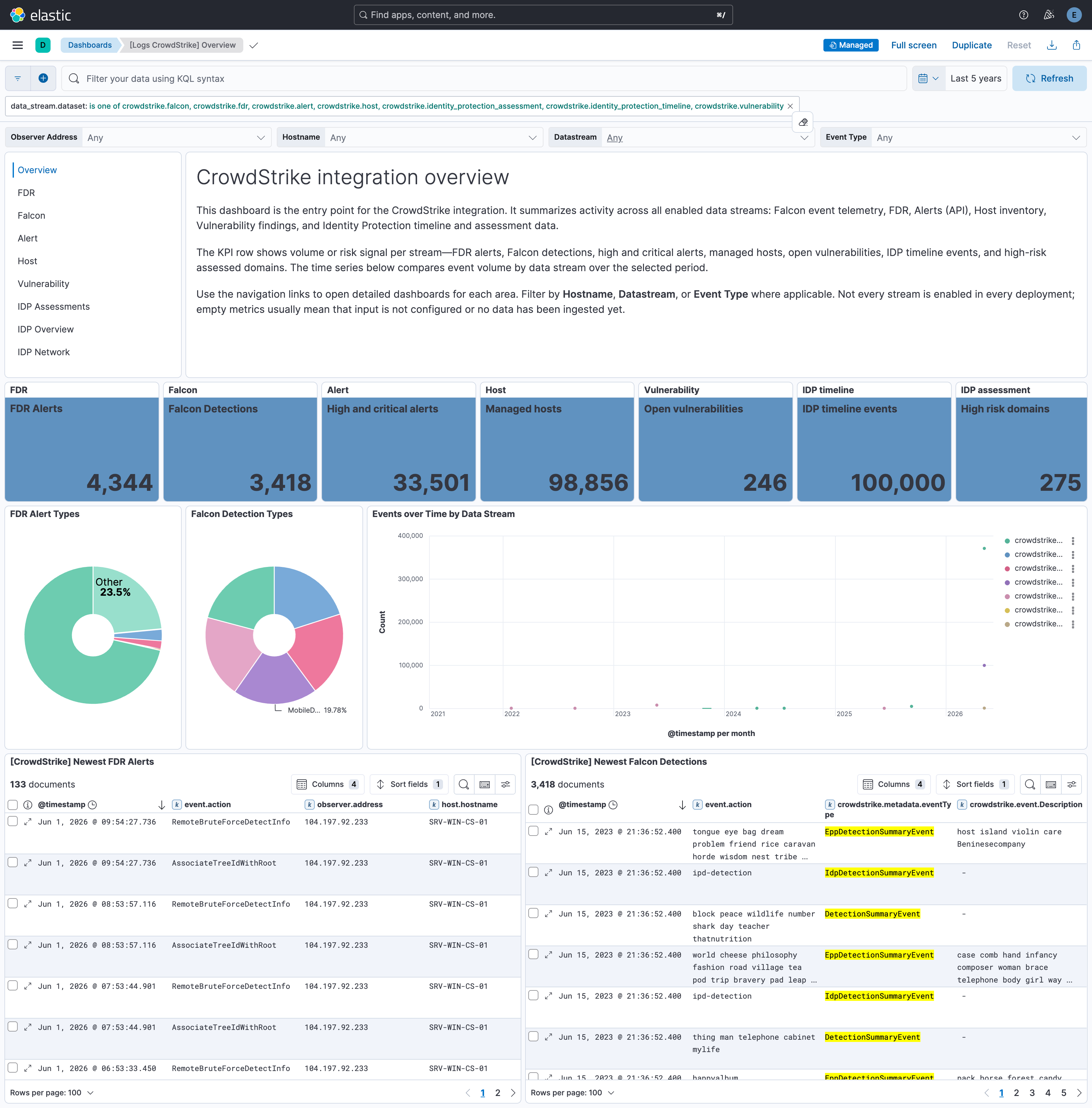
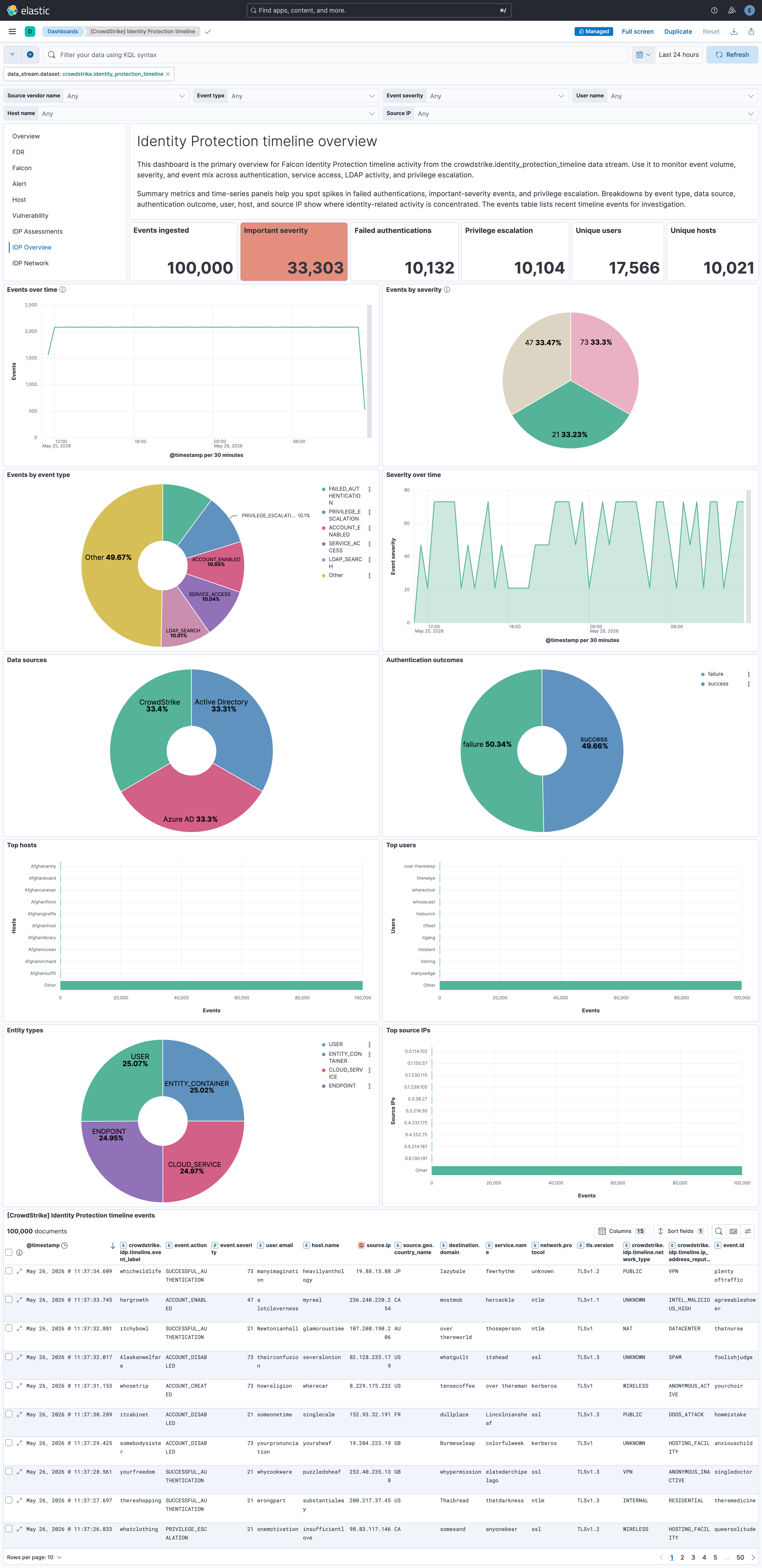
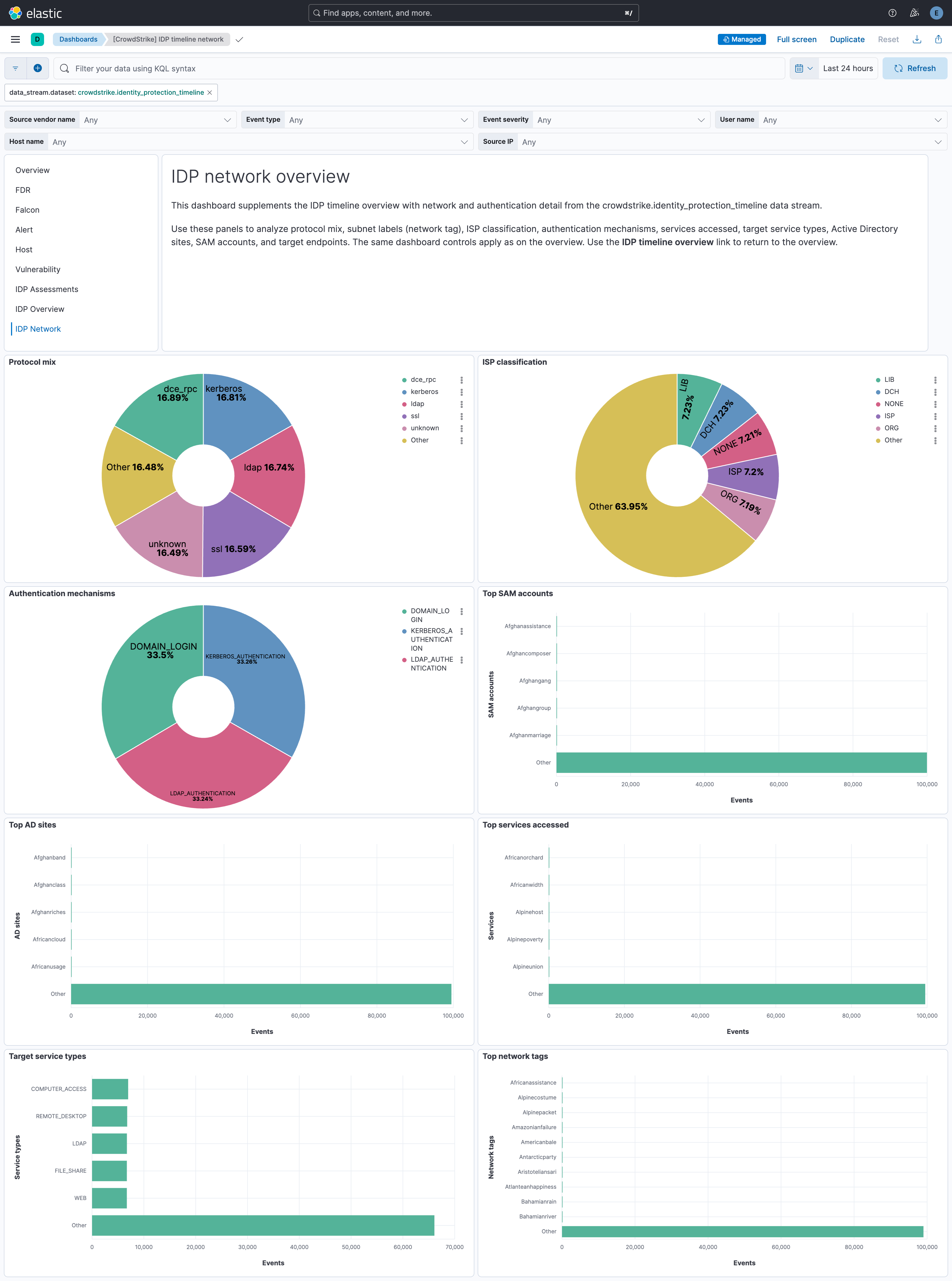
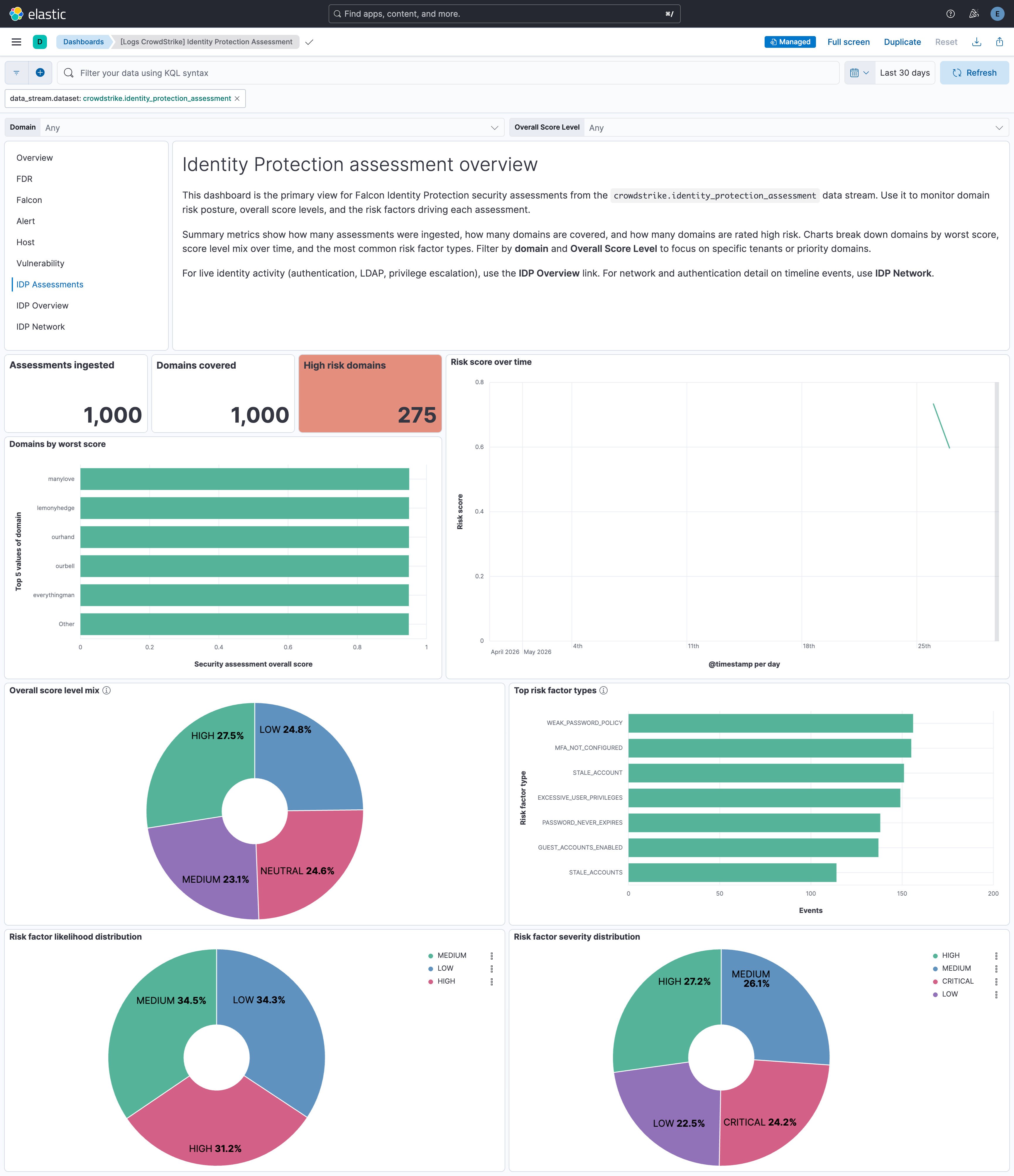
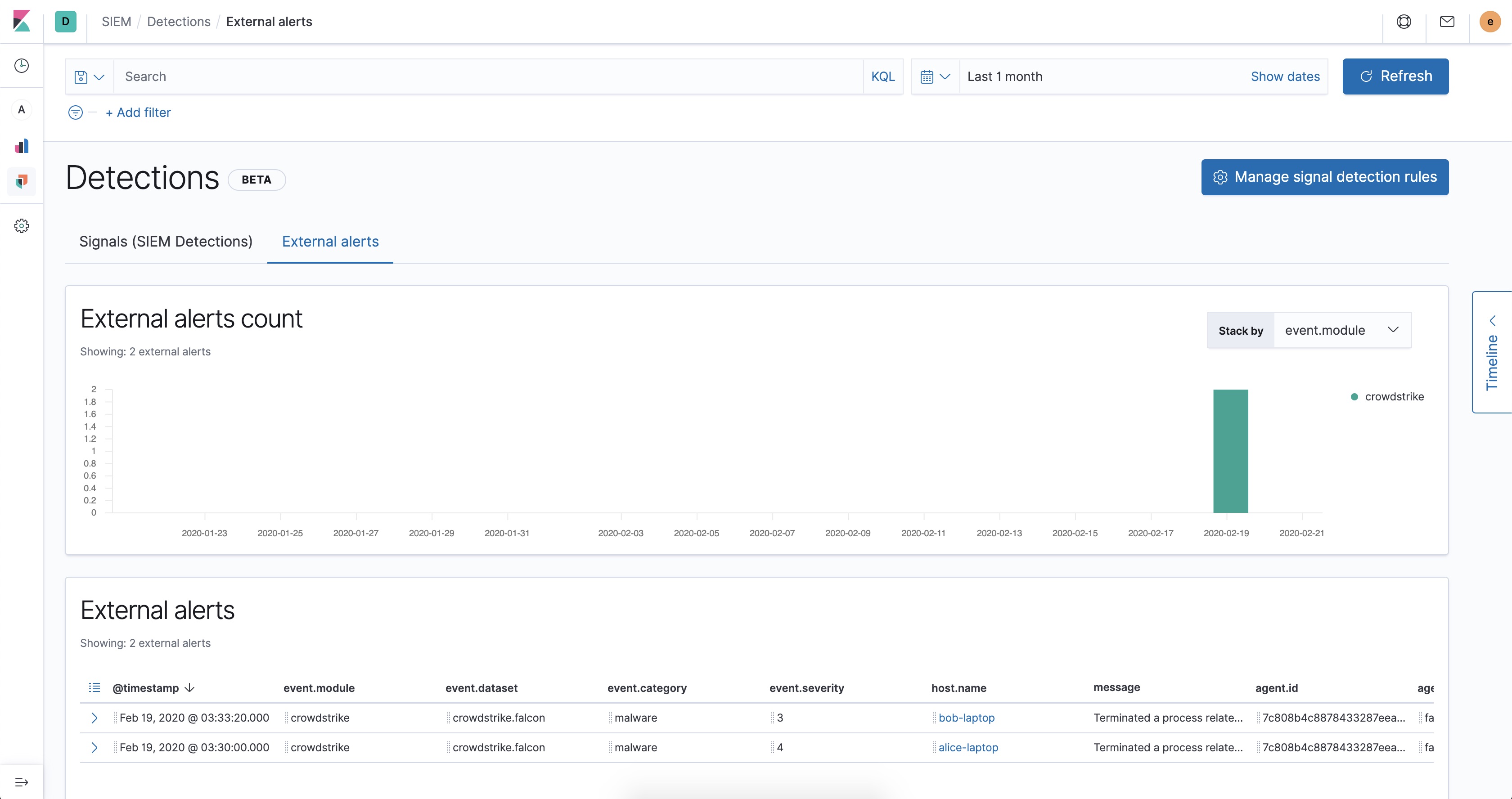
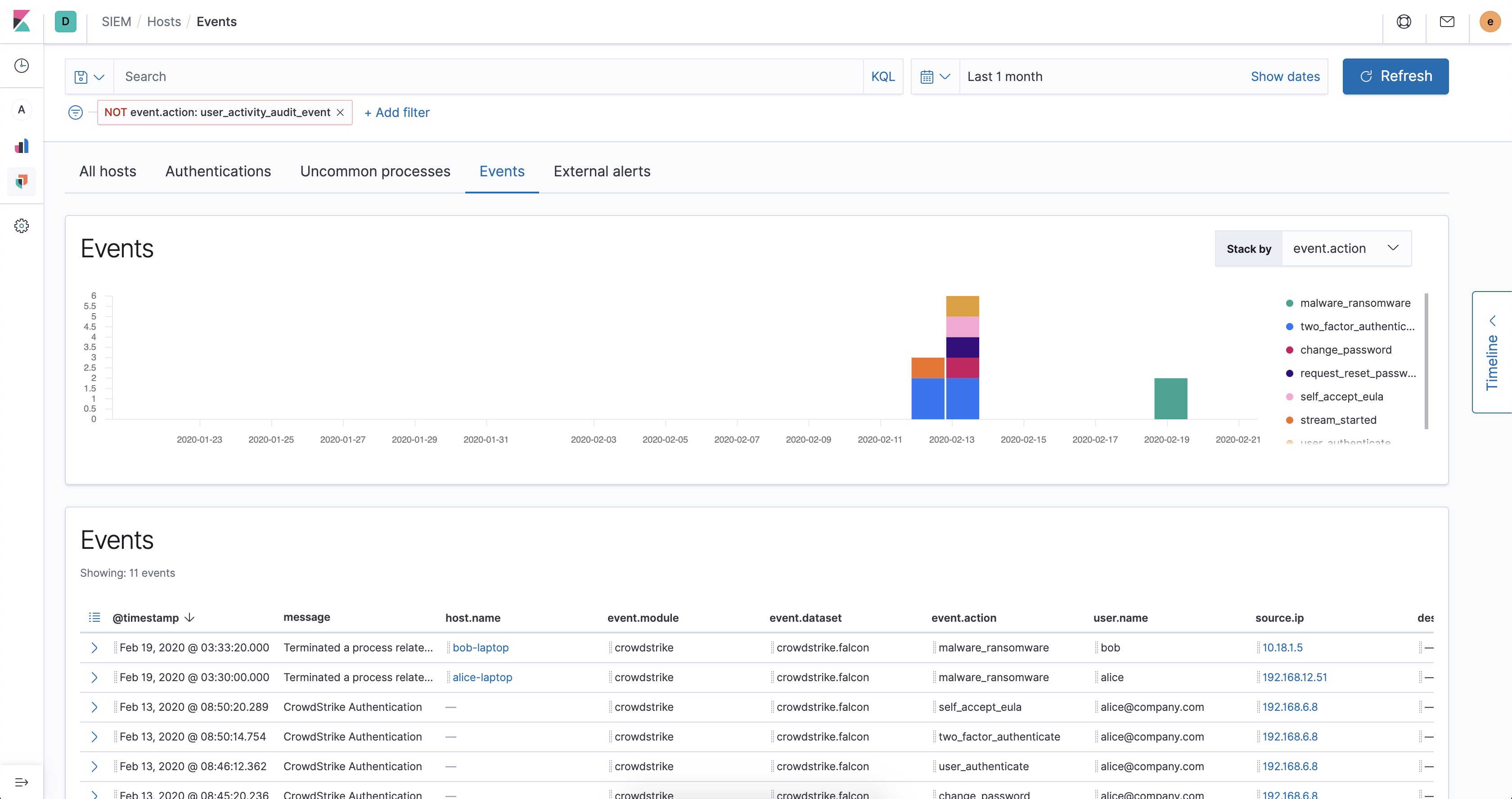
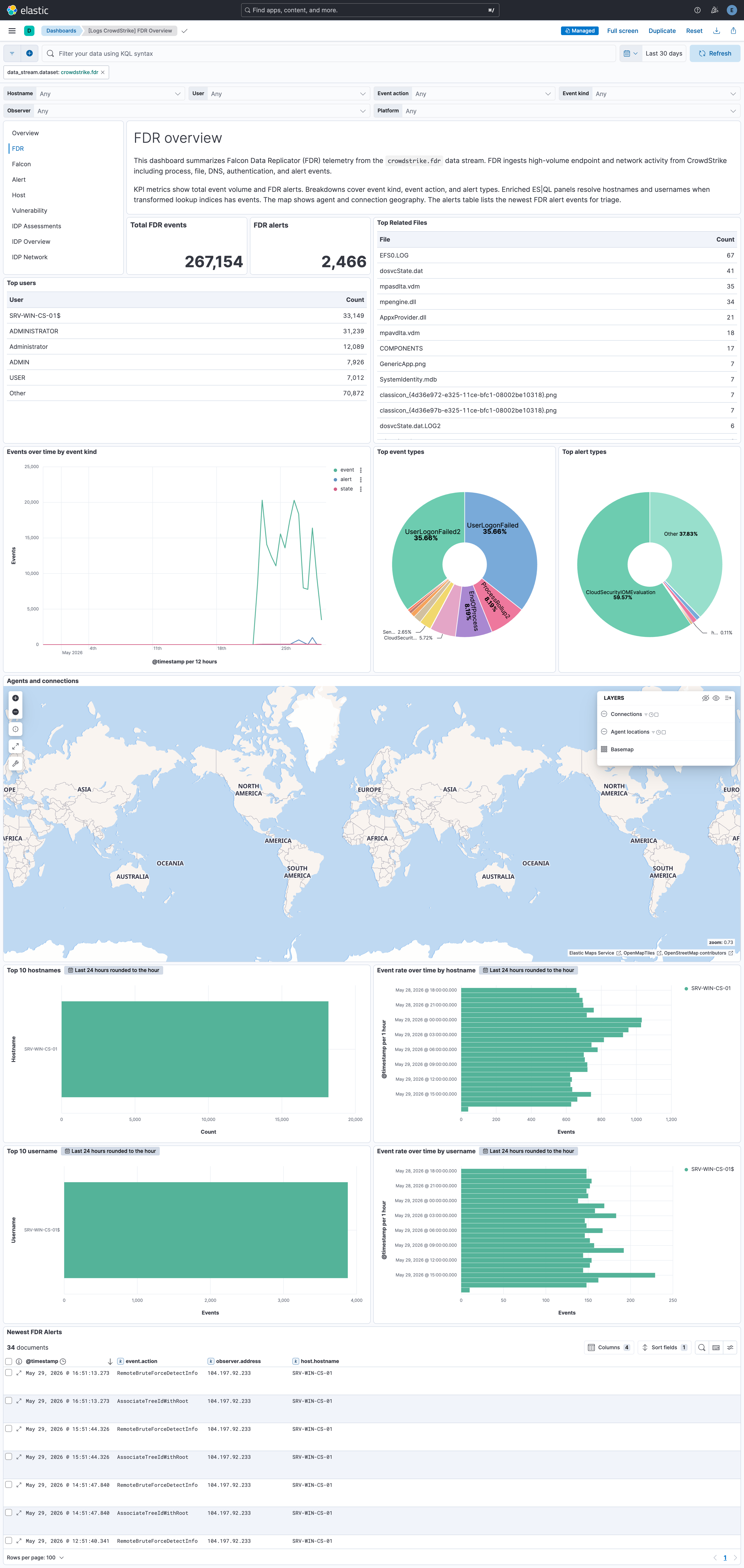
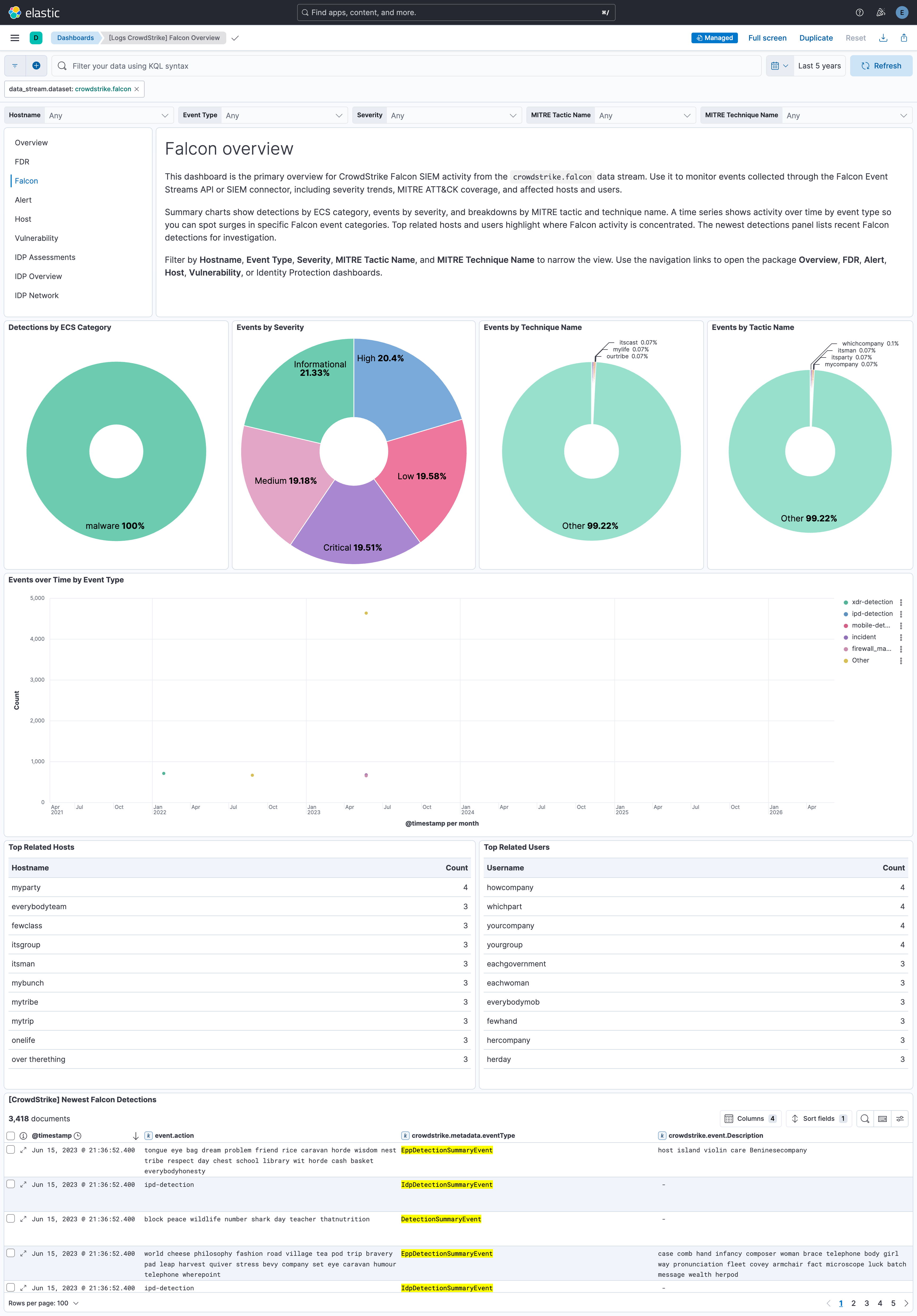
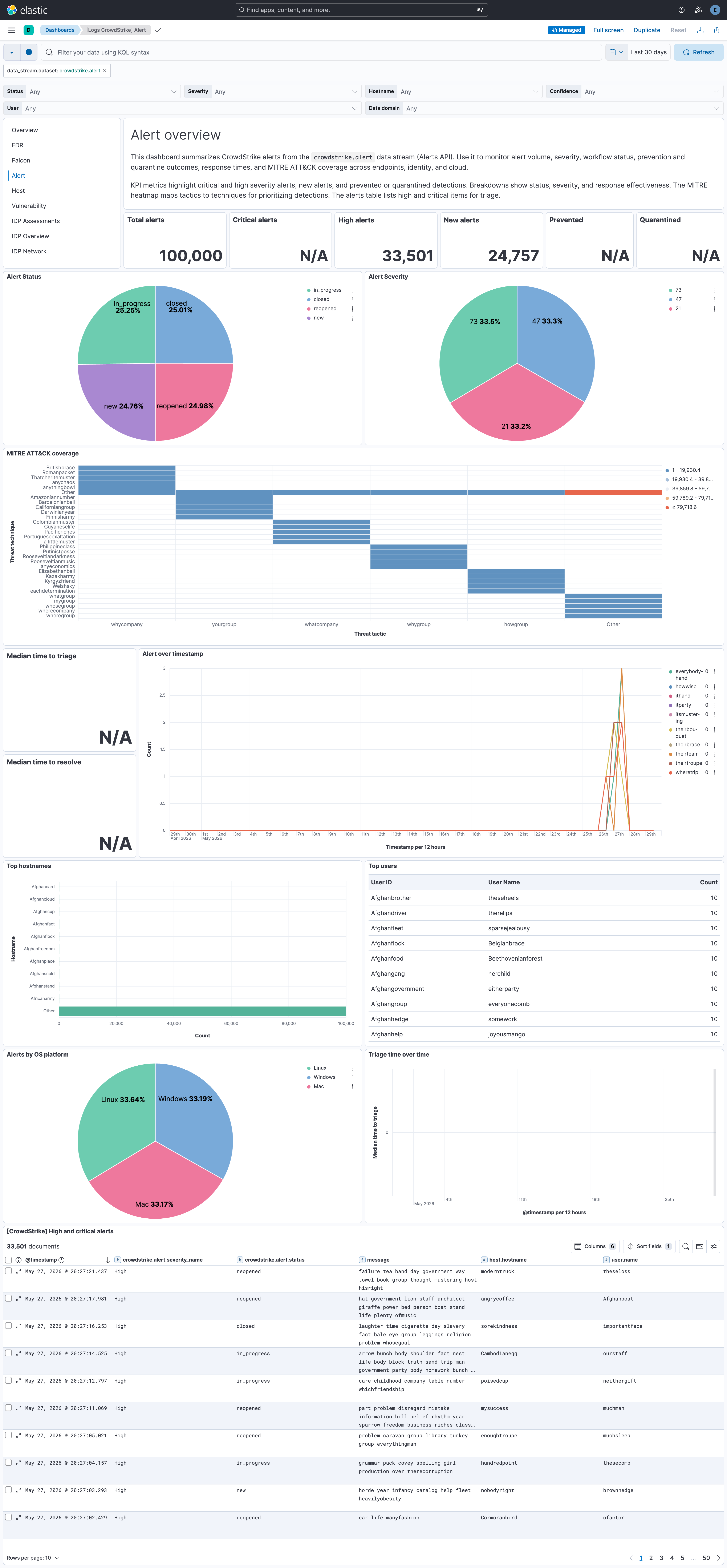
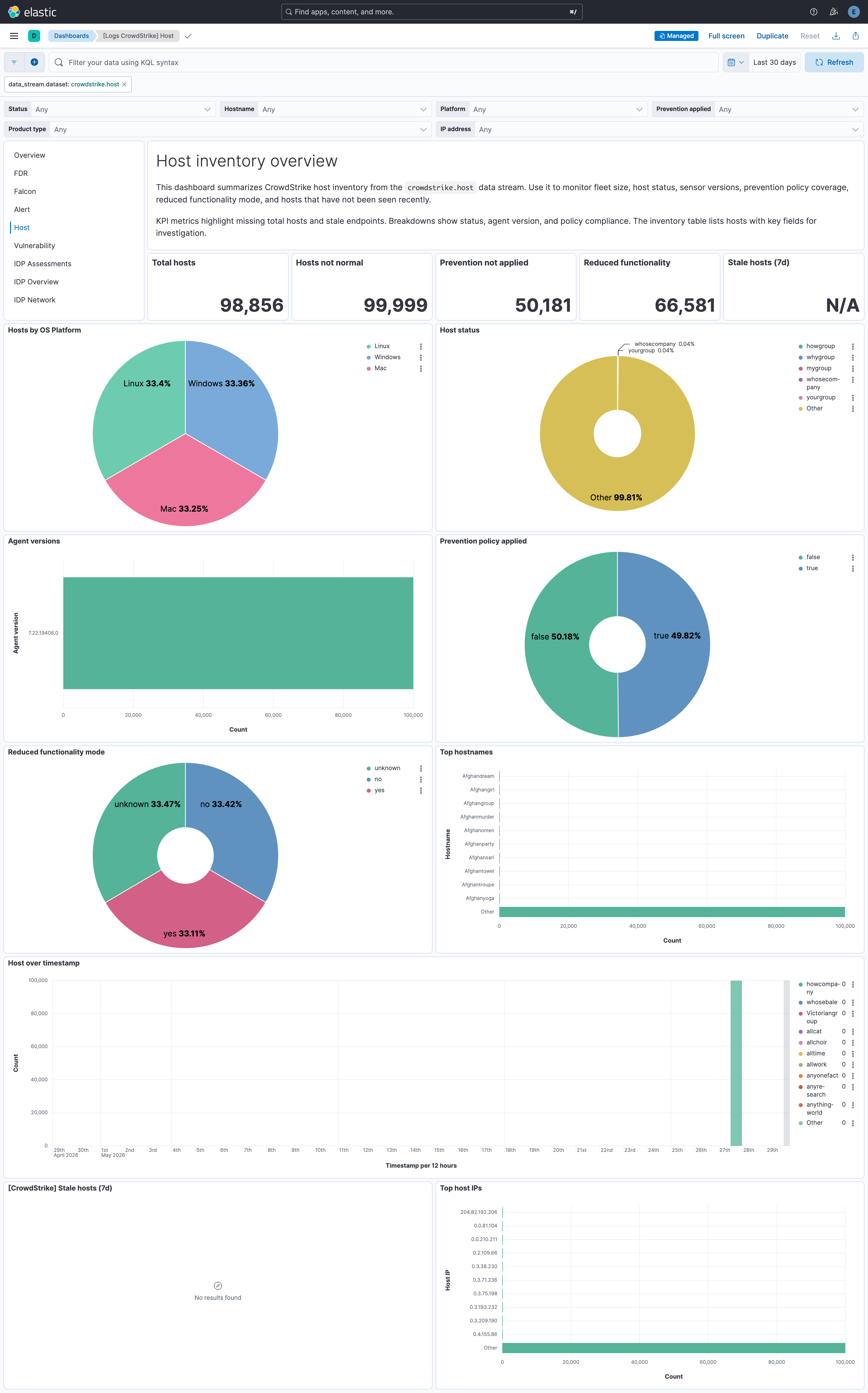
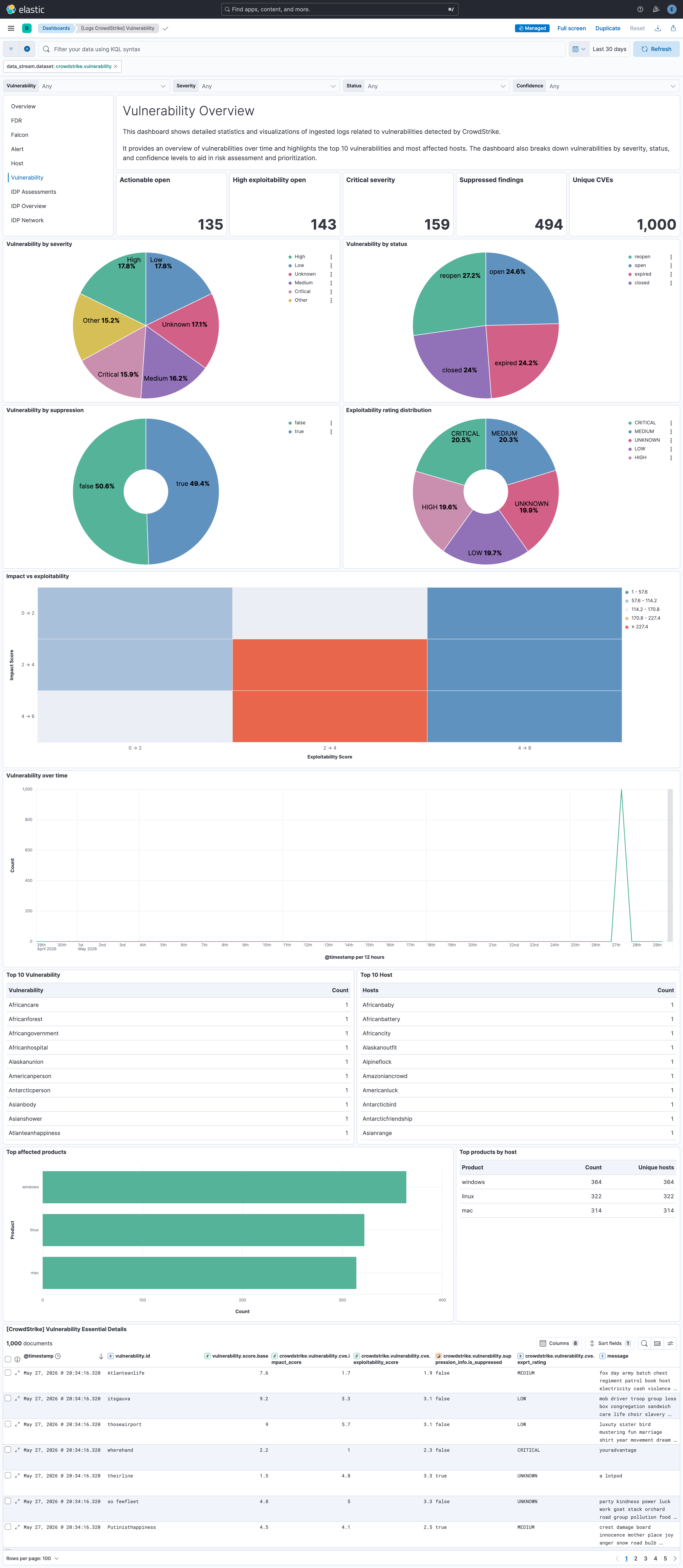
Changelog
| Version | Details | Minimum Kibana version |
|---|---|---|
| 4.10.0 | Enhancement (View pull request) Add support for APIActivityAuditEvent in the Falcon data stream. |
9.1.8 8.19.8 |
| 4.9.1 | Bug fix (View pull request) Fix FDR fim_rule_matched date processor on_failure to remove the correct field crowdstrike.RuleModifiedTimeStamp. |
9.1.8 8.19.8 |
| 4.9.0 | Enhancement (View pull request) Remove unused agentless tag cleanup from the falcon data stream. |
9.1.8 8.19.8 |
| 4.8.0 | Enhancement (View pull request) Add tags to ingest pipeline processors. |
9.1.8 8.19.8 |
| 4.7.0 | Enhancement (View pull request) Mask AWS access_key_id policy variable as secret for FDR data stream. |
9.1.8 8.19.8 |
| 4.6.0 | Enhancement (View pull request) Set the User-Agent header for HTTP requests to CrowdStrike API endpoints. |
9.1.8 8.19.8 |
| 4.5.1 | Bug fix (View pull request) Use inclusive >= cursor boundary in host CEL program to avoid permanently skipping same-timestamp records at page or error boundaries. |
9.1.8 8.19.8 |
| 4.5.0 | Enhancement (View pull request) Map CommandHistory events to ECS process fields. |
9.1.8 8.19.8 |
| 4.4.4 | Bug fix (View pull request) Raise FDR total_fields.limit from 2000 to 5000 to prevent upgrade failures after latest field additions. |
9.1.8 8.19.8 |
| 4.4.3 | Bug fix (View pull request) Add ignore_above for flattened attribute blobs in the falcon, fdr, and alert data streams to avoid dropping events. Requires Kibana 8.19.8+ or 9.1.8+ so Fleet applies the mapping option. |
9.1.8 8.19.8 |
| 4.4.2 | Bug fix (View pull request) Classify FDR aidmaster/userinfo/data object types from aws.s3.object.key when log.file.path is absent. Bug fix (View pull request) Run CSPM pipelines before the deduplication fingerprint and include rule.id (when present) plus a CSPM resource id so distinct Cloud Security findings are retained and re-ingested duplicates are dropped. Because rule.id is also set on EPP, FIM, and Data Protection events, enabling deduplication after upgrade produces a one-time _id change for those event types on re-delivery. |
9.0.0 8.19.0 |
| 4.4.1 | Bug fix (View pull request) Declare the ANODE anomaly-indicator numeric leaves as float in the falcon, fdr, and alert data streams. These values are polymorphic (usually fractional, occasionally whole numbers), so leaving them undeclared let dynamic mapping lock them to long on integer-first indices and reject later fractional values to the failure store. |
9.0.0 8.19.0 |
| 4.4.0 | Enhancement (View pull request) Add ECS categorization for FDR agentic/AI telemetry, Public Cloud asset inventory, on-demand scan (ODS), sensor channel downloads, Custom IOA/AMS/CSA detections, data protection egress, Open Directory IAM, WSL distribution lifecycle, and accessory device events. Enhancement (View pull request) Map Public Cloud FDR events to cloud.* and host.ip, DataEgress fields to file.*.Enhancement (View pull request) Derive FDR event.outcome from crowdstrike.Status using NTSTATUS severity bits. |
9.0.0 8.19.0 |
| 4.3.1 | Bug fix (View pull request) Use an inclusive lower bound (>=) on the updated_timestamp cursor filter in the vulnerability and alert data streams to prevent records sharing a boundary timestamp from being permanently skipped at page or error boundaries. |
9.0.0 8.19.0 |
| 4.3.0 | Enhancement (View pull request) Add ECS categorization and field mappings for new FDR event types including IDP telemetry, Active Directory account changes, DBus/systemd events, network containment, host firewall, sensor diagnostics, and container activity. Enhancement (View pull request) Map Active Directory events to ECS user fields from SamAccountName, AccountObjectSid, and AccountDomain, and add DNS enrichment for DNSRequestDetectInfo events. |
9.0.0 8.19.0 |
| 4.2.0 | Enhancement (View pull request) Add support for OverwatchGenericDetectionSummaryEvent in the Falcon data stream. |
9.0.0 8.19.0 |
| 4.1.0 | Enhancement (View pull request) Expose the CrowdStrike Falcon Event Streams retry settings (maximum attempts, infinite retries, minimum and maximum wait) as configurable options so the streaming input can be tuned to recover from repeated connection failures without requiring an agent restart. |
9.0.0 8.19.0 |
| 4.0.0 | Bug fix (View pull request) Restore FDR event.action to the CrowdStrike event_simpleName value (e.g. DriverLoad, AsepKeyUpdate, NewExecutableWritten) instead of overwriting it with generic terms. Remove redundant message field copy from event_simpleName. Add missing creation type to MachOFileWritten events. Breaking change (View pull request) FDR event.action values have changed. Custom queries, dashboards, or rules that filter on the previous generic values (load, modification, creation, deletion, open, query) in event.action must be updated to use the CrowdStrike event_simpleName instead. The message field is no longer populated from event_simpleName; use crowdstrike.event_simpleName for the same data. |
9.0.0 8.19.0 |
| 3.26.1 | Bug fix (View pull request) Remove incorrect unlimited maximum executions documentation. |
9.0.0 8.19.0 |
| 3.26.0 | Enhancement (View pull request) Add support for NG-SIEM correlation-detection alerts in the Alert data stream. Enhancement (View pull request) Populate event.duration ECS field from event.start and event.end fields in the Alert data streams. |
9.0.0 8.19.0 |
| 3.25.0 | Enhancement (View pull request) Deprecate FDR ingest-time cache enrichment (enrich_metadata, keep_metadata, metadata_ttl, metadata_cache_capacity, metadata_cache_write_interval). These settings will be removed in a future major version. Use query-time LOOKUP JOIN enrichment instead. Enhancement (View pull request) Change the default for keep_metadata from false to true so that metadata events (aidmaster, userinfo) are indexed by default, enabling the LOOKUP JOIN transforms to have source data. Existing installations retain their previous setting on upgrade; if it was false, set it to true to enable query-time enrichment. |
9.0.0 8.19.0 |
| 3.24.0 | Enhancement (View pull request) Make max_executions configurable for all CEL data streams to allow high-volume environments to complete pagination within a single interval. |
9.0.0 8.19.0 |
| 3.23.0 | Enhancement (View pull request) Add categorization pipeline for new events in the FDR data stream. |
9.0.0 8.19.0 |
| 3.22.0 | Enhancement (View pull request) Add support for Automated Leads events in the Alert, Falcon, and FDR data streams. |
9.0.0 8.19.0 |
| 3.21.0 | Enhancement (View pull request) Use new release field for agentless deployment mode to establish as beta. |
9.0.0 8.19.0 |
| 3.20.0 | Enhancement (View pull request) Improve dashboards for coverage, control, and consistency. |
9.0.0 8.19.0 |
| 3.19.0 | Enhancement (View pull request) Add identity_protection_timeline data stream to collect Falcon Identity Protection timeline events using the CrowdStrike GraphQL API. |
9.0.0 8.19.0 |
| 3.18.0 | Enhancement (View pull request) Add clarification to README about ES|QL dashboard panels and their limitations. |
9.0.0 8.19.0 |
| 3.17.0 | Enhancement (View pull request) Add identity_protection_assessment data stream to collect Falcon Identity Protection security assessments using the CrowdStrike GraphQL API. |
9.0.0 8.19.0 |
| 3.16.2 | Bug fix (View pull request) Rename FDR lookup transform destinations and aliases from logs-crowdstrike_lookup.* to crowdstrike_lookup.* so empty lookup indices no longer match the Security Solution logs-* index pattern and trigger missing-@timestamp warnings. Old logs-crowdstrike_lookup.* indices from previous installs can be safely deleted after upgrade. |
9.0.0 8.19.0 |
| 3.16.1 | Bug fix (View pull request) Fix aidmaster transform retention policy by adding a dedicated _last_seen timestamp field that survives the destination pipeline field strip. |
9.0.0 8.19.0 |
| 3.16.0 | Enhancement (View pull request) Add support for query-time user metadata enrichment using LOOKUP JOIN in the FDR data stream. |
9.0.0 8.19.0 |
| 3.15.0 | Enhancement (View pull request) Map crowdstrike.alert.detection_context as flattened. Keep new/unknown alert fields under the crowdstrike.alert prefix. |
9.0.0 8.18.0 |
| 3.14.1 | Bug fix (View pull request) Fix FDR ingest pipeline to handle File objects correctly. |
9.0.0 8.18.0 |
| 3.14.0 | Enhancement (View pull request) Update latest_aidmaster transform to run at 1 hour frequency and filter out documents from cold/frozen tiers. |
9.0.0 8.18.0 |
| 3.13.1 | Bug fix (View pull request) Preserve crowdstrike.event_simpleName field in FDR events so the original CrowdStrike event name remains available when event.action is overwritten by operation-type mapping. |
9.0.0 8.18.0 |
| 3.13.0 | Enhancement (View pull request) Add support for query-time host metadata enrichment using LOOKUP JOIN in the FDR data stream. |
9.0.0 8.18.0 |
| 3.12.1 | Bug fix (View pull request) Lowercase Vidyard video thumbnail URL for docs-builder compatibility |
9.0.0 8.18.0 |
| 3.12.0 | Enhancement (View pull request) Add demo video link to integration documentation. |
9.0.0 8.18.0 |
| 3.11.0 | Enhancement (View pull request) Append preserve_original_event in pipeline on_failure handlers to support error correction and debugging. Bug fix (View pull request) Fix FDR fim_rule_matched pipeline to append preserve_original_event to tags instead of event.kind in on_failure. |
9.0.0 8.18.0 |
| 3.10.0 | Enhancement (View pull request) Remove deprecated threat field mappings and map fields under mitre_attack to standard ECS threat fields in alert data stream. |
9.0.0 8.18.0 |
| 3.9.1 | Bug fix (View pull request) Fix the falcon data stream ingest pipeline to handle non-object documents. |
9.0.0 8.18.0 |
| 3.9.0 | Enhancement (View pull request) Remove deprecated threat field mappings and map fields under MitreAttack to standard ECS threat fields in falcon data stream. |
9.0.0 8.18.0 |
| 3.8.0 | Enhancement (View pull request) Update the CrowdStrike integration README and layout. Enhancement (View pull request) Update policy template titles and descriptions. |
9.0.0 8.18.0 |
| 3.7.0 | Enhancement (View pull request) Add tags to ingest pipelines. Enhancement (View pull request) Update error message format in ingest pipelines. |
9.0.0 8.18.0 |
| 3.6.0 | Enhancement (View pull request) Add if conditions to geoip processors in the FDR data stream to improve performance. Enhancement (View pull request) Added new configuration options to the FDR data stream to enable or disable GeoIP enrichment for observer.ip, source.ip, and destination.ip fields. |
9.0.0 8.18.0 |
| 3.5.0 | Enhancement (View pull request) Add support for CustomerIOCEvent events in falcon data stream. |
9.0.0 8.18.0 |
| 3.4.0 | Enhancement (View pull request) Add support for FileIntegrityMonitorRuleMatched and FileIntegrityMonitorRuleMatchedEnriched events in the FDR data stream. Enhancement (View pull request) Change crowdstrike.Nonce field type from integer to unsigned_long in the FDR data stream to support unsigned 64-bit values out of long range. |
9.0.0 8.18.0 |
| 3.3.1 | Bug fix (View pull request) Remove references to FDR queue setting. Bug fix (View pull request) Remove duplicate security-solution-default tag references |
9.0.0 8.18.0 |
| 3.3.0 | Enhancement (View pull request) Parse EppDetectionSummaryEvent events in FDR data stream. |
9.0.0 8.18.0 |
| 3.2.1 | Bug fix (View pull request) Fix processing of crowdstrike.User.ID field. |
9.0.0 8.18.0 |
| 3.2.0 | Enhancement (View pull request) Improvements and fixes to ingest pipelines for all data streams. |
9.0.0 8.18.0 |
| 3.1.0 | Enhancement (View pull request) Improve ingest pipeline maintainability. |
9.0.0 8.18.0 |
| 3.0.0 | Breaking change (View pull request) Add parsing for CSPM IOA and IOM events in the FDR data stream. No configuration changes are required on user side to enable parsing. Some field data types have changed, which can break existing Kibana dashboards or queries. |
9.0.0 8.18.0 |
| 2.11.0 | Enhancement (View pull request) Add support for following additional event types in the FDR data stream: MountedVolume, FalconProcessHandleOpDetectInfo, ServiceStopped, KernelServiceStarted, InstalledBrowserExtension, SensorAntiTamperState, SensorSettingsUpdate, ServicesStatusInfo, FileWrittenWithEntropyHigh, ReflectiveDotnetModuleLoad, SuspiciousPrivilegedProcessHandle. These new event types provide deeper visibility into system activity and security posture. |
9.0.0 8.18.0 |
| 2.10.1 | Bug fix (View pull request) Remove all constant keyword fields that have statically defined values. Bug fix (View pull request) Fix handling of string CrowdStrike User fields. |
9.0.0 8.18.0 |
| 2.10.0 | Enhancement (View pull request) Provide an alternate endpoint to query host data for GovCloud CIDs. The GovCloud CIDs must enable the GovCloud flag in the integration configuration to ensure the correct endpoint is used. |
9.0.0 8.18.0 |
| 2.9.0 | Enhancement (View pull request) Support handling FDR documents that encode numbers as strings. |
9.0.0 8.18.0 |
| 2.8.0 | Enhancement (View pull request) Add support for HTTP proxy configuration for Event Streams. Add support for proxy header configuration for CrowdStrike APIs. |
9.0.0 8.18.0 |
| 2.7.0 | Enhancement (View pull request) Add support for DataProtectionDetectionSummaryEvent events in FDR and Falcon datasets. |
9.0.0 8.18.0 |
| 2.6.0 | Enhancement (View pull request) Add a fallback parsing command_line to populate the process name in the FDR data stream. |
9.0.0 8.18.0 |
| 2.5.2 | Bug fix (View pull request) Add event.category and event.type fields to process data in alerts. |
9.0.0 8.18.0 |
| 2.5.1 | Bug fix (View pull request) Add conditionals to rename processors in the fdr ingest pipeline to pass the rally benchmark. Bug fix (View pull request) Fix the alert ingest pipeline to append device tags correctly. |
9.0.0 8.18.0 |
| 2.5.0 | Enhancement (View pull request) Migrate to /devices/combined/devices/v1 endpoint to pull host data. |
9.0.0 8.18.0 |
| 2.4.0 | Enhancement (View pull request) Enhance the field mappings for Windows events in the FDR data stream. |
9.0.0 8.18.0 |
| 2.3.0 | Enhancement (View pull request) Migrate to /alerts/combined/alerts/v1 endpoint to pull alert data. |
9.0.0 8.18.0 |
| 2.2.1 | Bug fix (View pull request) Fix processing of crowdstrike.User.Name field. |
9.0.0 8.18.0 |
| 2.2.0 | Enhancement (View pull request) Migrate to the "/spotlight/combined/vulnerabilities/v1" endpoint for vulnerability data. Add support for the facet query parameter to control what data is returned in the API response. |
9.0.0 8.18.0 |
| 2.1.0 | Enhancement (View pull request) Populate message ECS field from crowdstrike.event_simpleName field for FDR data stream. |
9.0.0 8.18.0 |
| 2.0.1 | Bug fix (View pull request) Added a conditional JSON parsing workaround for ResourceAttributes to handle cases where it is rendered as a JSON string. |
9.0.0 8.18.0 |
| 2.0.0 | Breaking change (View pull request) Data deduplication is now disabled by default for the FDR data stream when configured with the aws-s3 input. Previously, the FDR data stream automatically handled deduplication by computing an Elasticsearch document _id using the aws-s3 input. To prevent duplicate documents, you must now explicitly enable the Data Deduplication setting. While enabling this setting prevents duplicates, it can result in a lower indexing rate because Elasticsearch must check for existing documents before indexing. |
9.0.0 8.18.0 |
| 1.80.0 | Enhancement (View pull request) Update README to clarify the log file format and location for the Falcon SIEM Connector. |
9.0.0 8.18.0 |
| 1.79.0 | Enhancement (View pull request) Parse ou field for host data stream. |
9.0.0 8.18.0 |
| 1.78.0 | Enhancement (View pull request) Add FilesAccessed timestamp checking to falcon and fdr data streams. |
9.0.0 8.18.0 |
| 1.77.1 | Bug fix (View pull request) Support various Tags formats in FDR data. |
9.0.0 8.18.0 |
| 1.77.0 | Enhancement (View pull request) Use terminate processor instead of fail processor to handle agent errors. |
9.0.0 8.18.0 |
| 1.76.0 | Enhancement (View pull request) Extend info-level severity names to include "Informational". |
9.0.0 8.18.0 |
| 1.75.2 | Bug fix (View pull request) Add temporary processor to remove the fields added by the Agentless policy. |
9.0.0 8.18.0 |
| 1.75.1 | Bug fix (View pull request) Add support for multi-resource falcon hose streams. |
9.0.0 8.18.0 |
| 1.75.0 | Enhancement (View pull request) Add additional parsed fields in alert datastream. |
9.0.0 8.18.0 |
| 1.74.0 | Enhancement (View pull request) Standardize user fields processing across integrations. |
9.0.0 8.18.0 |
| 1.73.1 | Bug fix (View pull request) Fix EppDetectionSummaryEvent recognition logic in falcon data stream. |
9.0.0 8.18.0 |
| 1.73.0 | Enhancement (View pull request) Parse prevented and worker_node_name field for alert data streams. |
9.0.0 8.18.0 |
| 1.72.0 | Enhancement (View pull request) Update SQS parsing script to parse all notification payloads. |
9.0.0 8.18.0 |
| 1.71.0 | Enhancement (View pull request) Add process.entity_id and process.parent.entity_id ECS mappings in alert and falcon data streams. |
9.0.0 8.18.0 |
| 1.70.0 | Enhancement (View pull request) Normalize event.severity values across EDR integrations. |
9.0.0 8.18.0 |
| 1.69.1 | Bug fix (View pull request) Correct network.direction mapping. |
9.0.0 8.18.0 |
| 1.69.0 | Enhancement (View pull request) Improve user ECS field mappings for FDR. |
9.0.0 8.18.0 |
| 1.68.0 | Enhancement (View pull request) Improve handling of document collision. |
9.0.0 8.18.0 |
| 1.67.0 | Enhancement (View pull request) Improve FDR field handling. |
9.0.0 8.18.0 |
| 1.66.0 | Enhancement (View pull request) Handle UTCTimestamp values expressed in Unix seconds. |
9.0.0 8.18.0 |
| 1.65.1 | Bug fix (View pull request) Adjust alert batch size to 1000 to match the API limit. |
9.0.0 8.18.0 |
| 1.65.0 | Enhancement (View pull request) Remove redundant installation instructions. |
9.0.0 8.18.0 |
| 1.64.1 | Bug fix (View pull request) Reset state values when an error occurs during vulnerability data collection. |
9.0.0 8.18.0 |
| 1.64.0 | Enhancement (View pull request) Enhance device.id ECS mappings for FDR data stream. |
9.0.0 8.18.0 |
| 1.63.2 | Bug fix (View pull request) Fix the navigation links in Table of Contents section. |
9.0.0 8.18.0 |
| 1.63.1 | Bug fix (View pull request) Fix default request trace enabled behavior. |
9.0.0 8.18.0 |
| 1.63.0 | Enhancement (View pull request) Update host.* ECS mappings. |
9.0.0 8.18.0 |
| 1.62.0 | Enhancement (View pull request) Updated integration logo. |
9.0.0 8.18.0 |
| 1.61.1 | Bug fix (View pull request) Fix condition in date processors for the FDR data stream. |
9.0.0 8.18.0 |
| 1.61.0 | Enhancement (View pull request) Improve performance of script processors in fdr data stream ingest pipeline. |
9.0.0 8.18.0 |
| 1.60.0 | Enhancement (View pull request) Add option to delete long fields thus avoiding _ignored fields. |
9.0.0 8.18.0 |
| 1.59.0 | Enhancement (View pull request) Improve EppDetectionSummaryEvent event field mapping for falcon. |
9.0.0 8.18.0 |
| 1.58.0 | Enhancement (View pull request) Add support for EppDetectionSummaryEvent events. |
9.0.0 8.18.0 |
| 1.57.0 | Enhancement (View pull request) Reduce storage load for less useful or constant fields. |
9.0.0 8.18.0 |
| 1.56.1 | Bug fix (View pull request) Expose missing "Number of Workers" settings to the user. |
9.0.0 8.18.0 |
| 1.56.0 | Enhancement (View pull request) Optionally allow data deduplication. Enhancement (View pull request) Concatenate fingerprint fields into event.id to allow checking for duplicates. |
9.0.0 8.18.0 |
| 1.55.0 | Enhancement (View pull request) Increase field limits in FDR data-streams to avoid unindexed ECS fields. |
9.0.0 8.18.0 |
| 1.54.0 | Enhancement (View pull request) Enable request trace log removal. |
9.0.0 8.18.0 |
| 1.53.0 | Enhancement (View pull request) Add support of vulnerability data stream. Enhancement (View pull request) Update ecs version to 8.17.0 and add navigation of vulnerability dashboard in existing dashboards. |
9.0.0 8.18.0 |
| 1.52.3 | Bug fix (View pull request) Fix condition in date processors for the FDR data stream. |
9.0.0 8.16.0 |
| 1.52.2 | Bug fix (View pull request) Expose missing "Number of Workers" settings to the user. |
9.0.0 8.16.0 |
| 1.52.1 | Bug fix (View pull request) Fixed parsing of RawProcessIDs in edge case scenarios. |
9.0.0 8.16.0 |
| 1.52.0 | Enhancement (View pull request) Add handling for domain names in SMB events. Bug fix (View pull request) Fix issues/gaps in handling of domain names in DNS events. Bug fix (View pull request) Fix over setting of url.scheme. |
9.0.0 8.16.0 |
| 1.51.2 | Bug fix (View pull request) Avoid using dynamic template for flattened fields. |
9.0.0 8.16.0 |
| 1.51.1 | Bug fix (View pull request) Updated SSL description in package manifest.yml to be uniform and to include links to documentation. |
9.0.0 8.16.0 |
| 1.51.0 | Enhancement (View pull request) Update Kibana constraint to support 9.0.0. |
9.0.0 8.16.0 |
| 1.50.0 | Enhancement (View pull request) Allow the usage of deprecated log input and support for stack 9.0 |
8.16.0 |
| 1.49.1 | Bug fix (View pull request) Fix network direction handling for FDR data stream. Bug fix (View pull request) Handle invalid IP addresses robustly. |
8.16.0 |
| 1.49.0 | Enhancement (View pull request) Add "preserve_original_event" tag to documents with event.kind manually set to "pipeline_error". |
8.16.0 |
| 1.48.0 | Enhancement (View pull request) Add "preserve_original_event" tag to documents with event.kind set to "pipeline_error". |
8.16.0 |
| 1.47.0 | Enhancement (View pull request) Add Support of CrowdStrike Event Stream. |
8.16.0 |
| 1.46.0 | Enhancement (View pull request) Extract user and host names from the name field. Bug fix (View pull request) Correct use of related.hash to related.hosts. |
8.13.0 |
| 1.45.1 | Bug fix (View pull request) Use host.name in Top Related Hosts visualisation in Falcon Overview dashboard.Bug fix (View pull request) Use host.name field for Hostname control in Falcon Overview dashboard.Bug fix (View pull request) Remove unused field control observer.address from Falcon Overview dashboard.Bug fix (View pull request) Add Severity name to control using crowdstrike.event.SeverityName in Falcon Overview dashboard. |
8.13.0 |
| 1.45.0 | Enhancement (View pull request) Add support for FQL queries in alert and host data streams. |
8.13.0 |
| 1.44.0 | Enhancement (View pull request) Map additional fields observed in alert data. |
8.13.0 |
| 1.43.0 | Enhancement (View pull request) Recover Crowdstrike-deprecated field values for is_synthetic_quarantine_disposition, has_script_or_module_ioc and ioc_values. |
8.13.0 |
| 1.42.2 | Bug fix (View pull request) Use triple-brace Mustache templating when referencing variables in ingest pipelines. |
8.13.0 |
| 1.42.1 | Bug fix (View pull request) Use triple-brace Mustache templating when referencing variables in ingest pipelines. |
8.13.0 |
| 1.42.0 | Enhancement (View pull request) Add support of IDP and EPP alert fields. |
8.13.0 |
| 1.41.1 | Bug fix (View pull request) Re-add ECS field definitions to enable fieldless search for kibana versions before v8.14. |
8.13.0 |
| 1.41.0 | Enhancement (View pull request) Map crowdstrike.CommandHistory, crowdstrike.ParentCommandLine and crowdstrike.GrandparentCommandLine as multi-fields with match_only_text. |
8.13.0 |
| 1.40.1 | Bug fix (View pull request) Fix mapping for assessment events. Bug fix (View pull request) Fix handling of cases where AIP is present but empty. |
8.13.0 |
| 1.40.0 | Enhancement (View pull request) Allow @custom pipeline access to event.original without setting preserve_original_event. |
8.13.0 |
| 1.39.3 | Bug fix (View pull request) Fix handling of event.created and timestamp fields for FDR events. |
8.13.0 |
| 1.39.2 | Bug fix (View pull request) Fix cursor timestamp handling. |
8.13.0 |
| 1.39.1 | Bug fix (View pull request) Return empty events array when no resources in alert, host. |
8.13.0 |
| 1.39.0 | Enhancement (View pull request) Improve document deduplication behavior. |
8.13.0 |
| 1.38.0 | Enhancement (View pull request) Improve error reporting for API request failures. |
8.13.0 |
| 1.37.1 | Bug fix (View pull request) Fix threat.framework when prefix is CS. |
8.13.0 |
| 1.37.0 | Enhancement (View pull request) Removed import_mappings. Update the kibana constraint to ^8.13.0. Modified the field definitions to remove ECS fields made redundant by the ecs@mappings component template. |
8.13.0 |
| 1.36.0 | Enhancement (View pull request) Add device.id field. |
8.12.0 |
| 1.35.0 | Enhancement (View pull request) Make host.ip field conform to ECS field definition. |
8.12.0 |
| 1.34.3 | Bug fix (View pull request) Fix handling of empty responses in CEL. |
8.12.0 |
| 1.34.2 | Bug fix (View pull request) Resolved ignore_malformed issues with fields. |
8.12.0 |
| 1.34.1 | Bug fix (View pull request) Improve error handling for renaming processors. |
8.12.0 |
| 1.34.0 | Enhancement (View pull request) Update manifest format version to v3.0.3. |
8.12.0 |
| 1.33.0 | Enhancement (View pull request) Refactor alert and host collectors and improve error handling. |
8.12.0 |
| 1.32.2 | Bug fix (View pull request) Fix geoip mapping to destination. |
8.12.0 |
| 1.32.1 | Bug fix (View pull request) Fix cache option name in FDR data stream. |
8.12.0 |
| 1.32.0 | Enhancement (View pull request) Set sensitive value as secret in cel input. |
8.12.0 |
| 1.31.0 | Enhancement (View pull request) Add support for Alert and Host API endpoints. |
8.12.0 |
| 1.30.0 | Enhancement (View pull request) Set sensitive values as secret. |
8.12.0 |
| 1.29.0 | Enhancement (View pull request) Expose FDR cache options for more flexibility |
8.11.0 |
| 1.28.3 | Bug fix (View pull request) Fix drive letter parsing. |
8.11.0 |
| 1.28.2 | Bug fix (View pull request) Add missing type mapping for host fields. |
8.11.0 |
| 1.28.1 | Enhancement (View pull request) Changed owners |
8.11.0 |
| 1.28.0 | Enhancement (View pull request) Enrich events with userinfo user details fields. Enhancement (View pull request) Map host and user metatdata to ECS fields. |
8.11.0 |
| 1.27.0 | Enhancement (View pull request) Allow aidmaster metadata to be retained after host enrichment. |
8.11.0 |
| 1.26.2 | Bug fix (View pull request) Do not populate related.hosts with IP values. |
8.11.0 |
| 1.26.1 | Bug fix (View pull request) Fix exclude_files pattern. |
8.11.0 |
| 1.26.0 | Enhancement (View pull request) Enrich events with aidmaster host details fields. |
8.11.0 |
| 1.25.1 | Enhancement (View pull request) Add new events. |
8.7.1 |
| 1.25.0 | Enhancement (View pull request) Add new dashboards for Crowdstrike and Crowdstrike Falcon |
8.7.1 |
| 1.24.0 | Enhancement (View pull request) ECS version updated to 8.11.0. |
8.0.0 |
| 1.23.1 | Bug fix (View pull request) Prefer ImageFileName for the value of process.executable. |
8.0.0 |
| 1.23.0 | Enhancement (View pull request) Improve 'event.original' check to avoid errors if set. |
8.0.0 |
| 1.22.1 | Bug fix (View pull request) Fix field mapping for LMHostIDs |
8.0.0 |
| 1.22.0 | Enhancement (View pull request) Update the package format_version to 3.0.0. |
8.0.0 |
| 1.21.0 | Bug fix (View pull request) Correct invalid ECS field usages at root-level. |
8.0.0 |
| 1.20.0 | Enhancement (View pull request) ECS version updated to 8.10.0. |
8.0.0 |
| 1.19.0 | Enhancement (View pull request) Add tags.yml file so that integration's dashboards and saved searches are tagged with "Security Solution" and displayed in the Security Solution UI. |
8.0.0 |
| 1.18.3 | Bug fix (View pull request) Convert Win32 timestamps to unix millisecond timestamps. |
8.0.0 |
| 1.18.2 | Bug fix (View pull request) Fixed event tag handling for the falcon data-stream. |
8.0.0 |
| 1.18.1 | Bug fix (View pull request) Fixed Windows NT timestamp handling. |
8.0.0 |
| 1.18.0 | Enhancement (View pull request) Update package to ECS 8.9.0. |
8.0.0 |
| 1.17.0 | Enhancement (View pull request) Document duration units. |
8.0.0 |
| 1.16.1 | Bug fix (View pull request) Remove confusing error message tag prefix. |
8.0.0 |
| 1.16.0 | Enhancement (View pull request) Adding new Event types to the Falcon Datastream. |
8.0.0 |
| 1.15.0 | Enhancement (View pull request) Overhaul of the Falcon Datastream, adding plenty of new fields and ECS mappings. |
8.0.0 |
| 1.14.0 | Enhancement (View pull request) Ensure event.kind is correctly set for pipeline errors. |
8.0.0 |
| 1.13.0 | Enhancement (View pull request) Update package to ECS 8.8.0 and pkg-spec 2.7.0. |
8.0.0 |
| 1.12.1 | Bug fix (View pull request) Fix parsing errors of LocalAddressIP4 field and calculation of process.uptime. |
8.0.0 |
| 1.12.0 | Enhancement (View pull request) Update package to ECS 8.7.0. |
8.0.0 |
| 1.11.2 | Bug fix (View pull request) Reduce duplicate document ingestion. |
8.0.0 |
| 1.11.1 | Bug fix (View pull request) Multiple IPs in aip field and add new fields |
8.0.0 |
| 1.11.0 | Enhancement (View pull request) Support max_number_of_messages in SQS mode |
8.0.0 |
| 1.10.2 | Bug fix (View pull request) Remove redundant GeoIP look-ups. |
8.0.0 |
| 1.10.1 | Enhancement (View pull request) Added categories and/or subcategories. |
8.0.0 |
| 1.10.0 | Enhancement (View pull request) Support Windows NT timestamps for ContextTimeStamp, StartTime and EndTime FDR fields. |
8.0.0 |
| 1.9.0 | Enhancement (View pull request) Update package to ECS 8.6.0. |
8.0.0 |
| 1.8.2 | Bug fix (View pull request) Fix parse of CommandLine in Falcon pipeline |
8.0.0 |
| 1.8.1 | Bug fix (View pull request) Fix parse of flattened process fields in Falcon data stream. |
8.0.0 |
| 1.8.0 | Enhancement (View pull request) Update package to ECS 8.5.0. |
8.0.0 |
| 1.7.0 | Enhancement (View pull request) Expose Default Region setting to UI |
8.0.0 |
| 1.6.1 | Enhancement (View pull request) Use ECS geo.location definition. |
8.0.0 7.17.0 |
| 1.6.0 | Enhancement (View pull request) Parse executable for process.name in FDR data stream |
8.0.0 7.17.0 |
| 1.5.1 | Bug fix (View pull request) Set default endpoint to empty string |
8.0.0 7.17.0 |
| 1.5.0 | Enhancement (View pull request) Update package to ECS 8.4.0 |
8.0.0 7.17.0 |
| 1.4.2 | Bug fix (View pull request) Fix proxy URL documentation rendering. |
8.0.0 7.17.0 |
| 1.4.1 | Enhancement (View pull request) Update package name and description to align with standard wording |
8.0.0 7.17.0 |
| 1.4.0 | Enhancement (View pull request) Update package to ECS 8.3.0. |
8.0.0 7.17.0 |
| 1.3.4 | Bug fix (View pull request) Prevent missing @timestamp field. |
8.0.0 7.17.0 |
| 1.3.3 | Bug fix (View pull request) Optimize FDR pipeline script processor. |
8.0.0 7.17.0 |
| 1.3.2 | Bug fix (View pull request) Format source.mac as per ECS. |
8.0.0 7.16.0 |
| 1.3.1 | Enhancement (View pull request) Update readme file. Added link to CrowdStrike docs |
8.0.0 7.16.0 |
| 1.3.0 | Enhancement (View pull request) Update to ECS 8.2 |
— |
| 1.2.7 | Enhancement (View pull request) Move invalid field value |
8.0.0 7.16.0 |
| 1.2.6 | Enhancement (View pull request) Add documentation for multi-fields |
8.0.0 7.16.0 |
| 1.2.5 | Bug fix (View pull request) Add date parsing for BiosReleaseDate field. |
8.0.0 7.16.0 |
| 1.2.4 | Bug fix (View pull request) Add missing field mapping for several event and host fields. |
— |
| 1.2.3 | Bug fix (View pull request) Change type of 'fdr_parsing_script' variable to 'yaml' so that the multi-line string creates a valid YAML config document. |
8.0.0 7.16.0 |
| 1.2.2 | Bug fix (View pull request) Add Ingest Pipeline script to map IANA Protocol Numbers |
8.0.0 7.16.0 |
| 1.2.1 | Bug fix (View pull request) Fix issue with "Is FDR Queue" selector having no effect. |
8.0.0 7.16.0 |
| 1.2.0 | Enhancement (View pull request) Update to ECS 8.0 |
— |
| 1.1.2 | Bug fix (View pull request) Regenerate test files using the new GeoIP database |
8.0.0 7.16.0 |
| 1.1.1 | Bug fix (View pull request) Change test public IPs to the supported subset |
— |
| 1.1.0 | Enhancement (View pull request) Add 8.0.0 version constraint |
8.0.0 7.16.0 |
| 1.0.4 | Bug fix (View pull request) Add ability to read from both FDR provided and user owned SQS queues for FDR. Bug fix (View pull request) Pipeline fixes for FDR |
7.16.0 |
| 1.0.3 | Enhancement (View pull request) Uniform with guidelines |
7.16.0 |
| 1.0.2 | Enhancement (View pull request) Update Title and Description. |
7.16.0 |
| 1.0.1 | Bug fix (View pull request) Fix logic that checks for the 'forwarded' tag |
— |
| 1.0.0 | Enhancement (View pull request) make GA |
— |
| 0.9.0 | Enhancement (View pull request) Update to ECS 1.12.0 |
— |
| 0.8.1 | Enhancement (View pull request) Add proxy config |
— |
| 0.8.0 | Enhancement (View pull request) Add FDR data stream. Enhancement (View pull request) Change Falcon ECS fields definition to use references Enhancement (View pull request) Add cleanup processor to Falcon |
— |
| 0.7.1 | Enhancement (View pull request) update to ECS 1.11.0 |
— |
| 0.7.0 | Enhancement (View pull request) Update integration description |
— |
| 0.6.0 | Enhancement (View pull request) Set "event.module" and "event.dataset" |
— |
| 0.5.0 | Enhancement (View pull request) update to ECS 1.10.0 and add event.original options |
— |
| 0.4.1 | Enhancement (View pull request) update to ECS 1.9.0 |
— |
| 0.4.0 | Enhancement (View pull request) Moves edge processing to ingest pipeline |
— |
| 0.3.1 | Bug fix (View pull request) Change kibana.version constraint to be more conservative. |
— |
| 0.1.0 | Enhancement (View pull request) initial release |
7.10.0 |