CrowdStrike Falcon Intelligence
| Version | 2.13.0 (View all) |
| Managed integration release status | GA |
| Subscription level What's this? |
Basic |
| Developed by What's this? |
Elastic |
| Ingestion method(s) | API |
| Minimum Kibana version(s) | 9.1.0 8.19.0 |
You can use this integration as an Elastic Managed integration on Elastic Cloud Hosted deployments running this version or later.
CrowdStrike Falcon Intelligence is a threat intelligence product that provides advanced cybersecurity insights to organizations. Leveraging machine learning and behavioural analytics, Falcon Intelligence delivers real-time threat data, enabling proactive threat detection and response. With a focus on actionable intelligence, it empowers businesses to stay ahead of cyber adversaries and enhance their overall security posture. This CrowdStrike Falcon Intelligence integration enables you to consume and analyze CrowdStrike Falcon Intelligence data within Elastic Security, including Intel Indicator and IOCs, providing you with visibility and context for your cloud environments within Elastic Security.
Agentless integrations allow you to collect data without having to manage Elastic Agent in your cloud. They make manual agent deployment unnecessary, so you can focus on your data instead of the agent that collects it. For more information, refer to Agentless integrations and the Agentless integrations FAQ. Agentless deployments are only supported in Elastic Serverless and Elastic Cloud environments. This functionality is in beta and is subject to change. Beta features are not subject to the support SLA of official GA features.
The CrowdStrike Falcon Intelligence integration collects two types of data: IOC and Intel Indicator.
Both the endpoints are related to the threat intelligence. Intel Indicators provide information about a hash, particularly related to malware and threat types, while IOC provides information about the detection of an IPv4 address, including severity, platforms, and global application status.
Reference for CrowdStrike Falcon Intelligence APIs - https://falcon.crowdstrike.com/documentation/page/a2a7fc0e/crowdstrike-oauth2-based-apis. -> Go to the Accessing CrowdStrike API specification and find the API reference link for your cloud environment region.
Your Base URL depends on your cloud environment region. For example, the US-2 cloud environment will have the base URL as https://falcon.us-2.crowdstrike.com.
This module has been tested against the CrowdStrike Falcon Intelligence API Version v1.
Elastic Agent must be installed. For more details, check the Elastic Agent installation instructions.
This integration includes assets such as latest transform which requires users installing the integration to have kibana_system built-in role. Follow the documentation for information on kibana_system built-in role.
To collect data from CrowdStrike Falcon Intelligence, the following parameters from your CrowdStrike Falcon Intelligence instance are required:
Client ID
Client Secret
Token url
API Endpoint url
Required scopes for each data stream :
Data Stream Scope Intel read:intel IOC read:iocs read:ioc-management
Follow the documentation for enabling the scopes from the CrowdStrike console.
User should either have admin role or Detection Exception Manager role to access IOCs endpoint. Follow the documentation for managing user roles and permissions.
- In Kibana navigate to Management > Integrations.
- In the search top bar, type CrowdStrike Falcon Intelligence.
- Select the CrowdStrike Falcon Intelligence integration and add it.
- Add all the required integration configuration parameters, such as Client ID, Client Secret, URL, and Token URL. For all data streams, these parameters must be provided in order to retrieve logs.
- Save the integration.
The ingested IOCs expire after a certain duration. A separate Elastic Transform is created for Intel and IOC datasets to facilitate only active Indicators and IOCs, respectively, being available to the end users. Since we want to retain only valuable information and avoid duplicated data, the CrowdStrike Falcon Intelligence Elastic integration forces the intel indicators to rotate into a custom index called: logs-ti_crowdstrike_latest.dest_intel and forces the IOC logs to rotate into a custom index called: logs-ti_crowdstrike_latest.dest_ioc.
Please, refer to this index in order to set alerts and so on.
The latest transforms for both Intel and IOC datasets require users to have kibana_system role as noted in permissions.
IOC expiration is set default to false in CrowdStrike console but user can set the expiration duration in using the admin console. Some CrowdStrike IOCs may never expire and will continue to stay in the latest destination index. To avoid any false positives from such orphaned IOCs, users are allowed to configure IOC Expiration Duration parameter for both the dataset Intel and IOC, respectively, while setting up the integration. This parameter deletes all data inside the destination index logs-ti_crowdstrike_latest.intel and logs-ti_crowdstrike_latest.ioc after this specified duration is reached. Users must pull entire feed instead of incremental feed when this expiration happens so that the IOCs get reset.
This is possible thanks to a transform rule installed along with the integration. The transform rule parses the data stream content that is pulled from CrowdStrike Falcon Intelligence and only adds new intel indicators.
Both the data stream and the latest index have applied expiration through ILM and a retention policy in the transform respectively. See Data retention.
Threat indicators are re-collected across polling intervals, and the latest transform keeps the active, deduplicated view in its destination index. The source data streams therefore hold repeated copies of the same indicators.
The package bounds the growth of these source data streams with a retention that depends on the deployment type:
| Data stream | Self-managed and Elastic Cloud Hosted (ILM policy) | Serverless (data stream lifecycle) |
|---|---|---|
logs-ti_crowdstrike.intel-* |
logs-ti_crowdstrike.intel-default_policy: roll over after 1d, delete 2d after rollover |
delete 5d after rollover |
logs-ti_crowdstrike.ioc-* |
logs-ti_crowdstrike.ioc-default_policy: roll over after 1d, delete 2d after rollover |
delete 5d after rollover |
On self-managed and Elastic Cloud Hosted deployments the ILM policy applies. The data stream lifecycle shipped with the package is not used there. ILM counts the delete age from the rollover of a backing index, so a document can remain for up to the rollover age plus the delete age. On Serverless, ILM is not available and the data stream lifecycle applies instead. It also works per backing index: Elasticsearch rolls the write index over automatically on age, size, or document count, and deletes a backing index once the retention has passed since it rolled over. A document therefore stays for the retention plus up to one rollover interval. The rollover age is derived from the retention and is an implementation detail that Elasticsearch may change. Where the package installs a transform, the transform's destination indices are not affected by either.
To keep data for a different period:
- Self-managed and Elastic Cloud Hosted: edit the ILM policy in Kibana under Stack Management → Index Lifecycle Policies, or with
PUT _ilm/policy/<policy name>. A package upgrade reinstalls the package's ILM policies, so check your change after upgrading. - Serverless: set the retention on the data stream, for example
PUT _data_stream/logs-ti_crowdstrike.intel-default/_lifecyclewith the body{"data_retention": "90d"}. Replacedefaultwith your namespace.
This is the Intel dataset.
Example
{
    "@timestamp": "2023-11-21T06:16:01.000Z",
    "agent": {
        "ephemeral_id": "0a4081d5-cebd-4aa5-88f3-4056061d594d",
        "id": "0845386f-5916-4313-8f9d-2690b283c317",
        "name": "elastic-agent-91284",
        "type": "filebeat",
        "version": "8.18.0"
    },
    "data_stream": {
        "dataset": "ti_crowdstrike.intel",
        "namespace": "57429",
        "type": "logs"
    },
    "ecs": {
        "version": "8.11.0"
    },
    "elastic_agent": {
        "id": "0845386f-5916-4313-8f9d-2690b283c317",
        "snapshot": false,
        "version": "8.18.0"
    },
    "event": {
        "agent_id_status": "verified",
        "category": [
            "threat"
        ],
        "dataset": "ti_crowdstrike.intel",
        "id": "hash_sha256_c98e1a7f563824cd448b47613743dcd1c853742b78f42b000192b83d",
        "ingested": "2025-05-27T04:25:28Z",
        "kind": "enrichment",
        "original": "{\"_marker\":\"17005473618d17ae6353d123235e4158c5c81f25f0\",\"actors\":[\"SALTYSPIDER\"],\"deleted\":false,\"domain_types\":[\"example.com\"],\"id\":\"hash_sha256_c98e1a7f563824cd448b47613743dcd1c853742b78f42b000192b83d\",\"indicator\":\"c98e192bf71a7f97563824cd448b47613743dcd1c853742b78f42b000192b83d\",\"ip_address_types\":[\"81.2.69.192\"],\"kill_chains\":[\"Installation\",\"C2\"],\"labels\":[{\"created_on\":1700547356,\"last_valid_on\":1700547360,\"name\":\"MaliciousConfidence/High\"},{\"created_on\":1700547359,\"last_valid_on\":1700547359,\"name\":\"Malware/Mofksys\"},{\"created_on\":1700547359,\"last_valid_on\":1700547359,\"name\":\"ThreatType/Commodity\"},{\"created_on\":1700547359,\"last_valid_on\":1700547359,\"name\":\"ThreatType/CredentialHarvesting\"},{\"created_on\":1700547359,\"last_valid_on\":1700547359,\"name\":\"ThreatType/InformationStealer\"}],\"last_updated\":1700547361,\"malicious_confidence\":\"high\",\"malware_families\":[\"Mofksys\"],\"published_date\":1700547356,\"relations\":[{\"created_date\":1700547339,\"id\":\"example.com.yy\",\"indicator\":\"domain.ds\",\"last_valid_date\":1700547339,\"type\":\"domain\"},{\"created_date\":1700547339,\"id\":\"domain.xx.yy\",\"indicator\":\"domain.xx.fd\",\"last_valid_date\":1700547339,\"type\":\"domain\"}],\"reports\":[\"reports\"],\"targets\":[\"abc\"],\"threat_types\":[\"Commodity\",\"CredentialHarvesting\",\"InformationStealer\"],\"type\":\"hash_sha256\",\"vulnerabilities\":[\"CVE-2020-14882\",\"CVE-2021-41773\"]}",
        "type": [
            "indicator"
        ]
    },
    "input": {
        "type": "cel"
    },
    "related": {
        "hash": [
            "c98e192bf71a7f97563824cd448b47613743dcd1c853742b78f42b000192b83d"
        ],
        "ip": [
            "81.2.69.192"
        ]
    },
    "tags": [
        "preserve_original_event",
        "preserve_duplicate_custom_fields",
        "forwarded",
        "ti_crowdstrike-intel"
    ],
    "threat": {
        "indicator": {
            "confidence": "High",
            "file": {
                "hash": {
                    "sha256": "c98e192bf71a7f97563824cd448b47613743dcd1c853742b78f42b000192b83d"
                }
            },
            "name": "c98e192bf71a7f97563824cd448b47613743dcd1c853742b78f42b000192b83d",
            "provider": "crowdstrike",
            "type": "file"
        }
    },
    "ti_crowdstrike": {
        "intel": {
            "_marker": "17005473618d17ae6353d123235e4158c5c81f25f0",
            "actors": [
                "SALTYSPIDER"
            ],
            "deleted": false,
            "deleted_at": "2023-11-21T11:16:01.000Z",
            "domain_types": [
                "example.com"
            ],
            "expiration_duration": "5h",
            "id": "hash_sha256_c98e1a7f563824cd448b47613743dcd1c853742b78f42b000192b83d",
            "ip_address_types": [
                "81.2.69.192"
            ],
            "kill_chains": [
                "Installation",
                "C2"
            ],
            "labels": [
                {
                    "created_on": "2023-11-21T06:15:56.000Z",
                    "last_valid_on": "2023-11-21T06:16:00.000Z",
                    "name": "MaliciousConfidence/High"
                },
                {
                    "created_on": "2023-11-21T06:15:59.000Z",
                    "last_valid_on": "2023-11-21T06:15:59.000Z",
                    "name": "Malware/Mofksys"
                },
                {
                    "created_on": "2023-11-21T06:15:59.000Z",
                    "last_valid_on": "2023-11-21T06:15:59.000Z",
                    "name": "ThreatType/Commodity"
                },
                {
                    "created_on": "2023-11-21T06:15:59.000Z",
                    "last_valid_on": "2023-11-21T06:15:59.000Z",
                    "name": "ThreatType/CredentialHarvesting"
                },
                {
                    "created_on": "2023-11-21T06:15:59.000Z",
                    "last_valid_on": "2023-11-21T06:15:59.000Z",
                    "name": "ThreatType/InformationStealer"
                }
            ],
            "last_updated": "2023-11-21T06:16:01.000Z",
            "malicious_confidence": "high",
            "malware_families": [
                "Mofksys"
            ],
            "published_date": "2023-11-21T06:15:56.000Z",
            "relations": [
                {
                    "created_date": "2023-11-21T06:15:39.000Z",
                    "id": "example.com.yy",
                    "indicator": "domain.ds",
                    "last_valid_date": "2023-11-21T06:15:39.000Z",
                    "type": "domain"
                },
                {
                    "created_date": "2023-11-21T06:15:39.000Z",
                    "id": "domain.xx.yy",
                    "indicator": "domain.xx.fd",
                    "last_valid_date": "2023-11-21T06:15:39.000Z",
                    "type": "domain"
                }
            ],
            "reports": [
                "reports"
            ],
            "targets": [
                "abc"
            ],
            "threat_types": [
                "Commodity",
                "CredentialHarvesting",
                "InformationStealer"
            ],
            "type": "hash_sha256",
            "value": "c98e192bf71a7f97563824cd448b47613743dcd1c853742b78f42b000192b83d",
            "vulnerabilities": [
                "CVE-2020-14882",
                "CVE-2021-41773"
            ]
        }
    },
    "vulnerability": {
        "id": [
            "CVE-2020-14882",
            "CVE-2021-41773"
        ]
    }
}
Exported fields
| Field | Description | Type |
|---|---|---|
| @timestamp | Event timestamp. | date |
| data_stream.dataset | Data stream dataset. | constant_keyword |
| data_stream.namespace | Data stream namespace. | constant_keyword |
| data_stream.type | Data stream type. | constant_keyword |
| event.dataset | Event dataset. | constant_keyword |
| event.module | Event module. | constant_keyword |
| input.type | Type of filebeat input. | keyword |
| labels.is_ioc_transform_source | Indicates whether an IOC is in the raw source data stream, or the in latest destination index. | constant_keyword |
| log.offset | Log offset. | long |
| threat.feed.name | Display friendly feed name. | constant_keyword |
| threat.indicator.first_seen | The date and time when intelligence source first reported sighting this indicator. | date |
| threat.indicator.last_seen | The date and time when intelligence source last reported sighting this indicator. | date |
| threat.indicator.modified_at | The date and time when intelligence source last modified information for this indicator. | date |
| ti_crowdstrike.intel._marker | A special marker associated with the Intel Indicator. | keyword |
| ti_crowdstrike.intel.actors | Information related to actors associated with the Intel Indicator. | keyword |
| ti_crowdstrike.intel.deleted | Indicates whether the Intel Indicator has been deleted. | boolean |
| ti_crowdstrike.intel.deleted_at | Date when IOC was deleted/expired. | date |
| ti_crowdstrike.intel.domain_types | Information related to domain types associated with the Intel Indicator. | keyword |
| ti_crowdstrike.intel.expiration_duration | keyword | |
| ti_crowdstrike.intel.id | A unique identifier for the Intel Indicator. | keyword |
| ti_crowdstrike.intel.ip_address_types | Information related to IP address types associated with the Intel Indicator. | keyword |
| ti_crowdstrike.intel.kill_chains | Information related to kill chains associated with the Intel Indicator. | keyword |
| ti_crowdstrike.intel.labels.created_on | Timestamp indicating when the labels were created. | date |
| ti_crowdstrike.intel.labels.last_valid_on | Timestamp indicating when the labels were last valid. | date |
| ti_crowdstrike.intel.labels.name | The name of labels associated with the Intel Indicator. | keyword |
| ti_crowdstrike.intel.last_updated | Timestamp indicating when the Intel Indicator was last updated. | date |
| ti_crowdstrike.intel.malicious_confidence | Indicates the level of confidence that the Intel Indicator is malicious. | keyword |
| ti_crowdstrike.intel.malware_families | Information related to malware families associated with the Intel Indicator. | keyword |
| ti_crowdstrike.intel.published_date | Timestamp indicating when the Intel Indicator was published. | date |
| ti_crowdstrike.intel.relations.created_date | Create date of relation. | date |
| ti_crowdstrike.intel.relations.id | Id of the relation. | keyword |
| ti_crowdstrike.intel.relations.indicator | Indicator associated with the relation. | keyword |
| ti_crowdstrike.intel.relations.last_valid_date | Last valid date of relation. | date |
| ti_crowdstrike.intel.relations.type | Type of relation. | keyword |
| ti_crowdstrike.intel.reports | Information related to reports associated with the Intel Indicator. | keyword |
| ti_crowdstrike.intel.targets | Information related to targets associated with the Intel Indicator. | keyword |
| ti_crowdstrike.intel.threat_types | Information related to threat types associated with the Intel Indicator. | keyword |
| ti_crowdstrike.intel.type | The type of indicator, indicating it is a SHA256 hash. | keyword |
| ti_crowdstrike.intel.value | The specific value of the indicator. | keyword |
| ti_crowdstrike.intel.vulnerabilities | Information related to vulnerabilities associated with the Intel Indicator. | keyword |
This is the IOC dataset.
Example
{
    "@timestamp": "2023-11-01T10:22:23.106Z",
    "agent": {
        "ephemeral_id": "6b69edbe-1d0f-4094-80d6-12915b7784ed",
        "id": "36b03887-7783-4bc4-b8c5-6f8997e4cd1a",
        "name": "docker-fleet-agent",
        "type": "filebeat",
        "version": "8.13.0"
    },
    "data_stream": {
        "dataset": "ti_crowdstrike.ioc",
        "namespace": "60867",
        "type": "logs"
    },
    "ecs": {
        "version": "8.11.0"
    },
    "elastic_agent": {
        "id": "36b03887-7783-4bc4-b8c5-6f8997e4cd1a",
        "snapshot": false,
        "version": "8.13.0"
    },
    "event": {
        "action": "detect-again",
        "agent_id_status": "verified",
        "category": [
            "threat"
        ],
        "dataset": "ti_crowdstrike.ioc",
        "id": "34874a88935860cf6yyfc856d6abb6f35a29d8c077195ed6291aa8373696b44",
        "ingested": "2024-08-01T08:32:09Z",
        "kind": "enrichment",
        "original": "{\"action\":\"detect again\",\"applied_globally\":true,\"created_by\":\"abc.it@example.com\",\"created_on\":\"2023-11-01T10:22:23.10607613Z\",\"deleted\":false,\"description\":\"IS-38887\",\"expired\":false,\"from_parent\":false,\"id\":\"34874a88935860cf6yyfc856d6abb6f35a29d8c077195ed6291aa8373696b44\",\"metadata\":{\"filename\":\"High_Serverity_Heuristic_Sandbox_Threat.docx\"},\"modified_by\":\"example.it@ex.com\",\"modified_on\":\"2023-11-01T10:22:23.10607613Z\",\"platforms\":[\"windows\",\"mac\",\"linux\"],\"severity\":\"critical\",\"tags\":[\"IS-38887\"],\"type\":\"ipv4\",\"value\":\"81.2.69.192\"}",
        "type": [
            "indicator"
        ]
    },
    "file": {
        "name": "High_Serverity_Heuristic_Sandbox_Threat.docx"
    },
    "input": {
        "type": "cel"
    },
    "related": {
        "ip": [
            "81.2.69.192"
        ],
        "user": [
            "example.it@ex.com"
        ]
    },
    "tags": [
        "preserve_original_event",
        "preserve_duplicate_custom_fields",
        "forwarded",
        "ti_crowdstrike-ioc"
    ],
    "threat": {
        "indicator": {
            "description": "IS-38887",
            "first_seen": "2023-11-01T10:22:23.106Z",
            "ip": "81.2.69.192",
            "modified_at": "2023-11-01T10:22:23.106Z",
            "name": "81.2.69.192",
            "provider": "crowdstrike",
            "type": "ipv4-addr"
        }
    },
    "ti_crowdstrike": {
        "ioc": {
            "action": "detect again",
            "applied_globally": true,
            "created_by": "abc.it@example.com",
            "created_on": "2023-11-01T10:22:23.106Z",
            "deleted": false,
            "deleted_at": "2023-11-01T15:22:23.106Z",
            "description": "IS-38887",
            "expiration_duration": "5h",
            "expired": false,
            "from_parent": false,
            "id": "34874a88935860cf6yyfc856d6abb6f35a29d8c077195ed6291aa8373696b44",
            "metadata": {
                "filename": "High_Serverity_Heuristic_Sandbox_Threat.docx"
            },
            "modified_by": "example.it@ex.com",
            "modified_on": "2023-11-01T10:22:23.106Z",
            "platforms": [
                "windows",
                "mac",
                "linux"
            ],
            "severity": "critical",
            "tags": [
                "IS-38887"
            ],
            "type": "ipv4",
            "value": "81.2.69.192"
        }
    },
    "user": {
        "domain": "example.com",
        "name": "abc.it"
    }
}
Exported fields
| Field | Description | Type |
|---|---|---|
| @timestamp | Event timestamp. | date |
| data_stream.dataset | Data stream dataset. | constant_keyword |
| data_stream.namespace | Data stream namespace. | constant_keyword |
| data_stream.type | Data stream type. | constant_keyword |
| event.dataset | Event dataset. | constant_keyword |
| event.module | Event module. | constant_keyword |
| input.type | Type of filebeat input. | keyword |
| labels.is_ioc_transform_source | Indicates whether an IOC is in the raw source data stream, or the in latest destination index. | constant_keyword |
| log.offset | Log offset. | long |
| threat.feed.name | Display friendly feed name. | constant_keyword |
| threat.indicator.first_seen | The date and time when intelligence source first reported sighting this indicator. | date |
| threat.indicator.last_seen | The date and time when intelligence source last reported sighting this indicator. | date |
| threat.indicator.modified_at | The date and time when intelligence source last modified information for this indicator. | date |
| ti_crowdstrike.ioc.action | Describes the action taken when the IOC is detected. | keyword |
| ti_crowdstrike.ioc.applied_globally | Indicates whether the IOC is applied globally. | boolean |
| ti_crowdstrike.ioc.created_by | Indicates the entity or user who created the IOC. | keyword |
| ti_crowdstrike.ioc.created_on | Timestamp indicating when the IOC was created. | date |
| ti_crowdstrike.ioc.deleted | Indicates whether the IOC has been deleted. | boolean |
| ti_crowdstrike.ioc.deleted_at | Date when IOC was deleted/expired. | date |
| ti_crowdstrike.ioc.description | A textual description associated with the IOC. | keyword |
| ti_crowdstrike.ioc.expiration_duration | keyword | |
| ti_crowdstrike.ioc.expired | Indicates whether the IOC has expired. | boolean |
| ti_crowdstrike.ioc.from_parent | Indicates whether the IOC originated from a parent entity. | boolean |
| ti_crowdstrike.ioc.id | A unique identifier for the IOC. | keyword |
| ti_crowdstrike.ioc.metadata | Additional information or context about the IOC. | flattened |
| ti_crowdstrike.ioc.modified_by | Indicates the entity or user who last modified the IOC. | keyword |
| ti_crowdstrike.ioc.modified_on | Timestamp indicating when the IOC was last modified. | date |
| ti_crowdstrike.ioc.platforms | Specifies the platforms associated with the IOC. | keyword |
| ti_crowdstrike.ioc.severity | Indicates the severity level associated with the detection. | keyword |
| ti_crowdstrike.ioc.tags | Tags associated with the IOC. | keyword |
| ti_crowdstrike.ioc.type | The type of indicator. | keyword |
| ti_crowdstrike.ioc.value | The specific value of the indicator. | keyword |
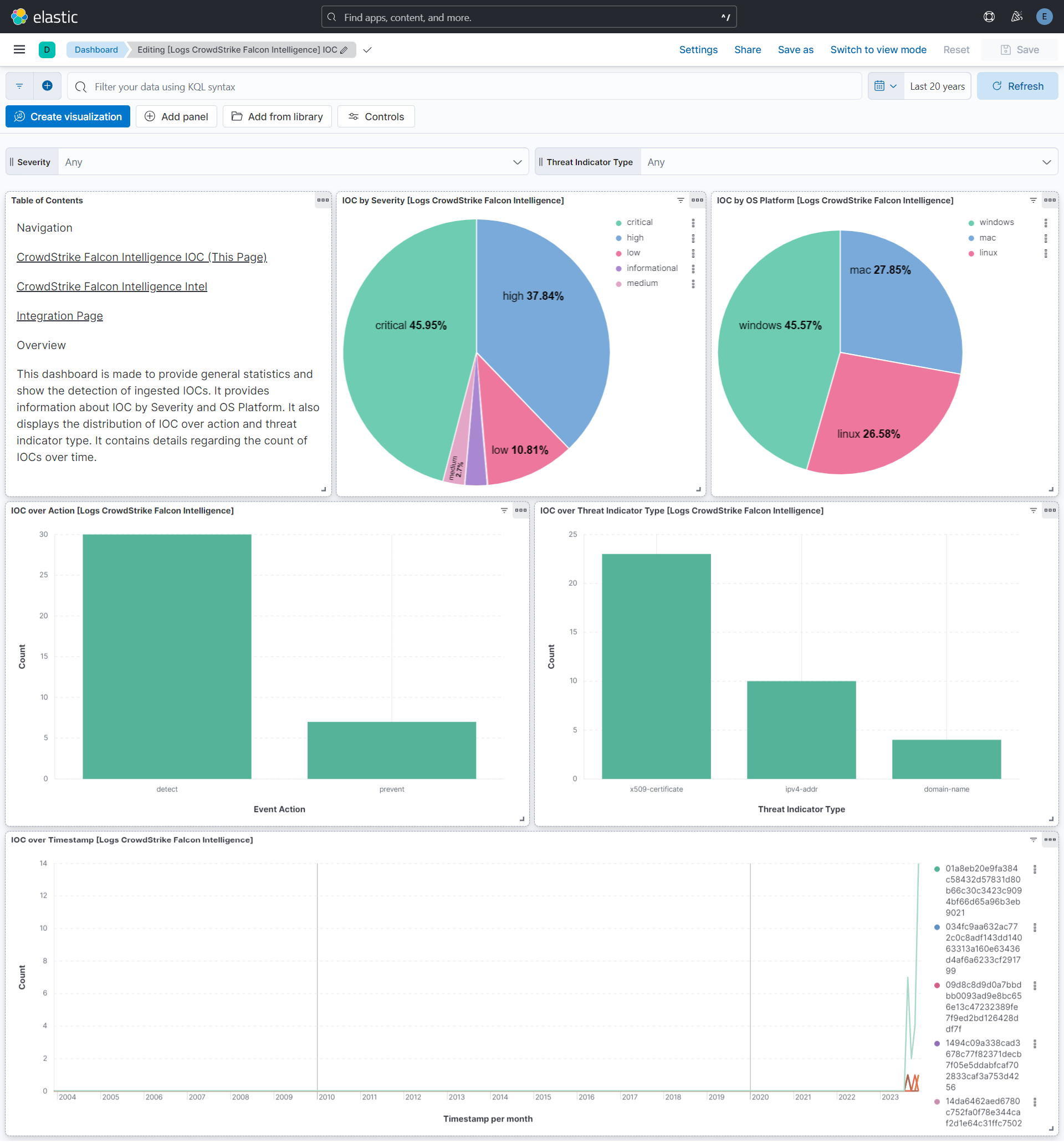
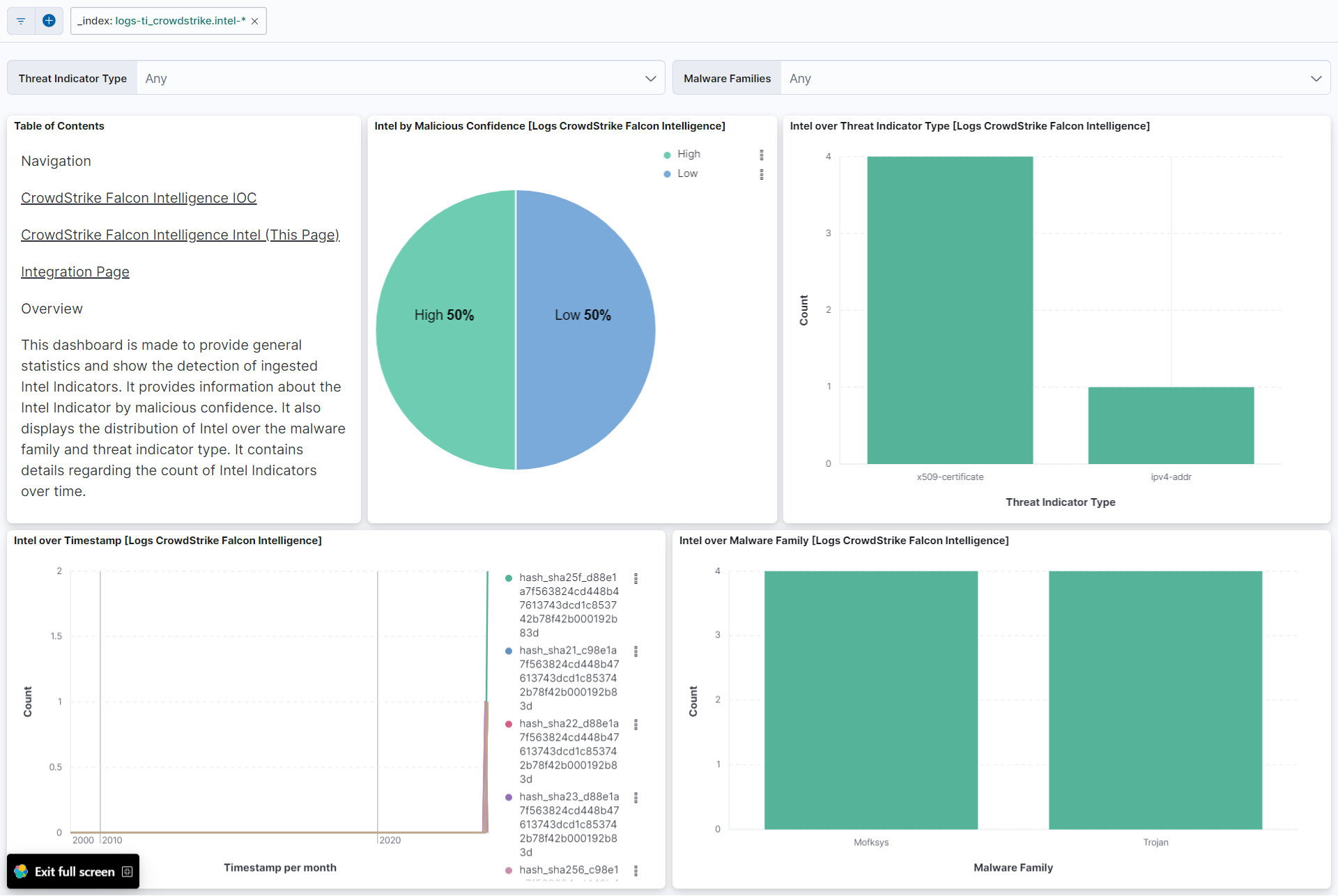
This integration includes one or more Kibana dashboards that visualizes the data collected by the integration. The screenshots below illustrate how the ingested data is displayed.
Changelog
| Version | Details | Minimum Kibana version |
|---|---|---|
| 2.13.0 | Enhancement (View pull request) Document the retention applied to source data streams on stateful and Serverless deployments, and how to change it. |
9.1.0 8.19.0 |
| 2.12.0 | Enhancement (View pull request) Remove redundant ECS field definitions and the catch-all dynamic template from the transforms, relying on the ecs@mappings component template. |
9.1.0 8.19.0 |
| 2.11.0 | Enhancement (View pull request) Add tags to ingest pipeline processors and add preserve_original_event to pipeline-level on_failure handlers. |
9.0.0 8.18.0 |
| 2.10.0 | Enhancement (View pull request) Set the User-Agent header for HTTP requests to CrowdStrike API endpoints. |
9.0.0 8.18.0 |
| 2.9.1 | Enhancement (View pull request) Set agentless deployment mode release field to ga. |
9.0.0 8.18.0 |
| 2.9.0 | Enhancement (View pull request) Use new release field for agentless deployment mode to establish as beta. |
9.0.0 8.18.0 |
| 2.8.0 | Enhancement (View pull request) Use num_failure_retries instead of unattended mode for transform failure recovery. |
9.0.0 8.18.0 |
| 2.7.1 | Bug fix (View pull request) Change data_stream.namespace field type from constant_keyword to keyword in transform destination indices to support multiple namespaces. |
9.0.0 8.18.0 |
| 2.7.0 | Enhancement (View pull request) Enable request trace log removal. |
9.0.0 8.18.0 |
| 2.6.1 | Bug fix (View pull request) Remove duplicated field definitions in transform. |
9.0.0 8.18.0 |
| 2.6.0 | Enhancement (View pull request) Enable Agentless deployment. |
9.0.0 8.18.0 |
| 2.5.0 | Enhancement (View pull request) Remove duplicated installation instructions from the documentation |
9.0.0 8.13.0 |
| 2.4.3 | Bug fix (View pull request) Copy ti_crowdstrike.intel.vulnerabilities into vulnerability.id instead of vulnerability.category. |
9.0.0 8.13.0 |
| 2.4.2 | Bug fix (View pull request) Fix default request trace enabled behavior. |
9.0.0 8.13.0 |
| 2.4.1 | Enhancement (View pull request) Update the required scope for IOC data stream. |
9.0.0 8.13.0 |
| 2.4.0 | Enhancement (View pull request) Update Kibana constraint to support 9.0.0. |
9.0.0 8.13.0 |
| 2.3.2 | Bug fix (View pull request) Ensure the appropriate threat.indicator fields are set to allow population of the Indicator column in Security Intelligence view. |
8.13.0 |
| 2.3.1 | Bug fix (View pull request) Updated SSL description in package manifest.yml to be uniform and to include links to documentation. |
8.13.0 |
| 2.3.0 | Enhancement (View pull request) Add "preserve_original_event" tag to documents with event.kind manually set to "pipeline_error". |
8.13.0 |
| 2.2.0 | Enhancement (View pull request) Do not remove event.original in main ingest pipeline. |
8.13.0 |
| 2.1.0 | Enhancement (View pull request) Add "preserve_original_event" tag to documents with event.kind set to "pipeline_error". |
8.13.0 |
| 2.0.0 | Bug fix (View pull request) Fix mapping type for ioc.value field. |
8.13.0 |
| 1.2.0 | Enhancement (View pull request) Set transform unattended to true for indefinite retries. Enhancement (View pull request) Update documentation with required permissions for running transforms. |
8.13.0 |
| 1.1.7 | Bug fix (View pull request) Fix labels.is_ioc_transform_source values |
8.13.0 |
| 1.1.6 | Bug fix (View pull request) Fix intel pagination bug due to cursor formatting |
8.13.0 |
| 1.1.5 | Bug fix (View pull request) Add missing fields in transform |
8.13.0 |
| 1.1.4 | Bug fix (View pull request) Fix max() calculation on empty resources leading to error. |
8.13.0 |
| 1.1.3 | Bug fix (View pull request) Fix ECS date mapping on threat fields. |
8.13.0 |
| 1.1.2 | Bug fix (View pull request) Fix handling of timestamps with positive time zone offsets. Bug fix (View pull request) Fix cursor timestamp handling in ioc data stream. |
8.13.0 |
| 1.1.1 | Bug fix (View pull request) Remove reference to a Kibana version from the README. |
8.13.0 |
| 1.1.0 | Enhancement (View pull request) Modified the field definitions to remove ECS fields made redundant by the ecs@mappings component template. |
8.13.0 |
| 1.0.1 | Bug fix (View pull request) Adjust field mappings for transform destination index. |
8.13.0 |
| 1.0.0 | Enhancement (View pull request) Release package as GA. |
8.13.0 |
| 0.5.5 | Enhancement (View pull request) Use modern ecs@mappings. |
8.13.0 |
| 0.5.4 | Enhancement (View pull request) Add the ECS mappings to be useful for threat Intel rules. |
8.12.0 |
| 0.5.3 | Bug fix (View pull request) Ensure integer timestamp is rendered as an integer. |
8.12.0 |
| 0.5.2 | Bug fix (View pull request) Add ilm policy to intel data stream. |
8.12.0 |
| 0.5.1 | Enhancement (View pull request) Add the mapping of hash sha1 type indicator. Enhancement (View pull request) Add the offset in the config in case of unsuccessful requests. |
8.12.0 |
| 0.5.0 | Enhancement (View pull request) Set sensitive values as secret, upgrade to package spec 3.0.3. |
8.12.0 |
| 0.4.1 | Bug fix (View pull request) Typecast the cursor value to string and update Readme. |
8.11.0 |
| 0.4.0 | Enhancement (View pull request) Adding support of Deep Pagination in Intel Data Stream. |
8.11.0 |
| 0.3.1 | Bug fix (View pull request) Adding null checks to processors. |
8.11.0 |
| 0.3.0 | Enhancement (View pull request) Improve error reporting for unsuccessful API queries. |
8.11.0 |
| 0.2.0 | Enhancement (View pull request) Update Readme. Enhancement (View pull request) Remove convert processor for the ip_address_type field. |
8.11.0 |
| 0.1.2 | Enhancement (View pull request) Changed owners |
8.11.0 |
| 0.1.1 | Bug fix (View pull request) Prevent CEL evaluation failure when pagination is not present. |
8.11.0 |
| 0.1.0 | Enhancement (View pull request) Initial release. |
8.11.0 |