ThreatQuotient
| Version | 1.42.0 (View all) |
| Managed integration release status | GA |
| Subscription level What's this? |
Basic |
| Developed by What's this? |
Partner |
| Ingestion method(s) | API |
| Minimum Kibana version(s) | 9.1.4 8.19.4 |
You can use this integration as an Elastic Managed integration on Elastic Cloud Hosted deployments running this version or later.
The ThreatQuotient integration uses the available ThreatQuotient REST API to retrieve indicators and Threat Intelligence.
Agentless integrations allow you to collect data without having to manage Elastic Agent in your cloud. They make manual agent deployment unnecessary, so you can focus on your data instead of the agent that collects it. For more information, refer to Agentless integrations and the Agentless integrations FAQ.
Agentless deployments are only supported in Elastic Serverless and Elastic Cloud environments. This functionality is in beta and is subject to change. Beta features are not subject to the support SLA of official GA features.
Elastic Agent must be installed. For more details, check the Elastic Agent installation instructions.
The ThreatQ integration requires you to set a valid URL, combination of Oauth2 credentials and the ID of the collection to retrieve indicators from. By default the indicators will be collected every 1 minute, and deduplication is handled by the API itself. This datastream supports expiration of indicators of compromise (IOC).
The ThreatQ's Threat datastream supports IOC expiration. The ingested IOCs expire after certain duration. In ThreatQ feed, this can happen in 3 ways:
- When the value of
threatq.statusisExpired. - When either of the fields
threatq.expires_atorthreatq.expired_atreaches currentnow()timestamp. - When the indicator is not updated in a long time leading to default expiration set by
IOC Expiration Durationconfiguration parameter. For more details, see Handling Orphaned IOCs.
The field threatq.ioc_expiration_reason indicates which among the 3 methods stated above is the reason for indicator expiration.
An Elastic Transform is created to facilitate only active IOCs be available to the end users. This transform creates destination indices named logs-ti_threatq_latest.dest_threat-* which only contains active and unexpired IOCs. The latest destination index also has an alias named logs-ti_threatq_latest.threat. When querying for active indicators or setting up indicator match rules, only use the latest destination indices or the alias to avoid false positives from expired IOCs. Dashboards for the Threat datastream are also pointing to the latest destination indices containing active IoCs. Read Data retention, which explains how the package avoids unbounded growth on source datastream .ds-logs-ti_threatq.threat-* indices.
Some IOCs may never expire and will continue to stay in the latest destination indices logs-ti_threatq_latest.dest_threat-*. To avoid any false positives from such orphaned IOCs, users are allowed to configure IOC Expiration Duration parameter while setting up the integration. This parameter deletes any indicator ingested into destination indices logs-ti_threatq_latest.dest_threat-* after this specified duration is reached, defaults to 90d from source's @timestamp field. Note that IOC Expiration Duration parameter only exists to add a fail-safe default expiration in case IOCs never expire.
Threat indicators are re-collected across polling intervals, and the latest transform keeps the active, deduplicated view in its destination index. The source data streams therefore hold repeated copies of the same indicators.
The package bounds the growth of these source data streams with a retention that depends on the deployment type:
| Data stream | Self-managed and Elastic Cloud Hosted (ILM policy) | Serverless (data stream lifecycle) |
|---|---|---|
logs-ti_threatq.threat-* |
logs-ti_threatq.threat-default_policy is installed but not attached in this version, so the default logs policy applies (no deletion) |
delete 5d after rollover |
On self-managed and Elastic Cloud Hosted deployments this version of the package installs the ILM policy but does not attach it to the source data stream, so the default logs policy applies and documents are not deleted. The data stream lifecycle shipped with the package is not used there. On Serverless, ILM is not available and the data stream lifecycle applies instead. It also works per backing index: Elasticsearch rolls the write index over automatically on age, size, or document count, and deletes a backing index once the retention has passed since it rolled over. A document therefore stays for the retention plus up to one rollover interval. The rollover age is derived from the retention and is an implementation detail that Elasticsearch may change. Where the package installs a transform, the transform's destination indices are not affected by either.
To keep data for a different period:
- Self-managed and Elastic Cloud Hosted: no package policy is attached to
logs-ti_threatq.threat-*, so the defaultlogspolicy applies. To attach the policy, which the package installs aslogs-ti_threatq.threat-default_policybut does not reference, addindex.lifecycle.name: logs-ti_threatq.threat-default_policyto thelogs-ti_threatq.threat@customcomponent template. Fleet keeps@customtemplates across package upgrades, and the change applies from the next rollover. To use a different period, editlogs-ti_threatq.threat-default_policyafter attaching it. - Serverless: set the retention on the data stream, for example
PUT _data_stream/logs-ti_threatq.threat-default/_lifecyclewith the body{"data_retention": "90d"}. Replacedefaultwith your namespace.
Exported fields
| Field | Description | Type |
|---|---|---|
| @timestamp | Event timestamp. | date |
| cloud.image.id | Image ID for the cloud instance. | keyword |
| data_stream.dataset | Data stream dataset name. | constant_keyword |
| data_stream.namespace | Data stream namespace. | constant_keyword |
| data_stream.type | Data stream type. | constant_keyword |
| event.dataset | Event dataset | constant_keyword |
| event.module | Event module | constant_keyword |
| host.containerized | If the host is a container. | boolean |
| host.os.build | OS build information. | keyword |
| host.os.codename | OS codename, if any. | keyword |
| input.type | Type of Filebeat input. | keyword |
| labels.is_ioc_transform_source | Indicates whether an IOC is in the raw source data stream, or the in latest destination index. | constant_keyword |
| log.flags | Flags for the log file. | keyword |
| log.offset | Offset of the entry in the log file. | long |
| threat.feed.dashboard_id | Dashboard ID used for Kibana CTI UI | constant_keyword |
| threat.indicator.first_seen | The date and time when intelligence source first reported sighting this indicator. | date |
| threat.indicator.last_seen | The date and time when intelligence source last reported sighting this indicator. | date |
| threat.indicator.modified_at | The date and time when intelligence source last modified information for this indicator. | date |
| threatq.adversaries.id | keyword | |
| threatq.adversaries.name | keyword | |
| threatq.attributes.attribute_id | keyword | |
| threatq.attributes.created_at | date | |
| threatq.attributes.id | keyword | |
| threatq.attributes.indicator_id | keyword | |
| threatq.attributes.name | keyword | |
| threatq.attributes.sources.name | keyword | |
| threatq.attributes.touched_at | date | |
| threatq.attributes.updated_at | date | |
| threatq.attributes.value | keyword | |
| threatq.class | keyword | |
| threatq.created_at | Object creation time. | date |
| threatq.description | keyword | |
| threatq.expired_at | Expiration time given by the API. Either expires_at or expired_at are present in the data. |
date |
| threatq.expires_at | Expiration time given by the API. Either expires_at or expired_at are present in the data. |
date |
| threatq.expires_calculated_at | Expiration calculation time. | date |
| threatq.generated_score | long | |
| threatq.hash | keyword | |
| threatq.id | Indicator ID. id, indicator_id or both could be present in the dataset. |
long |
| threatq.indicator_id | Indicator ID. id, indicator_id or both could be present in the dataset. |
long |
| threatq.indicator_value | Original indicator value. | keyword |
| threatq.ioc_expiration_reason | keyword | |
| threatq.ioc_expired_at | Expiration time given by the API. Either expires_at or expired_at are present in the data. |
date |
| threatq.ioc_expires_at | Expiration time given by the API. Either expires_at or expired_at are present in the data. |
date |
| threatq.manual_score | long | |
| threatq.published_at | Object publication time. | date |
| threatq.related_adversary_count | long | |
| threatq.related_asset_count | long | |
| threatq.related_attachment_count | long | |
| threatq.related_attack_pattern_count | long | |
| threatq.related_campaign_count | long | |
| threatq.related_course_of_action_count | long | |
| threatq.related_event_count | long | |
| threatq.related_exploit_target_count | long | |
| threatq.related_identity_count | long | |
| threatq.related_incident_count | long | |
| threatq.related_indicator_count | long | |
| threatq.related_infrastructure_count | long | |
| threatq.related_intrusion_set_count | long | |
| threatq.related_investigation_count | long | |
| threatq.related_malware_count | long | |
| threatq.related_note_count | long | |
| threatq.related_report_count | long | |
| threatq.related_signature_count | long | |
| threatq.related_task_count | long | |
| threatq.related_tool_count | long | |
| threatq.related_ttp_count | long | |
| threatq.related_vulnerability_count | long | |
| threatq.score | long | |
| threatq.sources.created_at | date | |
| threatq.sources.creator_source_id | keyword | |
| threatq.sources.creator_source_name | keyword | |
| threatq.sources.creator_source_type | keyword | |
| threatq.sources.id | keyword | |
| threatq.sources.indicator_id | keyword | |
| threatq.sources.indicator_status_id | keyword | |
| threatq.sources.indicator_type_id | keyword | |
| threatq.sources.name | keyword | |
| threatq.sources.provider | keyword | |
| threatq.sources.published_at | date | |
| threatq.sources.reference_id | keyword | |
| threatq.sources.source_expire_days | keyword | |
| threatq.sources.source_id | keyword | |
| threatq.sources.source_score | long | |
| threatq.sources.source_type | keyword | |
| threatq.sources.tlp_id | keyword | |
| threatq.sources.tlp_name | keyword | |
| threatq.sources.type | keyword | |
| threatq.sources.updated_at | date | |
| threatq.status.description | keyword | |
| threatq.status.id | keyword | |
| threatq.status.name | keyword | |
| threatq.status_id | keyword | |
| threatq.tags | keyword | |
| threatq.touched_at | date | |
| threatq.type.class | keyword | |
| threatq.type.id | keyword | |
| threatq.type.name | keyword | |
| threatq.type_id | keyword | |
| threatq.updated_at | Last modification time. | date |
| threatq.uuid | keyword |
Example
{
    "@timestamp": "2019-11-15T00:00:02.000Z",
    "agent": {
        "ephemeral_id": "26ecf3eb-1377-4f0f-9a26-e0fc1e26c696",
        "id": "6682ec55-39d7-4257-9b70-7746f52d4c96",
        "name": "elastic-agent-84748",
        "type": "filebeat",
        "version": "8.19.4"
    },
    "data_stream": {
        "dataset": "ti_threatq.threat",
        "namespace": "34591",
        "type": "logs"
    },
    "ecs": {
        "version": "8.17.0"
    },
    "elastic_agent": {
        "id": "6682ec55-39d7-4257-9b70-7746f52d4c96",
        "snapshot": false,
        "version": "8.19.4"
    },
    "event": {
        "agent_id_status": "verified",
        "category": [
            "threat"
        ],
        "created": "2025-12-24T06:20:58.427Z",
        "dataset": "ti_threatq.threat",
        "ingested": "2025-12-24T06:20:59Z",
        "kind": "enrichment",
        "original": "{\"adversaries\":[],\"attributes\":[{\"attribute_id\":3,\"created_at\":\"2020-09-11 14:35:53\",\"id\":1877,\"indicator_id\":336,\"name\":\"Description\",\"touched_at\":\"2020-10-15 14:36:00\",\"updated_at\":\"2020-10-15 14:36:00\",\"value\":\"Malicious Host\"},{\"attribute_id\":4,\"created_at\":\"2020-09-11 14:35:53\",\"id\":1878,\"indicator_id\":336,\"name\":\"Country\",\"touched_at\":\"2020-10-15 14:36:00\",\"updated_at\":\"2020-10-15 14:36:00\",\"value\":\"MP\"}],\"class\":\"network\",\"created_at\":\"2020-09-11 14:35:51\",\"expires_calculated_at\":\"2020-10-15 14:40:03\",\"hash\":\"1ece659dcec98b1e1141160b55655c96\",\"id\":336,\"published_at\":\"2020-09-11 14:35:51\",\"score\":4,\"sources\":[{\"created_at\":\"2020-09-11 14:35:53\",\"creator_source_id\":12,\"id\":336,\"indicator_id\":336,\"indicator_status_id\":2,\"indicator_type_id\":15,\"name\":\"AlienVault OTX\",\"published_at\":\"2020-09-11 14:35:53\",\"reference_id\":1,\"source_expire_days\":\"30\",\"source_id\":12,\"source_score\":1,\"source_type\":\"connectors\",\"updated_at\":\"2020-10-15 14:36:00\"}],\"status\":{\"description\":\"Poses a threat\",\"id\":2,\"name\":\"Active\"},\"status_id\":2,\"touched_at\":\"2021-06-07 19:47:27\",\"type\":{\"class\":\"network\",\"id\":15,\"name\":\"IP Address\"},\"type_id\":15,\"updated_at\":\"2019-11-15 00:00:02\",\"value\":\"89.160.20.156\"}",
        "type": [
            "indicator"
        ]
    },
    "input": {
        "type": "httpjson"
    },
    "related": {
        "hash": [
            "1ece659dcec98b1e1141160b55655c96"
        ],
        "ip": [
            "89.160.20.156"
        ]
    },
    "tags": [
        "preserve_original_event",
        "forwarded",
        "threatq-threat"
    ],
    "threat": {
        "indicator": {
            "confidence": "Low",
            "ip": "89.160.20.156",
            "provider": [
                "AlienVault OTX"
            ],
            "type": "ipv4-addr"
        }
    },
    "threatq": {
        "attributes": [
            {
                "attribute_id": "3",
                "created_at": "2020-09-11T14:35:53.000Z",
                "id": "1877",
                "indicator_id": "336",
                "name": "description",
                "touched_at": "2020-10-15T14:36:00.000Z",
                "updated_at": "2020-10-15T14:36:00.000Z",
                "value": "Malicious Host"
            },
            {
                "attribute_id": "4",
                "created_at": "2020-09-11T14:35:53.000Z",
                "id": "1878",
                "indicator_id": "336",
                "name": "country",
                "touched_at": "2020-10-15T14:36:00.000Z",
                "updated_at": "2020-10-15T14:36:00.000Z",
                "value": "MP"
            }
        ],
        "class": "network",
        "created_at": "2020-09-11T14:35:51.000Z",
        "expires_calculated_at": "2020-10-15T14:40:03.000Z",
        "hash": "1ece659dcec98b1e1141160b55655c96",
        "id": 336,
        "indicator_value": "89.160.20.156",
        "ioc_expiration_reason": "Expiration set by Elastic from the integration's parameter `IOC Expiration Duration`",
        "ioc_expired_at": "2019-11-20T00:00:02.000Z",
        "published_at": "2020-09-11T14:35:51.000Z",
        "sources": [
            {
                "created_at": "2020-09-11T14:35:53.000Z",
                "creator_source_id": "12",
                "id": "336",
                "indicator_id": "336",
                "indicator_status_id": "2",
                "indicator_type_id": "15",
                "name": "AlienVault OTX",
                "published_at": "2020-09-11T14:35:53.000Z",
                "reference_id": "1",
                "source_expire_days": "30",
                "source_id": "12",
                "source_score": 1,
                "source_type": "connectors",
                "updated_at": "2020-10-15T14:36:00.000Z"
            }
        ],
        "status": {
            "description": "Poses a threat",
            "id": "2",
            "name": "Active"
        },
        "status_id": "2",
        "touched_at": "2021-06-07T19:47:27.000Z",
        "type": {
            "class": "network",
            "id": "15",
            "name": "IP Address"
        },
        "type_id": "15"
    }
}
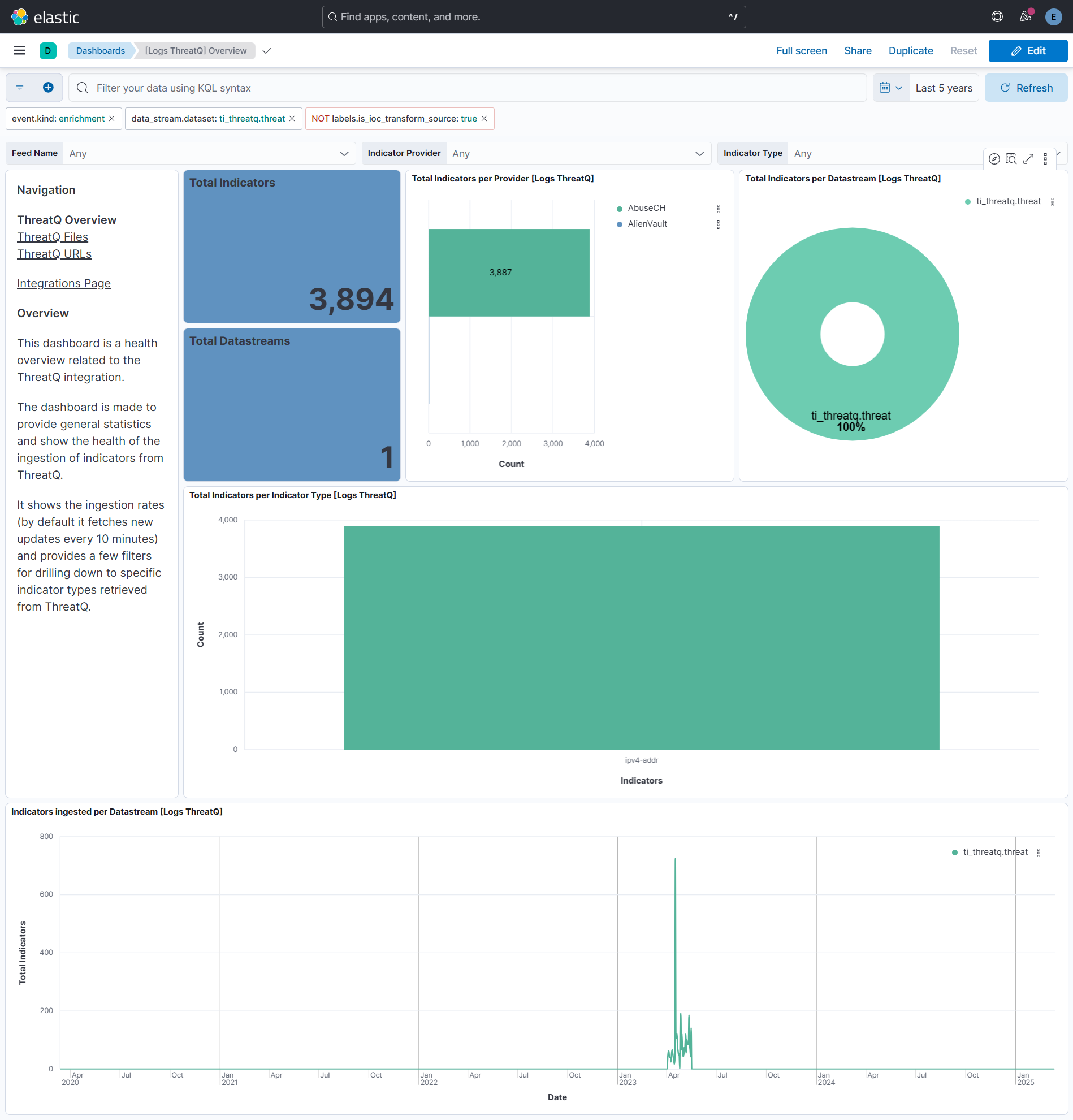
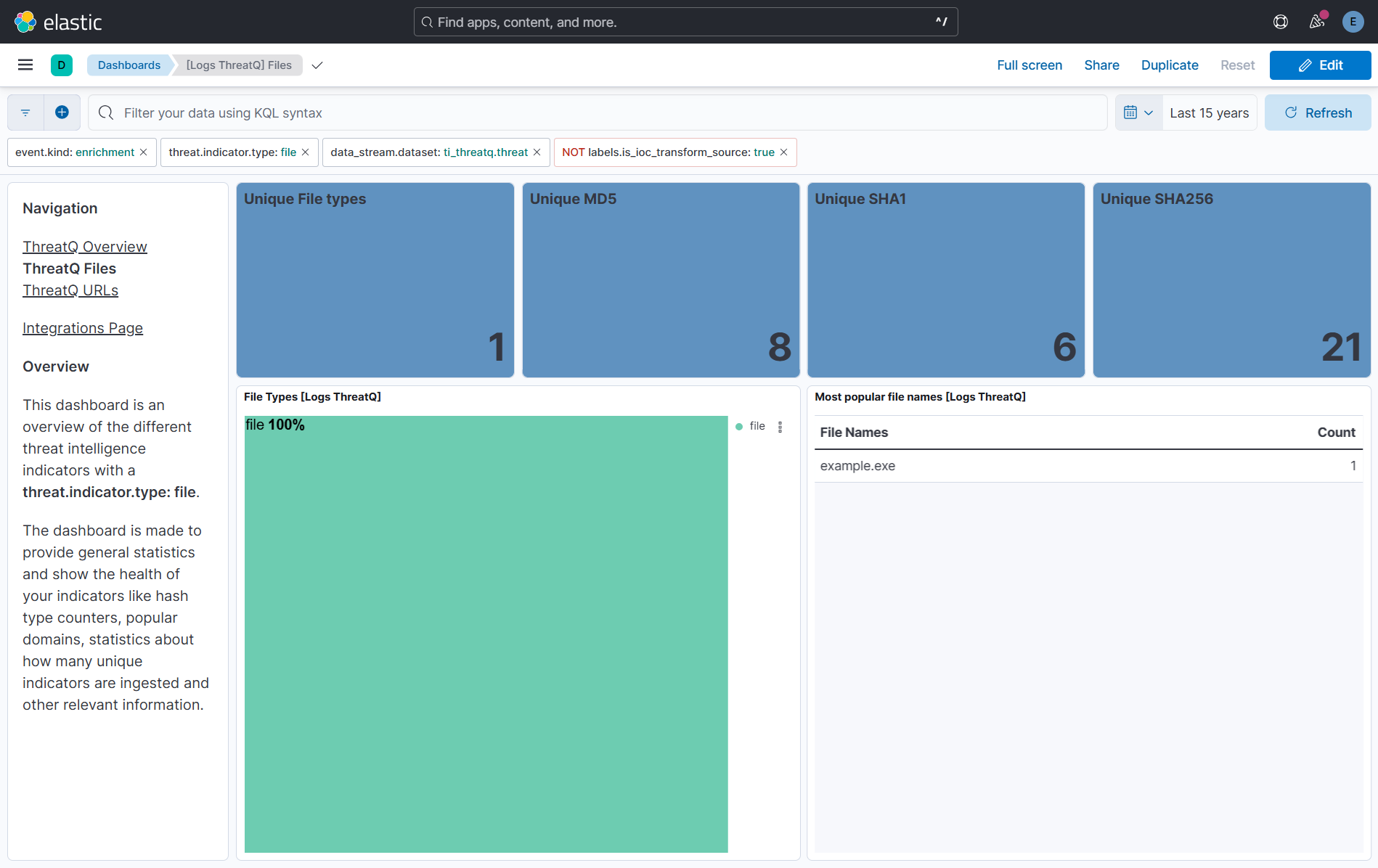
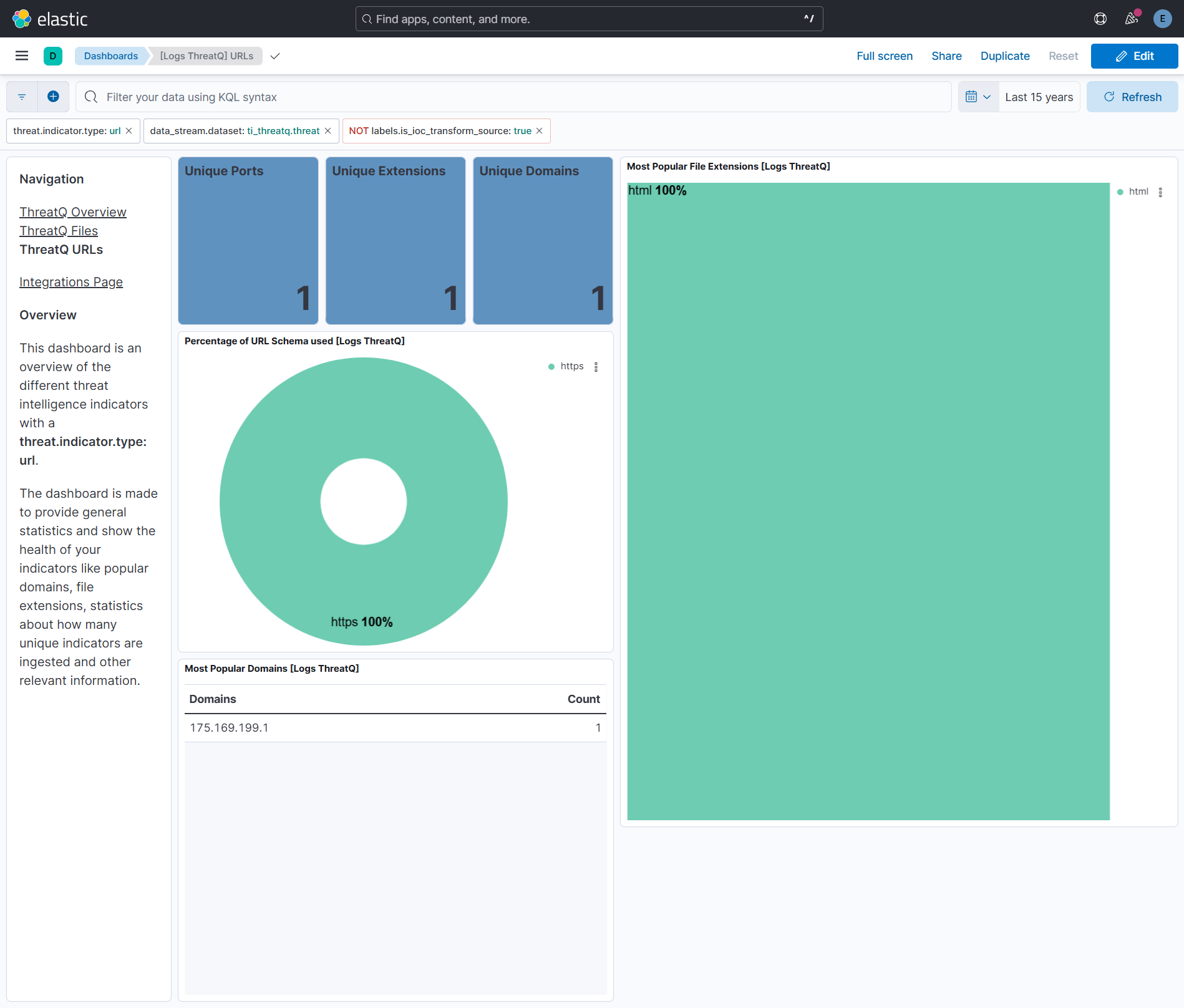
This integration includes one or more Kibana dashboards that visualizes the data collected by the integration. The screenshots below illustrate how the ingested data is displayed.
Changelog
| Version | Details | Minimum Kibana version |
|---|---|---|
| 1.42.0 | Enhancement (View pull request) Document the retention applied to source data streams on stateful and Serverless deployments, and how to change it. |
9.1.4 8.19.4 |
| 1.41.1 | Enhancement (View pull request) Link the latest IOC transform's agent fields to the threat data stream. The files differed only in whitespace. |
9.1.4 8.19.4 |
| 1.41.0 | Enhancement (View pull request) Remove redundant ECS field definitions and the catch-all dynamic template from the transforms, relying on the ecs@mappings component template. |
9.1.4 8.19.4 |
| 1.40.0 | Enhancement (View pull request) Add tags to ingest pipeline processors and add preserve_original_event to pipeline-level on_failure handlers. |
9.1.4 9.0.7 8.19.4 |
| 1.39.3 | Enhancement (View pull request) Set agentless deployment mode release field to ga. |
9.1.4 9.0.7 8.19.4 |
| 1.39.2 | Bug fix (View pull request) Restores sources and attributes fields after recent updates to the ThreatQ Platform's API. |
9.1.4 9.0.7 8.19.4 |
| 1.39.1 | Bug fix (View pull request) Fix transform destination to use keyword for data_stream.namespace, allowing multi-namespace deployments. |
9.1.4 9.0.7 8.19.4 |
| 1.39.0 | Enhancement (View pull request) Use new release field for agentless deployment mode to establish as beta. |
9.1.4 9.0.7 8.19.4 |
| 1.38.0 | Enhancement (View pull request) Use num_failure_retries instead of unattended mode for transform failure recovery. |
9.1.4 9.0.7 8.19.4 |
| 1.37.1 | Bug fix (View pull request) Remove duplicate security-solution-default tag references |
9.1.4 9.0.7 8.19.4 |
| 1.37.0 | Enhancement (View pull request) Prevent updating fleet health status to degraded when pagination completes. |
9.1.4 9.0.7 8.19.4 |
| 1.36.0 | Enhancement (View pull request) Allow transforms to run in unattended mode. |
9.0.0 8.18.0 |
| 1.35.0 | Enhancement (View pull request) Remove duplicated installation instructions from the documentation |
9.0.0 8.18.0 |
| 1.34.2 | Bug fix (View pull request) Add temporary processor to remove the fields added by the Agentless policy. |
9.0.0 8.18.0 |
| 1.34.1 | Bug fix (View pull request) Fix default request trace enabled behavior. |
9.0.0 8.18.0 |
| 1.34.0 | Enhancement (View pull request) Enable request trace log removal. |
9.0.0 8.18.0 |
| 1.33.0 | Enhancement (View pull request) Map threat.indicator.provider from sources.name instead of sources.provider. |
9.0.0 8.18.0 |
| 1.32.0 | Bug fix (View pull request) Add pagination logic in data collection. Enhancement (View pull request) Update confidence scoring logic, IOC ingestion batch size, ECS field mapping issues and dashboard. |
9.0.0 8.18.0 |
| 1.31.0 | Enhancement (View pull request) Update Kibana constraint to support 9.0.0. |
9.0.0 8.13.0 |
| 1.30.1 | Bug fix (View pull request) Updated SSL description to be uniform and to include links to documentation. |
8.13.0 |
| 1.30.0 | Enhancement (View pull request) Do not remove event.original in main ingest pipeline. |
8.13.0 |
| 1.29.0 | Enhancement (View pull request) Add "preserve_original_event" tag to documents with event.kind set to "pipeline_error". |
8.13.0 |
| 1.28.3 | Bug fix (View pull request) Fix labels.is_ioc_transform_source values |
8.13.0 |
| 1.28.2 | Bug fix (View pull request) Add missing fields in transform |
8.13.0 |
| 1.28.1 | Bug fix (View pull request) Fix ECS date mapping on threat fields. |
8.13.0 |
| 1.28.0 | Enhancement (View pull request) Update the kibana constraint to ^8.13.0. Modified the field definitions to remove ECS fields made redundant by the ecs@mappings component template. |
8.13.0 |
| 1.27.1 | Bug fix (View pull request) Adjust field mappings for transform destination index. |
8.12.0 |
| 1.27.0 | Enhancement (View pull request) Improve handling of empty responses. |
8.12.0 |
| 1.26.0 | Enhancement (View pull request) Support user configurable page size. |
8.12.0 |
| 1.25.0 | Enhancement (View pull request) Set sensitive values as secret. |
8.12.0 |
| 1.24.2 | Enhancement (View pull request) Changed owners |
8.11.0 |
| 1.24.1 | Bug fix (View pull request) Fix IOC expiration duration character casting. |
8.11.0 |
| 1.24.0 | Enhancement (View pull request) Support for IoC Expiration |
8.11.0 |
| 1.23.0 | Enhancement (View pull request) Limit request tracer log count to five. |
8.7.1 |
| 1.22.0 | Enhancement (View pull request) ECS version updated to 8.11.0. |
8.7.1 |
| 1.21.0 | Enhancement (View pull request) Improve 'event.original' check to avoid errors if set. |
8.7.1 |
| 1.20.0 | Enhancement (View pull request) Set 'partner' owner type. |
8.7.1 |
| 1.19.0 | Enhancement (View pull request) ECS version updated to 8.10.0. |
8.7.1 |
| 1.18.0 | Enhancement (View pull request) The format_version in the package manifest changed from 2.11.0 to 3.0.0. Removed dotted YAML keys from package manifest. Added 'owner.type: elastic' to package manifest. |
8.7.1 |
| 1.17.0 | Enhancement (View pull request) Add tags.yml file so that integration's dashboards and saved searches are tagged with "Security Solution" and displayed in the Security Solution UI. |
8.7.1 |
| 1.16.0 | Enhancement (View pull request) Update package-spec to 2.10.0. |
8.7.1 |
| 1.15.0 | Enhancement (View pull request) Update package to ECS 8.9.0. |
8.7.1 |
| 1.14.0 | Enhancement (View pull request) Document duration units. |
8.7.1 |
| 1.13.0 | Enhancement (View pull request) Document valid duration units. |
8.7.1 |
| 1.12.0 | Enhancement (View pull request) Ensure event.kind is correctly set for pipeline errors. |
8.7.1 |
| 1.11.0 | Enhancement (View pull request) Update package to ECS 8.8.0. |
8.7.1 |
| 1.10.0 | Enhancement (View pull request) Add a new flag to enable request tracing |
8.7.1 |
| 1.9.0 | Enhancement (View pull request) Update package to ECS 8.7.0. |
8.0.0 |
| 1.8.1 | Bug fix (View pull request) Honor preserve_original_event setting. |
8.0.0 |
| 1.8.0 | Enhancement (View pull request) Update package to ECS 8.6.0. |
8.0.0 |
| 1.7.1 | Bug fix (View pull request) Remove duplicate fields. |
8.0.0 |
| 1.7.0 | Enhancement (View pull request) Update package to ECS 8.5.0. |
8.0.0 |
| 1.6.0 | Enhancement (View pull request) Update package to ECS 8.4.0 |
8.0.0 |
| 1.5.1 | Bug fix (View pull request) Fix proxy URL documentation rendering. |
8.0.0 |
| 1.5.0 | Enhancement (View pull request) Update categories to include threat_intel. |
8.0.0 |
| 1.4.0 | Enhancement (View pull request) Update package to ECS 8.3.0. |
8.0.0 |
| 1.3.2 | Enhancement (View pull request) update readme to include link to threatQ documentation |
8.0.0 |
| 1.3.1 | Enhancement (View pull request) Update package descriptions |
8.0.0 |
| 1.3.0 | Enhancement (View pull request) Update to ECS 8.2 |
8.0.0 |
| 1.2.2 | Enhancement (View pull request) Add event.created field mapping |
8.0.0 |
| 1.2.1 | Enhancement (View pull request) Add documentation for multi-fields |
8.0.0 |
| 1.2.0 | Enhancement (View pull request) Update to ECS 8.0 |
8.0.0 |
| 1.1.0 | Enhancement (View pull request) Add threat.feed ECS fields and dashboard |
8.0.0 |
| 1.0.2 | Bug fix (View pull request) Change test public IPs to the supported subset |
8.0.0 |
| 1.0.1 | Enhancement (View pull request) Bumping minimum version |
8.0.0 |
| 1.0.0 | Enhancement (View pull request) Initial release |
— |